Start here · understand the lesson before the detail
What you are learning
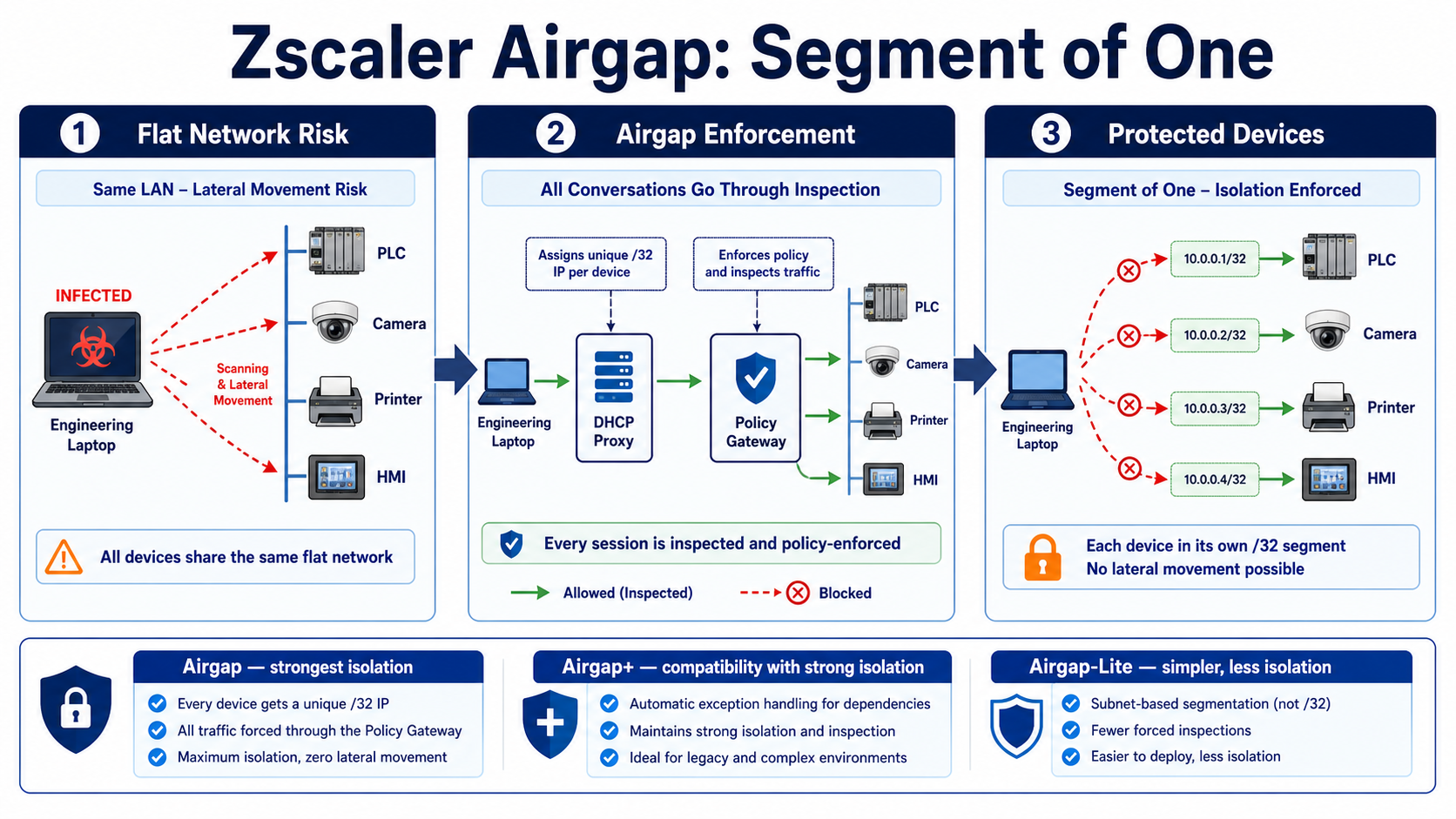
This lesson teaches how Zscaler Zero Trust Branch protection can isolate devices that cannot run an endpoint agent. You will see what a “segment of one” means, how the enforcement path changes device communication, and how to prove lateral movement is actually blocked.
In plain English
Traditional VLANs put many devices in one trusted neighbourhood. Airgap protection makes each protected device behave as if it lives alone. A device can still reach approved services, but a nearby compromised device does not receive automatic east-west access.
Real example
A contractor laptop becomes infected on a factory floor. On a flat subnet it can scan the PLC, HMI, printer, and cameras. With per-device isolation, each attempted conversation is forced through policy and denied unless the exact source, destination, and service are allowed.
Follow this flow
- Discover and classify each connected asset.
- Place supported assets into the intended Airgap protection mode.
- Assign the protected addressing and enforcement behaviour.
- Allow only required device-to-service conversations.
- Attempt lateral traffic and retain policy evidence that it was blocked.
Evidence to collect
- Asset identity, classification, and protection mode
- Address, gateway, and DHCP result on the endpoint
- Allowed dependency flows and denied lateral flows
- Before/after packet test plus enforcement logs
Common mistake to avoid
Do not enable the strongest isolation everywhere without first recording DHCP, multicast, broadcast, discovery, and legacy dependencies. Airgap, Airgap+, and Airgap-Lite offer different compatibility and isolation trade-offs; choose from tested requirements, not from the name alone.
Current official source checkpoint
- Protection solutionscurrent official reference used for this beginner explanation
- Airgap-Lite configurationcurrent official reference used for this beginner explanation

Key terms before you continue
Most engineers think Zscaler is only a cloud proxy that sits between users and the internet. Wrong — and that wrong belief is exactly why so many flat OT networks still get wiped end-to-end by one ransomware foothold. After the 2024 Airgap Networks acquisition, Zscaler also does east-west, device-to-device segmentation inside the LAN — agentless. By the end of this lesson you'll see why that single shift is the answer to a top interview question, and you'll never confuse it with ZPA again.
Don't look anything up. Just feel the gap — your brain learns better when it's already chasing an answer.
1. Two laptops sit on the same /24 subnet and the same switch. With Airgap enabled, can they ping each other directly? (Answer revealed in "What 'air gap' really means".)
2. Airgap needs no endpoint agent. So what does it intercept to give every device its own segment? (Answer revealed in "How the DHCP proxy enforces it".)
3. A PLC has a hardcoded static IP and never sends a DHCP request. Is it still segmented? (Answer revealed in "Common mistakes".)
Why this matters — one foothold, the whole plant gone
Picture an apartment society where, once you're past the main gate, you can walk into any flat — no inner doors, no second guard. That's a flat LAN: once malware lands on one device, it strolls sideways to every other device on the same subnet. Airgap rebuilds the society so each flat has its own private lift and the only way to visit a neighbour is to route back past the guard, who checks every visit.
On a typical OT plant, hundreds of PLCs, HMIs, cameras and printers share a flat Layer-2 network. They implicitly trust each other because they're in the same VLAN. One phished engineering laptop becomes a launch pad, and ransomware uses lateral movement over RDP and SMB to encrypt the entire floor in minutes. That implicit "inside = trusted" assumption is the exact thing Zero Trust says you must never do.
Architecturally, the failure is that east-west firewalls and NAC both still allow free movement within a trust zone. Airgap removes the trust zone itself: there is no "inside" anymore — every device is its own zone of one. The blast radius of any single compromise collapses from "the whole VLAN" to "exactly one device".
Priya runs OT security for a regional power utility. Her SCADA network is one big flat 10.20.0.0/16 with 1,400 devices — RTUs, HMIs, historians, vendor laptops. Last quarter a contractor's laptop carried Conficker in. It spread to 40 historians before anyone noticed, because every device could reach every other device. Re-architecting into VLANs means downtime she cannot get approved. She needs isolation without re-addressing or agents.
What "air gap" really means now
An air gap classically meant a network with no physical connection to anything else — unplugged, unreachable. Secure, but impractical: real plants need to patch, monitor and exchange data. Airgap's idea is a virtual air gap — keep the wires, but make every device behave as if it were alone on its own private network.
The mechanism is the segment of one (also called a "network of one"). Every device gets a unique /32 — a network containing exactly one host. There is no shared broadcast neighbourhood to roam. To reach any other device, traffic must leave the device, hit the Airgap gateway, get checked against identity-and-context policy, and only then be forwarded. Two devices on the same physical switch can no longer see each other at Layer 2.
Think of it like a mobile carrier: every SIM on the network is fully isolated from every other SIM by default, even though they share the same radio infrastructure. Calls between two phones still route through the carrier's core, which applies policy. Airgap brings that telco isolation model to the office and OT LAN — without you re-cabling or re-IP-ing anything.
The foundation vocabulary — tap to flip
Each device gets a unique /32 — a network of exactly one host. So what: there's no shared neighbourhood to roam; isolation is the default, not an add-on.
Airgap intercepts each DHCP request and hands back a /32 plus itself as the gateway. So what: no agent, no re-cabling — it inserts itself into the path the device already follows.
Device-to-device traffic inside the LAN (HMI↔sensor), not user→internet. So what: this is exactly what firewalls at the perimeter never see — and what ransomware abuses.
An attacker hopping device→device after the first foothold. So what: kill the east-west path and a breach stays at one device instead of the whole floor.
No software installed on endpoints. So what: works on legacy PLCs, cameras, printers and medical devices that physically cannot run an agent.
The OT layering model (Levels 0–5) separating field devices from business IT. So what: Airgap can enforce Purdue-layer separation without you re-cabling into physical zones.
Sneha manages network security at a Tata Steel plant. Her rolling-mill floor has 600 devices on one flat 172.16.40.0/22. Auditors flagged that any device can reach the historian. With Airgap she enables segmentation overnight; next morning every device still pings its historian (allowlisted), but a camera can no longer reach a PLC — and nobody had to touch a single IP address.
Two devices sit on the same /24 and the same switch. Before you read on — with Airgap enabled, can they ARP and ping each other directly at Layer 2?
How the DHCP proxy enforces it
Here's the clever bit, and the answer to pre-quiz Q2. Airgap is a DHCP proxy. Every device, when it boots, broadcasts a DHCP request asking "what's my IP and gateway?" Airgap intercepts that request and answers it. It hands the device a unique /32 address and sets the default gateway to Airgap itself. The device thinks it has a normal address — but its subnet mask says "you are alone", so it sends everything to the gateway.
Because the gateway is Airgap, every packet — even one destined for a device on the same physical switch — must travel up to the policy engine first. The engine identifies both endpoints (by MAC, fingerprint, classified asset type) and evaluates the east-west flow against policy. Allowed flows (HMI → its sensor) are forwarded; everything else is dropped. This is enforcement at line rate, distributed across the LAN — not a hairpin out to a distant cloud.
Airgap also auto-discovers and classifies every asset as it appears — IT / OT / printer / camera / medical — and can baseline normal behaviour before you enforce. A brand-new device that joins is fingerprinted, slotted into a class, ring-fenced into its own /32, and policy-governed from packet one. No CMDB import, no manual tagging required to start.
▶ Watch a packet get forced through Airgap
Aditya at an Infosys campus pings the printer from his laptop. Click Play — each stage lights up as the packet moves.
Aditya runs the campus network at an Infosys facility. He has 4,000 devices on a flat fabric. After enabling Airgap, a desktop infected via a malicious USB tries to scan 10.30.0.0/16 for open SMB. Every scan packet hairpins to Airgap, which sees "host → 4,000 unknown peers : SMB" — not in any baseline — and drops it. The malware can't even enumerate neighbours, let alone spread.
Giving each device a unique /32 turns it into a segment of ___.
If Airgap is the gateway for thousands of devices, won't that one box be a latency bottleneck for every conversation?
Deploying it — agentless, no re-addressing, hours not months
Because the only thing Airgap changes is the DHCP reply, deployment is fast. You don't install agents. You don't re-IP devices. You don't redesign VLANs or buy a hardware refresh. You drop Airgap into the LAN, let it auto-discover and classify every asset, baseline normal behaviour, then flip enforcement on — typically in hours to a few days, not a months-long re-architecture.
It replaces three things that all assumed implicit internal trust: east-west firewalls, NAC, and manual VLAN microsegmentation. Discovery first, classify by type and Purdue layer, baseline, then enforce — that order is the whole game.
airgap> show assets summary --site lucknow-plant
airgap> show segments status
Discovered assets ............ 612
  IT (laptops/desktops) ...... 184
  OT (PLC/RTU/HMI) ........... 271
  Printers ................... 38
  Cameras (IoT) .............. 119
Segments of one (/32) ........ 612 / 612  (100%)
Mode ......................... BASELINE (learning, not enforcing)
Unclassified ................. 0
Sneha enables segmentation on Day 1 and immediately enforces a deny-all-east-west policy. What's the most likely outcome on the SCADA floor?
The Ransomware Kill Switch™ — contain without halting
Think of a building's fire shutters. When a fire starts, shutters seal each floor so the fire can't spread — while every other floor keeps working normally. The ransomware kill switch is exactly that for your network.
It is a four-level graduated escalation. You don't jump straight to full lockdown — you raise the level only as far as the incident demands, so you contain the blast radius without taking the business offline. It instantly blocks the lateral protocols ransomware loves — RDP (3389), SMB (445), SSH (22) — and integrates with your SIEM/SOAR so a detection can trigger the right level automatically.
The graduated design exists precisely so an automated SOAR playbook doesn't over-react. Level 1 throttles east-west of the suspect class; Level 4 is full lockdown. Over-escalating to Level 4 will also cut the flows your own management/patch server needs — which is its own incident at 02:00.
Rahul works the SOC at Apollo Hospitals. At 02:00 the SIEM flags an infusion pump segment beaconing SMB to 30 other medical devices. He can't power anything off — these are life-critical. He engages the Kill Switch at Level 2, blocking RDP/SMB/SSH for that device class. Pumps keep dosing; the ransomware can't spread; the on-call team investigates without a single patient device going dark.
Sneha must segment a flat OT plant — no downtime allowed, and the legacy PLCs/cameras cannot run any agent. Which approach fits?
Airgap vs ZIA vs ZPA vs workload microsegmentation
This is the interview differentiator, so get it crisp. All four are "Zero Trust", but they guard different directions and layers.
- Airgap (Zero Trust Device Segmentation) — east-west, device-to-device, agentless, on the LAN. Stops lateral movement between devices.
- ZIA — north-south: user/device → internet. Proxy, SSL inspection, URL filter, sandbox.
- ZPA — north-south: user → private application (ZTNA). No inbound exposure of the app.
- Workload microsegmentation (Illumio-style) — east-west too, but agent-based, for servers/workloads in the datacenter where you can install agents.
A new IP camera joins Aditya's campus LAN. With Airgap running, how is it automatically isolated?
Common mistakes — name the symptom
Four gotchas trip up almost every first Airgap rollout. Tap each card to see the trap, then read the symptom-led callouts below.
A hardcoded-IP PLC sends no DHCP request, so there's nothing to intercept. So what: map static devices explicitly (ARP/gateway/static policy) — don't assume DHCP is the only mechanism.
Day-1 deny-all kills PROFINET/BACnet discovery. So what: baseline first, allowlist the legit east-west flows, then enforce — or "the HMI loses its sensors".
Jumping to Level 4 lockdown blocks RDP/SMB your own patch server needs. So what: use graduated levels and cap SOAR automation below full lockdown.
Airgap is east-west device-to-device on the LAN. So what: it is not ZPA (user→private app) or ZIA (user→internet) — right tool, different job.
A legacy PLC has a hardcoded static IP and never sends a DHCP request. There's nothing for the DHCP proxy to intercept, so admins panic that it slipped through. Reality (and pre-quiz Q3): static-IP devices are handled via ARP / gateway / static policy — but the assumption "DHCP proxy = the only mechanism" causes the confusion. Map static devices explicitly.
Over-aggressive Day-1 blocking killed legitimate east-west broadcast/multicast (PROFINET, BACnet, discovery). SCADA HMI↔sensor comms broke. Fix: baseline first, allowlist the legitimate east-west flows, then enforce.
The kill switch was over-escalated to Level 4 lockdown, which also blocked the RDP/SMB the management/patch server legitimately needs. Use the graduated levels — escalate only as far as the incident demands.
Confusing Airgap with ZPA/ZIA. Airgap is east-west, device-to-device, on the LAN — not north-south user→app (that's ZPA) or user→internet (that's ZIA). Right tool, wrong job description.
1. Baseline before you enforce. Run in learning mode, capture normal east-west flows, allowlist them, then flip enforcement — never the reverse.
2. Classify by Purdue layer. Use the Purdue model so field devices, supervisory and business IT get policy that matches their layer, not one flat rule.
3. Wire the kill switch to SOAR. Let a detection trigger the right graduated level automatically — and cap the automation at Level 3 so a 02:00 false positive can't lock out your own patch server.
Verification — confirm devices are truly segmented
After enforcement, prove it. Check segmentation status and the kill-switch level so you know "good" looks like this:
airgap> show segments status --enforce
airgap> show killswitch level
airgap> show flows denied --last 10m | head
Segments enforced ............ 612 / 612  (100%)
Mode ......................... ENFORCE
Kill switch .................. LEVEL 0 (normal)
Denied flows (last 10m):
  10.30.4.21 -> 10.30.4.55 : SMB/445   DENY (not baselined)
  10.20.1.8  -> 10.20.1.6  : RDP/3389  DENY (lateral block)
  10.30.4.21 -> 10.30.4.90 : print/9100 ALLOW (allowlisted)
Quick-reference table
| Concept | What it does | Why it matters |
|---|---|---|
| Segment of one (/32) | Each device gets a unique /32 | Blast radius of a breach = one device |
| DHCP proxy | Hands back /32 + Airgap gateway | Agentless way to force the hairpin |
| East-west enforcement | Every device-to-device flow checked | Kills lateral movement |
| Auto-discovery | Classifies IT/OT/printer/camera | No CMDB import to start |
| Kill switch (4 levels) | Graduated block of RDP/SMB/SSH | Contain without halting business |
| Airgap vs ZIA/ZPA | East-west LAN vs north-south cloud | The interview differentiator |
🤖 Ask the AI Tutor
Tap any question — instant context-aware answer scoped to this lesson. No login, no waiting.
Pre-curated answers from Zscaler docs + community Q&A, scoped to this blog only. For deeper / live questions, ask at chat.techclick.in.
📝 Wrap-up assessment
You've answered 3 inline. Seven left. 70% (7 of 10) total marks the lesson complete on your profile. Tap Submit all answers at the end.
In two lines: why does giving every device a /32 stop ransomware from spreading? Type it, then tap to compare with the expert version and get a one-liner you can paste to a colleague.
Opt in and we'll send 3 micro-questions on Day 1, Day 7 and Day 30 to lock this into long-term memory. Unsubscribe anytime.
— Techclick Team
Glossary
- Air gap
- Classically, a network with no physical connection to any other. Airgap delivers a virtual air gap — same wires, but every device behaves as if alone.
- Segment of one
- Each device gets a unique /32, forming a one-host network; all traffic to anyone else must route through the Airgap policy engine.
- DHCP proxy
- A device that intercepts DHCP requests and answers them, controlling the address and gateway each client receives. Airgap's agentless insertion point.
- East-west traffic
- Device-to-device communication inside the LAN (HMI↔sensor), as opposed to north-south traffic leaving for the internet.
- Lateral movement
- An attacker hopping device→device after the first foothold — the spread mechanism Airgap is designed to stop.
- Purdue model
- The OT reference architecture (Levels 0–5) separating field devices from supervisory and business IT layers.
- NAC
- Network Access Control (e.g. Cisco ISE, Forescout) — controls which devices join the network, but usually allows free movement once admitted to a VLAN.
- Ransomware kill switch
- A graduated escalation that instantly blocks the lateral protocols (RDP/SMB/SSH) ransomware uses, containing spread without halting the business.
📚 Sources
- Zscaler — Zero Trust Device Segmentation. zscaler.com/products-and-solutions/zero-trust-device-segmentation
- Zscaler — Zscaler Acquires Airgap Networks, Extends Zero Trust SASE (11 Apr 2024). zscaler.com/blogs/company-news
- Airgap Networks — Ransomware Kill Switch. airgap.io/blog/ransomware-kill-switch
- SiliconANGLE — Zscaler goes east-west with acquisition of Airgap Networks (11 Apr 2024). siliconangle.com
- Help Net Security — Zscaler Zero Trust Everywhere (Zenith Live 2025) (4 Jun 2025). helpnetsecurity.com
- WWT — Zscaler introduces a game-changing solution for simplifying Zero Trust on LANs. wwt.com
- Zscaler Cyber Academy — Digital Transformation Administrator (ZDTA). zscaler.com/zscaler-cyber-academy
What's next?
Next we open up the ZDTA → Zero Trust Branch exam objectives — how Branch Connector, Cloud Connector and Device Segmentation fit one architecture, and the exact interview phrasing that wins the OT-segmentation question.