Most engineers think...
Most candidates describe Trend Vision One SaaS Sovereign On-Prem Deployment as a product name and stop there. That is not enough for L2/L3 work.
The better model is operational: know the components, follow the flow, prove the policy hit, and explain the failure path. For this topic, the core idea is Deployment model decision across SaaS, sovereign/private cloud, on-premises and service-provider operations.
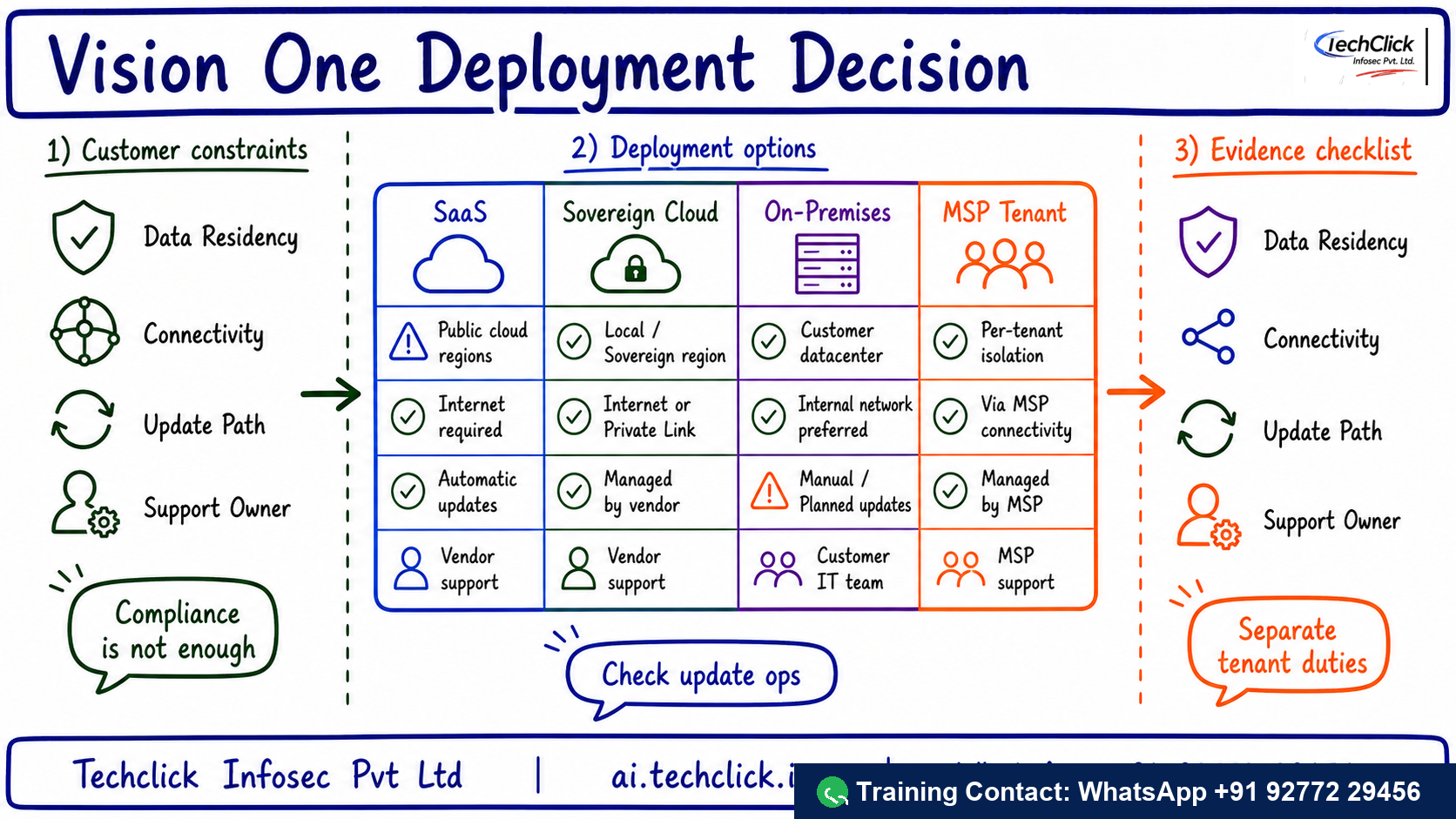
① What it solves and where it sits
Regulated customers cannot pick on-prem only because it sounds safe. They must run updates, manage connectivity, understand feature differences and document who owns what.
Production use case: Use it in architecture, RFP and CISO discussions for regulated, sovereign, air-gapped or MSP environments.
Best one-line description of Trend Vision One SaaS Sovereign On-Prem Deployment?
② Core components you must name
Use these names before jumping to troubleshooting. They anchor the architecture and make the interview answer sound practical.
- SaaS — Cloud-delivered platform option for standard connectivity
- Sovereign/private — Controlled deployment option for restricted data or region needs
- On-premises — Local deployment model with heavier operations ownership
- MSP tenant model — Multi-tenant visibility and delegated administration
- Update path — How content, product and detection updates are maintained
Say the path in order: List constraints → Pick model → Validate updates → Map tenants → Run pilot. It keeps the answer structured.
A decision is not real until logs/events show the rule, object and final action.
Most outages are not product magic; they are forwarding, health, identity, certificate or rule-order problems.
Safe rollout: Document constraints, choose a pilot tenant, validate telemetry/update path, then write operations and escalation responsibilities.
Lead with SaaS, Sovereign/private, On-premises. It sounds like production work, not brochure reading.
Which item belongs in the core architecture?
③ The traffic or telemetry path
The healthy path is: List constraints → Pick model → Validate updates → Map tenants → Run pilot. Walk it left to right. If a user report says 'it is broken', locate the exact stage where evidence stops.
The primary control is: Validate data residency, connectivity, regulation, tenant model, update path, feature parity and support owner.
If List constraints never reaches the control point, no later policy can help. Confirm steering/forwarding first.
▶ Watch the Trend Vision One SaaS Sovereign On-Prem Deployment decision path
Press Play for the healthy path, then Break it for the common outage.
What should you trace first during troubleshooting?
④ Operations, rollout and interview response
The safe rollout answer is: Document constraints, choose a pilot tenant, validate telemetry/update path, then write operations and escalation responsibilities. That prevents broad production impact while still moving toward enforcement.
Compared with default SaaS or default on-prem without evidence, the value is richer policy context, better visibility and a clearer operational evidence trail.
Rohan at a Noida SOC gets this ticket
A customer chooses on-prem for sovereignty but has no update or support ownership plan.
Deployment was selected for compliance language without operational readiness evidence.
Trace List constraints → Pick model → Validate updates → Map tenants → Run pilot, then compare policy logs, object health and user scope.
Console ▸ policy/logs ▸ health/status ▸ affected user testDocument data, connectivity, updates, tenant duties and support path before final deployment decision.
Repeat the original user test and capture the allow/block/health evidence in logs.
The final answer should include log evidence, health state and a user test. That is what separates RCA from guessing.
Safest production rollout answer?
🤖 Ask the AI Tutor
Tap any question — instant, scoped to this lesson. No login, no waiting.
Pre-curated from vendor docs + community Q&A, scoped to this lesson. For a live prod issue, paste your export into chat.techclick.in.
📝 Wrap-up assessment — six more
You've answered 4 inline. Six left. 70% (7 of 10) marks the lesson complete on your profile. Tap Submit all answers at the end.
🧠 In your own words
Explain Trend Vision One SaaS Sovereign On-Prem Deployment in one L2 interview sentence.
🗣 Teach a friend
Best way to lock it in — explain it in one line to a teammate. Tap to generate a paste-ready summary.
📖 Glossary
- Vision One
- Trend Micro platform for XDR, exposure management and cross-layer security operations.
- Workbench
- Investigation view that correlates alerts, entities and observations into an incident story.
- CREM
- Cyber Risk Exposure Management for asset, exposure and business-risk prioritization.
- Connector
- Integration path that forwards telemetry from products such as Workload Security.
- Activity Monitoring
- Workload telemetry for process, file, network, domain, registry and user activity.
- Response task
- A controlled action such as isolate, collect evidence, delete message or hand off.
📚 Sources
What's next?
Next, pair this lesson with the new Trend Vision One SaaS Sovereign On-Prem Deployment interview Q&A page and explain the same flow out loud in 90 seconds.