Most engineers think...
Most candidates describe Trend Vision One Automated Remediation Boundaries as a product name and stop there. That is not enough for L2/L3 work.
The better model is operational: know the components, follow the flow, prove the policy hit, and explain the failure path. For this topic, the core idea is Response task governance with approval and rollback evidence.
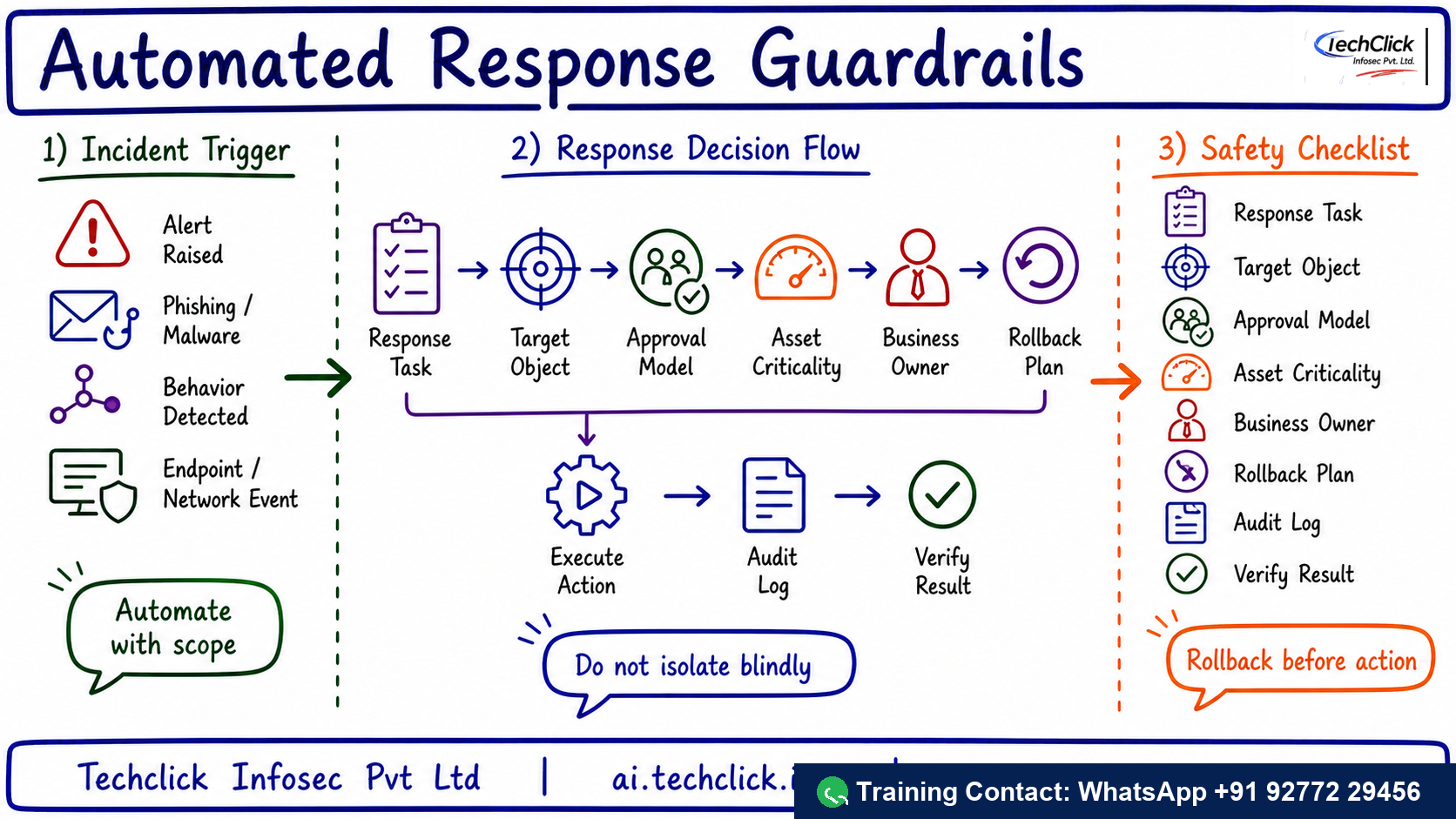
① What it solves and where it sits
A one-click response can be correct for malware on a laptop and dangerous for a production server. The SOC lead must know the boundary.
Production use case: Use it when building SOAR-style playbooks and deciding which actions need human approval.
Best one-line description of Trend Vision One Automated Remediation Boundaries?
② Core components you must name
Use these names before jumping to troubleshooting. They anchor the architecture and make the interview answer sound practical.
- Response task — Action such as isolate, collect, delete, block or hand off
- Approval model — Who can authorize disruptive response
- Target object — Host, user, mailbox, file, domain or cloud resource
- Rollback plan — How to undo the action safely
- Audit log — Evidence of who did what and why
Say the path in order: Pick action → Check target → Get approval → Execute task → Audit result. It keeps the answer structured.
A decision is not real until logs/events show the rule, object and final action.
Most outages are not product magic; they are forwarding, health, identity, certificate or rule-order problems.
Safe rollout: Start with collect-only playbooks, add approvals for disruptive actions, test rollback and review audit logs after every exercise.
Lead with Response task, Approval model, Target object. It sounds like production work, not brochure reading.
Which item belongs in the core architecture?
③ The traffic or telemetry path
The healthy path is: Pick action → Check target → Get approval → Execute task → Audit result. Walk it left to right. If a user report says 'it is broken', locate the exact stage where evidence stops.
The primary control is: Validate response task, approval model, target object, criticality, business owner, rollback plan and audit log.
If Pick action never reaches the control point, no later policy can help. Confirm steering/forwarding first.
▶ Watch the Trend Vision One Automated Remediation Boundaries decision path
Press Play for the healthy path, then Break it for the common outage.
What should you trace first during troubleshooting?
④ Operations, rollout and interview response
The safe rollout answer is: Start with collect-only playbooks, add approvals for disruptive actions, test rollback and review audit logs after every exercise. That prevents broad production impact while still moving toward enforcement.
Compared with full automation with no scope guardrails, the value is richer policy context, better visibility and a clearer operational evidence trail.
Rohan at a Noida SOC gets this ticket
An automated playbook isolates a production server during business hours.
The playbook did not check asset criticality, owner approval or rollback before disruptive action.
Trace Pick action → Check target → Get approval → Execute task → Audit result, then compare policy logs, object health and user scope.
Console ▸ policy/logs ▸ health/status ▸ affected user testAdd guardrails for production assets, require approval, collect evidence first and document rollback steps.
Repeat the original user test and capture the allow/block/health evidence in logs.
The final answer should include log evidence, health state and a user test. That is what separates RCA from guessing.
Safest production rollout answer?
🤖 Ask the AI Tutor
Tap any question — instant, scoped to this lesson. No login, no waiting.
Pre-curated from vendor docs + community Q&A, scoped to this lesson. For a live prod issue, paste your export into chat.techclick.in.
📝 Wrap-up assessment — six more
You've answered 4 inline. Six left. 70% (7 of 10) marks the lesson complete on your profile. Tap Submit all answers at the end.
🧠 In your own words
Explain Trend Vision One Automated Remediation Boundaries in one L2 interview sentence.
🗣 Teach a friend
Best way to lock it in — explain it in one line to a teammate. Tap to generate a paste-ready summary.
📖 Glossary
- Vision One
- Trend Micro platform for XDR, exposure management and cross-layer security operations.
- Workbench
- Investigation view that correlates alerts, entities and observations into an incident story.
- CREM
- Cyber Risk Exposure Management for asset, exposure and business-risk prioritization.
- Connector
- Integration path that forwards telemetry from products such as Workload Security.
- Activity Monitoring
- Workload telemetry for process, file, network, domain, registry and user activity.
- Response task
- A controlled action such as isolate, collect evidence, delete message or hand off.
📚 Sources
What's next?
Next, pair this lesson with the new Trend Vision One Automated Remediation Boundaries interview Q&A page and explain the same flow out loud in 90 seconds.