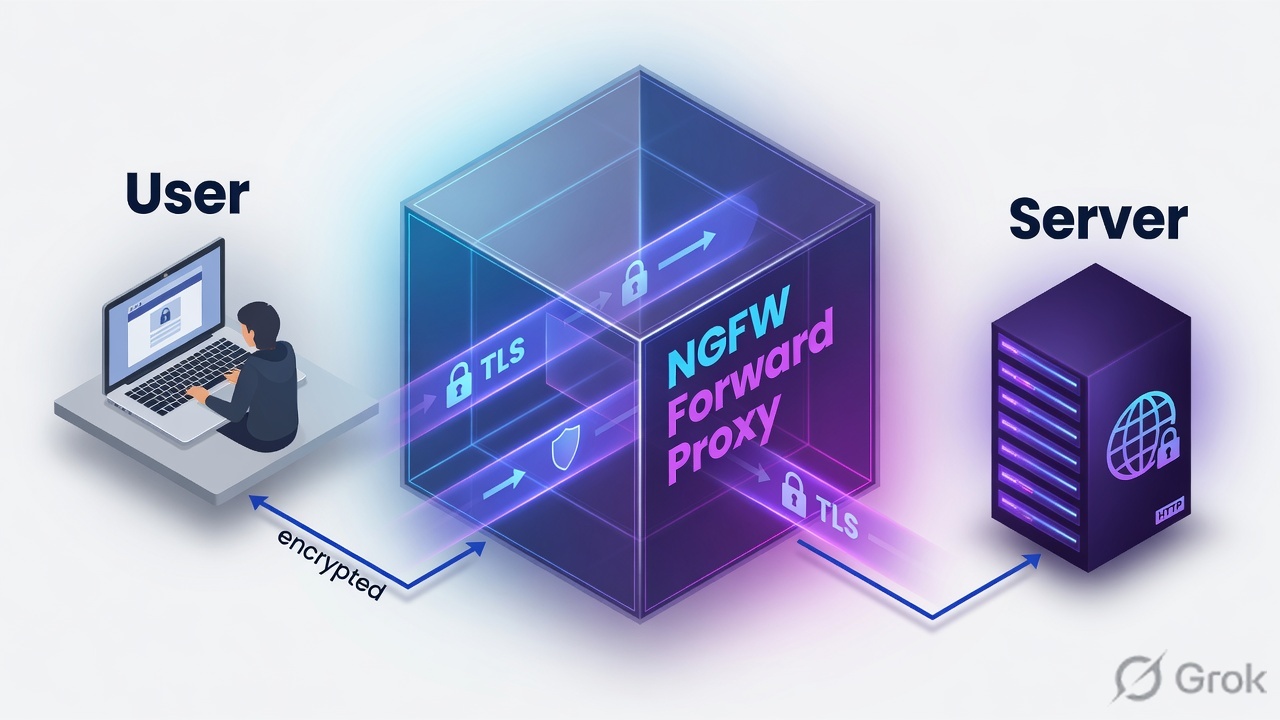
PAN-OS decryption is policy-based. Users leaving the network to the internet match SSL Forward Proxy: the NGFW opens two TLS sessions and presents a Forward Trust impersonation cert (or Forward Untrust if the real issuer is not in its CTL). Traffic arriving at your server matches SSL Inbound Inspection: import that server’s certificate and private key. Traffic you choose not to decrypt (finance, health, executives) is a No Decrypt rule at the top of Policies → Decryption, with a No Decryption profile on TLSv1.2 and earlier. Traffic that cannot be decrypted (pinned certs, client authentication) goes on Device → Certificate Management → SSL Decryption Exclusion. Prove it in Monitor → Logs → Decryption (Policy Name, Proxy Type, TLS version, cipher, Error Index) and Monitor → Logs → Traffic (Decrypted = yes).
1. Why encrypted traffic is still a hole
A Security allow with a profile group does not inspect what it cannot see. Most web sessions are TLS. Without a matching decryption policy, App-ID often stays on ssl, URL Filtering cannot apply HTTPS exceptions cleanly, and Advanced Threat Prevention / WildFire never see the payload.
Official wording is blunt: you cannot block traffic you do not inspect. That is why decryption is its own rulebase — Policies → Decryption — evaluated top-down, first match, separate from Security.
Three tickets this page is built to close:
- “HTTPS is broken after we turned decrypt on.” Usually a missing Forward Trust on the endpoint, a pinned app, or a No Decrypt rule sitting below a decrypt-any.
- “SOC still cannot see the payload.” Usually the session never matched a Decrypt rule, or QUIC bypassed TLS, or you only logged unsuccessful handshakes.
- “Our public site is being scanned through the firewall and we imported nothing.” That is Inbound Inspection, not Forward Proxy. You need the server cert and private key on the NGFW.
SSL Forward Proxy — outbound MITM. Firewall impersonates the internet server to the client.
SSL Inbound Inspection — inbound MITM. Firewall has your server’s cert + key and inspects clients talking to that server.
Forward Trust / Forward Untrust — the two impersonation CAs. Trust = “server issuer is in our CTL.” Untrust = “we do not trust that issuer; client must warn.”
No Decrypt — policy action you choose (legal / privacy). Still a decryption policy rule so the session is logged.
SSL Decryption Exclusion — hostname list for traffic that breaks if you decrypt (pinning, client auth). Technical, not legal.
2. Mental model · two sessions + two certs
Hold three parts. Interviews fail when people mix them.
1. Two TLS sessions
Client ↔ NGFW and NGFW ↔ server. New session keys on each side. The NGFW decrypts, applies Security + profiles, then re-encrypts. HA does not sync decrypted sessions.
2. The cert the client sees
Forward Proxy: impersonation signed by Forward Trust or Forward Untrust. Inbound: the real server cert (or chain) you imported. If the client already pinned the real leaf, this session dies.
3. Policy, then profile
The decryption rule picks Decrypt / No Decrypt and the Type. The attached decryption profile is the checks (expired cert, weak TLS, unsupported cipher). No profile = you decrypted without hardening.
Forward Trust on the client is how the user stays silent. Forward Untrust on the client is how you hide a bad issuer. Pinned apps go on the Exclusion list. Finance goes on a No Decrypt rule above the decrypt rule. The Decryption log Policy Name is the evidence — not the Security rule name.
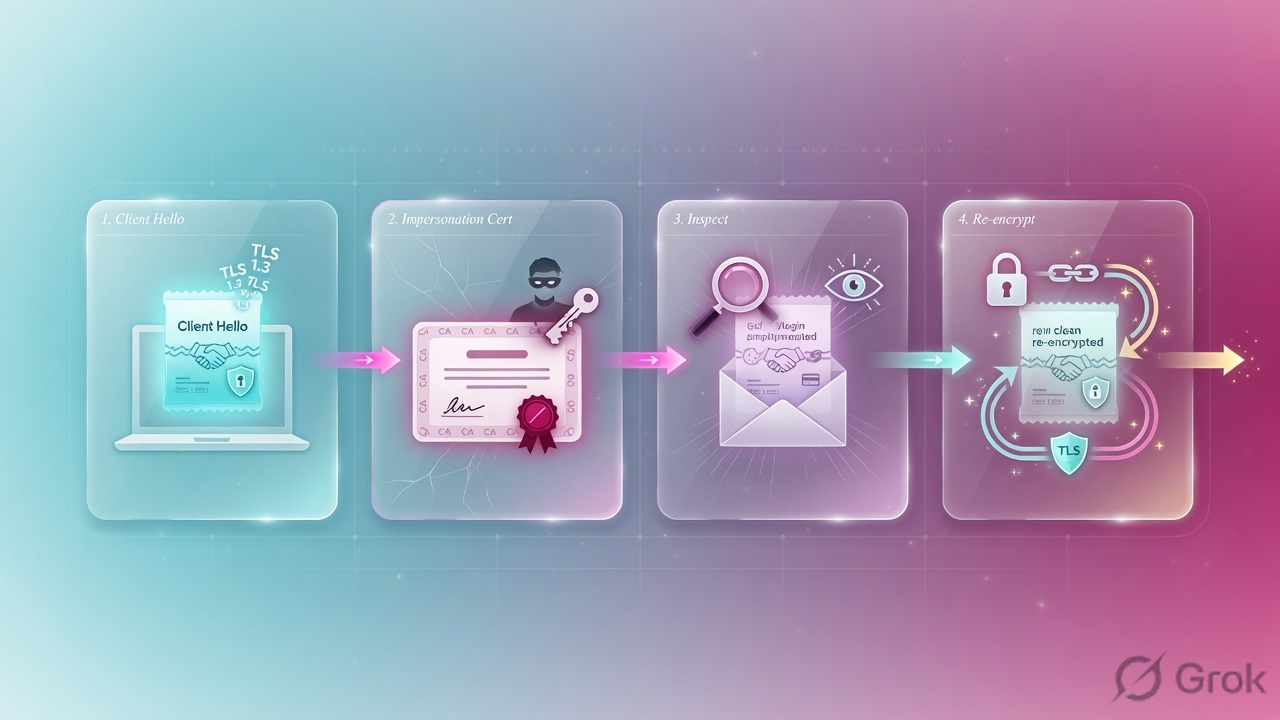
Forward Proxy handshake, official order:
- Internal client starts TLS to an external server.
- NGFW intercepts the certificate request and acts as the server to the client.
- NGFW opens a second session to the real server and looks like the client.
- If the server cert is signed by a CA in the NGFW CTL and the profile allows it, the NGFW mints a Forward Trust impersonation cert (SAN copied / CN appended if you enabled that check).
- If the issuer is not trusted, the NGFW mints a Forward Untrust copy. The client must warn. That warning is the feature.
- Keys are proxied the same way. Cleartext is inspected. Traffic is re-encrypted on the way out.
3. Decision flowchart
Read this before you click Policies → Decryption. The packet does not “find the safest mode.” It walks the decryption rulebase until one rule says Decrypt or No Decrypt.
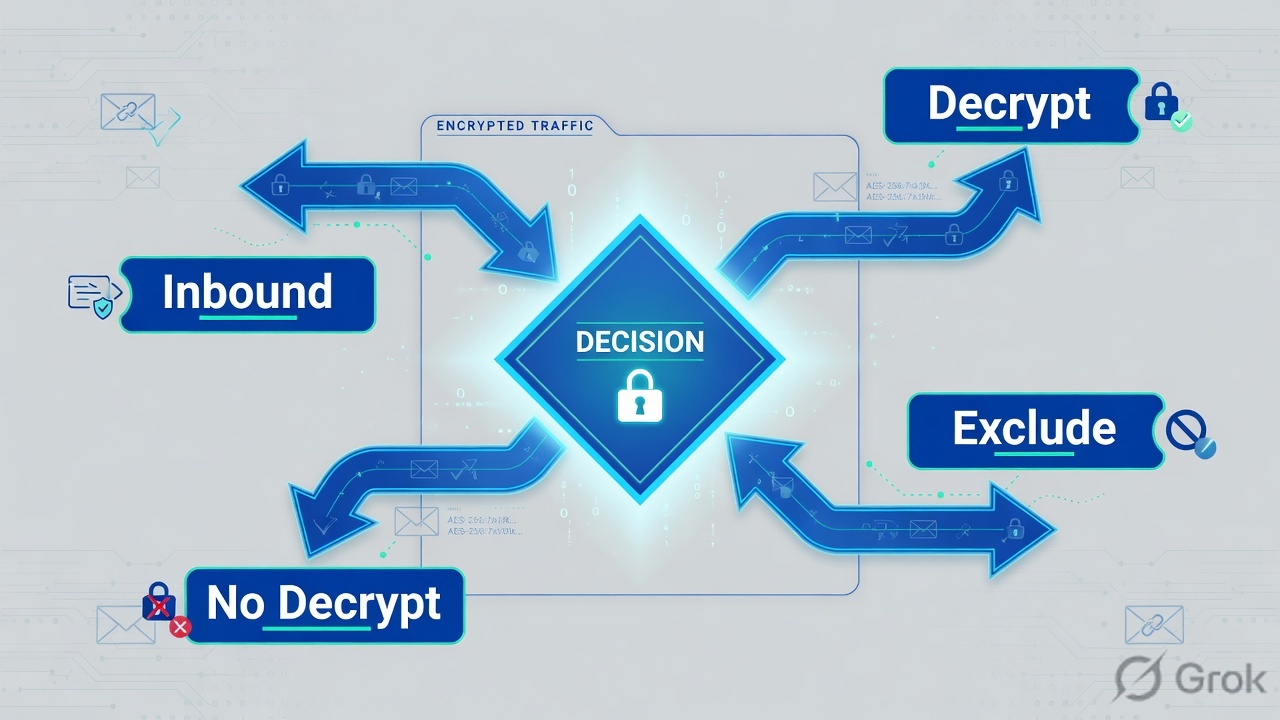
Read top → down. Diamond = decision. Green is inspect. Amber is a chosen skip. Red is a technical skip. Both skips must exist as objects or the decrypt-any below will still fire.
4. How to choose the mode
Mode is a Type on the Options tab, not a Security action. Mixing Forward Proxy with an imported server key is the classic “inbound never decrypts” ticket.
| You need | Type / action | What you attach | Why |
|---|---|---|---|
Users in trust browsing the internet |
Decrypt · SSL Forward Proxy | Forward Trust + Forward Untrust; SSL Forward Proxy profile | NGFW impersonates the destination. Clients must trust Forward Trust only. |
| Internet clients hitting your published HTTPS server | Decrypt · SSL Inbound Inspection | Server cert + private key (up to 12 certs per rule); inbound profile | NGFW must present the same leaf the server presents. PFS + chain: import the chain. |
| Finance, health, executives — you choose not to look | No Decrypt | No Decryption profile (TLSv1.2 and earlier only) | Legal / privacy. Place this rule above decrypt. Still logs if the rule exists. |
| Banking app, dropbox-style pin, client-auth site breaks | Leave Decrypt rules alone | SSL Decryption Exclusion hostname (or predefined PAN list) | Technical. A No Decrypt URL category will not fix a pin on a hostname the category missed. |
| Mobile apps that pin + TLSv1.3 | No Decrypt for those apps, or Max Version = TLSv1.2 on their profile | Separate rule + profile | TLSv1.3 encrypts certificate data, so automatic exclusion by cert info cannot run. |
| SSH port-forward tunnels | Decrypt · SSH Proxy | SSH Proxy profile (no certs) | Not on Strata Cloud Manager. Distinguishes ssh vs ssh-tunnel. |
Source: Decryption Policy Rules and Define Traffic to Decrypt — “Place rules that exclude traffic from decryption at the top.” Technical breaks go on the SSL decryption exclusion list, not a legal No Decrypt rule.
Do not install the Forward Untrust certificate into any client trust store. Official Configure SSL Forward Proxy: users will stop seeing warnings for issuers the NGFW itself does not trust. Do not attach a No Decryption profile to TLSv1.3 No Decrypt rules — certificate fields are encrypted, so expired-cert / untrusted-issuer checks cannot fire. Still create the No Decrypt rule so the session is logged.
5. Runbook · Side A certs, Side B rule, Side C log
Lab story (placeholder IPs only): users in zone trust (10.1.8.0/24) browse HTTPS to untrust. You will not decrypt financial-services or health-and-medicine. A pinned lab hostname pin.lab.example.com must keep working. Then you prove one decrypted session and one no-decrypt session in logs.
Primary source for clicks: Configure SSL Forward Proxy (PAN-OS & Panorama) and Define Traffic to Decrypt.
Side A — certificates and exclusions first
-
Confirm the data-plane path can proxy
Network → Interfaces → Ethernet. Forward Proxy needs Virtual Wire, Layer 2, or Layer 3 — not a tap you only use for Inbound visibility. Proxied Forward Proxy traffic does not carry DSCP / QoS.
-
Forward Trust (best practice: enterprise CA)
Device → Certificate Management → Certificates (labeled Device Certificates on PAN-OS 11.2 and earlier) → Generate. Unique Certificate Name per firewall. Common Name = FQDN or IP, no spaces. Signed By = External Authority (CSR) for an enterprise CA, or a self-signed root you mark Trusted Root CA then a subordinate with Certificate Authority checked. After import, open the cert and check Forward Trust Certificate.
Enterprise-CA path: skip pushing the leaf to endpoints if they already trust that enterprise root. Self-signed path: export PEM without the private key and deploy via GPO / MDM / GlobalProtect Trusted Root CA + Install in Local Root Certificate Store.
-
Forward Untrust (same cert on every firewall)
Generate a separate CA. Leave Signed By blank. Check Certificate Authority, then mark Forward Untrust Certificate. Do not export it. Do not install it on clients.
-
Technical exclusion for the pinned hostname
Device → Certificate Management → SSL Decryption Exclusion → Add. Hostname
pin.lab.example.com. This is the official door for certificate pinning and client authentication. Predefined Palo Alto Networks exclusions already cover many vendor sites — do not delete those rows. -
Decryption profiles
Objects → Decryption Profile → Add. Build three, not one:
dp-fwd-strict— SSL Forward Proxy + SSL Protocol Settings. Min Version TLSv1.2 (or TLSv1.3 if you have no pinned mobile apps on this rule). Max Version = Max. Leave DHE + ECDHE on. Block expired certificates, untrusted issuers, unsupported versions and ciphers.dp-no-decrypt— No Decryption tab: Block sessions with expired certificates + Block sessions with untrusted issuers. Attach only to TLSv1.2-and-earlier No Decrypt rules.- (If you publish a server later)
dp-inbound— SSL Inbound Inspection checks matching what that server actually supports. Separate profile per capability set (RSA-only vs PFS).
Device → Certificate Management → Certificates → fw1-fwd-trust
Certificate Information
Click next: generate lab-fwd-untrust, mark only Forward Untrust, do not export it. Then Objects → Decryption Profile. Source: Device → Certificate Management → Certificates (Configure SSL Forward Proxy, PAN-OS).
Side B — Policies → Decryption
-
No Decrypt first (position 1)
Policies → Decryption → Add. Name
no-decrypt-finance-health. Source Zone =trust. Destination Zone =untrust. Service/URL Category: URL Category =financial-services,health-and-medicine(predefined). Options: Action = No Decrypt. Decryption Profile =dp-no-decrypt. Log unsuccessful TLS handshakes (default); also check Log Successful TLS Handshakes on the pilot so you can prove the skip. -
Forward Proxy second (position 2)
Name
decrypt-users-fwd. Source Zone =trust, Source Address =net-users-trust(10.1.8.0/24). Destination Zone =untrust. Service = any (or application-default if you are excluding apps on default ports only). URL Category = any — the No Decrypt rule above already carved finance/health. Options: Action = Decrypt, Type = SSL Forward Proxy, Decryption Profile =dp-fwd-strict. Enable Log Successful TLS Handshakes on the pilot. -
Optional inbound later
A third rule, Type = SSL Inbound Inspection, Destination Address = the published server, Certificates = the imported server leaf (and the next leaf before cutover — up to 12). Do not put Forward Trust here. The NGFW checks that the Server Hello cert matches a cert on the rule; mismatch ends the session and the Decryption log says so.
-
Block QUIC so browsers fall back to TLS
This is a Policies → Security pair, not a decryption rule. Block application
quic, and block UDP services 80 and 443. Official best practice: Chrome will otherwise stay on proprietary encryption the NGFW cannot decrypt. -
Commit
Decryption policy is not live until Commit. Generate one subordinate Forward Trust per firewall so a revoke does not take down the fleet.
Policies → Decryption → Add
Decryption Policy Rule
Click next: OK, Commit, browse HTTPS from 10.1.8.41, then open Monitor → Logs → Decryption. Source: Policies → Decryption (Define Traffic to Decrypt, PAN-OS).
Side C — prove it in Traffic + Decryption logs
-
Generate two sessions
From 10.1.8.41: fetch a normal HTTPS site (should decrypt) and a financial-category site (should no-decrypt). Leave the pinned hostname for a third pass if you have it.
-
Traffic log — Decrypted flag
Monitor → Logs → Traffic. Filter
(addr.src in 10.1.8.41). On the decrypted session: Application should move off baresslonce identified, Action = allow, and the Decrypted column = yes. On the finance session: Decrypted = no, and the Security rule still allowed it. -
Decryption log — the close
Monitor → Logs → Decryption. This log exists only for sessions a decryption policy rule owns (including No Decrypt). Quote Policy Name, Proxy Type (forward / no-decrypt / inbound), TLS Version, cipher / key-exchange, SNI, Root Status, and on failures the Error / Error Index.
Monitor → Logs → Decryption
Decryption · filter (addr.src in 10.1.8.41)
Green close: Policy Name is yours, Proxy Type matches the Options tab, TLS version is what you intended, Error Index is empty on the happy path. Source: Configure Decryption Logging + Decryption Log Errors.
Monitor → Logs → Decryption: policy_name=decrypt-users-fwd · proxy_type=forward · TLS 1.2 or 1.3 · no Error Index. Same source in Traffic: Decrypted=yes, Application is a real App-ID at session end, Action = allow. Finance session: policy_name=no-decrypt-finance-health, Decrypted=no. Pinned hostname: either Exclusion cache / list, or a handshake error you then exclude — not a second decrypt rule.
show session all filter source 10.1.8.41 destination-port 443
show log decryption direction equal backward receive_time in last-hour
show log traffic direction equal backward ( addr.src in 10.1.8.41 ) and ( decrypted eq yes )
6. Runtime path after commit
After go-live the firewall does not re-read your intent. It does this.
Security policy still runs on undecrypted traffic. You get an allow/deny, not a payload. That is why “the Security rule hit” is not proof of inspection.
7. Traps + proof checklist
| Trap | What you see | What is true |
|---|---|---|
| Forward Trust never landed on the client | Every HTTPS site warns after commit | Self-signed path needs GPO/MDM/GlobalProtect. Enterprise-CA path needs the subordinate marked Forward Trust, not the root. |
| Forward Untrust in the trust store | No warnings on junk issuers | You taught the browser to trust what the NGFW itself does not trust. Remove it. |
| No Decrypt below decrypt-any | Finance is still decrypted | Decryption rules are first match. Move the skip to the top. |
| Pinned app treated as a URL category skip | App still dies; category never matched | Use Device → Certificate Management → SSL Decryption Exclusion (hostname). Technical ≠ legal. |
| No Decryption profile on TLSv1.3 | Expired / untrusted issuer still allowed | Certificate fields are encrypted. Profile checks cannot run. Keep the No Decrypt rule for logging. |
| Inbound without the private key | Session end = firewall/server certificate mismatch | Import cert + key (and chain for TLS1.2 + intermediates). Add the next cert before you swap the server leaf. |
| QUIC allowed | Chrome works, Decrypted = no, App-ID stays empty-ish | Block quic and UDP/80+443 so the browser falls back to TLS. |
| Only unsuccessful handshakes logged | Happy path is invisible | Options → Log Successful TLS Handshakes on the pilot. Watch Device → Setup → Management → Logging and Reporting Settings quota (default decryption log is 1%). |
| Client authentication / pin + proxy | Fatal alert, Local SSL Decryption Exclusion Cache grows | NGFW is a proxy — it cannot do true mutual TLS. Exclude the hostname or block client-auth in the profile if the app is not required. |
- Forward Trust is on the client trust store (or enterprise root already is). Forward Untrust is not.
- No Decrypt (legal) sits above Decrypt. Pinned hostnames are on SSL Decryption Exclusion.
- Each decrypt / no-decrypt rule has the matching decryption profile. No “naked” Decrypt action.
- QUIC is blocked in Security. Successful TLS handshakes are logged on the pilot rules.
- One live decrypt: Decryption log Policy Name + Proxy Type = forward, Traffic Decrypted = yes.
- One live skip: same logs show No Decrypt (or Exclusion) and Decrypted = no.
Knowledge check
Six judgment items. Same facts as the runbook. Check answers, then reset if you mixed No Decrypt with the Exclusion list or put Untrust in a trust store.
Sources
- Decryption Basics — policy-based decrypt of outbound (Forward Proxy) and inbound (Inbound Inspection); you cannot block what you do not inspect.
- SSL Forward Proxy — two sessions, impersonation cert, Forward Trust vs Forward Untrust handshake steps.
- SSL Inbound Inspection — import server cert + key; up to 12 certs; TLS1.3 sends the same chain the server sent; mismatch ends the session.
- Keys and Certificates for Decryption Policies — Forward Trust, Forward Untrust, inbound server certs, SAN copy, PFS (DHE/ECDHE).
- Configure SSL Forward Proxy — Device → Certificate Management; enterprise CA vs self-signed; never install Untrust on clients; Policies → Decryption Type = SSL Forward Proxy.
- Define Traffic to Decrypt — Policies → Decryption → Add; Options Action / Type; exclude rules at the top; QUIC block; pinning → exclusion list.
- Decryption Profiles — Objects → Decryption Profile; No Decryption profile not for TLSv1.3; SSL Protocol Settings Min/Max; mobile pin + TLS1.3 note.
- Exclude a Server from Decryption for Technical Reasons — SSL Decryption Exclusion for pinning / client auth (vs policy-based legal skip).
- Configure Decryption Logging — logs only for sessions a decryption rule owns, including No Decrypt; default = unsuccessful handshakes; Log Successful TLS Handshakes; 1% default quota.
- Decryption Log Errors and Error Indexes — Root Status uninspected on no-decrypt and some TLS1.3; filter examples.
- Deploy SSL Decryption Using Best Practices — No Decrypt above decrypt; no No-Decrypt profile on TLS1.3; Max Version TLS1.2 for many mobile pins.
Related: PAN-OS Security policy · PAN-OS session factory · Traffic not passing · Logging and reporting · Palo Alto interview hub · Palo Alto course