PBF overrides the virtual router’s routing table for a first-match flow: you pick the egress interface (and next hop) from source, dest, user, or service — not from the destination FIB. Attach Monitor and Disable this rule if nexthop/monitor ip is unreachable so a dead primary ISP falls back to the static default. Enforce Symmetric Return pins the reply to the MAC that sent the SYN — it needs a source interface, not only a zone. ECMP load-balances up to four equal-cost routes in one VR; it is not a policy override, and it will not install routes whose next hop is another VR. Multi-VR + Next VR is the structural dual-ISP design: each ISP owns a RIB, you stitch with one hop, and you leave PBF for tactical exceptions. Prove with show pbf rule all (Active vs Disabled) and show session id egress.
1. Why the FIB is “right” and still wrong
Normally the firewall uses the destination IP to pick the outgoing interface. The lookup is the routing table of the virtual router that owns the ingress interface. That is the FIB doing its job.
Guest WiFi and corp LAN can share one default route to ISP1 and still need different exits. The FIB has no “source zone = guest” column. Policy-Based Forwarding is the official override: match the packet, specify the egress, skip that destination lookup.

Three tickets this model closes:
- Guest still uses ISP1. There is no PBF match, or the monitor already disabled the rule, so the packet fell through to the default route.
- Primary ISP died and users hung. PBF had no monitor, so sessions kept aiming at a dead next hop.
- Inbound on ISP2 replies out ISP1. Asymmetric SYN / SYN-ACK. You needed Symmetric Return, or a per-ISP VR so the return FIB is already correct.
FIB — Forwarding Information Base. The best route(s) the virtual router actually uses to forward. The RIB holds candidates; the FIB is what the packet hits.
PBF — Policy-Based Forwarding. A first-match policy that overrides the routing table and sets the egress (or discards, or skips PBF).
Monitor / path monitoring — ICMP heartbeats to a target IP (or to the next hop if you leave the target blank). On failure you can disable the PBF rule so the VR routes, or keep the rule and use fail-over / wait-recover.
Enforce Symmetric Return — return traffic is sent back to the MAC that delivered the SYN (first packet), skipping the return FIB. Requires a source interface.
Next VR — a static-route next-hop type. The next hop is another virtual router on the same firewall. One hop only (A→C, not A→B→C).
ECMP — Equal Cost Multiple Path. Up to four equal-cost routes to the same dest in one VR’s FIB. Load-balances sessions. Not a source-based policy.
2. Mental model
Memorize three layers. PBF is the override. The VR FIB is the default. A second VR is a second default.
1 · PBF first-match
Top-down, like Security. First rule that matches source (zone or interface), dest, user, application/service wins. Later PBF rows are not evaluated.
2 · Then the VR FIB
No PBF match, or the matching rule is Disabled by the monitor → destination lookup in that interface’s virtual router. ECMP only matters here.
3 · Security and NAT still run
PBF does not allow or hide anything. You still need a Security allow and, for dual ISP, interface-based source NAT so the reply lands on the same public IP.
4 · Return is a separate problem
Outbound PBF + correct SNAT often makes the reply come back the same ISP. Inbound or asymmetric designs need Symmetric Return or a per-ISP VR.

PBF is evaluated before the destination FIB. A match overrides the route table. A monitor can disable that override. Symmetric Return overrides the return lookup. Multi-VR gives each ISP its own table so you stop fighting the FIB.
3. Decision flow (PBF before FIB)
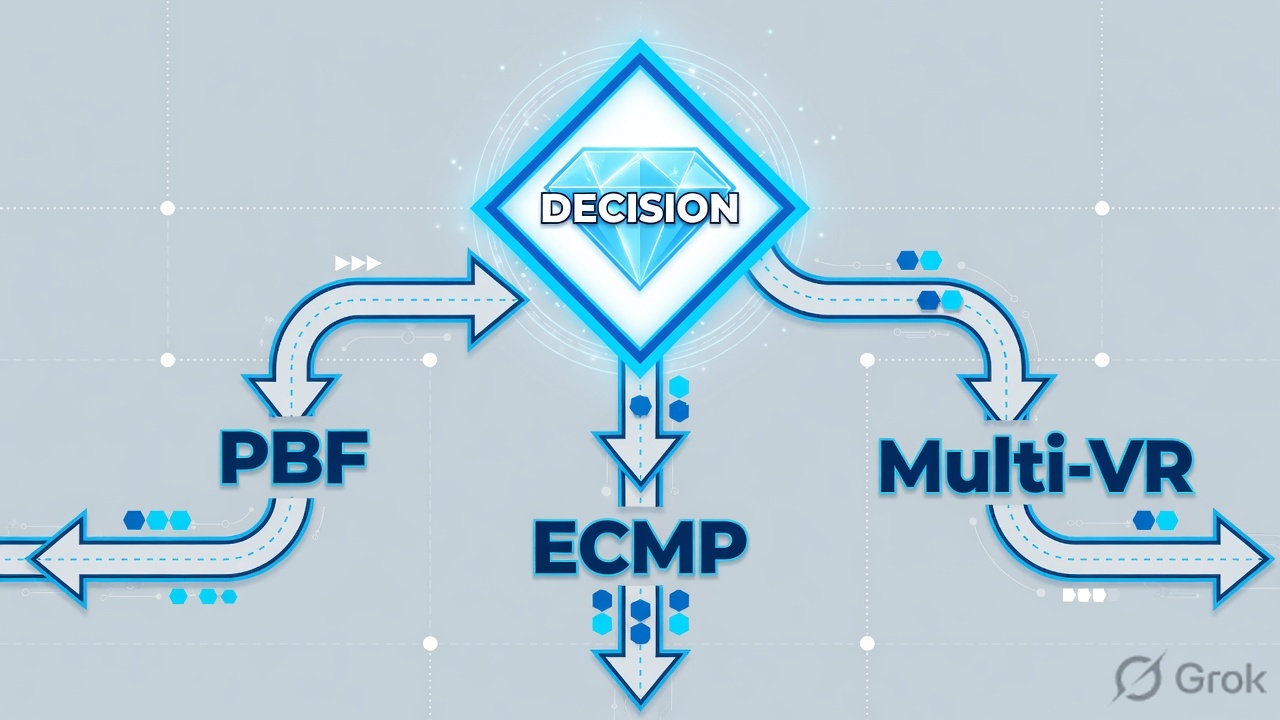
Flowchart first. A new session from trust to the internet hits this order — not “route, then maybe PBF.”
Read left → right, then down. Diamond = decision. No PBF match, or a disabled PBF rule, is the only way the destination FIB picks the exit.
4. How to choose: PBF vs ECMP vs multi-VR
If the requirement is “this class of traffic must leave this interface,” that is PBF. If the requirement is “share two equal links to the same dest,” that is ECMP. If the requirement is “each ISP has its own RIB, inbound and outbound, maybe its own BGP AS,” that is multi-VR.
| Use | When | What it cannot do | Return path |
|---|---|---|---|
| PBF | Small, named override: guest → cheap ISP, HTTP/HTTPS → primary ISP, leased line for one service. Official dual-ISP use case: PBF to primary + monitor + static default to backup. | Not a second routing table. App-ID is too late — do not match YouTube. Loopback is not a PBF source. Custom apps / filters / groups are not allowed. | Pair with interface-based SNAT. Add Enforce Symmetric Return only for inbound / asymmetric. Watch show pbf return-mac all. |
| ECMP | One VR, up to four equal-cost routes to the same dest, you want session load-share and faster link-fail shift inside that VR. | Not source-aware. Official: ECMP is not supported when one of the equal-cost routes has a virtual router (or logical router) as next hop — none of those routes install in the FIB. | Replies follow the public IP you SNATed to. Mixing ECMP across two ISPs without per-ISP NAT is how sessions break. |
| Multi-VR + Next VR | True dual-ISP both directions, BGP Local AS per ISP (one AS per VR), servers published on both publics, or PBF + Symmetric Return has grown into a pile of rules. | VRs do not share routes unless you wire them. Only one hop between VRs. ECMP will not hash across a Next-VR hop. | Each ISP VR has its own default and a static for the LAN via Next VR. Return is a FIB problem again — usually what you want. |
Unsafe: 30 PBF rows + Symmetric Return on “any” + ECMP on two ISP defaults in the same VR + a Next-VR static “for failover.” That design fights itself. ECMP will not install the Next-VR path; return-mac grows; guest and corp share a broken default.
Safe: Pick one primary tool. Dual-ISP outbound-only → official PBF + monitor + backup static + per-ISP DIPP. Dual-ISP both ways / BGP per ISP → one VR per ISP + Next VR. Keep PBF for the one guest or QoS exception.
5. Runbook · Side A interfaces, Side B PBF + next-vr, Side C proof
Lab addressing (RFC 5737 / 5735): ethernet1/3 trust 192.168.54.1/24, ethernet1/1 ISP1 203.0.113.2/30 gw 203.0.113.1, ethernet1/2 ISP2 198.51.100.2/30 gw 198.51.100.1. Official dual-ISP write-up puts both egress interfaces in one zone; you may also use untrust-isp1 / untrust-isp2 if Security must distinguish them.
Side A — interfaces, VR, backup static, NAT objects
-
Layer 3 interfaces in a VR
Network → Interfaces. Only Layer 3 interfaces support PBF; loopback does not. Assign each interface to a virtual router (start with
defaultfor the single-VR PBF design). Official dual-ISP example uses zoneCorporateon the LAN and one egress zone for both ISPs. -
Backup default in the FIB
Network → Virtual Routers → default → Static Routes → Add. Destination
0.0.0.0/0, Next Hop = IP Address198.51.100.1(backup ISP). This is the route that wins when PBF is Disabled. Do not point this default at Next VR if you also plan ECMP in this same VR. -
Negate internal destinations
Objects → Addresses for the internal range you must not PBF (example
10.0.0.0/8). Official dual-ISP step: add those addresses on the PBF Destination tab and tick Negate so LAN-to-LAN never leaves toward an ISP.
Source for Side A: Use Case: PBF for Outbound Access with Dual ISPs.
Side B — PBF rule, then optional Next VR
-
Add the PBF rule
Policies → Policy Based Forwarding → Add. General: Name
pbf-corp-isp1. Required: a name, a source zone or interface, and (for Forward) an egress interface. -
Source
Source → Type. Use Zone =
trustfor outbound-only. Switch Type to Interface (the LAN L3 IF) if you will tick Enforce Symmetric Return — official docs: Symmetric Return requires a source interface. -
Destination / Application / Service
Destination Address = internal object, Negate checked. Service = Add
service-httpandservice-https(official dual-ISP). Leave Application empty when you can. PBF is applied on the first packet (SYN) or first response (SYN/ACK), before App-ID is sure. You cannot use custom applications, application filters, or application groups. -
Forwarding
Action = Forward. Egress Interface = ethernet1/1. Next Hop = IP Address
203.0.113.1(IPv4 object must be /32). Other actions: Discard, No PBF (matched packets use the route table — useful as an exception row), Forward to VSYS on multi-vsys. -
Monitor
Tick Monitor, attach the default monitoring profile. Tick Disable this rule if nexthop/monitor ip is unreachable. Leave Target IP blank to ping the next hop, or set a far IP that is only reachable via this egress. Official table: when the rule is disabled, new sessions check remaining PBF rows then the routing table; established sessions also leave PBF and use the routing table.
-
Symmetric Return — only if inbound is asymmetric
Tick Enforce Symmetric Return and Add up to 8 IPs on Next Hop Address List (the upstream router that delivered the SYN). You cannot list a Tunnel or PPPoE address. Same-subnet dest IPs skip Symmetric Return on purpose so the packet is not silently discarded.
-
Per-ISP source NAT + Security
Policies → NAT: DIPP, Address Type = Interface Address, one rule per egress IF. Policies → Security: allow
trust→ egress zone, Log at Session End. PBF does not replace either rulebase. -
If you chose multi-VR instead
Network → Virtual Routers → Add
VR-ISP1,VR-ISP2, keep LAN onVR-Internal. Move each ISP interface into its VR. Static on VR-Internal: dest0.0.0.0/0, Next Hop = Next VR →VR-ISP1. On each ISP VR: dest LAN prefix, Next Hop = Next VR →VR-Internal, plus a default to that ISP gateway. Do not add Next VR between the two ISP VRs unless you want ISP-to-ISP transit. Official: only one hop between VRs.
Policies → Policy Based Forwarding → Add
PBF Policy Rule
Click next: Source tab Type = Zone trust (or Interface if Symmetric Return), Destination Negate internals, Service service-http / service-https, then Policies → NAT DIPP on ethernet1/1. Source: Create a Policy-Based Forwarding Rule + Dual-ISP use case.
Network → Virtual Routers → VR-Internal → Static Routes → Add
Static Route
Click next: on VR-ISP1 add dest 192.168.54.0/24 Next Hop = Next VR VR-Internal, plus 0.0.0.0/0 via 203.0.113.1. Repeat for VR-ISP2. Source: Network → Virtual Routers → Static Routes (Next VR).
Source for Side B clicks: Create a Policy-Based Forwarding Rule and Static Routes (Next VR).
Side C — prove rule state and egress
-
Confirm the PBF row is Active
Official dual-ISP verify:
show pbf rule all. You want Rule State = Active, Action Forward, the intended egress IF and next hop. After you unplug the primary (or fail the monitor), the same command must show Disabled. -
Session egress + NAT
Generate HTTPS from a trust host.
show session all, thenshow session id <id>. Quote ingress interface, egress interface, nat-rule. On primary-up, egress is ethernet1/1 and the ISP1 NAT rule. On primary-down, egress is ethernet1/2 and the backup NAT — and the PBF rule is not listed on that session. -
Symmetric Return table (only if you enabled it)
show pbf return-mac all— official command to see the model-limited table.clear pbf return-mac all(orname) during a change window if an upstream MAC moved (HSRP/VRRP) and replies hang. -
Multi-VR FIB
show routing route virtual-router VR-Internaland the same on each ISP VR. Confirm the default is Next VR (or the ISP gateway) and that there is no ISP1↔ISP2 Next-VR unless you designed transit.
admin@PA-NGFW> show pbf rule all
Rule            ID  Rule State  Action   Egress IF/VSYS  NextHop
==============  ==  ==========  ======   ==============  =========
pbf-corp-isp1    1  Active      Forward  ethernet1/1     203.0.113.1
admin@PA-NGFW> show pbf rule all
Rule            ID  Rule State  Action   Egress IF/VSYS  NextHop
==============  ==  ==========  ======   ==============  =========
pbf-corp-isp1    1  Disabled    Forward  ethernet1/1     203.0.113.1
admin@PA-NGFW> show session id 87212
        ingress interface             : ethernet1/3
        egress interface              : ethernet1/2
        nat-rule                      : NAT-Backup-ISP(vsys1)
        application                   : ssl
        rule                          : allow-trust-web
Primary up: Rule State Active, session egress ethernet1/1, natsrc is the ISP1 interface IP. Primary down: Rule State Disabled, new session egress ethernet1/2, backup NAT, PBF name absent from the session. That pair closes the ticket. Source: official Dual-ISP use case verify steps.
6. Runtime path after commit
After go-live the user does not care about your object names. One HTTPS SYN from a trust laptop does this.
Inbound on ISP2 is forwarded by VR-ISP2, then Next VR into VR-Internal. The reply looks up VR-Internal → you install the return prefix via VR-ISP2, not via the ISP1 default.
- SYN arrives on ethernet1/3. PBF evaluates top-down.
pbf-corp-isp1matches trust + service-https, destination is not the negated LAN prefix. - Monitor to
203.0.113.1is up → Action Forward, egress ethernet1/1, next hop203.0.113.1. The destination FIB is not consulted. - Security allow + DIPP on ethernet1/1 rewrite the source to
203.0.113.2. Session installs with that egress. - If the monitor fails and Disable-rule is checked, Rule State becomes Disabled. The next SYN uses remaining PBF rows, then the VR default out ethernet1/2. Established sessions also leave that PBF path (official monitor table).
- On a multi-VR design this SYN never needed PBF: VR-Internal’s only default is Next VR to VR-ISP1, and VR-ISP1’s default is ISP1.
7. Traps + proof checklist

| Failure | Looks like | Actual | Proof |
|---|---|---|---|
| PBF never hits | Guest still on ISP1 | No match (wrong source Type, dest not negated so an earlier No-PBF row stole it, or you matched Application and App-ID was late) | show pbf rule all + session has no PBF; rewrite Service to service-http / service-https |
| Monitor flap / no failover | Users hang when ISP1 dies | Monitor off, or Disable-rule unchecked so the rule stays enabled and new sessions still prefer a dead egress until you understand wait-recover vs fail-over | Unplug primary → Rule State Disabled → new show session id egress is the backup IF |
| Asymmetric inbound | SYN on ISP2, SYN-ACK out ISP1, session dies | Single VR FIB default ≠ ingress ISP. Symmetric Return off, or Source Type is still Zone | Source Type = Interface; Enforce Symmetric Return + Next Hop Address List; or move to multi-VR |
| return-mac full / stale MAC | Some inbound sessions hang; no Security deny | Model-limited Symmetric Return table (not user-sizable). Official check is show pbf return-mac all. Upstream HSRP MAC change leaves a stale entry |
show pbf return-mac all; clear pbf return-mac all in a window; narrow the rule or drop Symmetric Return after multi-VR |
| ECMP + Next VR | “We enabled ECMP for dual ISP” | Official: ECMP will not install equal-cost routes when a next hop is a virtual router | show routing fib — the Next-VR path is missing from the ECMP set |
| ISP-to-ISP transit | One ISP can reach the other through you | You added Next VR between VR-ISP1 and VR-ISP2 | No such static; plus a Security deny untrust-isp1 → untrust-isp2 |
- One laptop in
trust, HTTPS out — session egress = ethernet1/1, Rule State Active. - Same laptop to an internal prefix — PBF does not match (Negate). Session stays on-net.
- Fail the primary next hop — Rule State Disabled within the monitor threshold; new session egress = ethernet1/2; backup NAT name in
show session id. - Restore primary — rule returns to Active; new sessions use PBF again.
- If Symmetric Return is on:
show pbf return-mac allshows the upstream MAC and is not at the model cap. - If multi-VR:
show routing route virtual-router VR-ISP1has LAN via Next VR; no ISP1↔ISP2 Next-VR.
Weak: “PBF is policy-based routing.” Strong: “PBF is a first-match override of the VR FIB on the first packet. I monitor the next hop and disable the rule so the backup static takes new and established sessions. Symmetric Return needs a source interface and a finite return-mac table. Dual-ISP both ways is multi-VR with Next VR, one hop, not 40 PBF rows. ECMP is equal-cost session share in one VR — and it will not hash to another VR.”
Knowledge check
Six judgment items. Map each miss back to the flow, choose table, or traps — then retry.
Sources
- Policy-Based Forwarding — PBF overrides the routing table; dest-IP lookup is the default.
- PBF overview — alternate egress for security or performance (leased line vs internet).
- Create a Policy-Based Forwarding Rule — Policies → Policy Based Forwarding; source Zone vs Interface; Symmetric Return needs an interface; L3 only, no loopback; Actions Forward / Forward to VSYS / Discard / No PBF; Next Hop IP / FQDN / None; Monitor + Disable this rule; Next Hop Address List (max 8).
- Path Monitoring for PBF — ICMP heartbeats; disable-rule vs wait-recover / fail-over; new vs established session table.
- Egress Path and Symmetric Return — return to the SYN MAC; same-subnet exception; model-limited table via
show pbf return-mac all. - Service Versus Applications in PBF — first packet / SYN-ACK; prefer service objects; no custom app / filter / group.
- Use Case: PBF for Outbound Access with Dual ISPs — PBF to primary + monitor + backup static + per-ISP DIPP;
show pbf rule allActive vs Disabled;show session id. - Configure Virtual Routers — RIB → FIB; one best route unless ECMP; Next VR one hop; routes not shared across VRs; one BGP Local AS per VR.
- Static Routes — Next Hop = IP Address / Next VR / FQDN / Discard / None; path monitoring defaults (ping interval 3, count 5).
- ECMP — up to four equal-cost paths; session load-share; not supported when a next hop is a virtual router.
Related: Zones, interfaces, VR · NAT deep dive · Session factory · Session table and flow · Traffic not passing · SP3 architecture · Palo Alto interview hub · Palo Alto course