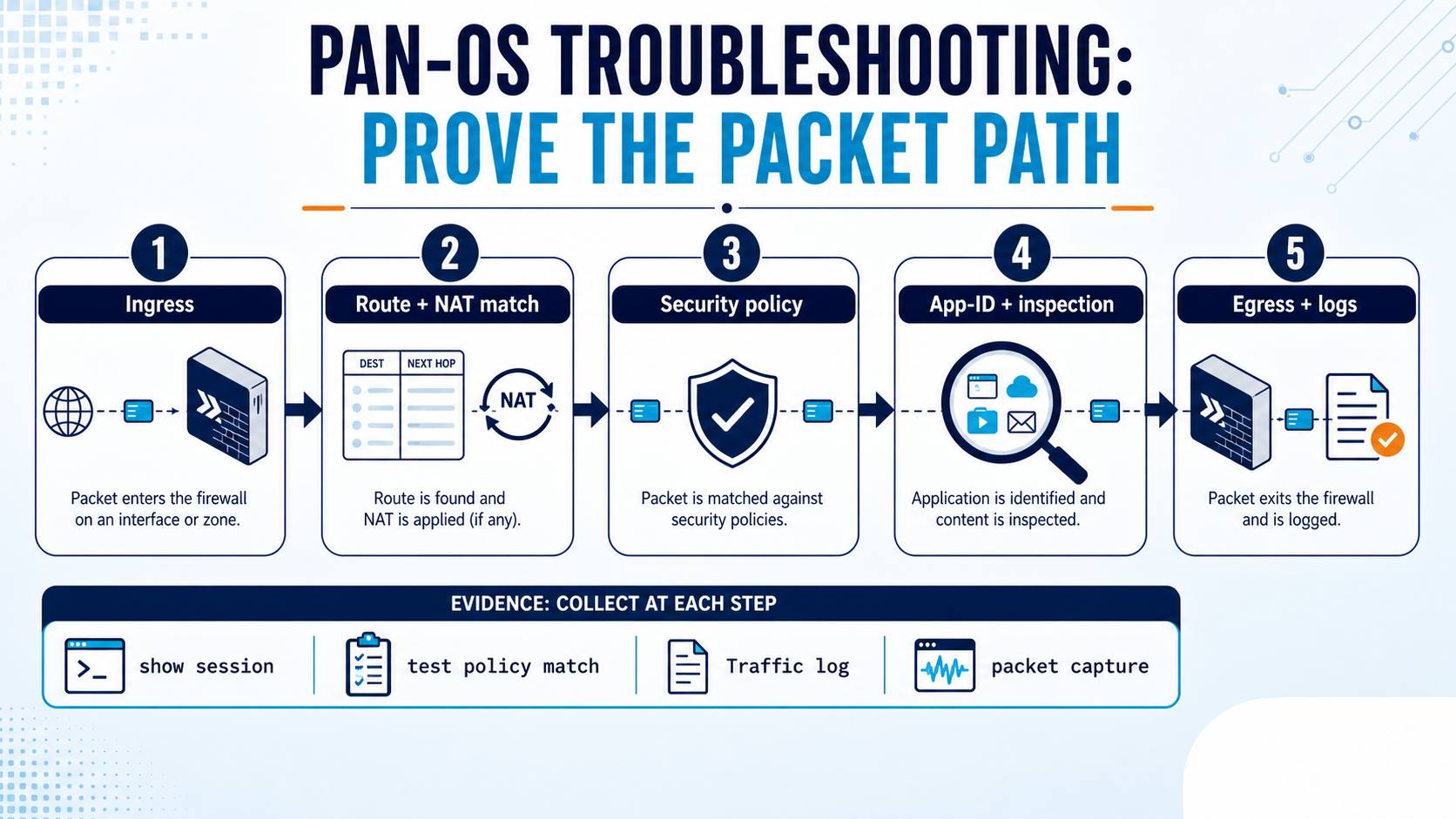
 Techclick
Most engineers think…
Most candidates walk in ready to list features — "it has App-ID, WildFire, GlobalProtect…" — like reading a brochure.
That is not what gets you hired. Interviewers test whether you can reason about the packet flow and NAT under pressure: "it's allowed but still dropped — why?" The candidate who calmly walks the flow (route → NAT eval → policy → App-ID) and says "pre-NAT IP, post-NAT zone" beats the brochure-reader every time.
① Architecture & core concepts
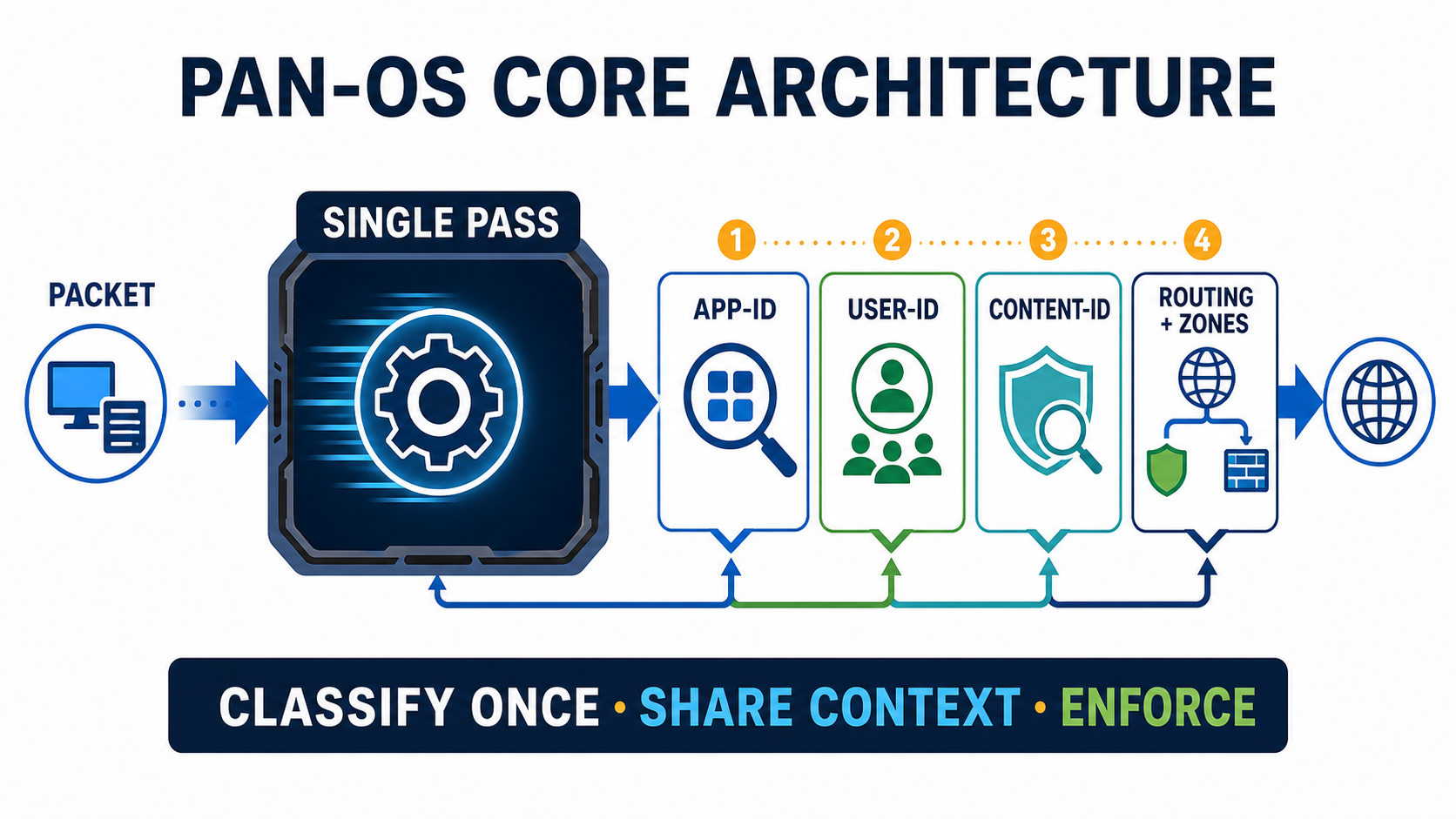
Palo Alto interviews almost always open here. The headline idea is SP3 — Single-Pass Parallel Processing. A legacy firewall may rescan a packet for each feature; PAN-OS shares classification and session context across networking, App-ID, User-ID and Content-ID. That architecture can reduce redundant work, but throughput still depends on platform, traffic mix, decryption, enabled inspections, and resource headroom.
The four engines every Palo Alto interview opens with
PAN-OS classifies traffic by app, user and content — not just port. Tap each card.
Identifies the real application regardless of port, protocol or encryption — so you allow 'salesforce', not 'port 443'.
Maps IP → username/group (from AD, GP, agent), so policy and logs are by person, not IP.
Single-pass threat engine: IPS, AV, anti-spyware, URL filtering, file blocking, WildFire.
Single-Pass Parallel Processing: read the packet once, run every engine in parallel on dedicated hardware.
Two structural terms come up next. A security zone groups interfaces by trust level — policy is always written zone-to-zone, never interface-to-interface, and inter-zone traffic is denied by default. A Virtual Router is the firewall's routing instance, while a vsys splits one box into independent logical firewalls.
You must allow ONLY the Finance group to use Salesforce, on any port. Which feature pair makes this possible?
When asked 'why is Palo Alto next-gen?', answer in one line: it classifies traffic by application (App-ID) and user (User-ID), not port — and inspects threats inline with Content-ID in a single pass.
② Packet flow & security policy
Packet flow here means the NAT and Security-policy decision path—not only PAN-OS internal slow-path/fast-path implementation. For a new Layer 3 flow, PAN-OS identifies the ingress zone and checks the session table, performs a route lookup for the original destination, evaluates NAT policy, and—when destination NAT changes the destination—performs a second route lookup to obtain the final egress interface and zone. Security policy then uses the original source and destination addresses with that final (post-DNAT) destination zone. If allowed, the firewall creates the session, identifies and inspects the application, applies the selected translation on egress, and forwards the packet.
Advanced note: where do slow path and fast path fit?
Security rules are read top-down, first-match — the first rule whose criteria all match wins, and the rest are skipped. Two hidden defaults sit at the bottom: intrazone-default (allow) and interzone-default (deny).
For inbound destination NAT, which sequence and Security-policy fields are correct?
Pause & Predict
For inbound DNAT to a DMZ server, which address and zone belong in the Security rule?
Karan at Infosys faces this
A new rule allows ssl from Trust to Untrust, but the user's session connects for a second then drops.
App-ID shift — the firewall permitted the first packets as ssl, then identified the true application, which the rule does not allow.
Open the Traffic log and read the final application field for that session; run a policy-match test.
Monitor ▸ Traffic ▸ (filter session) ▸ Application columnAdd the real App-ID (and its dependent apps) to the rule, or build an app-based rule instead of a port/ssl one.
Re-test; the Traffic log now shows an 'allow' with the correct application and a stable session.
③ Profiles, NAT & the policy form
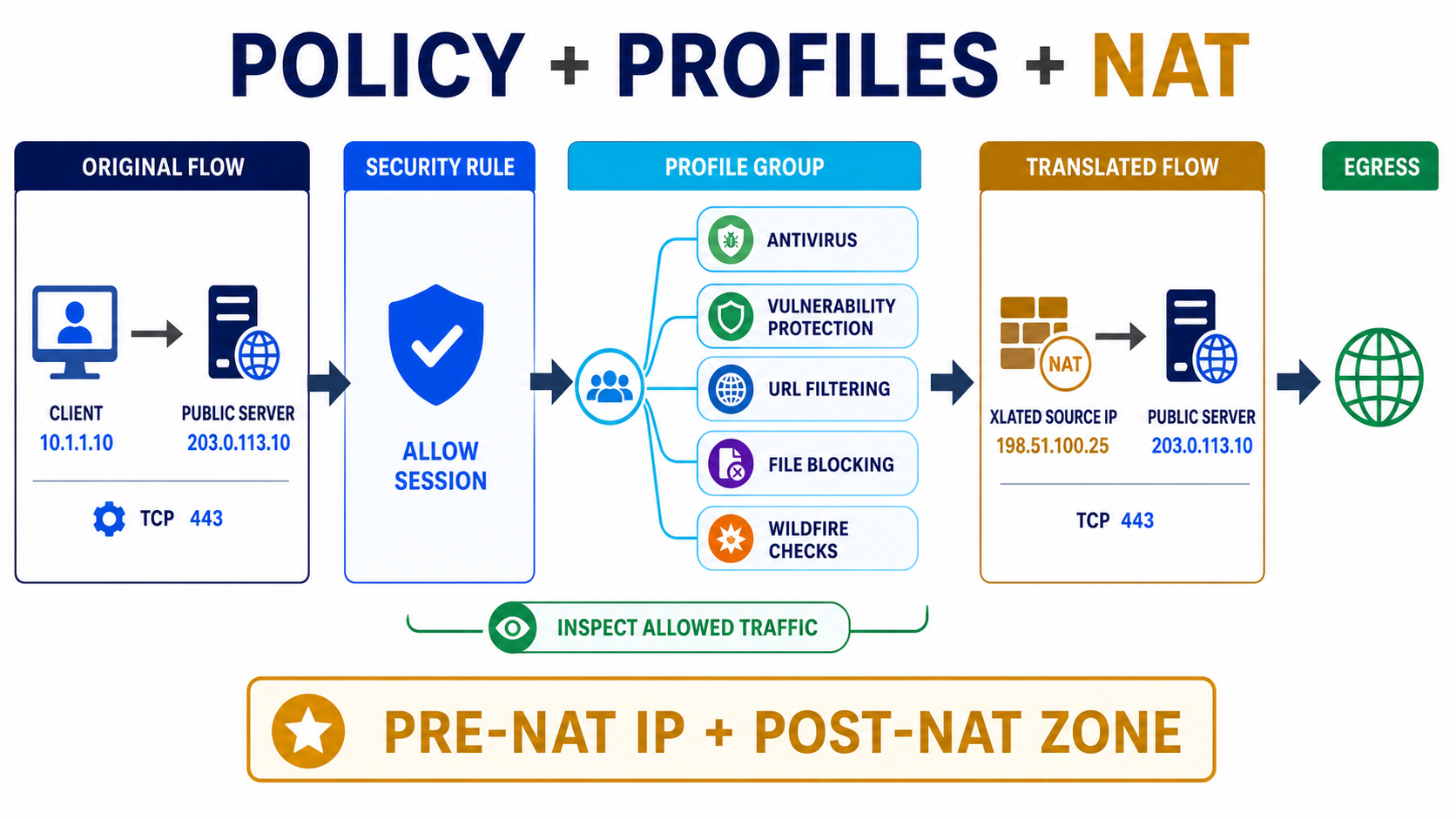
Once traffic is allowed, Content-ID inspects it. Instead of attaching six profiles to every rule, bundle them into a Security Profile Group and attach one object — consistent protection, less human error. A group named default auto-applies to new rules.
NAT is the other heavy topic. The golden rule: pre-NAT IP, post-NAT zone.
🖥️ This is the screen you'll configure most — Policies ▸ Security ▸ Add (the Security Policy Rule dialog). Fields ①②③ are where the pre-NAT-IP / post-NAT-zone rule lives.
① Destination Address stays the public (pre-NAT) IP. ② Destination Zone is the internal (post-NAT) DMZ zone. ③ Action = Allow with a Security Profile Group. Get ①+② right and inbound NAT works; swap them and 'NAT works but traffic is denied'.
You publish a DMZ web server with inbound destination NAT. In the SECURITY rule, the destination should be set as…
Pause & Predict
You built a destination-NAT rule for a new web server, but external users still can't reach it. Name the single most likely cause. Type your guess.
> test security-policy-match from trust to untrust source 10.1.1.10 \
    destination 8.8.8.8 protocol 6 destination-port 443 application ssl
> test nat-policy-match from trust to untrust source 10.1.1.10 \
destination 8.8.8.8 protocol 6 destination-port 443Allow-Internet; index: 3 Source NAT rule: SNAT-Outbound; translated 10.1.1.10 -> 203.0.113.5 (DIPP)
'NAT works but traffic is still denied' almost always means the security rule used the internal IP or the wrong zone. Re-check: destination = public IP, zone = internal/DMZ. NAT rules and security rules are both first-match, top-down.
Meera at TCS faces this
A destination-NAT rule for a new web server is built, but external users still can't reach it.
The security rule likely uses the internal IP or the wrong destination zone (pre-NAT/post-NAT mix-up).
Run test nat-policy-match (does NAT even hit?) then test security-policy-match with the public IP.
Set the security rule destination = public (pre-NAT) IP, destination zone = internal (post-NAT) zone; confirm the route to the public IP and proxy-ARP.
show session all filter shows the NAT'd session; external reachability succeeds.
④ GlobalProtect, HA, Panorama & troubleshooting
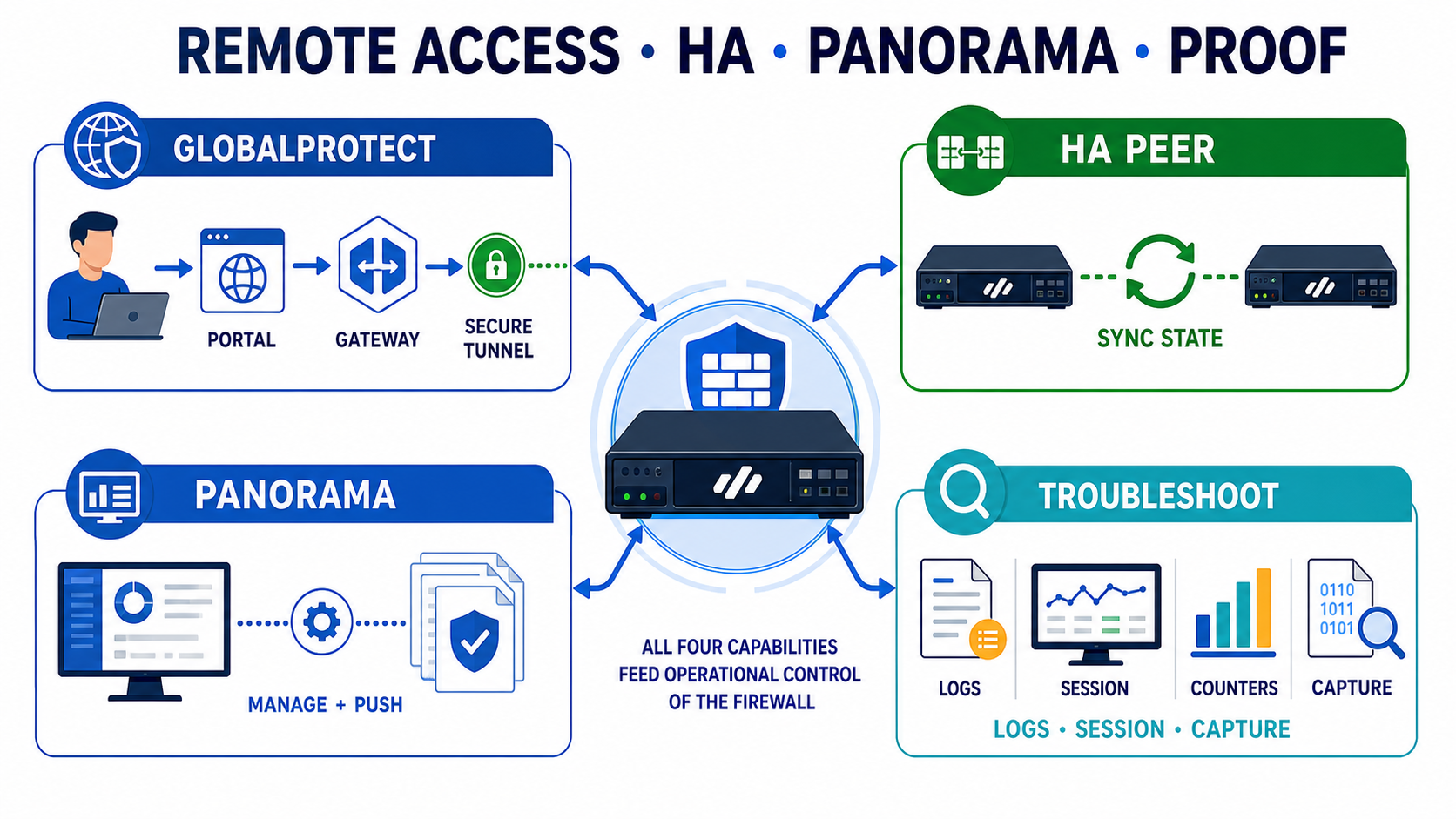
The final round mixes remote access, redundancy and CLI. GlobalProtect extends firewall policy to remote users (Portal + Gateway + Agent). In an HA pair, HA1 is the control link (heartbeat + config sync) and HA2 is the data link (session sync), so the passive unit can take over without dropping sessions. Panorama centrally manages the fleet.
Pause & Predict
In an Active/Passive HA pair, which link keeps sessions in sync so failover doesn't drop connections? Type your guess.
Anjali at HCL faces this
GlobalProtect users connect fine, then drop every ~50 seconds with 'tunnel is down due to keep-alive timeout'.
MTU/MSS — large packets fragment and keepalives are lost — or the gateway idle timeout is too aggressive.
Read the GlobalProtect logs for the keep-alive-timeout entry; take simultaneous gateway + client captures.
Network ▸ GlobalProtect ▸ Gateway ▸ logsLower tunnel MTU (1400 → 1260), raise the idle/disconnect timeout, allow UDP/4501 so IPSec is used instead of slower SSL.
Run sustained traffic past the old ~50s drop point; show global-protect-gateway current-user stays stable.
GlobalProtect drops every ~50s with 'keep-alive timeout'. Strongest FIRST fix?
Vikram at Wipro faces this
Users are reaching gambling/proxy sites that URL filtering should block — but only over HTTPS.
No SSL decryption — over HTTPS the firewall only sees the cert/SNI, so it can't categorize the full URL.
Check the URL log: blocked HTTPS sites showing as IP/'unknown' category means decryption isn't happening.
Monitor ▸ URL Filtering log ▸ category columnAdd an SSL Forward Proxy decryption policy for those categories, attach the URL profile to the right rule, and block proxy/DoH App-IDs.
Re-test the site over HTTPS — block page appears; the URL log now shows the correct category + 'block'.
Don't close on 'should work'. test security-policy-match and test nat-policy-match prove the logic; show session all filter proves a live session; show counter global filter delta yes severity drop names the real drop reason. Saying these in an interview shows you've done the job.
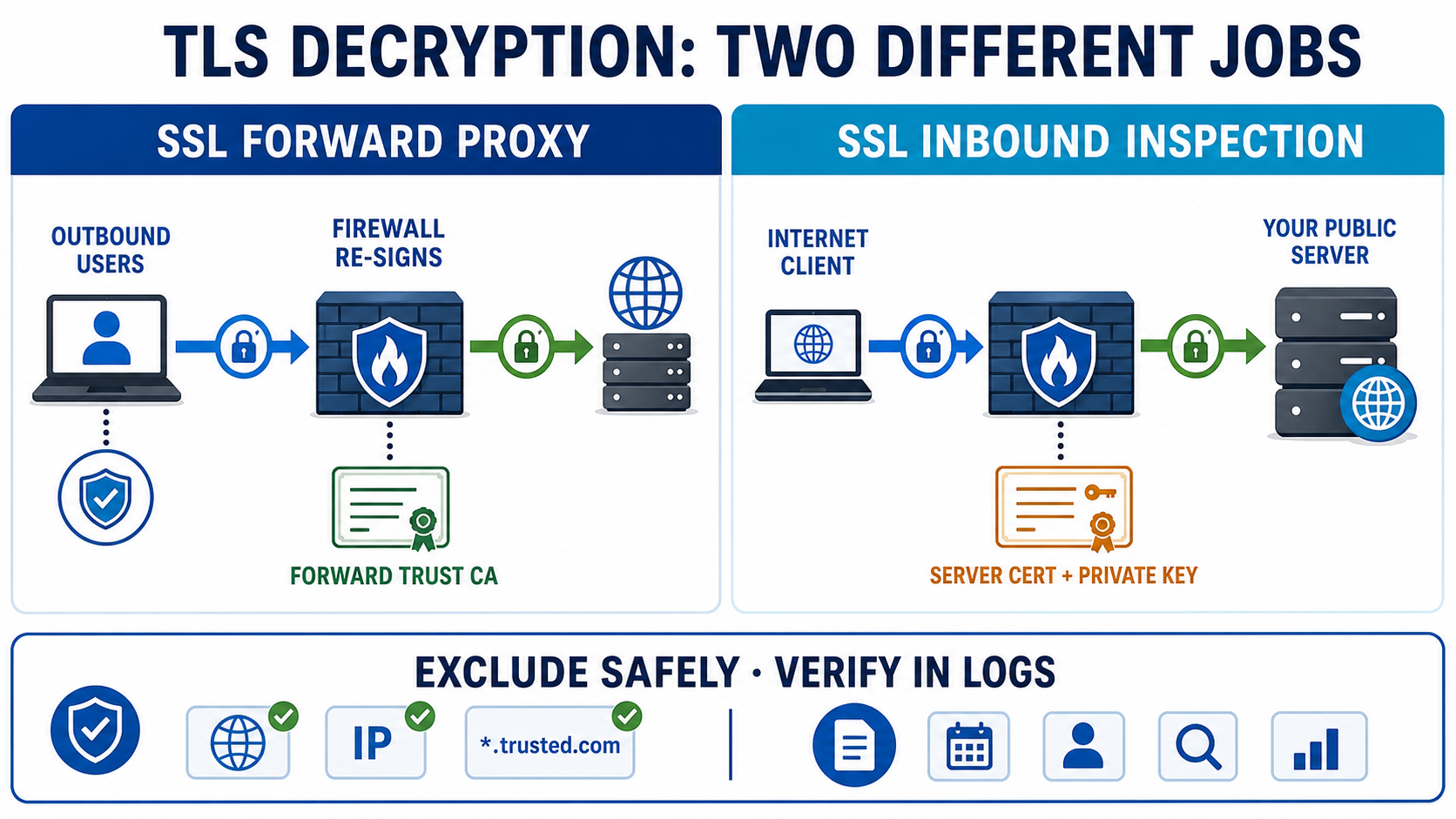
⑤ Decryption — SSL Forward Proxy vs SSL Inbound Inspection
Decryption is the single most common "experienced-candidate" question, because most threats now ride inside TLS. The interviewer wants two things: that you know the two modes and that you can build a real decryption policy with exclusions. The headline: PAN-OS can only inspect what it can read — without decryption, App-ID/URL/AV/WildFire only see the cert and SNI.
The exact distinction interviewers grade
- SSL Forward Proxy — for users going out to the internet. The firewall acts as a transparent proxy: it terminates the client's TLS, opens its own TLS to the real server, then re-signs the server's certificate on the fly using a Forward-Trust CA cert (must be trusted by clients via GPO/MDM) for good sites, and a Forward-Untrust cert for sites with a bad/expired cert (so users see a warning, not a silent trust). You do not have the destination server's private key.
- SSL Inbound Inspection — for traffic coming in to a server you own (your DMZ web/mail server). You import that server's real certificate and private key onto the firewall; it decrypts passively without re-signing, so clients see no change. No Forward-Trust/Untrust cert is needed here.
- The third type, SSH Proxy, decrypts SSH to catch port-forwarding/tunnelling abuse.
Building the policy — and the exclusions interviewers love to ask about
A decryption rulebase is first-match, top-down (like security/NAT). Each rule can attach a Decryption Profile that enforces the safety knobs: block sessions with expired/untrusted certs, block unsupported cipher/version, block on cert-status (OCSP/CRL) failure, and block client-auth/pinned sites. The non-negotiable real-world step is the no-decrypt list: you must exclude finance/banking, healthcare and government categories (legal/privacy), plus apps that use certificate pinning (many mobile/EDR/update apps) which simply break under Forward Proxy.
# 1) No-decrypt rule FIRST (privacy + pinned apps)
Policies ▸ Decryption ▸ Add  →  Name: No-Decrypt-Finance-Health
   Service/URL Category: financial-services, health-and-medicine
   Action: No Decrypt
# 2) Decrypt rule below it
Policies ▸ Decryption ▸ Add  →  Name: Decrypt-Outbound
   Source Zone: Trust   Dest Zone: Untrust   Category: any
   Type: SSL Forward Proxy   Decryption Profile: Strict-FwdProxy
# 3) Prove which rule a flow hits — no live traffic needed
> test decryption-policy-match from trust to untrust \
source 10.1.1.10 destination 13.33.0.1 protocol 6 destination-port 443Decrypt-Outbound; index: 2 (SSL Forward Proxy)
"Decryption broke this one app" → it is almost always certificate pinning or a client that doesn't trust your Forward-Trust CA. The fix is a No-Decrypt rule for that app/category, not turning decryption off globally. And remember: you can verify decrypted sessions with show session all filter ssl-decrypt yes.
Priya at Cognizant faces this
After enabling SSL Forward Proxy, users get certificate-error pages on many internal and SaaS apps.
The Forward-Trust CA certificate isn't installed in the clients' trusted-root store (or pinned apps reject any re-signed cert).
Open the Decryption log — entries with cert errors point to untrusted CA; identify pinned apps in the same log.
Monitor ▸ Logs ▸ Decryption ▸ Error columnPush the Forward-Trust CA to all endpoints via GPO/MDM; add a No-Decrypt rule for pinned/financial/health categories.
Sites load cleanly; show session all filter ssl-decrypt yes lists the decrypted flows; URL/AV/WildFire now categorize the full URL.
Pause & Predict
You must decrypt traffic to your own public mail server. Which mode, and what do you need to load on the firewall? Type your guess.
⑥ Enumerate the security profile types
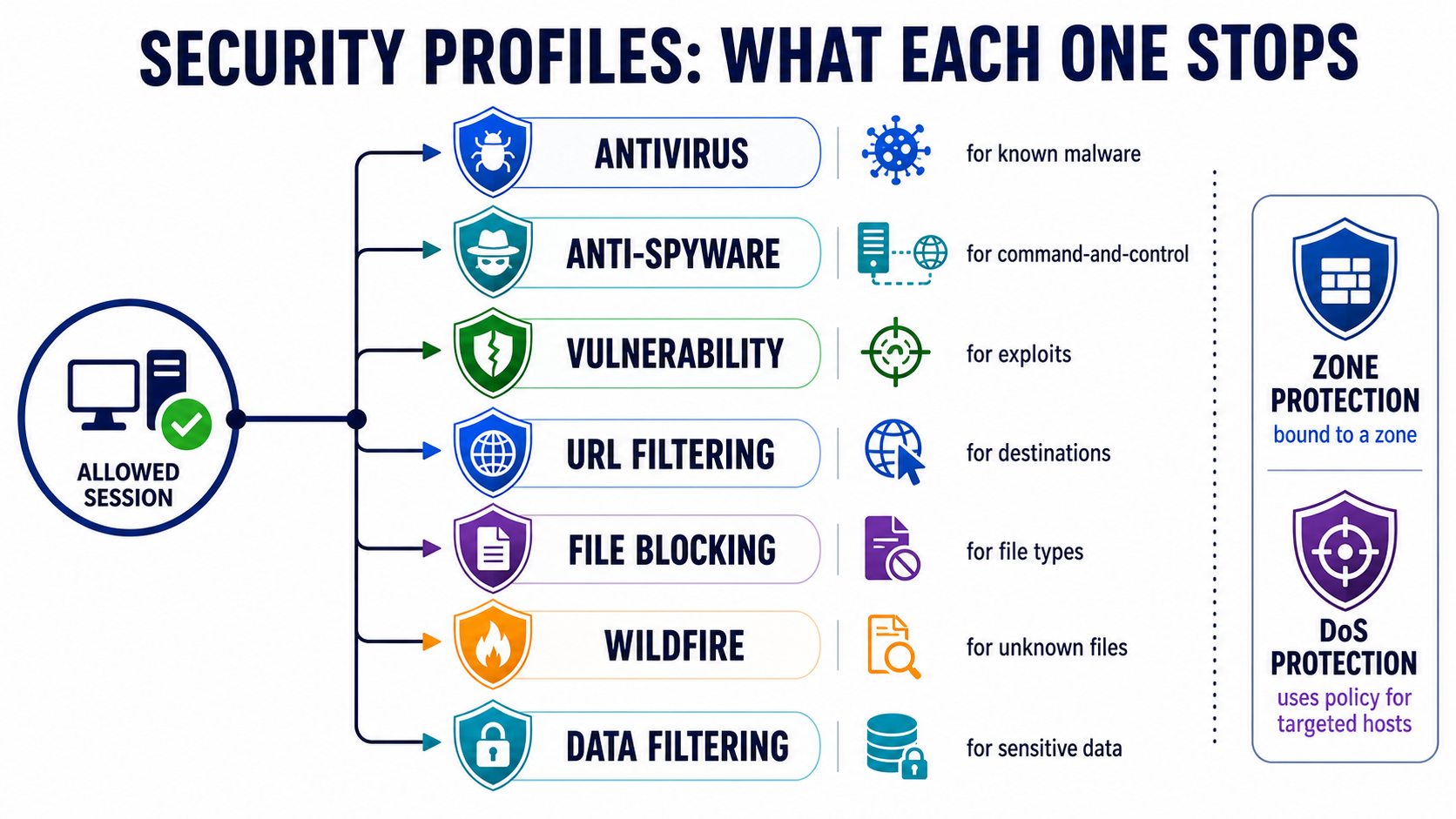
The audit's biggest gap: candidates say "I attach the default group" but can't list and differentiate the profiles. Interviewers ask this almost every round. Profiles are where Content-ID actually blocks threats — the security rule says "allow", the profiles say "but scan it for X". Attach them per-rule or, better, bundle into a Security Profile Group.
Stream-based scan for known malware in files/web/mail (actions per protocol: alert/drop/reset). Needs the AV content update.
Blocks command-and-control / spyware phone-home. Includes DNS Sinkhole to unmask infected internal hosts.
The IPS: blocks exploits of known CVEs (buffer overflows, RCE) by severity. Client-side & server-side rules.
Allow/alert/block by web category (PAN-DB). Needs decryption to see the full HTTPS URL.
Block/continue/alert on file type (e.g. .exe, .bat) by direction — independent of whether it's malware.
Sends unknown files to the cloud sandbox for zero-day verdicts; new signatures return in minutes.
Basic DLP: blocks sensitive patterns (credit-card, SSN, custom regex) leaving the network.
Flood/recon defence. Zone Protection = whole-zone aggregate; DoS Protection = a policy targeting specific hosts.
The first six (AV, Anti-Spyware, Vulnerability, URL, File Blocking, WildFire) plus Data Filtering attach to a security rule (often via a profile group). DoS Protection is its own policy, and Zone Protection is a profile bound to a zone — that distinction is graded next.
"Antivirus stops known malware, WildFire stops unknown/zero-day, Anti-Spyware stops the callback, Vulnerability Protection (the IPS) stops the exploit, URL Filtering controls where, File Blocking controls what file types." That one-line map separates a 6 from a 9.
Zone Protection vs DoS Protection — the pair they love to confuse you with
| Zone Protection | DoS Protection | |
|---|---|---|
| Scope | Whole zone, aggregate (all traffic entering the zone) | Specific hosts/groups via a DoS policy rule |
| Applied as | Profile bound to a zone | Profile referenced by a DoS policy |
| Protects against | Floods (SYN/UDP/ICMP), recon scans, packet-based attacks | Targeted floods at named critical servers (classified/aggregate) |
Pause & Predict
A clean .exe download (no malware signature) needs to be blocked outright for normal users. Which profile does it — Antivirus or File Blocking? Type your guess.
⑦ Deployment modes & U-turn (hairpin) NAT
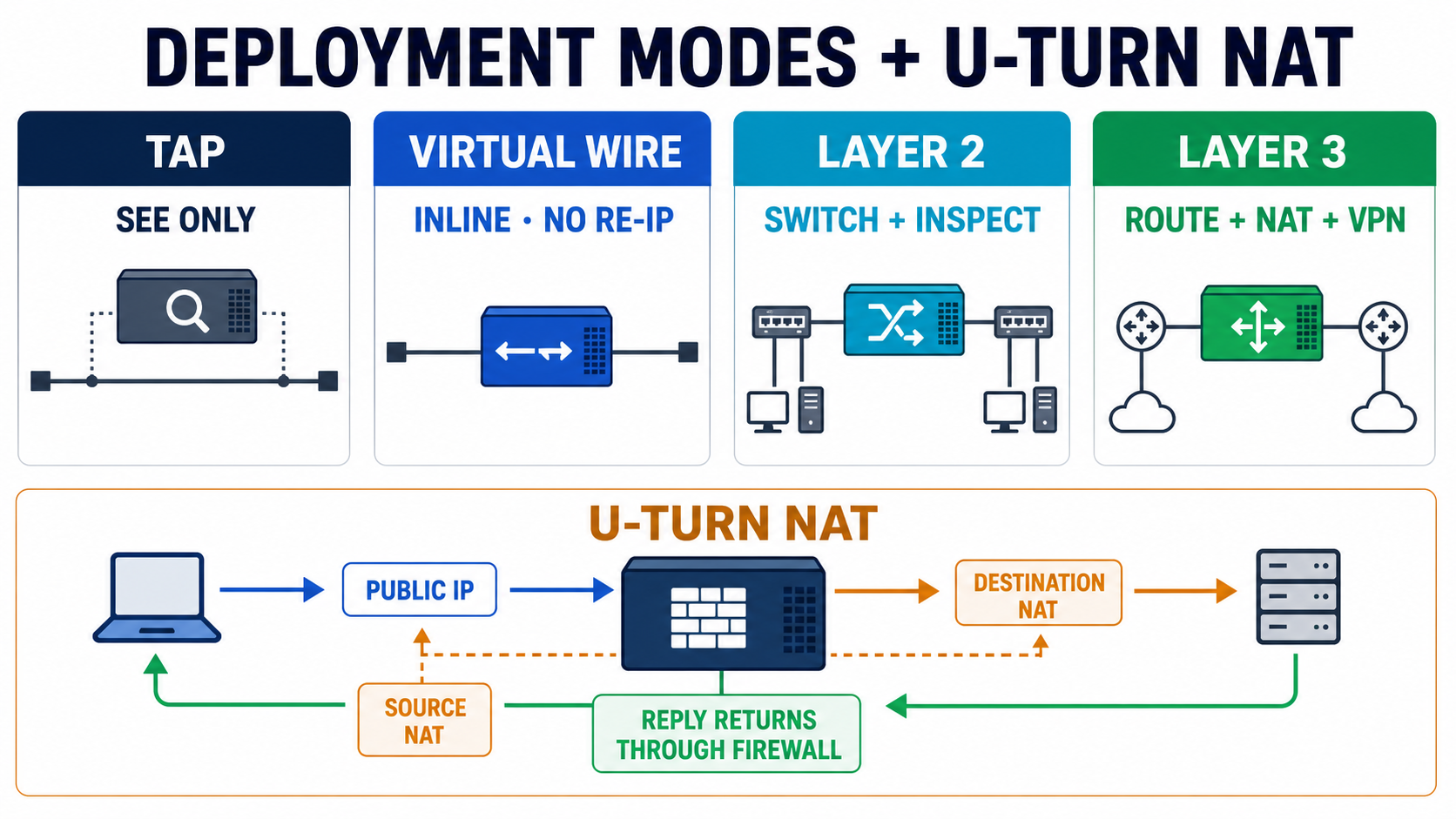
Design questions test whether you know how the box sits in the network. There are four interface/deployment modes, and the right answer is always "depends on how invasive the insertion can be."
- Tap — connects to a SPAN/mirror port; sees App-ID/User-ID/threats for visibility but cannot block. Use for evaluation/PoC.
- Virtual Wire (V-Wire) — two interfaces bonded as a "bump in the wire"; no IP/MAC of its own, passes VLAN tags transparently, but can enforce policy and App-ID. Use to drop a firewall inline without re-IP'ing the network.
- Layer 2 — interfaces switch within a subnet/VLAN; inspects and blocks between L2 segments; no routing/NAT.
- Layer 3 — interfaces have IPs; the firewall routes, runs dynamic protocols, terminates VPN, and does NAT. This is the standard production design.
U-turn (hairpin) NAT — when internal users hit the public IP of an internal server
This is a classic experienced-level question. U-turn NAT is needed when an internal client resolves an internal server by its public DNS name/IP, so the traffic "hairpins" — it leaves toward the firewall and must turn back into the same internal/DMZ zone. Without it, the client's packet goes to the public IP, the server replies directly with its private IP, the return path doesn't match the session, and the connection fails (asymmetric).
Policies ▸ NAT ▸ Add  →  Name: U-Turn-Web
  Original:  Source Zone Trust  Dest Zone Untrust(*)  Dest Addr 203.0.113.10
  Source Translation:       dynamic-ip-and-port  (egress interface IP)
  Destination Translation:  192.168.50.10  (the real internal server)
# (*) Dest zone in the NAT rule is the zone the route to the PUBLIC IP resolves to.
# Security rule: Source Zone Trust → Dest Zone DMZ, Dest Addr = 203.0.113.10 (pre-NAT)
U-turn does destination NAT (public → private server) and source NAT (client → firewall IP). The source NAT is the trick: it forces the server's reply back through the firewall instead of returning straight to the client with a private IP — killing the asymmetry. The cleaner long-term fix is split-horizon DNS so internal clients resolve the private IP directly.
Pause & Predict
You must drop a Palo Alto inline to inspect/block traffic but you cannot re-IP the existing network. Which deployment mode? Type your guess.
⑧ Panorama — Device Groups, Template Stacks & commit/push
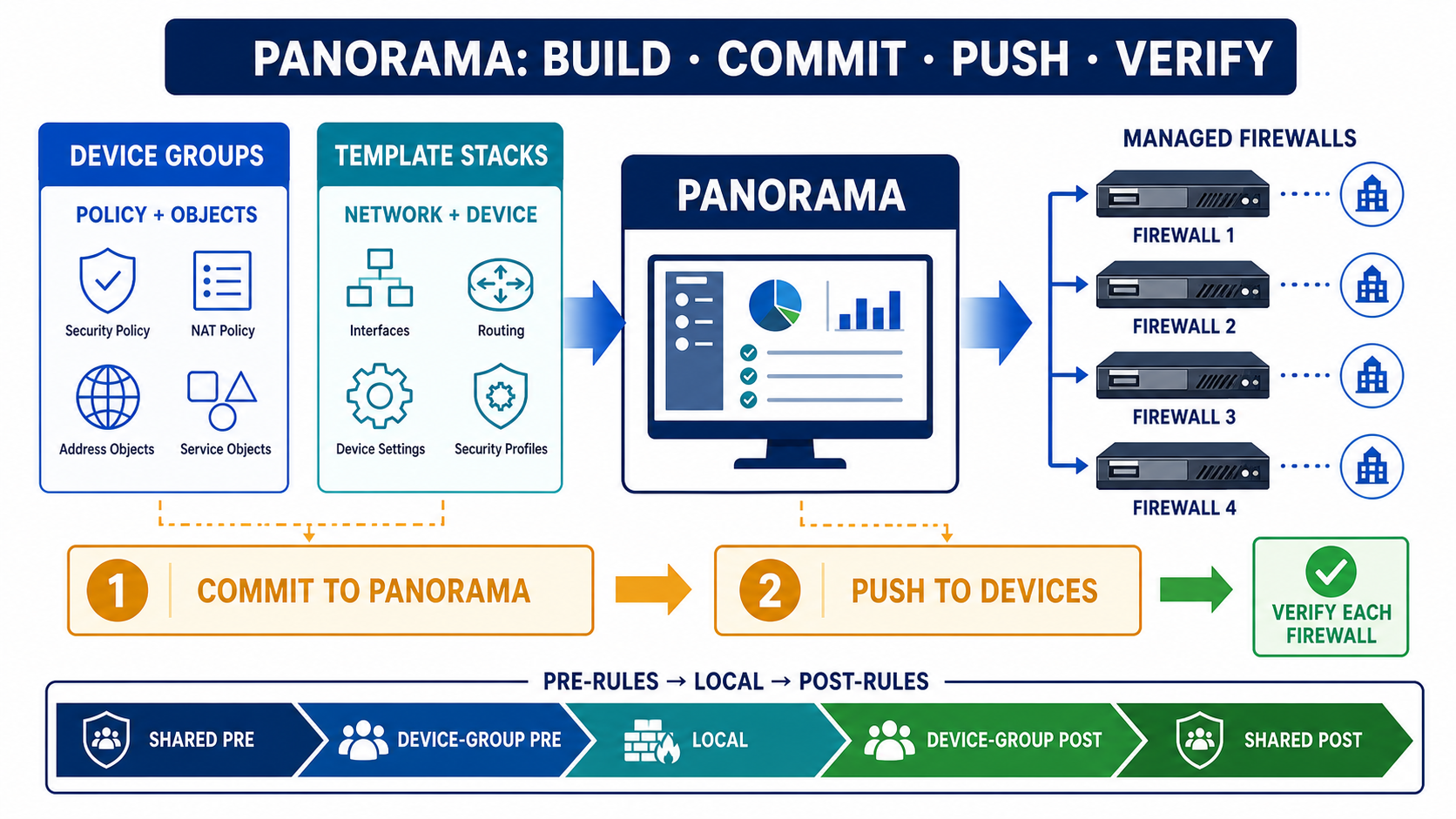
Any role managing more than a couple of firewalls hits this. The crisp split: Device Groups carry policy & objects; Templates/Template Stacks carry network & device config. Mixing those up is an instant red flag.
- Device Group — security/NAT/decryption rules and objects (addresses, services, profiles). Hierarchical: a child device group inherits from its parent and from Shared.
- Template — interfaces, zones, virtual routers, IKE/IPSec, GlobalProtect, log settings, etc. (the "Network" and "Device" tabs).
- Template Stack — an ordered combination of templates assigned to firewalls; if two templates set the same value, the one higher in the stack wins.
Rule order — the most-tested Panorama detail
On a managed firewall, rules evaluate in this exact order: Shared pre-rules → Device-Group pre-rules → the firewall's own local rules → Device-Group post-rules → Shared post-rules → default rules. Pre-rules sit at the top (broad allow/deny enforced centrally, e.g. block P2P for everyone); post-rules sit at the bottom (catch-all cleanup like a global deny-and-log). Local admins can insert rules only in the middle — they cannot override a pre-rule.
Commit vs Push — the verb interviewers want you to get right
Two distinct operations, and saying it precisely scores points: Commit to Panorama saves the candidate config into Panorama's running config — it does not reach any firewall. Push to Devices (Commit ▸ Push to Devices, or Push Scope) is what actually sends the device-group policy + template-stack config down to the managed firewalls. Modern PAN-OS combines them as "Commit and Push." If a change isn't taking effect on the box, the usual cause is you committed to Panorama but never pushed.
"I changed it in Panorama and committed, but the firewall still behaves the old way." → You committed to Panorama only; you must Push to Devices. Also check the firewall isn't out of sync and that a local override on the box isn't masking the pushed value (templates lose to a local override unless you revert it).
Pause & Predict
Where do you put a rule that blocks BitTorrent for every firewall in the fleet, that no local admin can override? Type your guess.
⑨ Dynamic routing, HA modes, application-default & App-ID lifecycle
The senior round rounds out routing, redundancy and policy hygiene. Keep each answer tight.
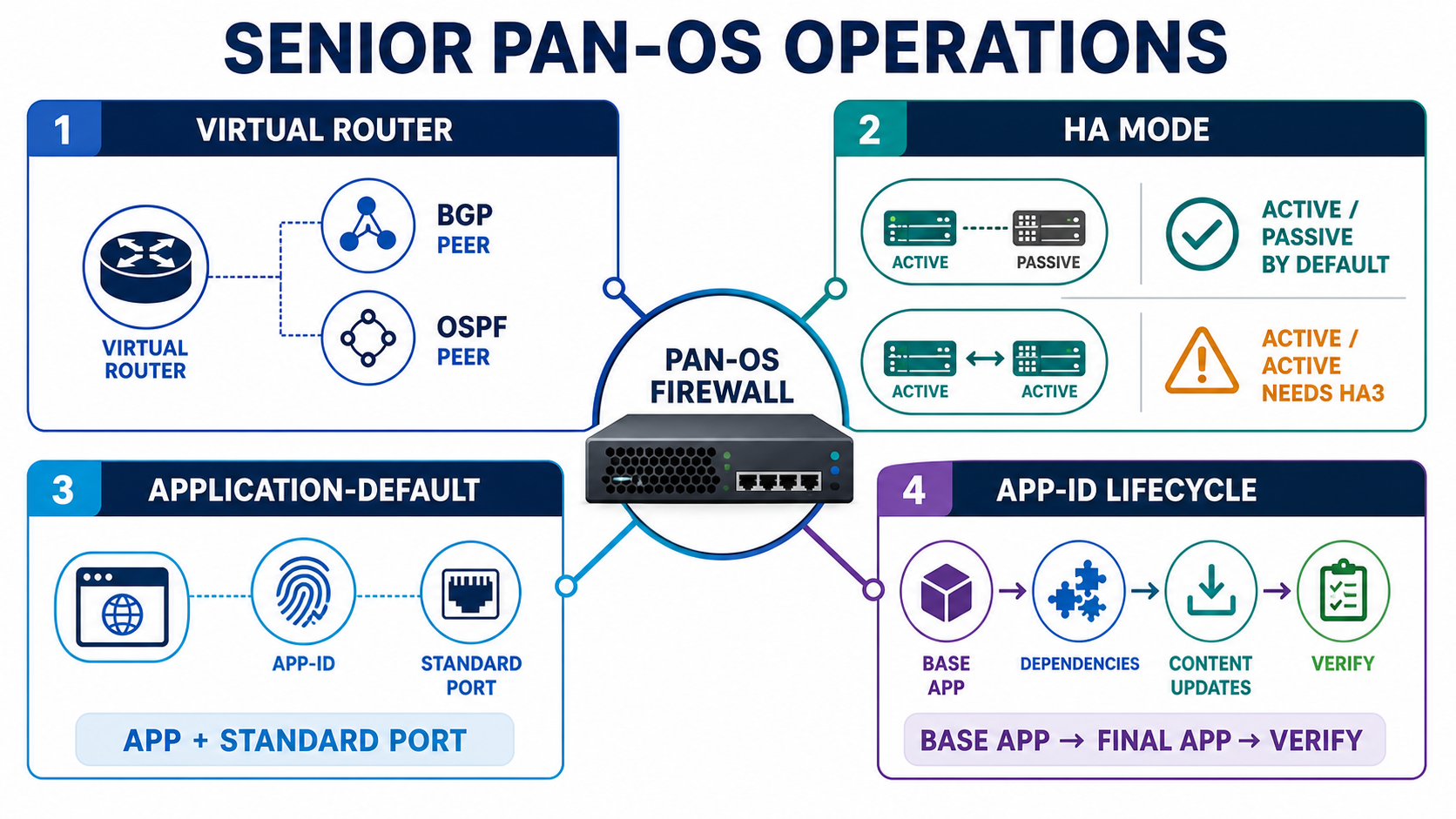
BGP / OSPF on the Virtual Router
Dynamic routing lives inside the Virtual Router (Network ▸ Virtual Routers). For OSPF you set the Router ID, define areas, add interfaces to an area, and pick the network/link type (broadcast/p2p). For BGP you set the local AS and Router ID, define peer groups and peers (neighbor IP + remote AS), and control advertisement with import/export route-maps and redistribution profiles. Each VR is an independent routing instance, so route leaking between VRs is explicit.
> show routing protocol bgp summary          # peers up? prefixes received?
> show routing protocol bgp peer             # state should be Established
> show routing protocol ospf neighbor        # Full/DR or Full/BDR?
> show routing route                         # is the learned route in the RIB/FIB?
BGP peer stuck in Connect/Active (never Established) is usually a security rule or zone issue blocking TCP/179 between the loopbacks, an AS-number mismatch, or no route back to the peer. OSPF neighbor stuck in ExStart/Exchange is an MTU mismatch on the link.
Active/Passive vs Active/Active HA
Active/Passive (A/P) is the default and what you should recommend by default: one unit forwards, the peer is hot-standby with synced sessions (over HA2), simple to reason about. Active/Active (A/A) has both units forwarding at once and is only worth it for specific needs — e.g. terminating asymmetric-routing designs, or running active dynamic routing on both peers. The caveats are exactly what they probe: A/A introduces asymmetric flows (a packet can arrive on the non-owner), so you need HA3 to forward packets to the session owner, plus floating IPs (or ARP load-sharing) and careful session-owner / session-setup tuning. Most shops run A/P because A/A is materially harder to design and troubleshoot for little gain.
"I'd default to Active/Passive for simplicity. I'd only choose Active/Active when the design genuinely needs both firewalls forwarding or active routing on both — and then I plan for asymmetry with HA3, floating IPs and session-owner settings."
application-default vs any in the Service column
The Service column controls ports. Setting Service to application-default tells the firewall to permit each allowed App-ID only on its standard port(s) (e.g. web-browsing on 80, dns on 53). Setting it to any permits the app on any port — which lets evasive apps tunnel over non-standard ports and is a classic over-permissive misconfiguration. Best practice: use application-default on allow rules; only widen to specific custom services when an app legitimately runs on a non-standard port.
App-ID lifecycle gotchas
- Dependency apps — many App-IDs depend on others (e.g.
facebook-baseunderpins other facebook apps; SSL/web-browsing often underpin SaaS). Allow the dependencies or the app won't fully work — PAN-OS shows "Depends On" in the App-ID object. - App-ID shift mid-session — the firewall allows initial packets as the base app, then re-classifies; if the final app isn't permitted the session drops (covered in §2).
- Content updates change behaviour — new App-ID signatures arrive in content updates and can re-classify traffic and even change which rule matches. Stage and review App-ID content updates (with a threshold/grace window) before they go live.
- Custom App-ID — for in-house/unknown apps, write a custom App-ID (signature on patterns/ports) so you can write precise policy instead of falling back to
unknown-tcp.
Routing: show routing route + show routing protocol bgp peer. HA: show high-availability state and show high-availability link-monitoring. App dependency: open the App-ID object and read "Depends On". Naming the exact command is what turns a textbook answer into an experienced one.
🤖 Ask the AI Tutor
Tap any question — instant, scoped to this lesson. No login, no waiting.
Pre-curated from Palo Alto docs + community Q&A, scoped to this lesson. For a live prod issue, paste your export into chat.techclick.in.
12 vendor-specific learning visuals
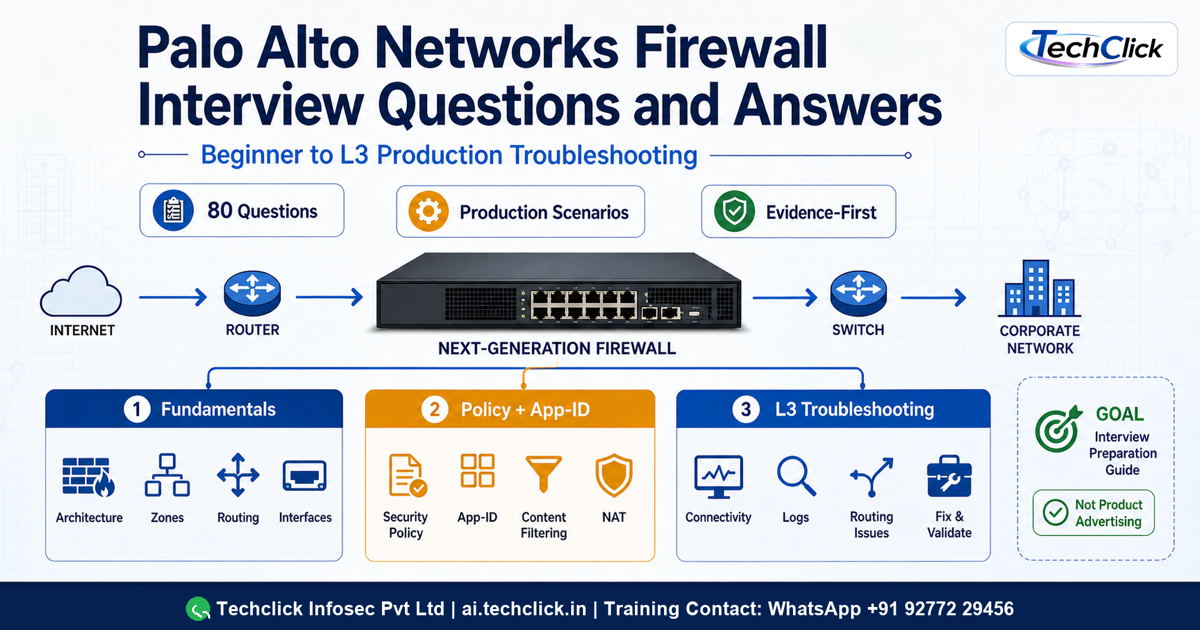
The guide cover maps the learning path from PAN-OS fundamentals through production troubleshooting and interview proof.
Original addresses, the destination-NAT route relookup, the final destination zone, Security-policy enforcement, inspection, and egress translation are shown as separate decisions.
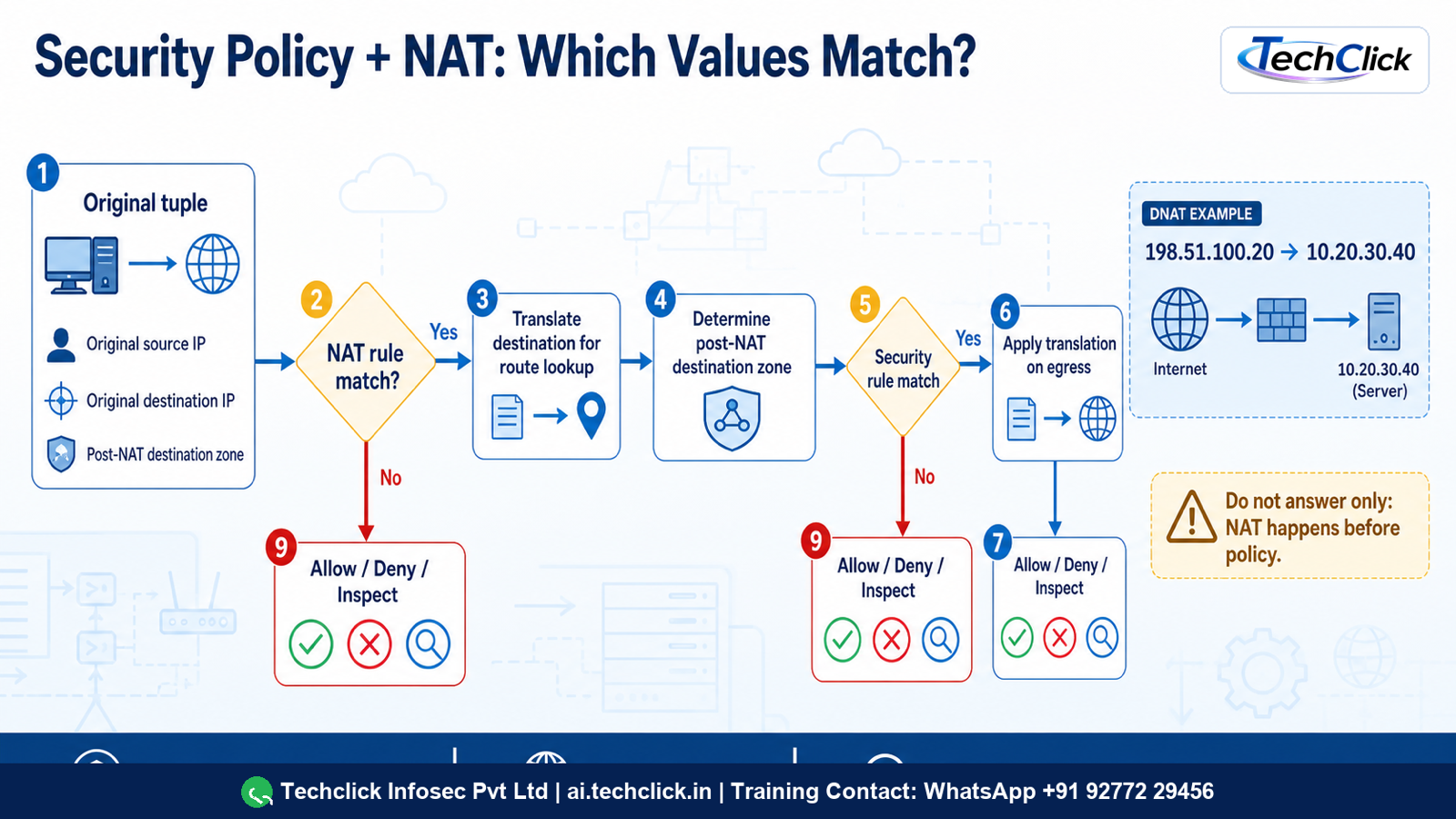
The diagram separates NAT rule fields from Security policy fields and shows why the post-DNAT destination zone and return path matter.
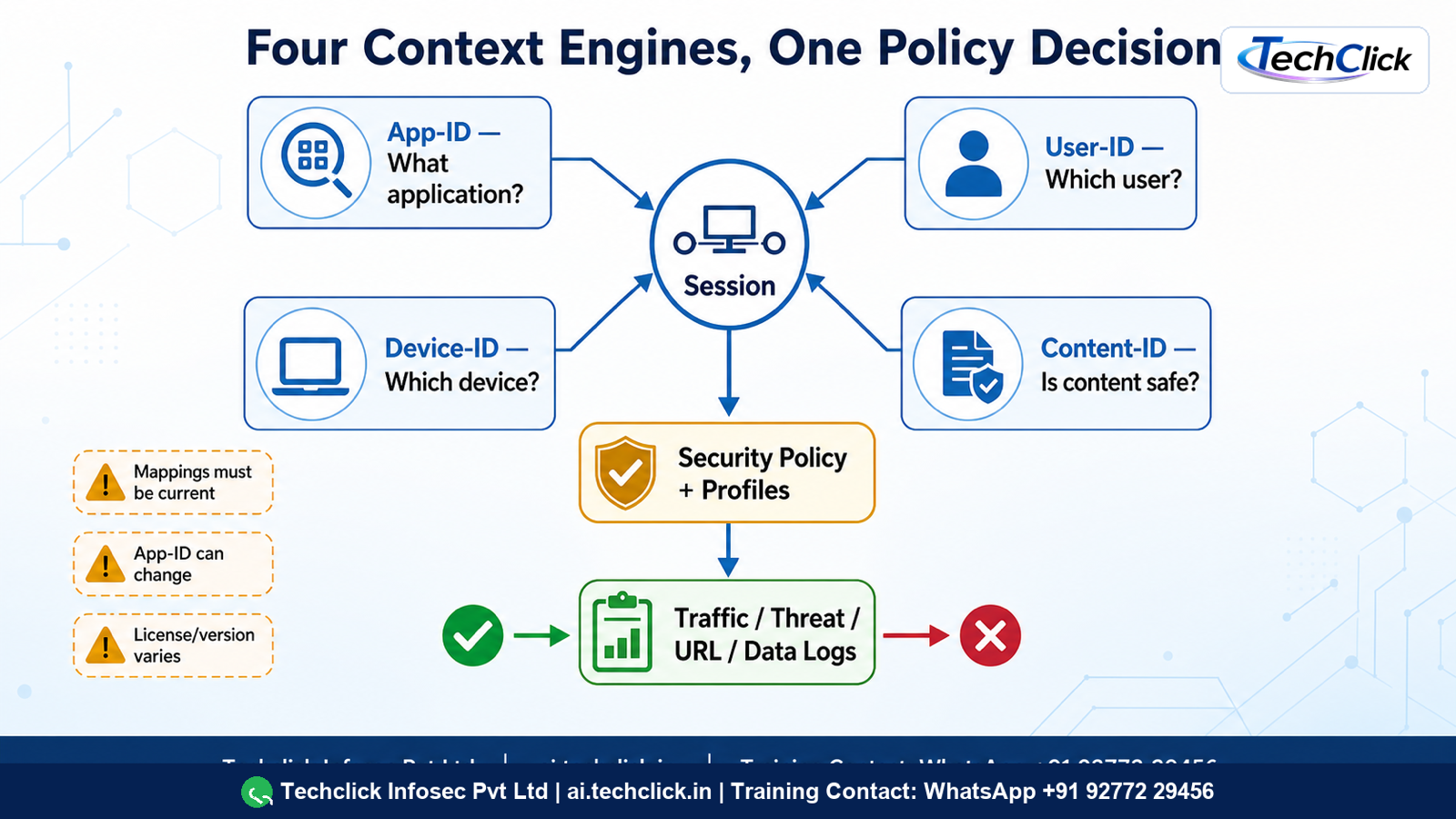
Four context engines converge on Security policy, attached profiles, final session classification, and correlated logs.
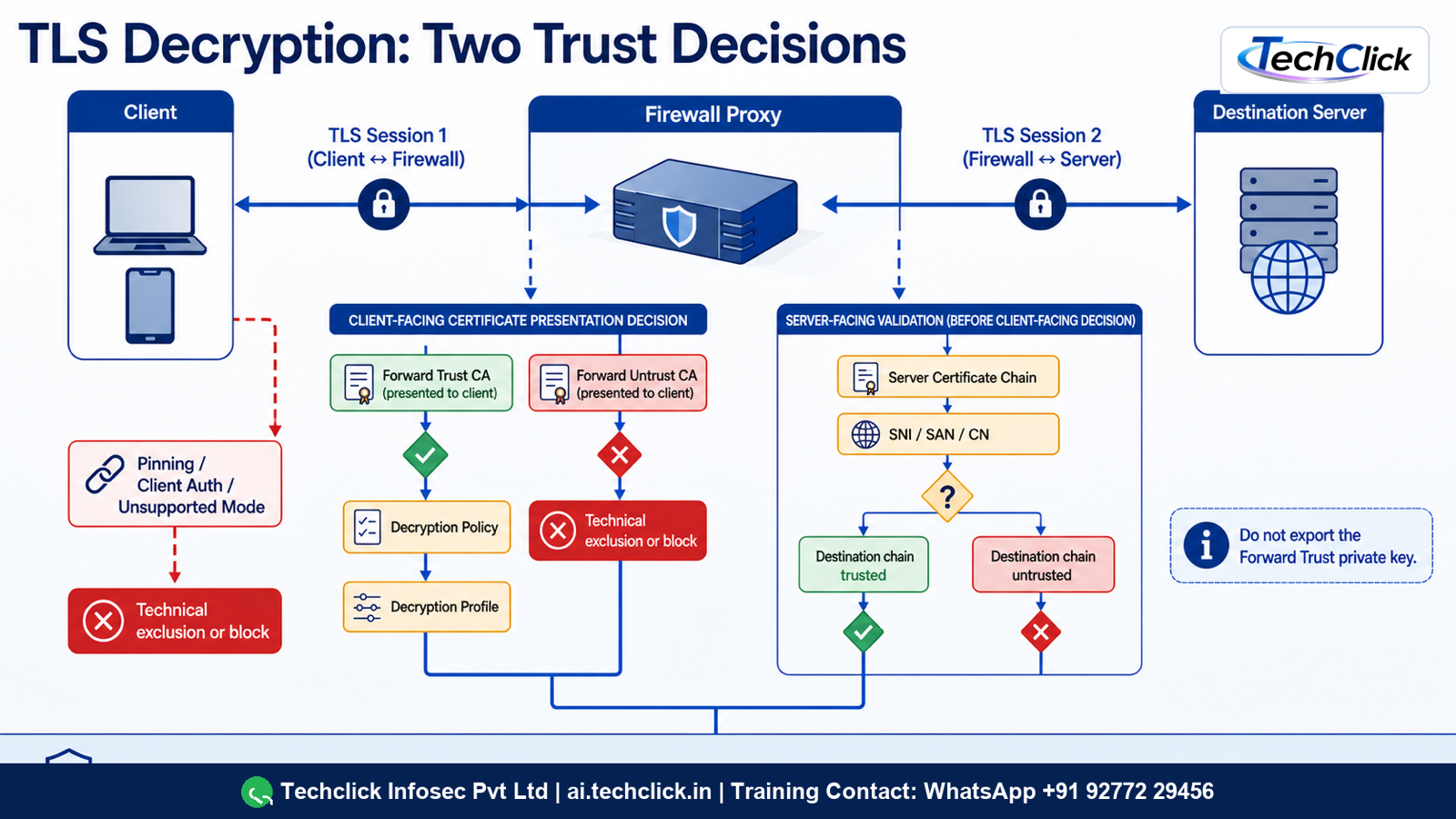
The firewall creates two TLS sessions, validates the server, presents a trusted substitute certificate to the client, and applies inspection or a justified exclusion.
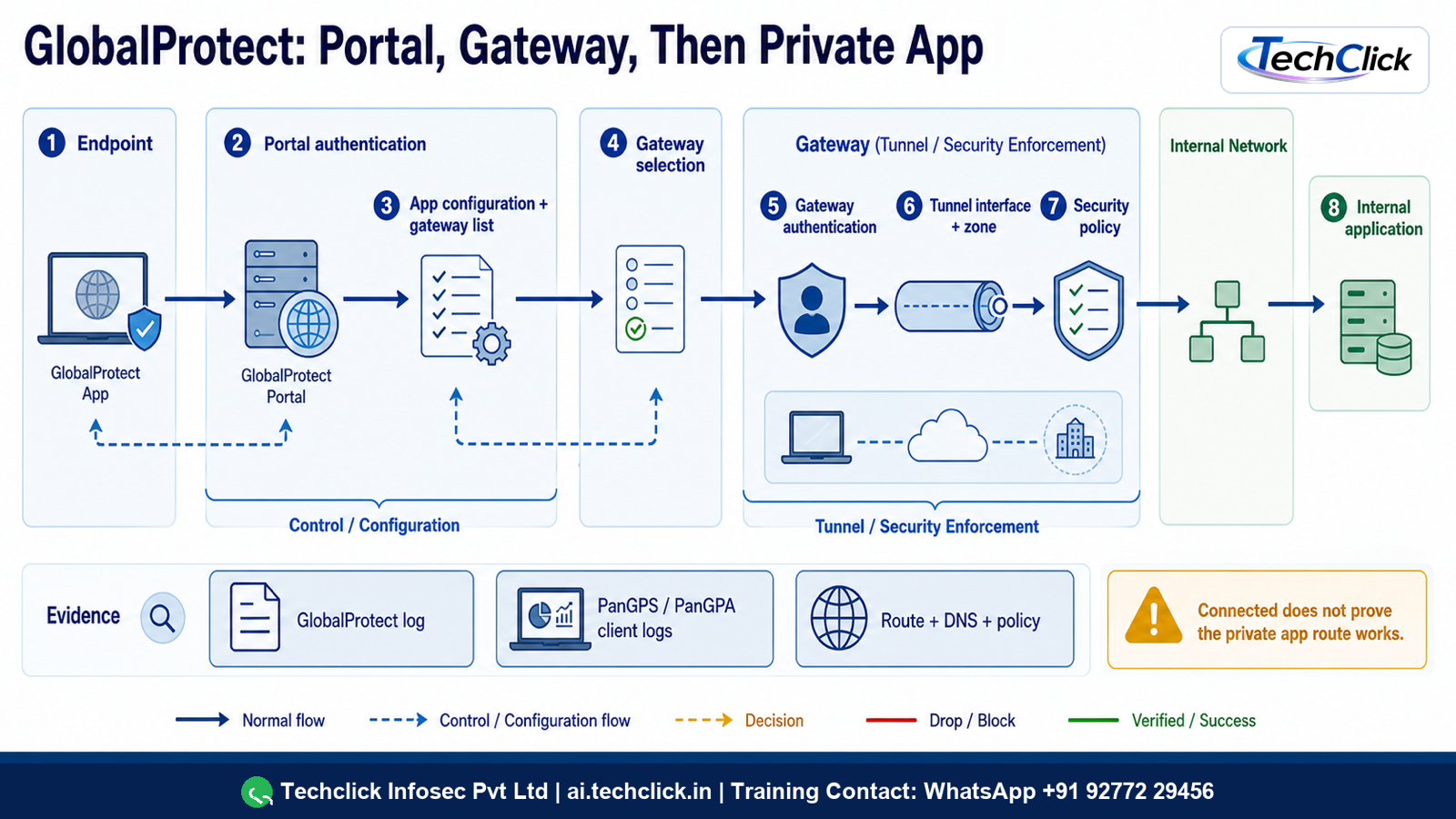
The visual separates portal configuration from gateway authentication and enforcement, then follows routes, DNS, policy, and return traffic.
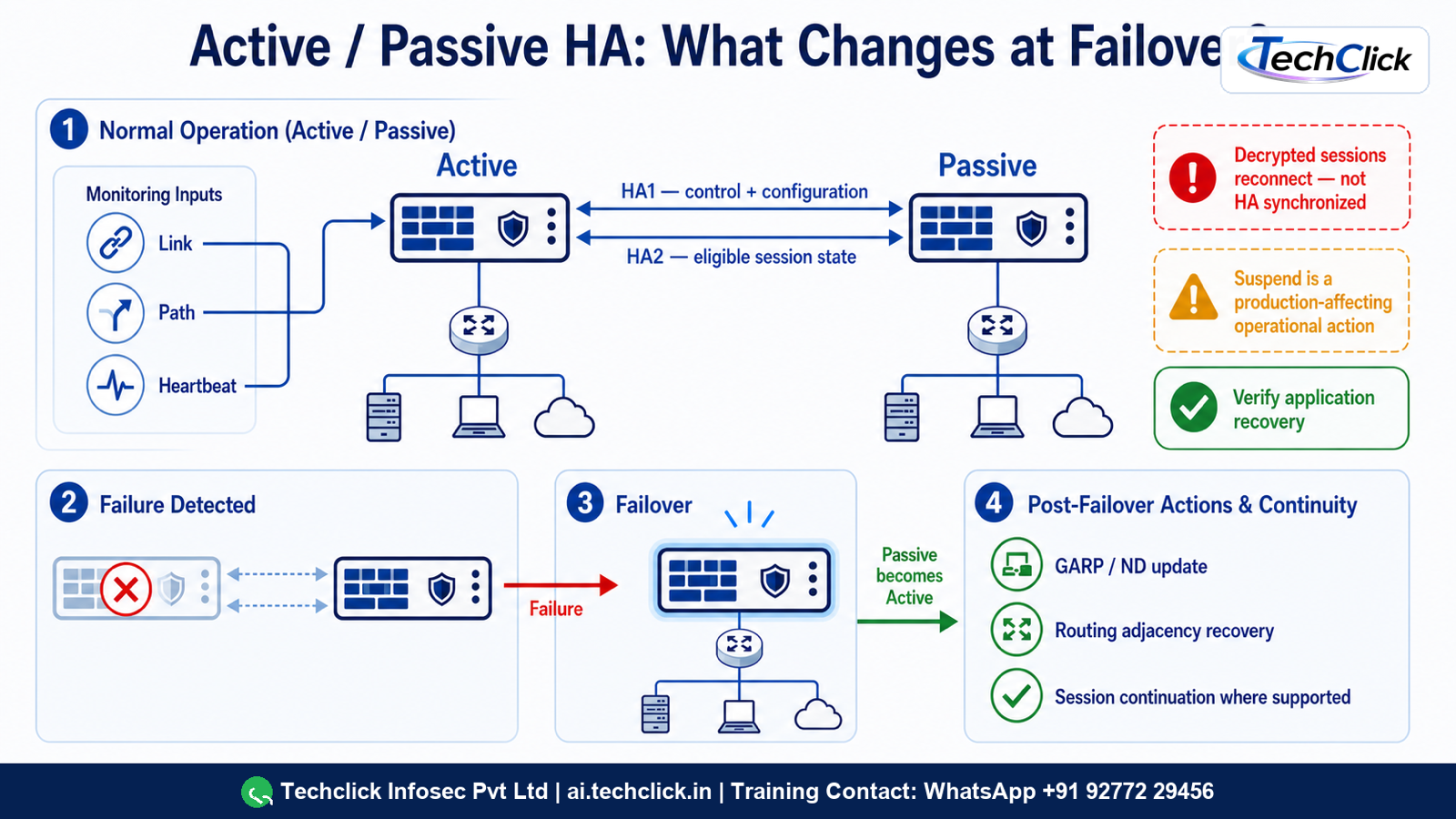
HA control, session synchronization, monitored failures, peer takeover, convergence, and application validation are shown as distinct gates.
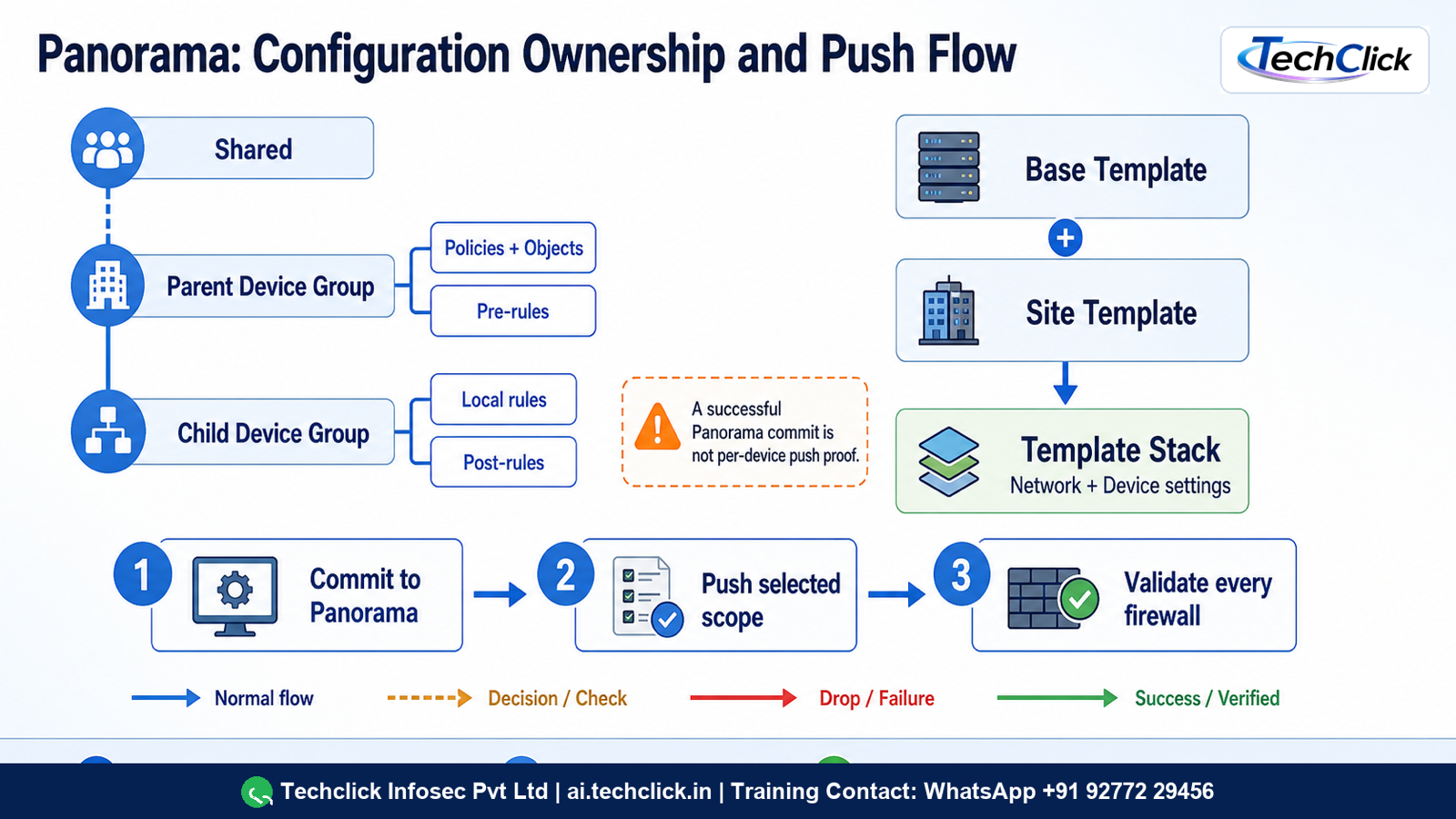
The hierarchy distinguishes policy ownership, network and device settings, Panorama commit, push jobs, local commit, and runtime verification.
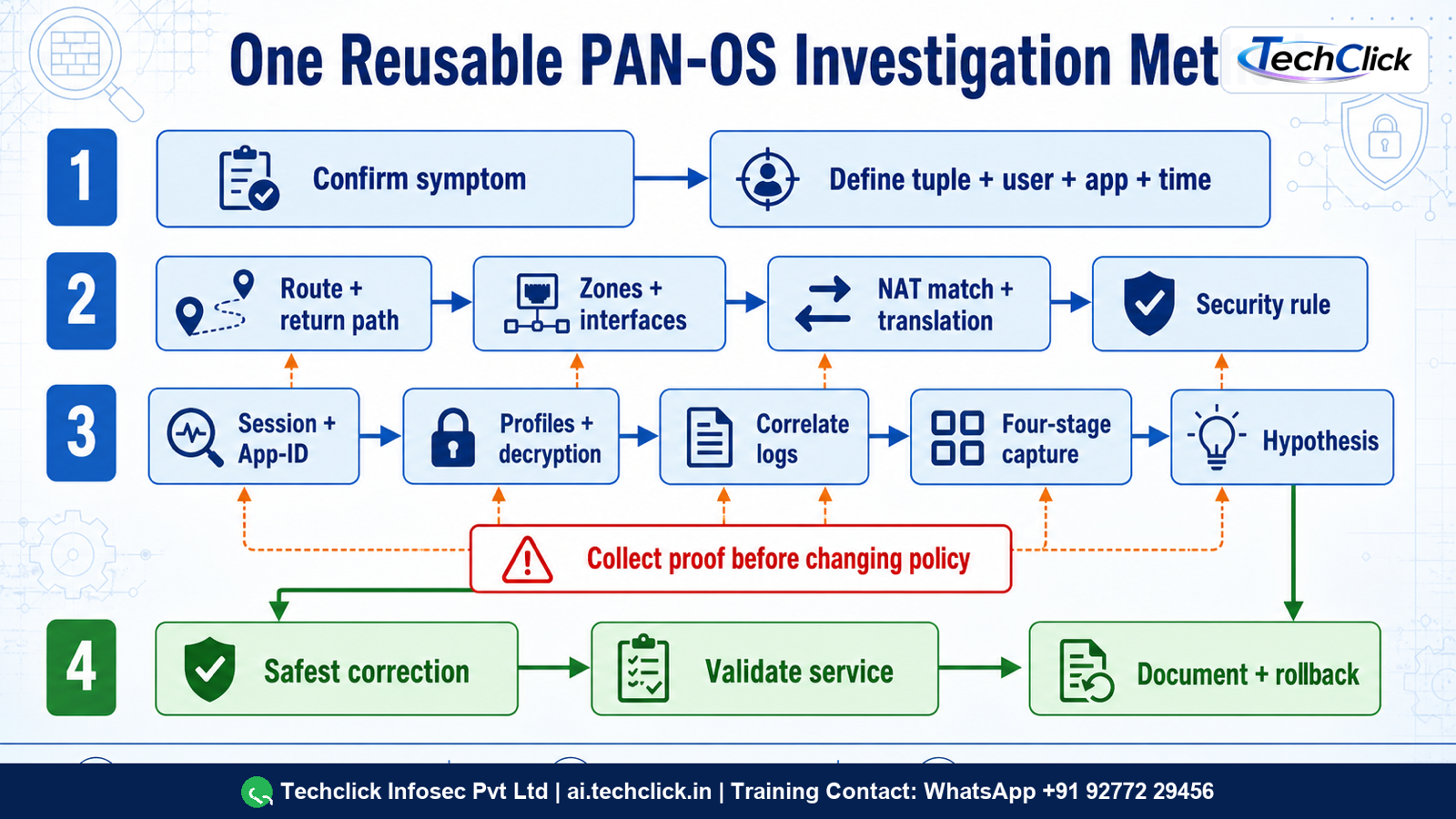
The tree starts with the exact tuple and timestamp, follows packet-path evidence, permits one reversible correction, and ends with the same business test.
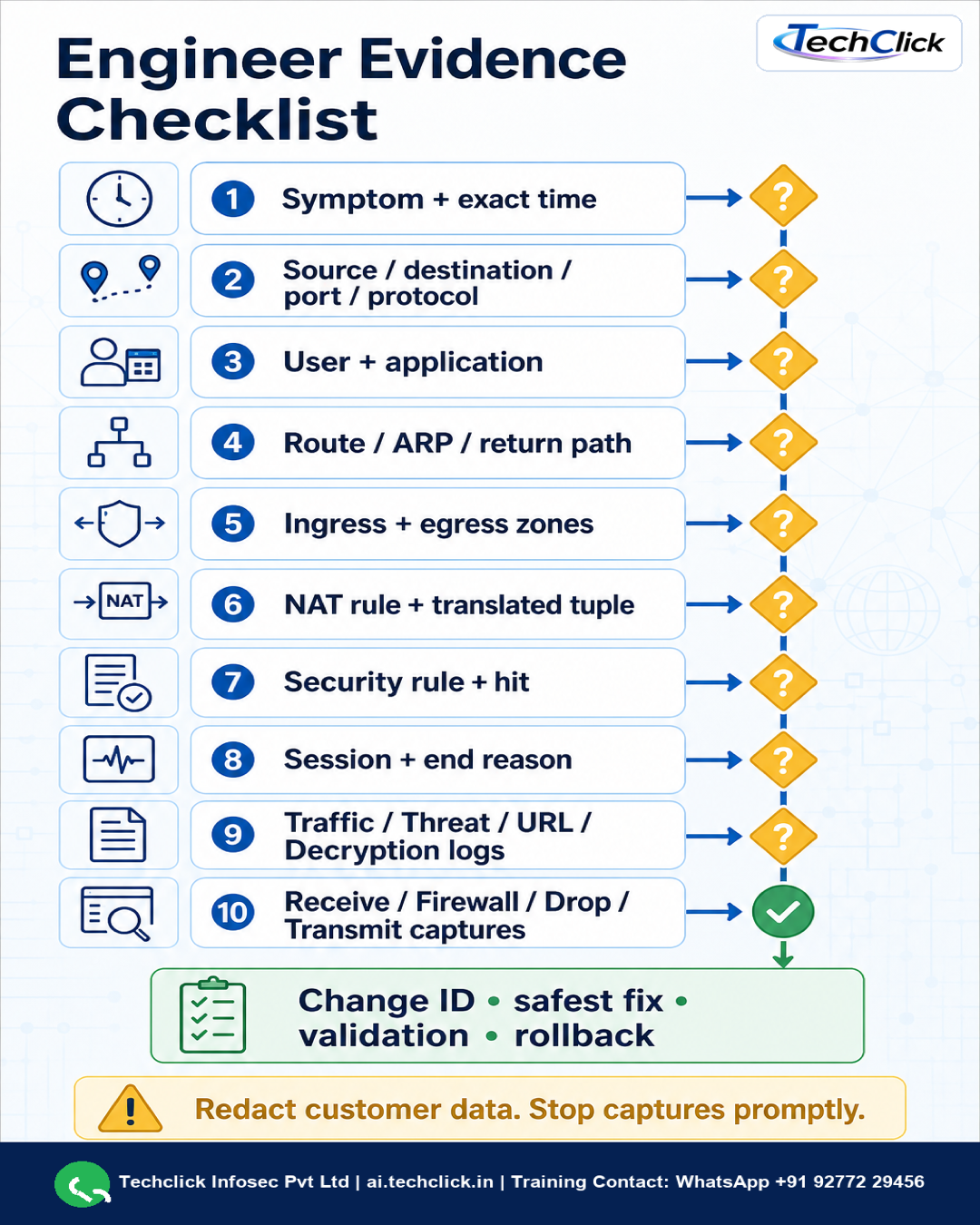
The portrait checklist covers scope, original and translated tuples, route and return path, policy, session, inspection logs, narrow captures, rollback, and validation.

The learning visual connects allowed sessions to antivirus, anti-spyware, vulnerability, URL, file, data, and WildFire inspection evidence.

The diagram reinforces original versus translated addressing, zone calculation, routing, and symmetric return behavior in an internal publication scenario.
Reusable 14-step investigation method
- Confirm the user-visible symptom and business impact
- Define source, destination, port, protocol, user, application, and time
- Verify routing and the return path
- Verify interfaces, zones, Vsys, and virtual/logical router context
- Verify NAT rule matching and translation
- Verify Security-policy matching using original IP fields
- Inspect session state, counters, and final App-ID
- Check profiles, decryption, identity, and content verdicts
- Correlate Traffic, Threat, URL, Decryption, GlobalProtect, System, and Configuration logs
- Capture packets at narrow receive/firewall/transmit/drop stages only if required
- State one falsifiable hypothesis
- Apply the smallest approved reversible correction
- Repeat the exact original business transaction
- Document evidence, monitoring, rollback state, and prevention
30 symptom → evidence → probable cause → safe next-step rows
| Symptom | Evidence | Probable cause | Safe next step |
|---|---|---|---|
| No Traffic log | Ingress capture and exact tuple/time | Traffic misses this firewall, wrong path, or wrong filter | Prove the upstream path and capture at ingress |
| Allow log but application fails | Session counters, end reason, both directions, server result | Return path, reset, profile, TLS, DNS, MTU, or server issue | Follow the session; do not broaden the allow rule |
| New Security rule has zero hits | Rule order, zones, original addresses, user/app/service | Earlier rule or incorrect match fields | Use policy-match prediction, then verify a real session |
| DNAT matches but no reply | ARP/route, transmit capture, server listener and route | Delivery or asymmetric return-path fault | Prove next hop and server return path |
| Session remains incomplete | TCP flags and c2s/s2c packet counters | Handshake or return path never completes | Fix transport before App-ID policy |
| Application is unknown-tcp | Bidirectional payload, content version, application signature | No known App-ID or insufficient stable signature | Assess a custom App-ID only after protocol proof |
| application-default denies | Final App-ID, destination port, rule service, dependencies | Nonstandard port or wrong/final App-ID | Use a narrow documented service or app design |
| Wrong User-ID mapping | Mapping source, age, timeout, group, NAT/VDI context | Stale, shared-address, or normalization error | Correct the mapping source and repeat login/logoff |
| URL false positive | URL log, full URL/category, SNI, profile action | Category or narrow exception requirement | Validate business ownership and scope an expiring exception |
| Threat log but no block | Threat action, rule/profile group, session ID | Alert action intentionally permits and records | Stage supported enforcement after impact review |
| Only decrypted traffic fails | Decryption log, certificate chain, controlled no-decrypt test | Pinning, mTLS, trust, cipher, or server-chain issue | Fix trust/chain or create a narrow technical exclusion |
| GlobalProtect connected but app fails | Endpoint route/DNS, tunnel, receive capture, policy/session | Split tunnel, DNS, route, policy, or app return path | Prove each hop from endpoint to private app |
| GlobalProtect authentication fails | Portal and gateway logs, certificate, IdP/RADIUS stage | Wrong auth profile, certificate, clock, or identity-provider flow | Isolate portal versus gateway and the exact auth method |
| HA peer is suspended | HA state, link errors, transition reason, config sync | Maintenance state or unresolved monitored fault | Find the suspension cause before making the peer functional |
| Sessions reset during failover | Session type, HA2 sync, failover/convergence timestamps | Unsynchronized/decrypted session or path recovery delay | Document exceptions and validate application recovery |
| Panorama push partially fails | Per-device validation and job details | Scope, hierarchy, override, compatibility, or local commit error | Correct only the failed target and repush safely |
| Receive-stage packets but no firewall-stage packets | Narrow stage captures and delta drop counters | Early dataplane parsing, zone, spoof, or resource drop | Correlate one counter delta before changing policy |
| Firewall-stage packets but no transmit packets | Session state, drop reason, route and profile logs | Policy/profile/route decision prevents egress | Correct the proven decision and repeat the same tuple |
| High dataplane CPU | Resource monitor, session rate, features, traffic baseline | Feature mix, traffic surge, attack, or defect | Contain the proven load source; do not reboot blindly |
| Packet-buffer pressure | Buffer metrics, queues, microburst and interface evidence | Burst, congestion, attack, or slow egress | Mitigate the proven source or queue and monitor recovery |
| Behavior changes after upgrade | Version/content diff, known issues, good/bad evidence | App-ID, profile action, compatibility, or software defect | Reproduce and use the supported rollback path if justified |
| Commit succeeds but behavior is unchanged | Running configuration, rule UUID, job target, live session | Wrong context/target or existing session retains old state | Verify the running rule and test a new controlled session |
| Commit validation fails | Job messages, config diff, referenced objects | Dependency, invalid value, or unsupported configuration | Correct the named validation error; do not force unrelated changes |
| Route exists but traffic exits wrong interface | FIB lookup, PBF match, ECMP, session egress | PBF/ECMP/virtual-router selection differs from assumption | Prove forwarding selection and reverse path |
| IPsec tunnel is up but application fails | Proxy IDs, routes, Security/NAT rules, counters both directions | Selector, no-NAT, route, policy, MTU, or peer return issue | Follow the application tuple, not tunnel status alone |
| DNS works by IP but not by name | Endpoint DNS config, query/response capture, DNS Security log | Wrong resolver/route, blocked response, suffix, or security verdict | Validate one query end to end before changing access policy |
| File upload is blocked unexpectedly | Traffic, Threat, Data Filtering, File Blocking, WildFire logs | Profile action or verdict on an allowed session | Correlate session ID and create only an approved narrow exception |
| Panorama value differs on one firewall | Template stack variables, overrides, pushed/running config | Override or hierarchy precedence | Identify ownership and remove only the unintended override |
| Interface is up but neighbor is unresolved | ARP/ND, VLAN/tag, zone/interface, adjacent switch evidence | Layer-2 reachability or addressing error | Fix the proven L2/neighbor fault before policy changes |
| Intermittent loss with allow logs | Good/bad captures, interface/queue counters, HA/routing events | Microburst, physical loss, asymmetry, resource pressure, or upstream fault | Preserve synchronized evidence and correct the proven fault domain |
10 hands-on labs
LAB-01: Security policy and session proof
Objective: Build and validate security policy and session proof using runtime evidence rather than a success-only screenshot.
Topology: Two routed lab zones
Prerequisites: Isolated lab, configuration snapshot, console access, documentation-only addresses, change/rollback owner, and no production traffic.
Task: Create a narrow TCP/8443 rule and prove rule, session, app, and logs
Evidence: Before/after config diff, exact tuple and timestamp, running rule, session/log output, narrow captures where needed, and application result.
Expected: The intended flow succeeds and every claimed decision is supported by matching PAN-OS evidence.
Failure variation: Change the service to TCP/443 and explain the deny
Cleanup: Restore the saved lab state, remove test objects and sessions using the approved runbook, and verify baseline traffic.
LAB-02: DNAT publication
Objective: Build and validate dnat publication using runtime evidence rather than a success-only screenshot.
Topology: Client, PAN-OS VM, and isolated web server
Prerequisites: Isolated lab, configuration snapshot, console access, documentation-only addresses, change/rollback owner, and no production traffic.
Task: Publish one documentation address, prove original/translated tuples and return path
Evidence: Before/after config diff, exact tuple and timestamp, running rule, session/log output, narrow captures where needed, and application result.
Expected: The intended flow succeeds and every claimed decision is supported by matching PAN-OS evidence.
Failure variation: Remove the server return route
Cleanup: Restore the saved lab state, remove test objects and sessions using the approved runbook, and verify baseline traffic.
LAB-03: Application-default
Objective: Build and validate application-default using runtime evidence rather than a success-only screenshot.
Topology: Client and test service on standard/nonstandard ports
Prerequisites: Isolated lab, configuration snapshot, console access, documentation-only addresses, change/rollback owner, and no production traffic.
Task: Compare service any, explicit service, and application-default safely
Evidence: Before/after config diff, exact tuple and timestamp, running rule, session/log output, narrow captures where needed, and application result.
Expected: The intended flow succeeds and every claimed decision is supported by matching PAN-OS evidence.
Failure variation: Move the service to a nonstandard port
Cleanup: Restore the saved lab state, remove test objects and sessions using the approved runbook, and verify baseline traffic.
LAB-04: User-ID lifecycle
Objective: Build and validate user-id lifecycle using runtime evidence rather than a success-only screenshot.
Topology: Directory test user and isolated client
Prerequisites: Isolated lab, configuration snapshot, console access, documentation-only addresses, change/rollback owner, and no production traffic.
Task: Prove login mapping, group policy, and logoff expiry
Evidence: Before/after config diff, exact tuple and timestamp, running rule, session/log output, narrow captures where needed, and application result.
Expected: The intended flow succeeds and every claimed decision is supported by matching PAN-OS evidence.
Failure variation: Create a stale/shared-IP mapping condition
Cleanup: Restore the saved lab state, remove test objects and sessions using the approved runbook, and verify baseline traffic.
LAB-05: Security Profiles
Objective: Build and validate security profiles using runtime evidence rather than a success-only screenshot.
Topology: Safe benign test files and isolated web path
Prerequisites: Isolated lab, configuration snapshot, console access, documentation-only addresses, change/rollback owner, and no production traffic.
Task: Correlate Traffic and inspection logs without using live malware
Evidence: Before/after config diff, exact tuple and timestamp, running rule, session/log output, narrow captures where needed, and application result.
Expected: The intended flow succeeds and every claimed decision is supported by matching PAN-OS evidence.
Failure variation: Change an alert action in the lab and predict the result
Cleanup: Restore the saved lab state, remove test objects and sessions using the approved runbook, and verify baseline traffic.
LAB-06: TLS Forward Proxy
Objective: Build and validate tls forward proxy using runtime evidence rather than a success-only screenshot.
Topology: Lab CA, managed client, and test HTTPS server
Prerequisites: Isolated lab, configuration snapshot, console access, documentation-only addresses, change/rollback owner, and no production traffic.
Task: Prove both TLS sessions, client trust, server validation, and logs
Evidence: Before/after config diff, exact tuple and timestamp, running rule, session/log output, narrow captures where needed, and application result.
Expected: The intended flow succeeds and every claimed decision is supported by matching PAN-OS evidence.
Failure variation: Remove client trust or present an invalid server chain
Cleanup: Restore the saved lab state, remove test objects and sessions using the approved runbook, and verify baseline traffic.
LAB-07: GlobalProtect path
Objective: Build and validate globalprotect path using runtime evidence rather than a success-only screenshot.
Topology: Lab portal/gateway, endpoint, and private app
Prerequisites: Isolated lab, configuration snapshot, console access, documentation-only addresses, change/rollback owner, and no production traffic.
Task: Prove authentication, tunnel, DNS, route, policy, and return traffic
Evidence: Before/after config diff, exact tuple and timestamp, running rule, session/log output, narrow captures where needed, and application result.
Expected: The intended flow succeeds and every claimed decision is supported by matching PAN-OS evidence.
Failure variation: Omit the private route or DNS suffix
Cleanup: Restore the saved lab state, remove test objects and sessions using the approved runbook, and verify baseline traffic.
LAB-08: Active/passive HA
Objective: Build and validate active/passive ha using runtime evidence rather than a success-only screenshot.
Topology: Supported virtual or appliance HA lab
Prerequisites: Isolated lab, configuration snapshot, console access, documentation-only addresses, change/rollback owner, and no production traffic.
Task: Record baseline, perform planned failover, and measure app recovery
Evidence: Before/after config diff, exact tuple and timestamp, running rule, session/log output, narrow captures where needed, and application result.
Expected: The intended flow succeeds and every claimed decision is supported by matching PAN-OS evidence.
Failure variation: Disable one monitored lab link and predict the election
Cleanup: Restore the saved lab state, remove test objects and sessions using the approved runbook, and verify baseline traffic.
LAB-09: Panorama hierarchy
Objective: Build and validate panorama hierarchy using runtime evidence rather than a success-only screenshot.
Topology: Panorama and two lab firewalls
Prerequisites: Isolated lab, configuration snapshot, console access, documentation-only addresses, change/rollback owner, and no production traffic.
Task: Push Device Group policy and Template Stack network settings, then prove each target
Evidence: Before/after config diff, exact tuple and timestamp, running rule, session/log output, narrow captures where needed, and application result.
Expected: The intended flow succeeds and every claimed decision is supported by matching PAN-OS evidence.
Failure variation: Add a lab override and explain precedence
Cleanup: Restore the saved lab state, remove test objects and sessions using the approved runbook, and verify baseline traffic.
LAB-10: Evidence-first incident
Objective: Build and validate evidence-first incident using runtime evidence rather than a success-only screenshot.
Topology: Reusable two-zone lab with traffic generator
Prerequisites: Isolated lab, configuration snapshot, console access, documentation-only addresses, change/rollback owner, and no production traffic.
Task: Inject one hidden route/policy/NAT fault and resolve it with the 14-step method
Evidence: Before/after config diff, exact tuple and timestamp, running rule, session/log output, narrow captures where needed, and application result.
Expected: The intended flow succeeds and every claimed decision is supported by matching PAN-OS evidence.
Failure variation: Have a second engineer inject a different fault without revealing it
Cleanup: Restore the saved lab state, remove test objects and sessions using the approved runbook, and verify baseline traffic.
10 mock incident tickets
INC-01: Payroll app allowed but times out
Available evidence: Traffic log is allow; transmit SYN has no reply
Candidate questions: Exact tuple and time? Who is affected? Does it ever work? What changed? Expected path? Application error? Rollback owner?
Investigation: Clarify → route/zone → NAT → Security rule → session → inspection logs → ingress/egress/return evidence → one hypothesis.
Root cause: Server return route points to another firewall
Correction: Apply the smallest approved correction that directly fixes the proven mismatch and preserves unrelated controls.
Validation: Repeat the original user transaction, prove both directions and expected rule/session/log evidence, monitor, and document closure.
Prevention: Add pre-change validation, ownership/expiry for exceptions, targeted monitoring, and a regression test for this failure class.
INC-02: Published service stopped after NAT change
Available evidence: NAT match succeeds; ARP for public address is unanswered
Candidate questions: Exact tuple and time? Who is affected? Does it ever work? What changed? Expected path? Application error? Rollback owner?
Investigation: Clarify → route/zone → NAT → Security rule → session → inspection logs → ingress/egress/return evidence → one hypothesis.
Root cause: Required upstream routing or proxy ARP behavior is missing
Correction: Apply the smallest approved correction that directly fixes the proven mismatch and preserves unrelated controls.
Validation: Repeat the original user transaction, prove both directions and expected rule/session/log evidence, monitor, and document closure.
Prevention: Add pre-change validation, ownership/expiry for exceptions, targeted monitoring, and a regression test for this failure class.
INC-03: SaaS login breaks with application-default
Available evidence: Final App-ID uses a nonstandard port after content update
Candidate questions: Exact tuple and time? Who is affected? Does it ever work? What changed? Expected path? Application error? Rollback owner?
Investigation: Clarify → route/zone → NAT → Security rule → session → inspection logs → ingress/egress/return evidence → one hypothesis.
Root cause: Rule service no longer matches final application behavior
Correction: Apply the smallest approved correction that directly fixes the proven mismatch and preserves unrelated controls.
Validation: Repeat the original user transaction, prove both directions and expected rule/session/log evidence, monitor, and document closure.
Prevention: Add pre-change validation, ownership/expiry for exceptions, targeted monitoring, and a regression test for this failure class.
INC-04: Wrong user receives privileged policy
Available evidence: Shared VDI address maps to the last user
Candidate questions: Exact tuple and time? Who is affected? Does it ever work? What changed? Expected path? Application error? Rollback owner?
Investigation: Clarify → route/zone → NAT → Security rule → session → inspection logs → ingress/egress/return evidence → one hypothesis.
Root cause: User-ID source and terminal-server design are incorrect
Correction: Apply the smallest approved correction that directly fixes the proven mismatch and preserves unrelated controls.
Validation: Repeat the original user transaction, prove both directions and expected rule/session/log evidence, monitor, and document closure.
Prevention: Add pre-change validation, ownership/expiry for exceptions, targeted monitoring, and a regression test for this failure class.
INC-05: Allowed download resets
Available evidence: Threat log shares the Traffic session ID and uses reset-both
Candidate questions: Exact tuple and time? Who is affected? Does it ever work? What changed? Expected path? Application error? Rollback owner?
Investigation: Clarify → route/zone → NAT → Security rule → session → inspection logs → ingress/egress/return evidence → one hypothesis.
Root cause: Attached profile enforces the content verdict
Correction: Apply the smallest approved correction that directly fixes the proven mismatch and preserves unrelated controls.
Validation: Repeat the original user transaction, prove both directions and expected rule/session/log evidence, monitor, and document closure.
Prevention: Add pre-change validation, ownership/expiry for exceptions, targeted monitoring, and a regression test for this failure class.
INC-06: Finance site fails only under decryption
Available evidence: Decryption log shows untrusted server chain
Candidate questions: Exact tuple and time? Who is affected? Does it ever work? What changed? Expected path? Application error? Rollback owner?
Investigation: Clarify → route/zone → NAT → Security rule → session → inspection logs → ingress/egress/return evidence → one hypothesis.
Root cause: Origin server sends an incomplete certificate chain
Correction: Apply the smallest approved correction that directly fixes the proven mismatch and preserves unrelated controls.
Validation: Repeat the original user transaction, prove both directions and expected rule/session/log evidence, monitor, and document closure.
Prevention: Add pre-change validation, ownership/expiry for exceptions, targeted monitoring, and a regression test for this failure class.
INC-07: GlobalProtect connects but internal names fail
Available evidence: Tunnel is up; endpoint uses public DNS with no internal zone
Candidate questions: Exact tuple and time? Who is affected? Does it ever work? What changed? Expected path? Application error? Rollback owner?
Investigation: Clarify → route/zone → NAT → Security rule → session → inspection logs → ingress/egress/return evidence → one hypothesis.
Root cause: Split-DNS configuration is missing
Correction: Apply the smallest approved correction that directly fixes the proven mismatch and preserves unrelated controls.
Validation: Repeat the original user transaction, prove both directions and expected rule/session/log evidence, monitor, and document closure.
Prevention: Add pre-change validation, ownership/expiry for exceptions, targeted monitoring, and a regression test for this failure class.
INC-08: HA failover resets critical sessions
Available evidence: HA2 is degraded and affected sessions were not synchronized
Candidate questions: Exact tuple and time? Who is affected? Does it ever work? What changed? Expected path? Application error? Rollback owner?
Investigation: Clarify → route/zone → NAT → Security rule → session → inspection logs → ingress/egress/return evidence → one hypothesis.
Root cause: Session-state synchronization failed before takeover
Correction: Apply the smallest approved correction that directly fixes the proven mismatch and preserves unrelated controls.
Validation: Repeat the original user transaction, prove both directions and expected rule/session/log evidence, monitor, and document closure.
Prevention: Add pre-change validation, ownership/expiry for exceptions, targeted monitoring, and a regression test for this failure class.
INC-09: One firewall rejects Panorama push
Available evidence: Validation job names an unsupported setting on the older peer
Candidate questions: Exact tuple and time? Who is affected? Does it ever work? What changed? Expected path? Application error? Rollback owner?
Investigation: Clarify → route/zone → NAT → Security rule → session → inspection logs → ingress/egress/return evidence → one hypothesis.
Root cause: PAN-OS compatibility differs across targets
Correction: Apply the smallest approved correction that directly fixes the proven mismatch and preserves unrelated controls.
Validation: Repeat the original user transaction, prove both directions and expected rule/session/log evidence, monitor, and document closure.
Prevention: Add pre-change validation, ownership/expiry for exceptions, targeted monitoring, and a regression test for this failure class.
INC-10: Five-second packet-loss bursts at noon
Available evidence: Queue drops correlate with backup microbursts and clean policy logs
Candidate questions: Exact tuple and time? Who is affected? Does it ever work? What changed? Expected path? Application error? Rollback owner?
Investigation: Clarify → route/zone → NAT → Security rule → session → inspection logs → ingress/egress/return evidence → one hypothesis.
Root cause: Egress congestion, not Security policy, drops traffic
Correction: Apply the smallest approved correction that directly fixes the proven mismatch and preserves unrelated controls.
Validation: Repeat the original user transaction, prove both directions and expected rule/session/log evidence, monitor, and document closure.
Prevention: Add pre-change validation, ownership/expiry for exceptions, targeted monitoring, and a regression test for this failure class.
20 rapid-fire revision checks
RF-01: Which IPs are used in Security policy with DNAT?
Original source and original destination IPs; the destination zone is based on the post-DNAT route.
RF-02: What does application-default add?
It restricts the final App-ID to its defined standard ports.
RF-03: Does an allow Traffic log prove the app works?
No; prove return traffic, inspection outcome, and the user transaction.
RF-04: What usually causes incomplete?
Too few packets to identify the application, commonly a failed handshake or return path.
RF-05: What does unknown-tcp mean?
A fuller TCP flow did not match a known App-ID; prove the protocol before designing a custom App-ID.
RF-06: Portal or gateway enforces GlobalProtect traffic?
The portal distributes configuration; the gateway authenticates and enforces the tunnel.
RF-07: Does a Threat alert action block?
No; alert records the event while permitting the content unless another control blocks it.
RF-08: What is HA1?
The HA control link for heartbeats, control messages, and configuration synchronization.
RF-09: What is HA2?
The HA data link for eligible session and dataplane state synchronization.
RF-10: What is HA3?
Packet forwarding between peers in active/active designs when session ownership requires it.
RF-11: Device Groups or Templates own Security policy?
Device Groups own policy and objects; Templates/Template Stacks own network and device settings.
RF-12: What does a Panorama commit prove?
Only that Panorama candidate changes committed; it does not prove push, local commit, or runtime behavior.
RF-13: Candidate versus running configuration?
Candidate holds pending edits; running is the successfully committed active state.
RF-14: Why check log at end?
It provides final App-ID, bytes, action/end reason, and completed-session evidence.
RF-15: What is the first troubleshooting input?
The exact user-visible symptom, five-tuple, application, scope, and timestamp.
RF-16: What comes before packet capture?
Logs, route/rule/session evidence, then a narrow filter and one reproduction if capture is still needed.
RF-17: What proves service restoration?
The same original business transaction succeeds with expected runtime evidence in both directions.
RF-18: Why not clear sessions immediately?
It destroys failed-state evidence and can disrupt unrelated users.
RF-19: What is a safe exception?
Narrow, justified, owned, monitored, time-bounded, reversible, and validated.
RF-20: What ends every incident answer?
Validation, monitoring, documentation, rollback state, and prevention.
15 multiple-choice questions with explanations
MCQ-01: A DNAT Security rule should normally match which destination IP?
- The original public destination
- The translated private destination
- Both in one field
- The egress interface address
Answer: A. The original public destination
Why: Security policy uses original IP fields; the destination zone is derived after DNAT routing.
MCQ-02: What best proves a predicted policy match is working?
- The match-test command alone
- A successful commit
- A real session plus matching logs and application result
- A ping from another source
Answer: C. A real session plus matching logs and application result
Why: A prediction does not create traffic; runtime session and application evidence prove behavior.
MCQ-03: An allow Traffic log with a failed application means:
- The firewall is not involved
- Only the Security rule allowed the session
- NAT is always correct
- The server is always at fault
Answer: B. Only the Security rule allowed the session
Why: Profiles, decryption, routing, return traffic, or the server can still fail.
MCQ-04: application-default checks:
- Only TCP 443
- The final App-ID against its defined standard ports
- URL category only
- User group only
Answer: B. The final App-ID against its defined standard ports
Why: It combines identified application and its defined default ports.
MCQ-05: A session marked incomplete most often indicates:
- Confirmed malware
- Insufficient exchange to identify an application
- A Panorama push error
- A valid custom App-ID
Answer: B. Insufficient exchange to identify an application
Why: Start with handshake and return-path evidence.
MCQ-06: Which GlobalProtect component distributes endpoint configuration?
- Portal
- Gateway only
- Panorama log collector
- HA2
Answer: A. Portal
Why: The portal supplies configuration; the gateway authenticates and enforces tunnel access.
MCQ-07: A Threat action of alert normally:
- Blocks and resets
- Records while permitting
- Disables the profile
- Clears the session table
Answer: B. Records while permitting
Why: Alert is evidence, not an enforcement action.
MCQ-08: Which HA link synchronizes eligible session state?
- HA1
- HA2
- HA3 only
- Management interface only
Answer: B. HA2
Why: HA2 carries dataplane/session state.
MCQ-09: Panorama Security policy is organized in:
- Template Stacks
- Device Groups
- Virtual Routers
- Log Collectors
Answer: B. Device Groups
Why: Device Groups own policies and objects.
MCQ-10: A Panorama commit without a push proves:
- The firewalls are updated
- Only Panorama has committed its candidate
- Applications work
- HA is synchronized
Answer: B. Only Panorama has committed its candidate
Why: Push and local runtime validation are separate gates.
MCQ-11: For a wrong User-ID mapping, check first:
- Only LDAP bind
- Mapping source, age, group, NAT/VDI context
- NAT oversubscription
- Packet buffer
Answer: B. Mapping source, age, group, NAT/VDI context
Why: Authentication health alone does not prove the live IP-to-user mapping.
MCQ-12: Transmit capture shows SYN but no reply. The safest conclusion is:
- Security policy denied it
- Investigate next hop, server, and return path
- Clear all sessions
- Disable inspection
Answer: B. Investigate next hop, server, and return path
Why: Egress without reply narrows the fault domain but does not name the exact cause.
MCQ-13: A decryption-only failure should first use:
- A global no-decrypt rule
- Decryption logs, certificate evidence, and a controlled comparison
- A reboot
- Service any
Answer: B. Decryption logs, certificate evidence, and a controlled comparison
Why: The evidence distinguishes trust, pinning, mTLS, cipher, and server-chain issues.
MCQ-14: Before a production packet capture, you should:
- Capture any traffic indefinitely
- Define a narrow filter, limit, one reproduction, and stop plan
- Clear sessions first
- Suspend the HA peer
Answer: B. Define a narrow filter, limit, one reproduction, and stop plan
Why: Time-bounded capture protects performance and privacy.
MCQ-15: The strongest incident closure evidence is:
- The change committed
- The original transaction passes with expected session/log/path evidence
- The dashboard is green
- A different ping works
Answer: B. The original transaction passes with expected session/log/path evidence
Why: Repeat the same business test and correlate runtime proof.
30-question mock interview
- PA-001: What makes a Palo Alto Networks NGFW different from a port-based firewall?
Short answer first; then mechanism, production example, exact evidence, safe correction, validation, and one follow-up. - PA-003: How do you read session_end_reason without jumping to conclusions?
Short answer first; then mechanism, production example, exact evidence, safe correction, validation, and one follow-up. - PA-005: What is the difference between candidate and running configuration?
Short answer first; then mechanism, production example, exact evidence, safe correction, validation, and one follow-up. - PA-007: How do intrazone-default and interzone-default behave?
Short answer first; then mechanism, production example, exact evidence, safe correction, validation, and one follow-up. - PA-008: What do Applications and Threats content updates change?
Short answer first; then mechanism, production example, exact evidence, safe correction, validation, and one follow-up. - PA-010: What belongs in a safe firewall configuration backup plan?
Short answer first; then mechanism, production example, exact evidence, safe correction, validation, and one follow-up. - PA-012: When would you use a virtual wire, Layer 2, Layer 3, TAP, or a virtual system?
Short answer first; then mechanism, production example, exact evidence, safe correction, validation, and one follow-up. - PA-014: A BGP peer is established but the application route is missing. What do you check?
Short answer first; then mechanism, production example, exact evidence, safe correction, validation, and one follow-up. - PA-016: When would QoS help, and when would it hide the real issue?
Short answer first; then mechanism, production example, exact evidence, safe correction, validation, and one follow-up. - PA-018: How can PBF create a routing or return-path failure?
Short answer first; then mechanism, production example, exact evidence, safe correction, validation, and one follow-up. - PA-021: How do you use test security-policy-match and test nat-policy-match safely?
Short answer first; then mechanism, production example, exact evidence, safe correction, validation, and one follow-up. - PA-023: How would you design least-privilege policy for a new three-tier application?
Short answer first; then mechanism, production example, exact evidence, safe correction, validation, and one follow-up. - PA-025: Traffic is allowed by policy, but the application does not work. What next?
Short answer first; then mechanism, production example, exact evidence, safe correction, validation, and one follow-up. - PA-028: A destination-NAT rule publishes a DMZ server. Which address and zone belong in Security policy?
Short answer first; then mechanism, production example, exact evidence, safe correction, validation, and one follow-up. - PA-030: What is U-turn NAT, and why is source translation often required with it?
Short answer first; then mechanism, production example, exact evidence, safe correction, validation, and one follow-up. - PA-031: When do you place an explicit no-NAT rule above a broader NAT rule?
Short answer first; then mechanism, production example, exact evidence, safe correction, validation, and one follow-up. - PA-033: How does NAT rule order affect matching?
Short answer first; then mechanism, production example, exact evidence, safe correction, validation, and one follow-up. - PA-035: Why can a session be allowed initially and then reset after App-ID changes?
Short answer first; then mechanism, production example, exact evidence, safe correction, validation, and one follow-up. - PA-037: Why does traffic appear as incomplete, unknown-tcp, or unknown-udp?
Short answer first; then mechanism, production example, exact evidence, safe correction, validation, and one follow-up. - PA-039: What does Device-ID add to policy?
Short answer first; then mechanism, production example, exact evidence, safe correction, validation, and one follow-up. - PA-041: Why is Application Override risky?
Short answer first; then mechanism, production example, exact evidence, safe correction, validation, and one follow-up. - PA-043: How do Security Profiles and a Security Profile Group work together?
Short answer first; then mechanism, production example, exact evidence, safe correction, validation, and one follow-up. - PA-046: Zone Protection versus DoS Protection: when do you use each?
Short answer first; then mechanism, production example, exact evidence, safe correction, validation, and one follow-up. - PA-050: How do DNS Security and file controls complement other profiles?
Short answer first; then mechanism, production example, exact evidence, safe correction, validation, and one follow-up. - PA-054: A certificate is about to expire on a firewall. How do you determine blast radius?
Short answer first; then mechanism, production example, exact evidence, safe correction, validation, and one follow-up. - PA-058: Portal versus Gateway in GlobalProtect: what does each do?
Short answer first; then mechanism, production example, exact evidence, safe correction, validation, and one follow-up. - PA-062: GlobalProtect authentication fails. How do you isolate the stage?
Short answer first; then mechanism, production example, exact evidence, safe correction, validation, and one follow-up. - PA-068: What does and does not synchronize across HA peers?
Short answer first; then mechanism, production example, exact evidence, safe correction, validation, and one follow-up. - PA-075: How do log collectors and forwarding fit an investigation?
Short answer first; then mechanism, production example, exact evidence, safe correction, validation, and one follow-up. - PA-080: A PAN-OS or content upgrade changes production behavior. How do you investigate?
Short answer first; then mechanism, production example, exact evidence, safe correction, validation, and one follow-up.
Glossary
- App-ID
- Application classification used by policy, application-default, and logging.
- User-ID
- Time-bounded IP-to-user and group context.
- Device-ID
- Endpoint attributes used for visibility and supported policy enforcement.
- Content-ID
- Shared content-inspection context behind security services.
- Virtual Router
- Layer-3 forwarding instance in the classic routing engine.
- PBF
- Policy-Based Forwarding that steers matching traffic away from the normal FIB choice.
- DNAT
- Destination Network Address Translation.
- SP3
- Single-Pass Parallel Processing architecture.
- HA1 / HA2 / HA3
- HA control/config, session-state, and active/active packet-forwarding links.
- Device Group
- Panorama hierarchy for policies and objects.
- Template Stack
- Panorama hierarchy for network and device settings.
80 Palo Alto Networks firewall interview questions and answers
PAN-OS and NGFW fundamentals 10 questions
Beginner1. What makes a Palo Alto Networks NGFW different from a port-based firewall?
Short interview answer (30–60 seconds): The practical difference is the unit of policy. A traditional rule mainly sees source, destination, protocol, and port. PAN-OS can identify the actual application with App-ID, the person or group with User-ID, and the content with Content-ID. That lets me write intent-based policy: Finance users may use the approved Salesforce application, but not an unsanctioned file-sharing app, even if both arrive over TCP 443. I still verify what the firewall classified rather than trusting the port. In a production review I filter the Traffic log by user and check App-ID, rule, action, session ID, and related Threat or URL events.
If the application is not identified immediately, I explain what the firewall learned over the life of the session and which dependency was required. That shows I understand policy as an observed decision, not a port-label shortcut.
I also say what I would not claim: App-ID is not a substitute for sound addressing, routing, or a narrowly scoped rule.
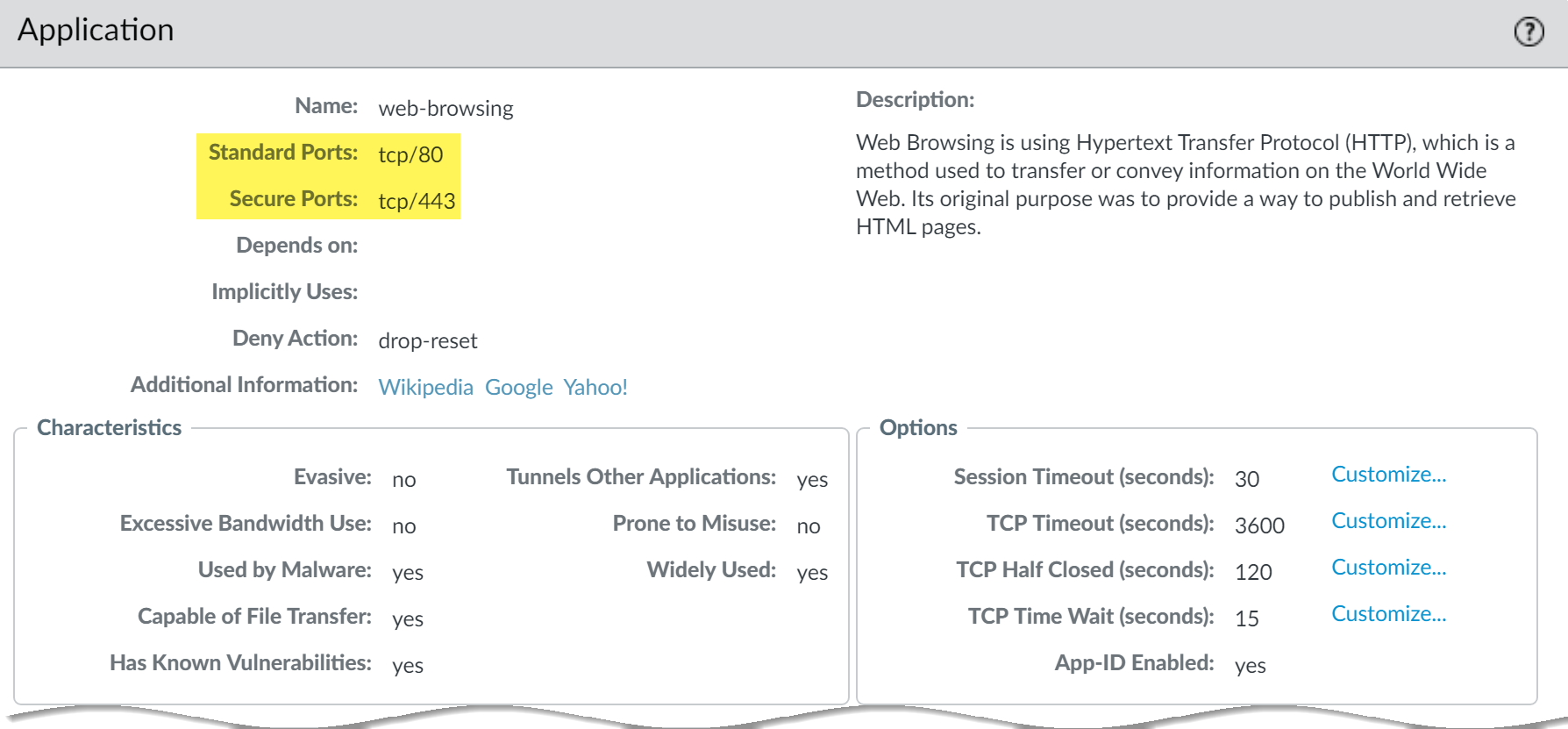
Detailed technical explanation
Mental model: Port rules ask “which door?”; App-ID/User-ID/Content-ID ask “what, who, and is it safe?”
Three points to remember
- Identify context: Classify application, user, content, source, destination, and session.
- Build intent rule: Allow the business application, not merely its destination port.
- Verify evidence: Check App-ID, User-ID, rule action, and related inspection logs.
Production example: Allow the Finance group’s Salesforce App-ID with application-default and a profile group; do not simply open 443 to a large address range.
Evidence, logs, commands, counters, captures, or GUI: Use the capture beside this answer as your reference. In your own lab, repeat the same check with the real tuple, user, and rule, then redact hostnames, addresses, and identities before sharing it.
Common incorrect answer or misunderstanding: App-ID does not eliminate ports or routing; it adds context to them.
Interviewer follow-up: How would you handle Salesforce dependencies without allowing generic `ssl` permanently?
Model answer to the follow-up: I would clarify the exact tuple and expected result, verify the relevant route, rule, session, and log evidence, make the narrowest reversible correction, then repeat the same business test and document rollback evidence.
Beginner explanation
Think of PAN-OS as a security checkpoint that remembers each conversation. It combines who is communicating, which application is in use, what content is present, and where the traffic is going.
Traffic path
Client packet → ingress interface and zone → session lookup/new-session classification → Security policy and profiles → route/egress → return traffic through the same stateful session.
Safe evidence command
SAFE READ-ONLY show system info
Purpose: Confirms the PAN-OS release, model, serial context, and operational state. Interpretation: Do not treat one green state or allow log as end-to-end proof. Correlate the fundamentals output with the same tuple, session ID, both traffic directions, final application result, and the user-visible test.
Operational caution
The listed command is read-only. Use narrow filters for packet capture or debug, schedule disruptive session clear/restart/failover/upgrade actions, name the rollback owner, and never paste customer secrets or unredacted production data.
Version or licensing note: Core behavior applies broadly; exact fields and GUI paths vary by PAN-OS release.
Beginner2. Explain Single-Pass Parallel Processing (SP3) without using marketing language.
Short interview answer (30–60 seconds): I explain SP3 as an inspection path: PAN-OS classifies and inspects a flow once, then shares that context with the security engines instead of repeatedly handing the same payload through separate proxies. The operational benefit is consistent correlation of the application, user, content verdict, route, and session state. It is not a promise of unlimited speed. Enabling decryption, Threat Prevention, or large numbers of sessions changes CPU and memory demand, so I test the actual feature mix. For a pilot I compare one session’s Traffic and Threat logs, inspect its session state, and baseline dataplane CPU, throughput, and active sessions before expanding the change.
I would also record software version, enabled subscriptions, decryption scope, and traffic mix. Those details make a capacity comparison reproducible and prevent someone from treating a lab result as a guarantee for a different production workload.
That is the level of answer I give after years of capacity incidents: describe the measured workload, not a headline number.
Detailed technical explanation
Mental model: One packet journey, shared context, several checks—not one magic performance switch.
Three points to remember
- Classify once: Identify the flow without repeatedly proxying the same payload.
- Share context: Reuse application, user, content, route, and session state.
- Measure workload: Baseline CPU, throughput, sessions, decryption, and enabled protections.
Production example: Decrypt one application group first, compare resource use and verdicts, then widen the rollout only if the measured headroom is acceptable.
Evidence, logs, commands, counters, captures, or GUI: Use the capture beside this answer as your reference. In your own lab, repeat the same check with the real tuple, user, and rule, then redact hostnames, addresses, and identities before sharing it.
Common incorrect answer or misunderstanding: SP3 improves reuse of classification and inspection; it does not guarantee the same throughput for every feature mix.
Interviewer follow-up: Which enabled controls and TLS characteristics belong in the sizing test?
Model answer to the follow-up: I would clarify the exact tuple and expected result, verify the relevant route, rule, session, and log evidence, make the narrowest reversible correction, then repeat the same business test and document rollback evidence.
Beginner explanation
Think of PAN-OS as a security checkpoint that remembers each conversation. It combines who is communicating, which application is in use, what content is present, and where the traffic is going.
Traffic path
Client packet → ingress interface and zone → session lookup/new-session classification → Security policy and profiles → route/egress → return traffic through the same stateful session.
Safe evidence command
SAFE READ-ONLY show system info
Purpose: Confirms the PAN-OS release, model, serial context, and operational state. Interpretation: Do not treat one green state or allow log as end-to-end proof. Correlate the fundamentals output with the same tuple, session ID, both traffic directions, final application result, and the user-visible test.
Operational caution
The listed command is read-only. Use narrow filters for packet capture or debug, schedule disruptive session clear/restart/failover/upgrade actions, name the rollback owner, and never paste customer secrets or unredacted production data.
Version or licensing note: Core behavior applies broadly; exact fields and GUI paths vary by PAN-OS release.
Intermediate3. How do you read session_end_reason without jumping to conclusions?
Short interview answer (30–60 seconds): I never diagnose from session_end_reason alone. I correlate it with the action, packets and bytes in each direction, TCP state, Threat/Decryption events, counters, and a narrow packet capture. aged-out can be normal idle UDP—or a sign that replies never came back. tcp-rst-from-server means the observed reset came from the server side; it is not automatically a firewall reset.
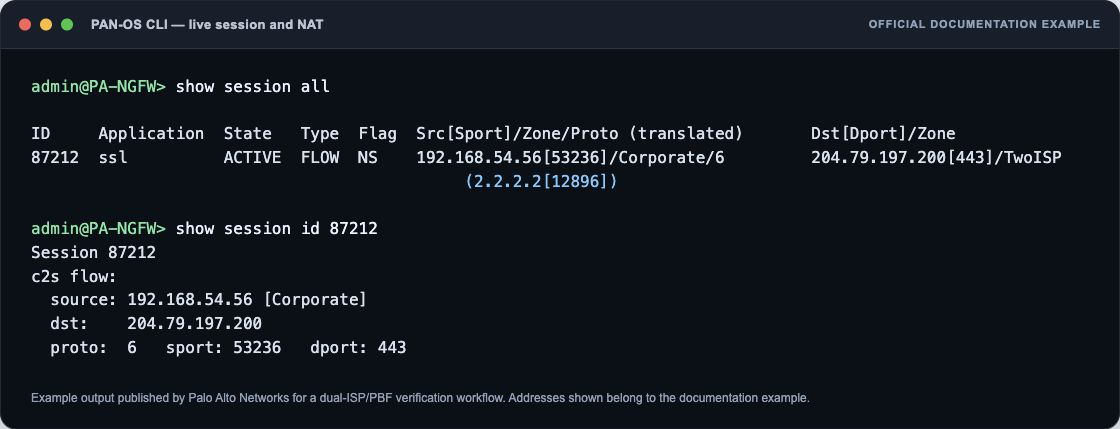
Detailed technical explanation
Start with the decision the firewall is making, then name the evidence that proves it.
Three points to remember
- Read Full Tuple: Combine end reason with action, bytes, TCP state, and timestamps.
- Capture Narrow Flow: Confirm reset origin or timeout behavior using a focused packet capture.
- Explain, Don't Assume: Protocol context determines whether aging out is normal or failure.
Production example: Use one known-good transaction and one controlled failure so the result can be proved rather than guessed.
Evidence, logs, commands, counters, captures, or GUI: Use the capture beside this answer as your reference. In your own lab, repeat the same check with the real tuple, user, and rule, then redact hostnames, addresses, and identities before sharing it.
Common incorrect answer or misunderstanding: The original is sound. Add that timeout values and reason labels vary by protocol and PAN-OS release, and that an apparent server reset should still be confirmed in capture when the source matters.
Interviewer follow-up: How does `tcp-rst-from-server` differ from a firewall-generated reset?
Model answer to the follow-up: I would clarify the exact tuple and expected result, verify the relevant route, rule, session, and log evidence, make the narrowest reversible correction, then repeat the same business test and document rollback evidence.
Beginner explanation
Think of PAN-OS as a security checkpoint that remembers each conversation. It combines who is communicating, which application is in use, what content is present, and where the traffic is going.
Traffic path
Client packet → ingress interface and zone → session lookup/new-session classification → Security policy and profiles → route/egress → return traffic through the same stateful session.
Safe evidence command
SAFE READ-ONLY show system info
Purpose: Confirms the PAN-OS release, model, serial context, and operational state. Interpretation: Do not treat one green state or allow log as end-to-end proof. Correlate the fundamentals output with the same tuple, session ID, both traffic directions, final application result, and the user-visible test.
Operational caution
The listed command is read-only. Use narrow filters for packet capture or debug, schedule disruptive session clear/restart/failover/upgrade actions, name the rollback owner, and never paste customer secrets or unredacted production data.
Version or licensing note: Core behavior applies broadly; exact fields and GUI paths vary by PAN-OS release.
Intermediate4. How do the management plane and dataplane differ during an incident?
Short interview answer (30–60 seconds): The management plane runs administration, commits, routing processes, and logging services; the dataplane forwards and inspects sessions. I check both because a reachable GUI does not prove forwarding health, and high dataplane load does not automatically mean the management plane is failing.
Detailed technical explanation
The management plane runs administration, commits, routing processes, and logging services; the dataplane forwards and inspects sessions. I check both because a reachable GUI does not prove forwarding health, and high dataplane load does not automatically mean the management plane is failing. The engineering standard is to correlate configuration intent with one real session and time-bounded evidence before changing policy.
Production example: A commit is responsive while users report loss; dataplane resource and session counters rise but management CPU is normal.
Evidence an engineer should collect: show system resources; show running resource-monitor; show session info; system and traffic logs
Relevant logs, commands, counters, captures, or GUI: `show system resources` is operational management-plane evidence; `show running resource-monitor` is operational dataplane evidence.
Common incorrect answer or misunderstanding: Assuming one CPU graph represents the whole firewall.
Interviewer follow-up: Which command would you start with for dataplane load?
Model answer to the follow-up: I would start with `show running resource-monitor`, then correlate the interval with session pressure and the user-visible failure.
Beginner explanation
Think of PAN-OS as a security checkpoint that remembers each conversation. It combines who is communicating, which application is in use, what content is present, and where the traffic is going.
Traffic path
Client packet → ingress interface and zone → session lookup/new-session classification → Security policy and profiles → route/egress → return traffic through the same stateful session.
Safe evidence command
SAFE READ-ONLY show system info
Purpose: Confirms the PAN-OS release, model, serial context, and operational state. Interpretation: Do not treat one green state or allow log as end-to-end proof. Correlate the fundamentals output with the same tuple, session ID, both traffic directions, final application result, and the user-visible test.
Operational caution
The listed command is read-only. Use narrow filters for packet capture or debug, schedule disruptive session clear/restart/failover/upgrade actions, name the rollback owner, and never paste customer secrets or unredacted production data.
Version or licensing note: Command output and available intervals vary by PAN-OS release and platform.
Beginner5. What is the difference between candidate and running configuration?
Short interview answer (30–60 seconds): Edits live in candidate configuration until a successful commit validates and activates them. A successful edit or Panorama commit is not proof that the firewall is running the intended change.
Detailed technical explanation
Edits live in candidate configuration until a successful commit validates and activates them. A successful edit or Panorama commit is not proof that the firewall is running the intended change. The engineering standard is to correlate configuration intent with one real session and time-bounded evidence before changing policy.
Production example: An engineer sees the new rule in the editor, but traffic still matches the old rule because the commit failed.
Evidence an engineer should collect: Config diff, commit job ID, `show jobs all`, running policy, configuration log
Relevant logs, commands, counters, captures, or GUI: `show jobs all` is operational; `validate full` is configuration mode and non-disruptive but creates a job.
Common incorrect answer or misunderstanding: Saying Save or OK activates the change.
Interviewer follow-up: How do you prove a commit completed?
Model answer to the follow-up: Check the job status and messages, then verify the running rule and a real session—not only the candidate view.
Beginner explanation
Think of PAN-OS as a security checkpoint that remembers each conversation. It combines who is communicating, which application is in use, what content is present, and where the traffic is going.
Traffic path
Client packet → ingress interface and zone → session lookup/new-session classification → Security policy and profiles → route/egress → return traffic through the same stateful session.
Safe evidence command
SAFE READ-ONLY show system info
Purpose: Confirms the PAN-OS release, model, serial context, and operational state. Interpretation: Do not treat one green state or allow log as end-to-end proof. Correlate the fundamentals output with the same tuple, session ID, both traffic directions, final application result, and the user-visible test.
Operational caution
The listed command is read-only. Use narrow filters for packet capture or debug, schedule disruptive session clear/restart/failover/upgrade actions, name the rollback owner, and never paste customer secrets or unredacted production data.
Version or licensing note: Commit UI and validation messages vary by release.
Beginner6. Why is PAN-OS described as a stateful firewall?
Short interview answer (30–60 seconds): The first packets create a session with direction, zones, rule, NAT, application, and counters. Later packets use that session state, while App-ID or policy state can still evolve as the flow reveals more information.
Detailed technical explanation
The first packets create a session with direction, zones, rule, NAT, application, and counters. Later packets use that session state, while App-ID or policy state can still evolve as the flow reveals more information. The engineering standard is to correlate configuration intent with one real session and time-bounded evidence before changing policy.
Production example: A return packet is allowed because it belongs to an established permitted session, not because a reverse allow rule was independently matched.
Evidence an engineer should collect: Session ID, state, c2s/s2c counters, rule, NAT tuple, end reason
Relevant logs, commands, counters, captures, or GUI: `show session id <id>` is operational and reads one live session.
Common incorrect answer or misunderstanding: Claiming every packet repeats the complete first-packet policy path.
Interviewer follow-up: What can still change after session creation?
Model answer to the follow-up: The identified application and inspection verdict can change as payload appears; verify the final App-ID and end reason.
Beginner explanation
Think of PAN-OS as a security checkpoint that remembers each conversation. It combines who is communicating, which application is in use, what content is present, and where the traffic is going.
Traffic path
Client packet → ingress interface and zone → session lookup/new-session classification → Security policy and profiles → route/egress → return traffic through the same stateful session.
Safe evidence command
SAFE READ-ONLY show system info
Purpose: Confirms the PAN-OS release, model, serial context, and operational state. Interpretation: Do not treat one green state or allow log as end-to-end proof. Correlate the fundamentals output with the same tuple, session ID, both traffic directions, final application result, and the user-visible test.
Operational caution
The listed command is read-only. Use narrow filters for packet capture or debug, schedule disruptive session clear/restart/failover/upgrade actions, name the rollback owner, and never paste customer secrets or unredacted production data.
Version or licensing note: Exact session fields vary by PAN-OS version.
Beginner7. How do intrazone-default and interzone-default behave?
Short interview answer (30–60 seconds): PAN-OS has default Security rules after administrator rules: intrazone-default permits same-zone traffic and interzone-default denies cross-zone traffic by default. I inspect the effective rulebase and logging settings instead of assuming defaults are visible in hit statistics.
Detailed technical explanation
PAN-OS has default Security rules after administrator rules: intrazone-default permits same-zone traffic and interzone-default denies cross-zone traffic by default. I inspect the effective rulebase and logging settings instead of assuming defaults are visible in hit statistics. The engineering standard is to correlate configuration intent with one real session and time-bounded evidence before changing policy.
Production example: Two servers in one zone communicate without an explicit rule because intrazone-default applies.
Evidence an engineer should collect: Traffic log rule name, zones, effective running policy, override state
Relevant logs, commands, counters, captures, or GUI: Monitor > Logs > Traffic; Policies > Security; `show running security-policy` operational
Common incorrect answer or misunderstanding: Assuming same-zone traffic is denied merely because no custom rule exists.
Interviewer follow-up: When would you override intrazone-default?
Model answer to the follow-up: When same-zone lateral movement must be denied or logged, create explicit segmentation rules and validate required dependencies first.
Beginner explanation
Think of PAN-OS as a security checkpoint that remembers each conversation. It combines who is communicating, which application is in use, what content is present, and where the traffic is going.
Traffic path
Client packet → ingress interface and zone → session lookup/new-session classification → Security policy and profiles → route/egress → return traffic through the same stateful session.
Safe evidence command
SAFE READ-ONLY show system info
Purpose: Confirms the PAN-OS release, model, serial context, and operational state. Interpretation: Do not treat one green state or allow log as end-to-end proof. Correlate the fundamentals output with the same tuple, session ID, both traffic directions, final application result, and the user-visible test.
Operational caution
The listed command is read-only. Use narrow filters for packet capture or debug, schedule disruptive session clear/restart/failover/upgrade actions, name the rollback owner, and never paste customer secrets or unredacted production data.
Version or licensing note: Default-rule logging and visibility can be customized; rule-usage behavior varies.
Beginner8. What do Applications and Threats content updates change?
Short interview answer (30–60 seconds): Content updates can add or revise App-IDs, dependencies, decoders, and threat signatures without changing PAN-OS software. I stage them because a new App-ID or default action can change rule matching or enforcement.
Detailed technical explanation
Content updates can add or revise App-IDs, dependencies, decoders, and threat signatures without changing PAN-OS software. I stage them because a new App-ID or default action can change rule matching or enforcement. The engineering standard is to correlate configuration intent with one real session and time-bounded evidence before changing policy.
Production example: After a content update, traffic previously logged as ssl becomes a specific SaaS App-ID and misses the rule.
Evidence an engineer should collect: Content version, release notes, dynamic-update job, before/after App-ID, rule hits
Relevant logs, commands, counters, captures, or GUI: Device > Dynamic Updates; `show jobs all` operational
Common incorrect answer or misunderstanding: Treating content updates as only antivirus files.
Interviewer follow-up: What is your rollback evidence?
Model answer to the follow-up: Record the previous content version, affected flows, and before/after logs; follow the supported content rollback procedure for that release.
Beginner explanation
Think of PAN-OS as a security checkpoint that remembers each conversation. It combines who is communicating, which application is in use, what content is present, and where the traffic is going.
Traffic path
Client packet → ingress interface and zone → session lookup/new-session classification → Security policy and profiles → route/egress → return traffic through the same stateful session.
Safe evidence command
SAFE READ-ONLY show system info
Purpose: Confirms the PAN-OS release, model, serial context, and operational state. Interpretation: Do not treat one green state or allow log as end-to-end proof. Correlate the fundamentals output with the same tuple, session ID, both traffic directions, final application result, and the user-visible test.
Operational caution
The listed command is read-only. Use narrow filters for packet capture or debug, schedule disruptive session clear/restart/failover/upgrade actions, name the rollback owner, and never paste customer secrets or unredacted production data.
Version or licensing note: Content cadence and rollback support are release dependent; subscriptions affect signature access.
Beginner9. How should you interpret Traffic log start and end entries?
Short interview answer (30–60 seconds): Start logs provide early visibility but may not contain the final App-ID, bytes, or end reason. End logs contain the completed session view when the session ends. I choose logging based on investigation and retention needs.
Detailed technical explanation
Start logs provide early visibility but may not contain the final App-ID, bytes, or end reason. End logs contain the completed session view when the session ends. I choose logging based on investigation and retention needs. The engineering standard is to correlate configuration intent with one real session and time-bounded evidence before changing policy.
Production example: A start log shows ssl; the end log shows the final collaboration App-ID and policy-deny end reason.
Evidence an engineer should collect: Log subtype/time, session ID, app, bytes, repeat count, action, end reason
Relevant logs, commands, counters, captures, or GUI: Monitor > Logs > Traffic; log-at-start/log-at-end on Security rule
Common incorrect answer or misunderstanding: Treating the start log as the final classification.
Interviewer follow-up: Why enable log at start selectively?
Model answer to the follow-up: It helps find long-lived or never-completing sessions, but increases log volume and must be sized.
Beginner explanation
Think of PAN-OS as a security checkpoint that remembers each conversation. It combines who is communicating, which application is in use, what content is present, and where the traffic is going.
Traffic path
Client packet → ingress interface and zone → session lookup/new-session classification → Security policy and profiles → route/egress → return traffic through the same stateful session.
Safe evidence command
SAFE READ-ONLY show system info
Purpose: Confirms the PAN-OS release, model, serial context, and operational state. Interpretation: Do not treat one green state or allow log as end-to-end proof. Correlate the fundamentals output with the same tuple, session ID, both traffic directions, final application result, and the user-visible test.
Operational caution
The listed command is read-only. Use narrow filters for packet capture or debug, schedule disruptive session clear/restart/failover/upgrade actions, name the rollback owner, and never paste customer secrets or unredacted production data.
Version or licensing note: Fields and session-end reasons vary by PAN-OS release.
Intermediate10. What belongs in a safe firewall configuration backup plan?
Short interview answer (30–60 seconds): Keep named configuration exports, Panorama or device backups, software/content versions, device-state material where supported, and a tested restore procedure. Protect exports because they can contain sensitive topology and hashed or encrypted values.
Detailed technical explanation
Keep named configuration exports, Panorama or device backups, software/content versions, device-state material where supported, and a tested restore procedure. Protect exports because they can contain sensitive topology and hashed or encrypted values. The engineering standard is to correlate configuration intent with one real session and time-bounded evidence before changing policy.
Production example: Before an upgrade, the team stores a versioned configuration and confirms the recovery path on the passive peer.
Evidence an engineer should collect: Config audit, export timestamp, software/content versions, restore test, access controls
Relevant logs, commands, counters, captures, or GUI: Device > Setup > Operations and Panorama scheduled exports; paths vary
Common incorrect answer or misunderstanding: Calling an untested XML export a disaster-recovery plan.
Interviewer follow-up: What should never be placed in the interview guide?
Model answer to the follow-up: Customer configs, keys, PSKs, credentials, or unredacted addresses; use documentation ranges and sanitized evidence.
Beginner explanation
Think of PAN-OS as a security checkpoint that remembers each conversation. It combines who is communicating, which application is in use, what content is present, and where the traffic is going.
Traffic path
Client packet → ingress interface and zone → session lookup/new-session classification → Security policy and profiles → route/egress → return traffic through the same stateful session.
Safe evidence command
SAFE READ-ONLY show system info
Purpose: Confirms the PAN-OS release, model, serial context, and operational state. Interpretation: Do not treat one green state or allow log as end-to-end proof. Correlate the fundamentals output with the same tuple, session ID, both traffic directions, final application result, and the user-visible test.
Operational caution
The listed command is read-only. Use narrow filters for packet capture or debug, schedule disruptive session clear/restart/failover/upgrade actions, name the rollback owner, and never paste customer secrets or unredacted production data.
Version or licensing note: Export/restore capabilities depend on platform, Panorama, and release.
Zones, interfaces, virtual routers, and routing 8 questions
Intermediate11. How do zones, interfaces, and Virtual Routers relate to each other?
Short interview answer (30–60 seconds): An interface can belong to a security zone for policy and to a Virtual Router for Layer-3 forwarding. The Virtual Router chooses the next hop and egress interface; the zones describe the trust boundary that Security policy evaluates. They work together but are not interchangeable. A route can be correct while the rule still misses because the resulting egress zone is different from the one the administrator expected. When troubleshooting, I inspect the interface and zone, confirm the interface’s Virtual Router, run a FIB lookup for the destination, and compare ingress and egress zones in the session or Traffic log. A zone is not a route table, and routing alone never grants access.
When the path changes, I re-check both directions. Return traffic can select a different Virtual Router or zone, and the resulting asymmetry may look like a policy problem even though the first packet matched correctly.
This separation also makes ownership clear: the routing team owns next-hop reachability, while the firewall team owns zone policy and inspection.
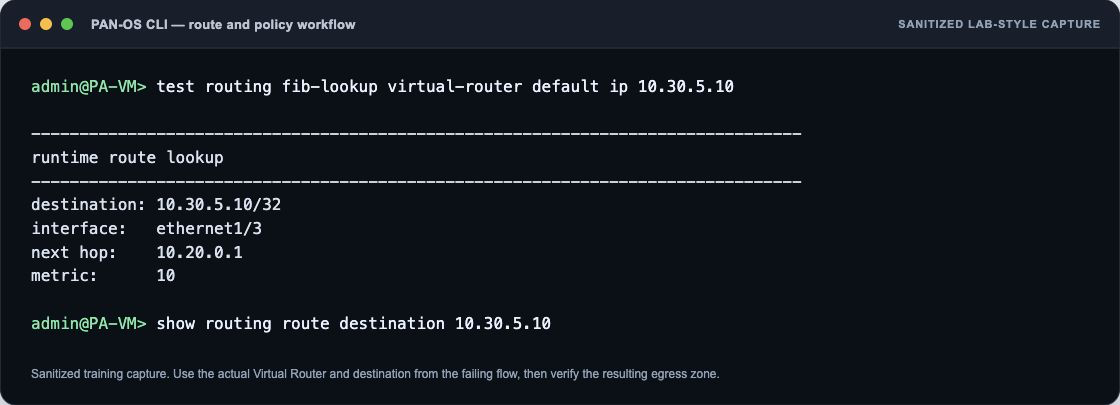
Detailed technical explanation
Mental model: Virtual Router answers “where next?”; zone answers “which trust boundary?”
Three points to remember
- Assign interface: Place the interface in a security zone and Virtual Router.
- Select route: Use the Virtual Router to choose next hop and egress.
- Evaluate zones: Match Security policy using resulting source and destination zones.
Production example: A server subinterface is accidentally attached to another Virtual Router, so traffic leaves through the wrong zone and misses the intended rule.
Evidence, logs, commands, counters, captures, or GUI: Use the capture beside this answer as your reference. In your own lab, repeat the same check with the real tuple, user, and rule, then redact hostnames, addresses, and identities before sharing it.
Common incorrect answer or misunderstanding: Zone membership and route selection are separate configuration facts that must both be verified.
Interviewer follow-up: If the next hop changes the egress zone, which Security-rule fields must be reevaluated?
Model answer to the follow-up: I would clarify the exact tuple and expected result, verify the relevant route, rule, session, and log evidence, make the narrowest reversible correction, then repeat the same business test and document rollback evidence.
Beginner explanation
A firewall must know both where to send a packet and how the reply will return. A correct allow rule cannot repair a missing route, wrong zone, unresolved neighbor, or asymmetric return path.
Traffic path
Source → ingress zone → virtual-router or logical-router lookup/PBF → next hop and egress interface → destination → a valid route back to the session source.
Safe evidence command
SAFE READ-ONLY test routing fib-lookup virtual-router <vr> ip <destination>
Purpose: Predicts the forwarding lookup in the named virtual router; syntax differs with Advanced Routing. Interpretation: Do not treat one green state or allow log as end-to-end proof. Correlate the routing output with the same tuple, session ID, both traffic directions, final application result, and the user-visible test.
Operational caution
The listed command is read-only. Use narrow filters for packet capture or debug, schedule disruptive session clear/restart/failover/upgrade actions, name the rollback owner, and never paste customer secrets or unredacted production data.
Version or licensing note: Virtual Router and Advanced Routing Engine syntax differ by release.
Intermediate12. When would you use a virtual wire, Layer 2, Layer 3, TAP, or a virtual system?
Short interview answer (30–60 seconds): I choose the mode based on who owns routing, how much change the insertion can tolerate, and how isolation is required. TAP gives visibility without forwarding or enforcement. Virtual wire is transparent inline enforcement between two interfaces. Layer 2 switches frames, while Layer 3 routes and supports normal routed designs and NAT. A virtual system (vsys) is different: it creates administratively isolated logical firewalls on one appliance, regardless of the physical interface mode. In a merger I might begin with TAP for visibility, move to virtual wire for low-disruption enforcement, and adopt Layer 3 after routing ownership and rollback are agreed. I also check asymmetric paths and bypass/failure behavior before choosing virtual wire.
The rollback question matters as much as the initial insertion. I want a tested bypass or maintenance path, clear ownership of spanning-tree or routing behavior, and a change window that lets me remove the firewall without leaving a partial path.
Detailed technical explanation
Mental model: Interface mode controls forwarding; vsys controls administrative separation.
Three points to remember
- Define insertion: Decide visibility, inline enforcement, switching, or routing requirements.
- Choose forwarding: Use TAP, virtual wire, Layer 2, or Layer 3 accordingly.
- Isolate administrators: Use virtual systems when tenants need separate logical firewalls.
Production example: Two tenants share hardware but need separate policy and admins: use separate vsys, then select L3 or vwire per tenant topology.
Evidence, logs, commands, counters, captures, or GUI: No authentic PAN-OS screenshot is available. Capture Network > Interfaces with type/zone and the vsys assignment; include link-state output.
Common incorrect answer or misunderstanding: Virtual wire avoids addressing changes, not routing or asymmetric-path design decisions.
Interviewer follow-up: When would a virtual system solve isolation without changing the physical deployment mode?
Model answer to the follow-up: I would clarify the exact tuple and expected result, verify the relevant route, rule, session, and log evidence, make the narrowest reversible correction, then repeat the same business test and document rollback evidence.
Beginner explanation
A firewall must know both where to send a packet and how the reply will return. A correct allow rule cannot repair a missing route, wrong zone, unresolved neighbor, or asymmetric return path.
Traffic path
Source → ingress zone → virtual-router or logical-router lookup/PBF → next hop and egress interface → destination → a valid route back to the session source.
Safe evidence command
SAFE READ-ONLY test routing fib-lookup virtual-router <vr> ip <destination>
Purpose: Predicts the forwarding lookup in the named virtual router; syntax differs with Advanced Routing. Interpretation: Do not treat one green state or allow log as end-to-end proof. Correlate the routing output with the same tuple, session ID, both traffic directions, final application result, and the user-visible test.
Operational caution
The listed command is read-only. Use narrow filters for packet capture or debug, schedule disruptive session clear/restart/failover/upgrade actions, name the rollback owner, and never paste customer secrets or unredacted production data.
Version or licensing note: Virtual Router and Advanced Routing Engine syntax differ by release.
Intermediate13. How do static routes, OSPF/BGP, and policy-based forwarding interact with Security policy?
Short interview answer (30–60 seconds): The routing table—or a matching Policy-Based Forwarding rule—chooses the next hop and egress interface. That decision determines the zones used for the session. Security policy is still evaluated; PBF is not a bypass. I use PBF as a controlled exception, with path monitoring and a symmetric return path, not as a substitute for fixing routing.
Detailed technical explanation
Start with the decision the firewall is making, then name the evidence that proves it.
Three points to remember
- Select path: Routing or matching PBF chooses next hop, interface, and zones.
- Enforce policy: Security policy still evaluates; PBF never bypasses policy.
- Protect symmetry: Monitor paths and design return routing to avoid asymmetric sessions.
Production example: Use one known-good transaction and one controlled failure so the result can be proved rather than guessed.
Evidence, logs, commands, counters, captures, or GUI: Use the capture beside this answer as your reference. In your own lab, repeat the same check with the real tuple, user, and rule, then redact hostnames, addresses, and identities before sharing it.
Common incorrect answer or misunderstanding: The original answer is accurate. Avoid promising that PBF “fails back” unless path monitoring and the fallback routing design are actually configured. Call out asymmetric return and any symmetric-return feature explicitly.
Interviewer follow-up: How do symmetric-return and Enforce Symmetric Return affect this design?
Model answer to the follow-up: I would clarify the exact tuple and expected result, verify the relevant route, rule, session, and log evidence, make the narrowest reversible correction, then repeat the same business test and document rollback evidence.
Beginner explanation
A firewall must know both where to send a packet and how the reply will return. A correct allow rule cannot repair a missing route, wrong zone, unresolved neighbor, or asymmetric return path.
Traffic path
Source → ingress zone → virtual-router or logical-router lookup/PBF → next hop and egress interface → destination → a valid route back to the session source.
Safe evidence command
SAFE READ-ONLY test routing fib-lookup virtual-router <vr> ip <destination>
Purpose: Predicts the forwarding lookup in the named virtual router; syntax differs with Advanced Routing. Interpretation: Do not treat one green state or allow log as end-to-end proof. Correlate the routing output with the same tuple, session ID, both traffic directions, final application result, and the user-visible test.
Operational caution
The listed command is read-only. Use narrow filters for packet capture or debug, schedule disruptive session clear/restart/failover/upgrade actions, name the rollback owner, and never paste customer secrets or unredacted production data.
Version or licensing note: Virtual Router and Advanced Routing Engine syntax differ by release.
Intermediate14. A BGP peer is established but the application route is missing. What do you check?
Short interview answer (30–60 seconds): Established only tells me that the BGP control session is up. I trace the prefix through four states: was it received, did an import policy accept it, did the next hop resolve, and did it win route selection and enter the FIB? I also confirm that the application uses the same Virtual Router and address family as the BGP peer.
Detailed technical explanation
Start with the decision the firewall is making, then name the evidence that proves it.
Three points to remember
- Confirm receipt: Check whether BGP received the prefix from the established peer.
- Check acceptance: Verify import policy, next-hop resolution, address family, and virtual router.
- Confirm installation: Ensure route selection wins and the prefix enters the forwarding table.
Production example: Use one known-good transaction and one controlled failure so the result can be proved rather than guessed.
Evidence, logs, commands, counters, captures, or GUI: Use the capture beside this answer as your reference. In your own lab, repeat the same check with the real tuple, user, and rule, then redact hostnames, addresses, and identities before sharing it.
Common incorrect answer or misunderstanding: The original is sound. Add “received versus accepted versus active” as explicit checkpoints, and mention IPv4/IPv6 address-family mismatch. Do not imply that an Established peer guarantees any particular prefix.
Interviewer follow-up: How would you distinguish an import-policy rejection from route-selection loss?
Model answer to the follow-up: I would clarify the exact tuple and expected result, verify the relevant route, rule, session, and log evidence, make the narrowest reversible correction, then repeat the same business test and document rollback evidence.
Beginner explanation
A firewall must know both where to send a packet and how the reply will return. A correct allow rule cannot repair a missing route, wrong zone, unresolved neighbor, or asymmetric return path.
Traffic path
Source → ingress zone → virtual-router or logical-router lookup/PBF → next hop and egress interface → destination → a valid route back to the session source.
Safe evidence command
SAFE READ-ONLY test routing fib-lookup virtual-router <vr> ip <destination>
Purpose: Predicts the forwarding lookup in the named virtual router; syntax differs with Advanced Routing. Interpretation: Do not treat one green state or allow log as end-to-end proof. Correlate the routing output with the same tuple, session ID, both traffic directions, final application result, and the user-visible test.
Operational caution
The listed command is read-only. Use narrow filters for packet capture or debug, schedule disruptive session clear/restart/failover/upgrade actions, name the rollback owner, and never paste customer secrets or unredacted production data.
Version or licensing note: Virtual Router and Advanced Routing Engine syntax differ by release.
Expert15. How would you troubleshoot intermittent packet loss when policy is consistently allow?
Short interview answer (30–60 seconds): Intermittent loss demands timestamps and repeated samples; a single successful test proves very little. I first define the failing transaction and capture both good and bad attempts with the same source, destination, application, and time. I compare interface errors, discards, duplex or link events, dataplane and packet-buffer health, QoS queue drops, session directional counters, HA/path changes, and global drop counters. A time-bounded packet capture at receive, firewall, and transmit stages tells me where the missing packet disappears. I correlate those timestamps with provider circuits, switches, endpoints, routing neighbor changes, and application logs. If policy is always allow, I do not stop investigating: congestion, microbursts, asymmetric routing, MTU issues, upstream loss, and resource pressure remain possible. I use delta counters and a synthetic probe that runs continuously enough to catch a five-second brownout, while avoiding an invasive capture on a busy dataplane. Once the fault domain is proven, I make the smallest fix and repeat the same test under peak conditions. I preserve the failed-state evidence before clearing sessions or rebooting anything.
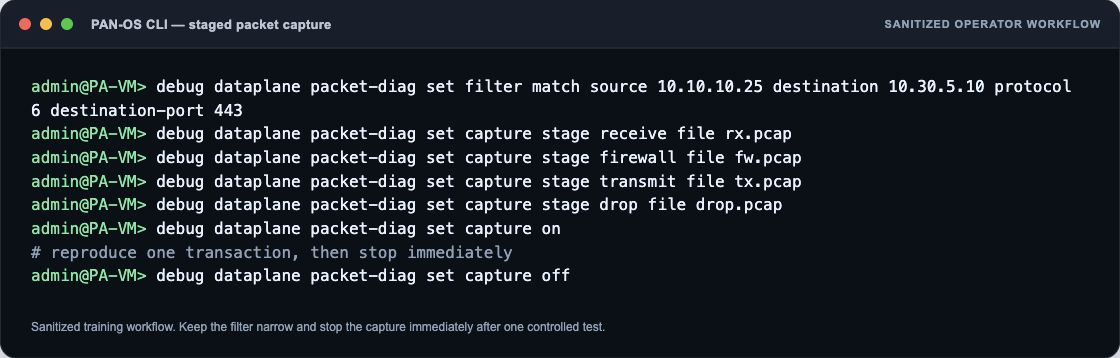
Detailed technical explanation
Mental model: Intermittent loss is a movie, not a photograph; collect synchronized frames until the failure appears.
Three points to remember
- Capture Good And Bad: Timestamp repeated failures using identical tuples and controlled probes.
- Compare Layers: Check interfaces, queues, HA, routes, counters, captures, and endpoints.
- Fix Proven Domain: Correlate provider and application evidence before changing configuration.
Production example: Voice policy allows every call, but egress queue drops spike during backups; the capture and counters identify contention, not policy.
Evidence, logs, commands, counters, captures, or GUI: Use the capture beside this answer as your reference. In your own lab, repeat the same check with the real tuple, user, and rule, then redact hostnames, addresses, and identities before sharing it.
Common incorrect answer or misunderstanding: Consistent allow logs rule out a policy deny, not congestion, physical errors, asymmetric routing, or drops outside the firewall.
Interviewer follow-up: How would you design a test that catches a five-second brownout?
Model answer to the follow-up: I would clarify the exact tuple and expected result, verify the relevant route, rule, session, and log evidence, make the narrowest reversible correction, then repeat the same business test and document rollback evidence.
Beginner explanation
A firewall must know both where to send a packet and how the reply will return. A correct allow rule cannot repair a missing route, wrong zone, unresolved neighbor, or asymmetric return path.
Traffic path
Source → ingress zone → virtual-router or logical-router lookup/PBF → next hop and egress interface → destination → a valid route back to the session source.
Safe evidence command
SAFE READ-ONLY test routing fib-lookup virtual-router <vr> ip <destination>
Purpose: Predicts the forwarding lookup in the named virtual router; syntax differs with Advanced Routing. Interpretation: Do not treat one green state or allow log as end-to-end proof. Correlate the routing output with the same tuple, session ID, both traffic directions, final application result, and the user-visible test.
Operational caution
The listed command is read-only. Use narrow filters for packet capture or debug, schedule disruptive session clear/restart/failover/upgrade actions, name the rollback owner, and never paste customer secrets or unredacted production data.
Version or licensing note: Virtual Router and Advanced Routing Engine syntax differ by release.
Intermediate16. When would QoS help, and when would it hide the real issue?
Short interview answer (30–60 seconds): QoS helps when there is a proven, controllable bottleneck and business traffic must share limited bandwidth. I identify the actual application, classify it reliably, and reserve or prioritize it while shaping less-sensitive bulk traffic. Before changing policy I baseline link utilization, queue drops, latency, jitter, loss, DSCP markings, and application behavior during the busy period. Afterward I repeat the same call or transaction and verify QoS class counters, interface queues, and user experience. QoS cannot create bandwidth, repair a bad cable, fix asymmetric routing, or make a slow server faster. It can also hide the root cause: prioritizing one class may make that class look healthy while starving backups or masking an upstream provider problem. If the path is uncongested, adding QoS is a distraction. I prefer a small, reversible pilot with an explicit stop condition and an owner who can confirm the business result. The senior answer connects classification to the real bottleneck, measures both protected and deprioritized traffic, and keeps captures and counters so the team can tell improvement from merely moving the pain.
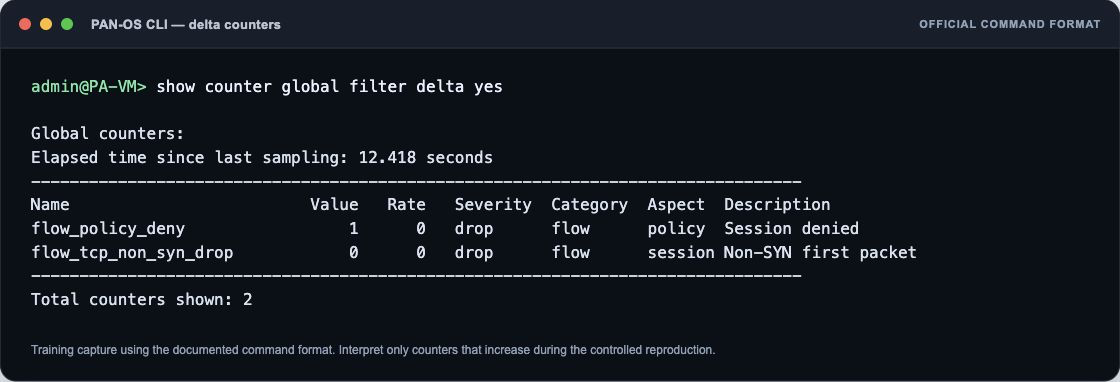
Detailed technical explanation
Mental model: QoS is a traffic marshal at a narrow bridge; it helps only when the bridge is the bottleneck.
Three points to remember
- Prove Bottleneck: Baseline utilization, queues, latency, jitter, loss, and application behavior.
- Classify And Shape: Prioritize verified App-ID traffic; shape bulk traffic during contention.
- Measure Tradeoffs: Repeat tests and ensure QoS did not hide upstream or server faults.
Production example: Prioritize voice during a saturated WAN link, but investigate server latency instead when the link is at 30% utilization.
Evidence, logs, commands, counters, captures, or GUI: Use the capture beside this answer as your reference. In your own lab, repeat the same check with the real tuple, user, and rule, then redact hostnames, addresses, and identities before sharing it.
Common incorrect answer or misunderstanding: QoS does not fix loss that occurs before the firewall’s controlled queue, and “voice priority” without verified App-ID and congestion evidence is guesswork.
Interviewer follow-up: When would shaping a bulk class be safer than reserving bandwidth for voice?
Model answer to the follow-up: I would clarify the exact tuple and expected result, verify the relevant route, rule, session, and log evidence, make the narrowest reversible correction, then repeat the same business test and document rollback evidence.
Beginner explanation
A firewall must know both where to send a packet and how the reply will return. A correct allow rule cannot repair a missing route, wrong zone, unresolved neighbor, or asymmetric return path.
Traffic path
Source → ingress zone → virtual-router or logical-router lookup/PBF → next hop and egress interface → destination → a valid route back to the session source.
Safe evidence command
SAFE READ-ONLY test routing fib-lookup virtual-router <vr> ip <destination>
Purpose: Predicts the forwarding lookup in the named virtual router; syntax differs with Advanced Routing. Interpretation: Do not treat one green state or allow log as end-to-end proof. Correlate the routing output with the same tuple, session ID, both traffic directions, final application result, and the user-visible test.
Operational caution
The listed command is read-only. Use narrow filters for packet capture or debug, schedule disruptive session clear/restart/failover/upgrade actions, name the rollback owner, and never paste customer secrets or unredacted production data.
Version or licensing note: Virtual Router and Advanced Routing Engine syntax differ by release.
Intermediate17. How do you prove the forward route and return path?
Short interview answer (30–60 seconds): Use a FIB lookup for the destination, confirm next hop and egress interface, then verify the server or upstream route back to the translated source. One correct forward route does not prove symmetry.
Detailed technical explanation
Use a FIB lookup for the destination, confirm next hop and egress interface, then verify the server or upstream route back to the translated source. One correct forward route does not prove symmetry. The engineering standard is to correlate configuration intent with one real session and time-bounded evidence before changing policy.
Production example: SYN packets transmit toward the server but replies use another firewall and the session remains incomplete.
Evidence an engineer should collect: Virtual router, FIB route, ARP/ND, receive/transmit captures, peer routing table
Relevant logs, commands, counters, captures, or GUI: `test routing fib-lookup ...` is operational; syntax differs for Virtual Router versus Advanced Routing logical router.
Common incorrect answer or misunderstanding: Checking only the firewall default route.
Interviewer follow-up: What evidence proves asymmetry?
Model answer to the follow-up: A receive capture shows the request and transmit shows egress, while no reply returns; the peer/router capture shows the reply on another path.
Beginner explanation
A firewall must know both where to send a packet and how the reply will return. A correct allow rule cannot repair a missing route, wrong zone, unresolved neighbor, or asymmetric return path.
Traffic path
Source → ingress zone → virtual-router or logical-router lookup/PBF → next hop and egress interface → destination → a valid route back to the session source.
Safe evidence command
SAFE READ-ONLY test routing fib-lookup virtual-router <vr> ip <destination>
Purpose: Predicts the forwarding lookup in the named virtual router; syntax differs with Advanced Routing. Interpretation: Do not treat one green state or allow log as end-to-end proof. Correlate the routing output with the same tuple, session ID, both traffic directions, final application result, and the user-visible test.
Operational caution
The listed command is read-only. Use narrow filters for packet capture or debug, schedule disruptive session clear/restart/failover/upgrade actions, name the rollback owner, and never paste customer secrets or unredacted production data.
Version or licensing note: Advanced Routing Engine uses different CLI syntax in newer releases.
Expert18. How can PBF create a routing or return-path failure?
Short interview answer (30–60 seconds): Policy-Based Forwarding can select a next hop different from the FIB for matching traffic. I test PBF match, monitor status, symmetric-return settings where used, and the reverse path before changing Security policy.
Detailed technical explanation
Policy-Based Forwarding can select a next hop different from the FIB for matching traffic. I test PBF match, monitor status, symmetric-return settings where used, and the reverse path before changing Security policy. The engineering standard is to correlate configuration intent with one real session and time-bounded evidence before changing policy.
Production example: Web traffic is steered to an ISP that does not own the source NAT address, so replies never return.
Evidence an engineer should collect: PBF rule, monitored next hop, session pbf-rule, NAT address, both-direction captures
Relevant logs, commands, counters, captures, or GUI: Policies > Policy Based Forwarding; `show session id <id>` operational
Common incorrect answer or misunderstanding: Saying PBF replaces routing globally.
Interviewer follow-up: When is disabling a PBF rule unsafe?
Model answer to the follow-up: When it carries production classes or failover behavior; first scope the affected tuples and prepare a reversible change.
Beginner explanation
A firewall must know both where to send a packet and how the reply will return. A correct allow rule cannot repair a missing route, wrong zone, unresolved neighbor, or asymmetric return path.
Traffic path
Source → ingress zone → virtual-router or logical-router lookup/PBF → next hop and egress interface → destination → a valid route back to the session source.
Safe evidence command
SAFE READ-ONLY test routing fib-lookup virtual-router <vr> ip <destination>
Purpose: Predicts the forwarding lookup in the named virtual router; syntax differs with Advanced Routing. Interpretation: Do not treat one green state or allow log as end-to-end proof. Correlate the routing output with the same tuple, session ID, both traffic directions, final application result, and the user-visible test.
Operational caution
The listed command is read-only. Use narrow filters for packet capture or debug, schedule disruptive session clear/restart/failover/upgrade actions, name the rollback owner, and never paste customer secrets or unredacted production data.
Version or licensing note: PBF fields and symmetric-return options are version dependent.
Security policy and matching 8 questions
Beginner19. What does application-default protect you from, and when would you not use it?
Short interview answer (30–60 seconds): I use application-default as the normal service setting on an App-ID rule. It means the firewall accepts that application only on the ports Palo Alto defines as normal for it. That prevents a rule for, say, web-browsing from quietly allowing the same application on an unusual port where it may be trying to evade controls. I would make an exception only when I can prove a legitimate application uses a different port. In that case I create a narrow custom service, document the owner and reason, and still require the expected App-ID. I do not change the whole rule to service any just to make one legacy system work. After the change I check the traffic log for the final App-ID and actual port, and set a review date for the exception.
I also ask the application owner whether the port is documented by the vendor and whether the service can be moved to its normal port. An exception with no owner, expiry, or test evidence is technical debt waiting to become an access hole.
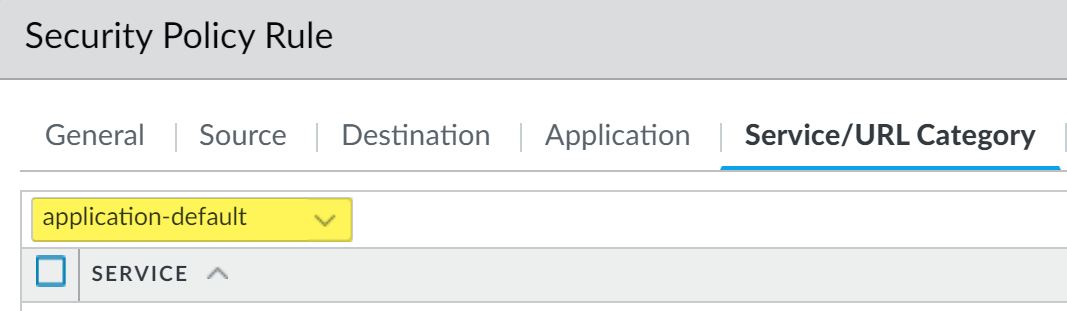
Detailed technical explanation
Mental model: App-ID says “what”; application-default adds “where it is allowed to talk.”
Three points to remember
- Set application-default: Restrict each App-ID to its vendor-defined normal ports.
- Document exception: Use a narrow custom service only for verified nonstandard ports.
- Verify actual port: Confirm final App-ID, destination port, owner, and review date.
Production example: A payroll server uses TCP 8443. Keep normal web rules on application-default; create one reviewed 8443 exception for that server.
Evidence, logs, commands, counters, captures, or GUI: Use the capture beside this answer as your reference. In your own lab, repeat the same check with the real tuple, user, and rule, then redact hostnames, addresses, and identities before sharing it.
Common incorrect answer or misunderstanding: Avoid saying application-default blocks every non-standard port unconditionally; a custom service can intentionally permit a documented exception.
Interviewer follow-up: What evidence would justify retaining the nonstandard-port exception at the next review?
Model answer to the follow-up: I would clarify the exact tuple and expected result, verify the relevant route, rule, session, and log evidence, make the narrowest reversible correction, then repeat the same business test and document rollback evidence.
Beginner explanation
Security rules are checked in order. The first matching rule decides whether the session may start, while attached profiles can still inspect and block harmful content.
Traffic path
Original source/destination and zones → ordered Security rule match → application/service/user/device criteria → attached inspection profiles → action and session log.
Safe evidence command
SAFE READ-ONLY test security-policy-match source <src> destination <dst> protocol 6 destination-port <port>
Purpose: Predicts a Security rule match without generating the application transaction. Interpretation: Do not treat one green state or allow log as end-to-end proof. Correlate the policy output with the same tuple, session ID, both traffic directions, final application result, and the user-visible test.
Operational caution
The listed command is read-only. Use narrow filters for packet capture or debug, schedule disruptive session clear/restart/failover/upgrade actions, name the rollback owner, and never paste customer secrets or unredacted production data.
Version or licensing note: Policy-match parameters and rule-usage features vary by PAN-OS release.
Beginner20. Explain pre-rules, local rules, post-rules, and the default rules.
Short interview answer (30–60 seconds): Panorama pre-rules are evaluated before rules created locally on the firewall. Post-rules are evaluated after the local rules. PAN-OS uses first match, so a matching pre-rule cannot be overridden by a local rule later in the order. The built-in intrazone and interzone defaults sit at the bottom. I preview the effective rulebase on the target firewall rather than trusting the rule order I see on Panorama.
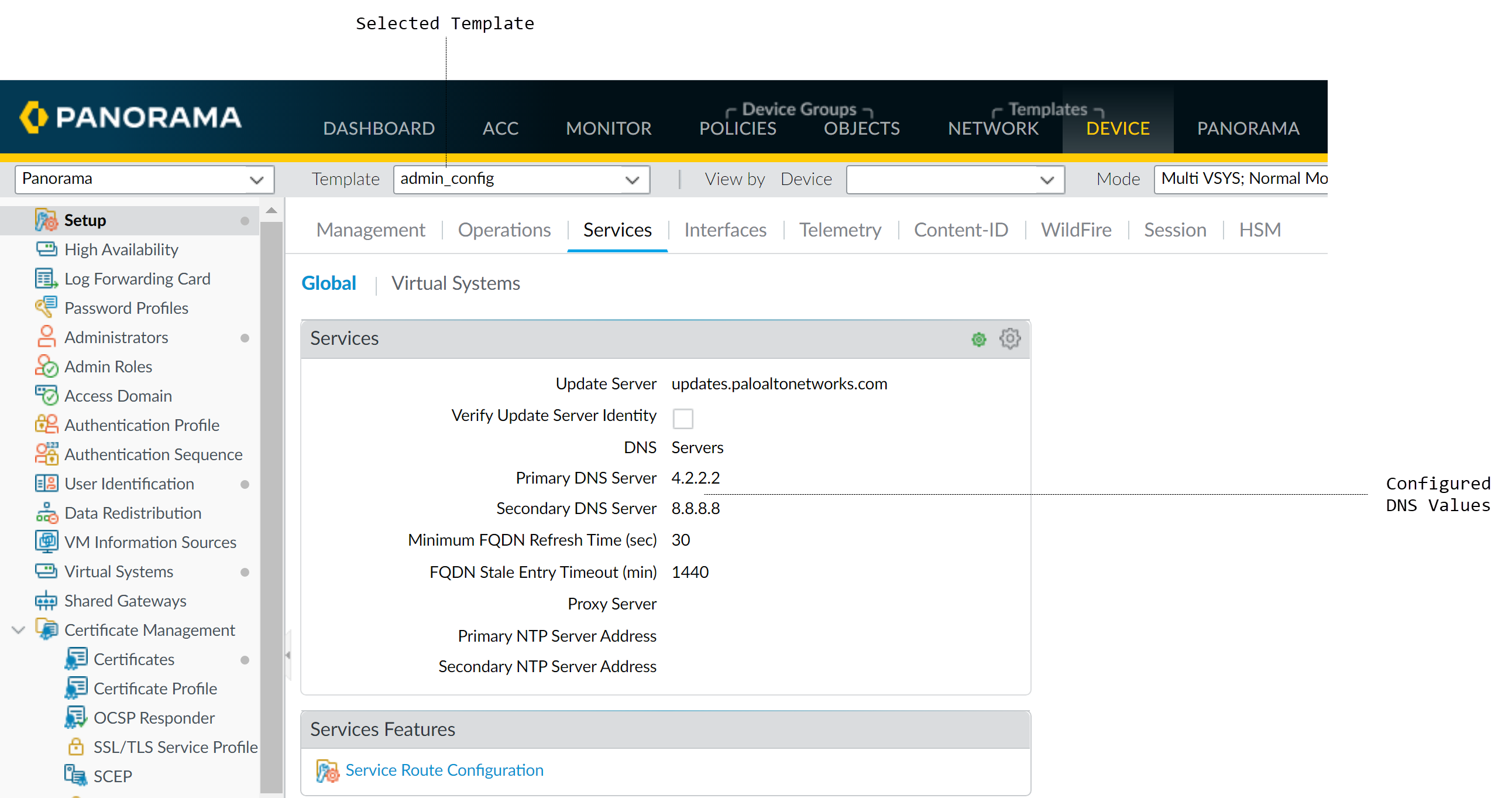
Detailed technical explanation
Start with the decision the firewall is making, then name the evidence that proves it.
Three points to remember
- Order rule sources: Pre-rules evaluate before local rules; post-rules evaluate after them.
- Apply first match: A matching pre-rule cannot be overridden by a later local rule.
- Confirm defaults: Intrazone and interzone defaults remain at the bottom of the rulebase.
Production example: Use one known-good transaction and one controlled failure so the result can be proved rather than guessed.
Evidence, logs, commands, counters, captures, or GUI: Use the capture beside this answer as your reference. In your own lab, repeat the same check with the real tuple, user, and rule, then redact hostnames, addresses, and identities before sharing it.
Common incorrect answer or misunderstanding: The original is technically sound. Make the phrase “default rules remain at the bottom” explicit: these are intrinsic defaults, not ordinary movable rules, and the exact default action/logging behavior can vary by PAN-OS release and configuration. Do not teach students that “local always wins.
Interviewer follow-up: Where must an approved exception be placed if a matching Panorama pre-rule currently denies it?
Model answer to the follow-up: I would clarify the exact tuple and expected result, verify the relevant route, rule, session, and log evidence, make the narrowest reversible correction, then repeat the same business test and document rollback evidence.
Beginner explanation
Security rules are checked in order. The first matching rule decides whether the session may start, while attached profiles can still inspect and block harmful content.
Traffic path
Original source/destination and zones → ordered Security rule match → application/service/user/device criteria → attached inspection profiles → action and session log.
Safe evidence command
SAFE READ-ONLY test security-policy-match source <src> destination <dst> protocol 6 destination-port <port>
Purpose: Predicts a Security rule match without generating the application transaction. Interpretation: Do not treat one green state or allow log as end-to-end proof. Correlate the policy output with the same tuple, session ID, both traffic directions, final application result, and the user-visible test.
Operational caution
The listed command is read-only. Use narrow filters for packet capture or debug, schedule disruptive session clear/restart/failover/upgrade actions, name the rollback owner, and never paste customer secrets or unredacted production data.
Version or licensing note: Policy-match parameters and rule-usage features vary by PAN-OS release.
Intermediate21. How do you use test security-policy-match and test nat-policy-match safely?
Short interview answer (30–60 seconds): I use test security-policy-match and test nat-policy-match as prediction tools. I enter the real source and destination, zones, protocol, service/port, and—where supported—the user and application. The result tells me which rule the configuration would select; it does not create a session or prove App-ID, server response, or return routing.
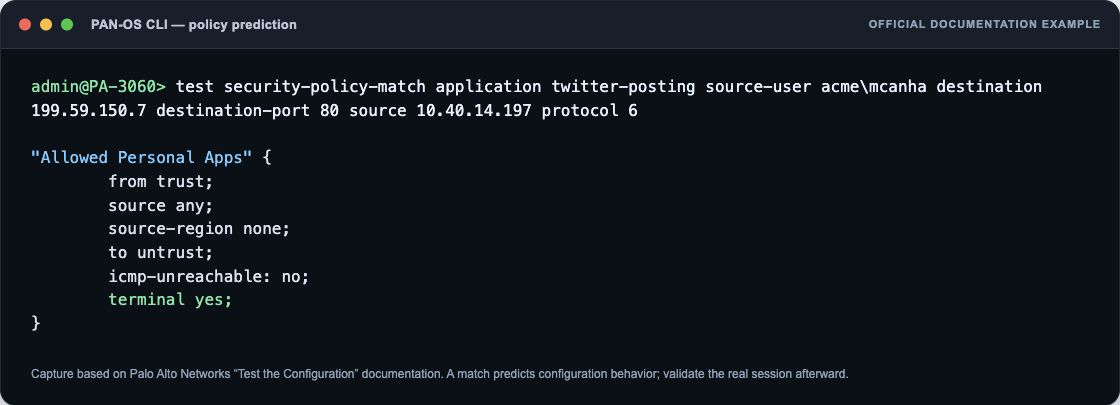
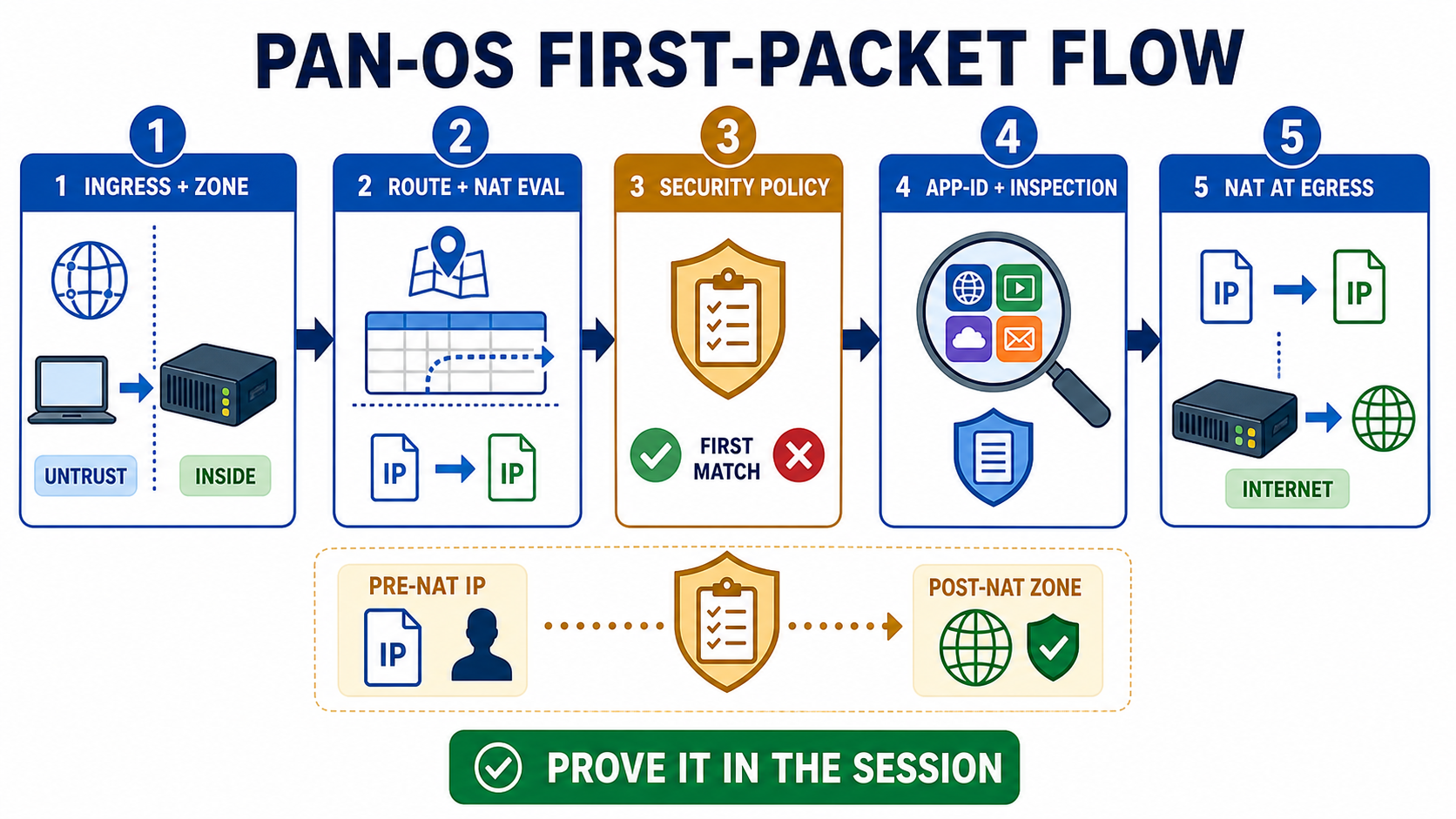
Detailed technical explanation
Start with the decision the firewall is making, then name the evidence that proves it.
Three points to remember
- Build exact tuple: Enter real zones, addresses, protocol, service, user, and application.
- Predict rule: Run security and NAT match tests to identify selected rules.
- Prove session: Confirm logs, App-ID, translation, return routing, and server response afterward.
Production example: Use one known-good transaction and one controlled failure so the result can be proved rather than guessed.
Evidence, logs, commands, counters, captures, or GUI: Use the capture beside this answer as your reference. In your own lab, repeat the same check with the real tuple, user, and rule, then redact hostnames, addresses, and identities before sharing it.
Common incorrect answer or misunderstanding: The original correctly warns that tests are predictions. Tighten it by saying that user and application fields are version/command dependent; a test that supplies an assumed App-ID can differ from a first packet’s real classification.
Interviewer follow-up: Why might the real session choose a different application than the test input?
Model answer to the follow-up: I would clarify the exact tuple and expected result, verify the relevant route, rule, session, and log evidence, make the narrowest reversible correction, then repeat the same business test and document rollback evidence.
Beginner explanation
Security rules are checked in order. The first matching rule decides whether the session may start, while attached profiles can still inspect and block harmful content.
Traffic path
Original source/destination and zones → ordered Security rule match → application/service/user/device criteria → attached inspection profiles → action and session log.
Safe evidence command
SAFE READ-ONLY test security-policy-match source <src> destination <dst> protocol 6 destination-port <port>
Purpose: Predicts a Security rule match without generating the application transaction. Interpretation: Do not treat one green state or allow log as end-to-end proof. Correlate the policy output with the same tuple, session ID, both traffic directions, final application result, and the user-visible test.
Operational caution
The listed command is read-only. Use narrow filters for packet capture or debug, schedule disruptive session clear/restart/failover/upgrade actions, name the rollback owner, and never paste customer secrets or unredacted production data.
Version or licensing note: Policy-match parameters and rule-usage features vary by PAN-OS release.
Intermediate22. How would you migrate a broad port-based rulebase to App-ID safely?
Short interview answer (30–60 seconds): I would treat this as a measured policy migration, not a single "replace service with application" edit. First I would inventory the existing rules, owners, hit counts, source and destination zones, and the applications actually seen in Traffic logs. I would export a baseline of allowed sessions and identify unknown, incomplete, and dependent applications. For each rule I would create a temporary, tightly scoped App-ID rule above the old rule, using application-default, the existing security profiles, and explicit exceptions only when evidence justifies them. I would run it in a pilot window, compare rule hits and user reports, and review Monitor > Traffic for app, rule, session end reason, and bytes. If an application is initially identified as ssl or web-browsing, I investigate dependencies rather than permanently allowing any service. After the observation period, I disable the legacy rule, watch for denied sessions, and keep a tested rollback. Finally I remove unused ports and document the business owner. That sequence preserves availability while steadily improving least privilege.
Detailed technical explanation
Mental model: Think of the old rule as a bridge. Build a narrower bridge beside it, prove traffic crosses, then remove the old bridge.
Three points to remember
- Inventory Baseline: Export rules, owners, hits, applications, dependencies, and current sessions.
- Pilot App-ID: Place scoped App-ID rules above legacy ports with application-default.
- Observe And Retire: Compare logs, remediate misses, disable old rules, preserve rollback.
Production example: Replace “users to any TCP/443” with Salesforce and Microsoft 365 App-IDs for the pilot group, then expand after clean logs.
Evidence, logs, commands, counters, captures, or GUI: Use the capture beside this answer as your reference. In your own lab, repeat the same check with the real tuple, user, and rule, then redact hostnames, addresses, and identities before sharing it.
Common incorrect answer or misunderstanding: Do not “convert every service field to application-default” in one commit. Some legacy or custom applications need a documented transition rule and owner.
Interviewer follow-up: How long would you observe before declaring the legacy rule unused?
Model answer to the follow-up: I would clarify the exact tuple and expected result, verify the relevant route, rule, session, and log evidence, make the narrowest reversible correction, then repeat the same business test and document rollback evidence.
Beginner explanation
Security rules are checked in order. The first matching rule decides whether the session may start, while attached profiles can still inspect and block harmful content.
Traffic path
Original source/destination and zones → ordered Security rule match → application/service/user/device criteria → attached inspection profiles → action and session log.
Safe evidence command
SAFE READ-ONLY test security-policy-match source <src> destination <dst> protocol 6 destination-port <port>
Purpose: Predicts a Security rule match without generating the application transaction. Interpretation: Do not treat one green state or allow log as end-to-end proof. Correlate the policy output with the same tuple, session ID, both traffic directions, final application result, and the user-visible test.
Operational caution
The listed command is read-only. Use narrow filters for packet capture or debug, schedule disruptive session clear/restart/failover/upgrade actions, name the rollback owner, and never paste customer secrets or unredacted production data.
Version or licensing note: Policy-match parameters and rule-usage features vary by PAN-OS release.
Expert23. How would you design least-privilege policy for a new three-tier application?
Short interview answer (30–60 seconds): I start with an agreed flow matrix: users to web tier, web to application tier, application to database, and the supporting DNS, NTP, certificate, monitoring, backup, and update flows. I place each tier in an intentional zone or segment, identify service accounts with User-ID or another reliable identity source, and write directional rules using the required App-IDs and application-default. Every rule gets the smallest source, destination, service, schedule, and business owner practical. I attach the right Security Profile Group, enable useful logging, and place specific rules above broader ones. During build, a temporary discovery rule can expose dependencies, but it has an expiry and is replaced with explicit rules after observing real sessions. I validate with policy-match tests, controlled transactions, App-ID dependencies, and deny logs between tiers. I review return traffic, health checks, failover nodes, and maintenance paths so “least privilege” does not break resilience. Finally I remove unused objects and set review dates. A broad three-tier allow rule is quick, but it hides lateral movement and makes future troubleshooting much harder.
Detailed technical explanation
Mental model: Each tier is a room with one labeled door to the next—not an open hallway through the building.
Three points to remember
- Map Required Flows: Document users, tiers, identities, dependencies, health checks, and backups.
- Write Narrow Rules: Allow specific App-IDs on application-default with profiles and logging.
- Validate And Remove: Test sessions, review denies, expire discovery access, and schedule ownership.
Production example: Allow web-to-app on the documented API App-ID and app-to-database on the database App-ID only; deny all other east-west traffic.
Evidence, logs, commands, counters, captures, or GUI: Use the capture beside this answer as your reference. In your own lab, repeat the same check with the real tuple, user, and rule, then redact hostnames, addresses, and identities before sharing it.
Common incorrect answer or misunderstanding: Least privilege includes operational dependencies such as DNS, NTP, monitoring, and backups; omitting them creates fragile “secure” designs.
Interviewer follow-up: How would health checks and backup traffic change the minimum rule set?
Model answer to the follow-up: I would clarify the exact tuple and expected result, verify the relevant route, rule, session, and log evidence, make the narrowest reversible correction, then repeat the same business test and document rollback evidence.
Beginner explanation
Security rules are checked in order. The first matching rule decides whether the session may start, while attached profiles can still inspect and block harmful content.
Traffic path
Original source/destination and zones → ordered Security rule match → application/service/user/device criteria → attached inspection profiles → action and session log.
Safe evidence command
SAFE READ-ONLY test security-policy-match source <src> destination <dst> protocol 6 destination-port <port>
Purpose: Predicts a Security rule match without generating the application transaction. Interpretation: Do not treat one green state or allow log as end-to-end proof. Correlate the policy output with the same tuple, session ID, both traffic directions, final application result, and the user-visible test.
Operational caution
The listed command is read-only. Use narrow filters for packet capture or debug, schedule disruptive session clear/restart/failover/upgrade actions, name the rollback owner, and never paste customer secrets or unredacted production data.
Version or licensing note: Policy-match parameters and rule-usage features vary by PAN-OS release.
Intermediate24. A newly created Security rule has no hits. What do you check first?
Short interview answer (30–60 seconds): Confirm the exact tuple and time, then check rule order, zones, original addresses, user, application, service, schedule, and whether traffic reaches this firewall. Use a policy-match test as a prediction and verify a real session.
Detailed technical explanation
Confirm the exact tuple and time, then check rule order, zones, original addresses, user, application, service, schedule, and whether traffic reaches this firewall. Use a policy-match test as a prediction and verify a real session. The engineering standard is to correlate configuration intent with one real session and time-bounded evidence before changing policy.
Production example: A rule references the translated server IP, so DNAT traffic continues to match a lower rule.
Evidence an engineer should collect: Rule UUID/order, hit count, traffic log, zones, pre-NAT addresses, session
Relevant logs, commands, counters, captures, or GUI: `test security-policy-match ...` is operational and non-disruptive; it does not create traffic.
Common incorrect answer or misunderstanding: Moving the rule to the top before proving why it misses.
Interviewer follow-up: Can a policy-match test prove service restoration?
Model answer to the follow-up: No. It predicts configuration matching; a real transaction and logs prove runtime behavior.
Beginner explanation
Security rules are checked in order. The first matching rule decides whether the session may start, while attached profiles can still inspect and block harmful content.
Traffic path
Original source/destination and zones → ordered Security rule match → application/service/user/device criteria → attached inspection profiles → action and session log.
Safe evidence command
SAFE READ-ONLY test security-policy-match source <src> destination <dst> protocol 6 destination-port <port>
Purpose: Predicts a Security rule match without generating the application transaction. Interpretation: Do not treat one green state or allow log as end-to-end proof. Correlate the policy output with the same tuple, session ID, both traffic directions, final application result, and the user-visible test.
Operational caution
The listed command is read-only. Use narrow filters for packet capture or debug, schedule disruptive session clear/restart/failover/upgrade actions, name the rollback owner, and never paste customer secrets or unredacted production data.
Version or licensing note: Available match-test parameters vary by PAN-OS release.
Intermediate25. Traffic is allowed by policy, but the application does not work. What next?
Short interview answer (30–60 seconds): Treat allow as one decision, not success. Check session counters and end reason, return traffic, App-ID transition, application-default, profiles, decryption, DNS, MTU, and server response; capture both directions if needed.
Detailed technical explanation
Treat allow as one decision, not success. Check session counters and end reason, return traffic, App-ID transition, application-default, profiles, decryption, DNS, MTU, and server response; capture both directions if needed. The engineering standard is to correlate configuration intent with one real session and time-bounded evidence before changing policy.
Production example: The firewall allows the SYN, but the server resets because its TLS chain is incomplete.
Evidence an engineer should collect: Traffic/Threat/URL/Decryption logs, session, route, four-stage capture, server logs
Relevant logs, commands, counters, captures, or GUI: `show session id <id>` operational; staged capture is debug-related and performance-sensitive.
Common incorrect answer or misunderstanding: Adding service any because the Traffic log says allow.
Interviewer follow-up: What is the safest first correction?
Model answer to the follow-up: None until the failing stage is proved; correct the narrow route, dependency, profile exception, or server issue and retest the same transaction.
Beginner explanation
Security rules are checked in order. The first matching rule decides whether the session may start, while attached profiles can still inspect and block harmful content.
Traffic path
Original source/destination and zones → ordered Security rule match → application/service/user/device criteria → attached inspection profiles → action and session log.
Safe evidence command
SAFE READ-ONLY test security-policy-match source <src> destination <dst> protocol 6 destination-port <port>
Purpose: Predicts a Security rule match without generating the application transaction. Interpretation: Do not treat one green state or allow log as end-to-end proof. Correlate the policy output with the same tuple, session ID, both traffic directions, final application result, and the user-visible test.
Operational caution
The listed command is read-only. Use narrow filters for packet capture or debug, schedule disruptive session clear/restart/failover/upgrade actions, name the rollback owner, and never paste customer secrets or unredacted production data.
Version or licensing note: Log fields and decryption details vary by release and subscription.
Advanced26. Why can IP-and-port testing pass while application-default fails?
Short interview answer (30–60 seconds): A port test proves Layer 4 reachability. application-default also requires the final App-ID to use a defined standard port. A custom or legacy service on a nonstandard port needs a narrow documented exception or custom App-ID design.
Detailed technical explanation
A port test proves Layer 4 reachability. application-default also requires the final App-ID to use a defined standard port. A custom or legacy service on a nonstandard port needs a narrow documented exception or custom App-ID design. The engineering standard is to correlate configuration intent with one real session and time-bounded evidence before changing policy.
Production example: TCP 8443 opens, but the rule allowing web-browsing with application-default denies the session after identification.
Evidence an engineer should collect: Final App-ID, destination port, rule/service, application metadata, end reason
Relevant logs, commands, counters, captures, or GUI: Objects > Applications; Traffic log; Policy Optimizer where supported
Common incorrect answer or misunderstanding: Changing the whole rule to service any.
Interviewer follow-up: What evidence justifies a custom service?
Model answer to the follow-up: Vendor documentation, owner approval, final App-ID, exact endpoints, risk review, expiry, and a successful controlled test.
Beginner explanation
Security rules are checked in order. The first matching rule decides whether the session may start, while attached profiles can still inspect and block harmful content.
Traffic path
Original source/destination and zones → ordered Security rule match → application/service/user/device criteria → attached inspection profiles → action and session log.
Safe evidence command
SAFE READ-ONLY test security-policy-match source <src> destination <dst> protocol 6 destination-port <port>
Purpose: Predicts a Security rule match without generating the application transaction. Interpretation: Do not treat one green state or allow log as end-to-end proof. Correlate the policy output with the same tuple, session ID, both traffic directions, final application result, and the user-visible test.
Operational caution
The listed command is read-only. Use narrow filters for packet capture or debug, schedule disruptive session clear/restart/failover/upgrade actions, name the rollback owner, and never paste customer secrets or unredacted production data.
Version or licensing note: Application ports and dependencies can change with content updates.
NAT and packet-processing behavior 8 questions
Advanced27. Walk through the first-packet flow for a brand-new session.
Short interview answer (30–60 seconds): For a new flow I first establish the ingress interface and zone and confirm there is no existing session. PAN-OS performs route and NAT-policy evaluation, then evaluates Security policy using the original addresses and the resulting post-NAT destination zone. The session is classified and inspected as more packets arrive, and translation is applied on the egress path. Established packets then use cached session state rather than repeating the entire slow path. For a published API, I prove each stage with a session view and staged receive, firewall, and transmit captures: ingress zone, route, NAT rule, Security rule, translated tuple, App-ID, and end reason. “NAT happens before policy” is too vague for an interview; state exactly which address and zone fields are matched.
I also mention that the first packet may be logged before the final App-ID is known. That is why a short-lived generic classification in a log does not automatically mean the rule should allow generic SSL forever.
Detailed technical explanation
Mental model: Follow one new conversation from ingress to egress, recording every decision.
Three points to remember
- Receive packet: Identify ingress interface, source zone, and existing session state.
- Match route NAT: Evaluate route and NAT, retaining original addresses for policy.
- Inspect forward: Apply Security policy, classify content, translate, and transmit.
Production example: Public API traffic keeps the public address for policy matching but transmits toward the translated DMZ server.
Evidence, logs, commands, counters, captures, or GUI: Use the capture beside this answer as your reference. In your own lab, repeat the same check with the real tuple, user, and rule, then redact hostnames, addresses, and identities before sharing it.
Common incorrect answer or misunderstanding: Distinguish policy matching fields from when the translated packet leaves the interface.
Interviewer follow-up: Which parts of the flow are cached for an established session?
Model answer to the follow-up: I would clarify the exact tuple and expected result, verify the relevant route, rule, session, and log evidence, make the narrowest reversible correction, then repeat the same business test and document rollback evidence.
Beginner explanation
NAT rewrites an address or port, but it does not replace routing or Security policy. Always keep the original tuple, translated tuple, destination zone, and return path separate.
Traffic path
Ingress packet → NAT rule match → destination translation if used → destination route/zone determination → Security policy using original IP fields → source translation if used → return-session reversal.
Safe evidence command
SAFE READ-ONLY test nat-policy-match source <src> destination <dst> protocol 6 destination-port <port>
Purpose: Predicts NAT rule matching for a sanitized tuple; verify exact syntax on the target release. Interpretation: Do not treat one green state or allow log as end-to-end proof. Correlate the nat output with the same tuple, session ID, both traffic directions, final application result, and the user-visible test.
Operational caution
The listed command is read-only. Use narrow filters for packet capture or debug, schedule disruptive session clear/restart/failover/upgrade actions, name the rollback owner, and never paste customer secrets or unredacted production data.
Version or licensing note: NAT capacity, proxy ARP, and command syntax are platform/version dependent.
Advanced28. A destination-NAT rule publishes a DMZ server. Which address and zone belong in Security policy?
Short interview answer (30–60 seconds): For an internet client reaching a DMZ server through destination NAT, I write the Security rule with the public, original destination address and the post-NAT DMZ destination zone. That combination is easy to miss: PAN-OS uses the original destination address for the address match, while NAT and routing determine the translated destination and resulting zone before the policy decision. I verify the design instead of relying on memory. First I run test nat-policy-match for the client, public IP, and service. Then I inspect the session or Traffic log to confirm original and translated destinations, ingress and egress zones, and the rule that actually matched. Using the server's private address in the Security rule is a classic mistake—the DNAT rule can be correct while the allow rule never matches.
I also check the return route and any hairpin requirement. Publishing a server is not complete when the inbound rule matches; the server must reply through a path that preserves the stateful session and exposes only the intended service.

Detailed technical explanation
Mental model: Match the visitor's public address, but place the visitor into the server's DMZ zone after translation.
Three points to remember
- Match public address: Use the original public destination address in Security policy.
- Use DMZ zone: Set destination zone to the post-NAT server's physical zone.
- Verify translation: Confirm NAT match, original tuple, translated tuple, and egress.
Production example: Public 203.0.113.20 translates to 10.20.10.20 in untrust-to-dmz; the rule names 203.0.113.20 and destination zone DMZ.
Evidence, logs, commands, counters, captures, or GUI: Use the capture beside this answer as your reference. In your own lab, repeat the same check with the real tuple, user, and rule, then redact hostnames, addresses, and identities before sharing it.
Common incorrect answer or misunderstanding: Do not generalize this to every NAT design; validate the exact PAN-OS NAT and policy evaluation for the traffic direction.
Interviewer follow-up: How would source NAT or hairpin access change the return-path design?
Model answer to the follow-up: I would clarify the exact tuple and expected result, verify the relevant route, rule, session, and log evidence, make the narrowest reversible correction, then repeat the same business test and document rollback evidence.
Beginner explanation
NAT rewrites an address or port, but it does not replace routing or Security policy. Always keep the original tuple, translated tuple, destination zone, and return path separate.
Traffic path
Ingress packet → NAT rule match → destination translation if used → destination route/zone determination → Security policy using original IP fields → source translation if used → return-session reversal.
Safe evidence command
SAFE READ-ONLY test nat-policy-match source <src> destination <dst> protocol 6 destination-port <port>
Purpose: Predicts NAT rule matching for a sanitized tuple; verify exact syntax on the target release. Interpretation: Do not treat one green state or allow log as end-to-end proof. Correlate the nat output with the same tuple, session ID, both traffic directions, final application result, and the user-visible test.
Operational caution
The listed command is read-only. Use narrow filters for packet capture or debug, schedule disruptive session clear/restart/failover/upgrade actions, name the rollback owner, and never paste customer secrets or unredacted production data.
Version or licensing note: NAT capacity, proxy ARP, and command syntax are platform/version dependent.
Expert29. How do you troubleshoot source-NAT exhaustion or asymmetric return traffic?
Short interview answer (30–60 seconds): I first prove which failure I have; I do not immediately add addresses to the NAT pool. For exhaustion, I check the NAT rule hit count, active sessions per translated address, translated port allocation, and allocation errors. A branch rollout that creates thousands of outbound connections may run out of usable translated ports while existing sessions continue. For asymmetry, I trace one failed five-tuple in both directions: route lookup, session state, receive/transmit packet captures, and the return gateway. The firewall must see the return packets on the expected path for stateful inspection to work. I correlate the Traffic log, session details, NAT translation, and captures for the same timestamp. Only after evidence shows a real DIPP capacity problem do I expand the pool or change oversubscription; if the reverse route or downstream device is wrong, a larger pool merely hides the fault.
I preserve a failed sample before clearing sessions, because clearing destroys useful evidence. A short maintenance capture, NAT counters, and a before/after session count give the next engineer a defensible record of what changed and why.
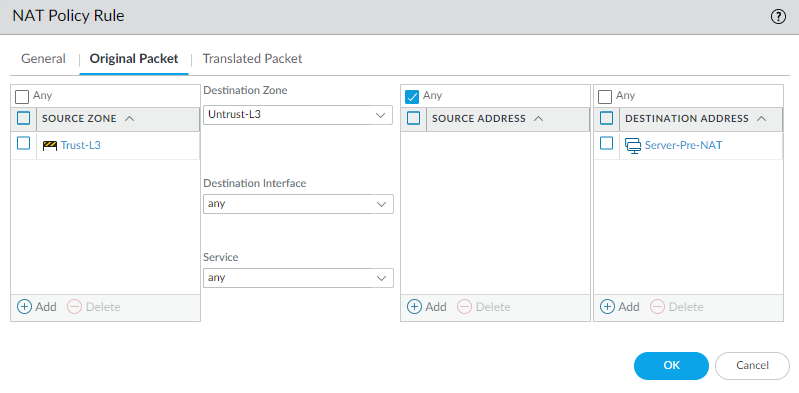
Detailed technical explanation
Mental model: Follow one conversation out and back; verify both the translated identity and the return path.
Three points to remember
- Prove exhaustion: Check translated ports, session counts, counters, and allocation errors.
- Trace return path: Capture both directions and verify routing symmetry for one session.
- Remediate measured cause: Expand pools only after proving capacity, not asymmetric routing.
Production example: New SaaS sessions fail during patching, but old sessions work. Per-address port counts and allocation errors confirm DIPP exhaustion.
Evidence, logs, commands, counters, captures, or GUI: Use the capture beside this answer as your reference. In your own lab, repeat the same check with the real tuple, user, and rule, then redact hostnames, addresses, and identities before sharing it.
Common incorrect answer or misunderstanding: Increase the pool” is a remediation, not a diagnosis; prove port exhaustion first.
Interviewer follow-up: How would DIPP oversubscription and destination-port reuse affect your calculation?
Model answer to the follow-up: I would clarify the exact tuple and expected result, verify the relevant route, rule, session, and log evidence, make the narrowest reversible correction, then repeat the same business test and document rollback evidence.
Beginner explanation
NAT rewrites an address or port, but it does not replace routing or Security policy. Always keep the original tuple, translated tuple, destination zone, and return path separate.
Traffic path
Ingress packet → NAT rule match → destination translation if used → destination route/zone determination → Security policy using original IP fields → source translation if used → return-session reversal.
Safe evidence command
SAFE READ-ONLY test nat-policy-match source <src> destination <dst> protocol 6 destination-port <port>
Purpose: Predicts NAT rule matching for a sanitized tuple; verify exact syntax on the target release. Interpretation: Do not treat one green state or allow log as end-to-end proof. Correlate the nat output with the same tuple, session ID, both traffic directions, final application result, and the user-visible test.
Operational caution
The listed command is read-only. Use narrow filters for packet capture or debug, schedule disruptive session clear/restart/failover/upgrade actions, name the rollback owner, and never paste customer secrets or unredacted production data.
Version or licensing note: NAT capacity, proxy ARP, and command syntax are platform/version dependent.
Beginner30. What is U-turn NAT, and why is source translation often required with it?
Short interview answer (30–60 seconds): U-turn, or hairpin, NAT is when an inside client uses a service's public name and address to reach a server that is also inside. The firewall destination-translates the public address to the internal server. I often add source NAT so the server sends its reply back through the firewall; otherwise it may route directly to the client's private address. That direct reply can break stateful inspection and make the client see an unexpected address or tuple. I verify the forward and reverse session entries, NAT rule, source and destination zones, and a capture on both sides. The Security rule still needs to allow the real traffic path. There are designs where routing is deliberately symmetric without source translation, but I would only omit SNAT after proving the server's return route and the client behavior in a lab or controlled change.
The practical test is simple: the server must reply toward the firewall, and the client must receive the address it requested. I validate both with captures before calling the hairpin design complete or production-safe.
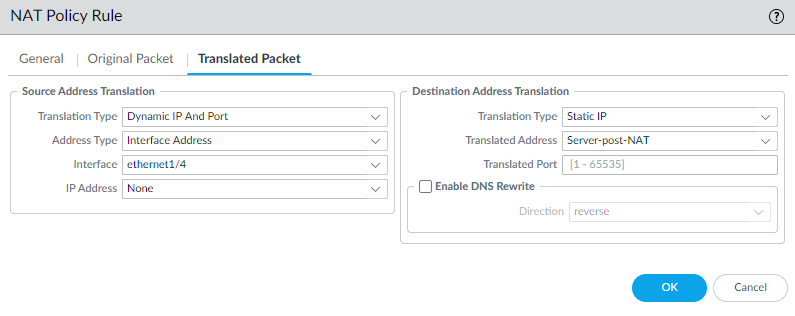
Detailed technical explanation
Mental model: Hairpin traffic must enter and leave through the same security checkpoint so both sides agree on the conversation.
Three points to remember
- Translate public destination: Map the inside client's public service address to its server.
- Preserve symmetry: Source-translate when needed so replies return through the firewall.
- Validate both directions: Check tuples, routes, zones, and captures before production use.
Production example: An employee inside opens portal.example.com; DNAT sends it to 10.20.10.20 and SNAT keeps the portal's reply through the firewall.
Evidence, logs, commands, counters, captures, or GUI: Use the capture beside this answer as your reference. In your own lab, repeat the same check with the real tuple, user, and rule, then redact hostnames, addresses, and identities before sharing it.
Common incorrect answer or misunderstanding: Source translation is common, not mathematically mandatory; the deciding test is a proven symmetric return path.
Interviewer follow-up: When can U-turn NAT work without source translation?
Model answer to the follow-up: I would clarify the exact tuple and expected result, verify the relevant route, rule, session, and log evidence, make the narrowest reversible correction, then repeat the same business test and document rollback evidence.
Beginner explanation
NAT rewrites an address or port, but it does not replace routing or Security policy. Always keep the original tuple, translated tuple, destination zone, and return path separate.
Traffic path
Ingress packet → NAT rule match → destination translation if used → destination route/zone determination → Security policy using original IP fields → source translation if used → return-session reversal.
Safe evidence command
SAFE READ-ONLY test nat-policy-match source <src> destination <dst> protocol 6 destination-port <port>
Purpose: Predicts NAT rule matching for a sanitized tuple; verify exact syntax on the target release. Interpretation: Do not treat one green state or allow log as end-to-end proof. Correlate the nat output with the same tuple, session ID, both traffic directions, final application result, and the user-visible test.
Operational caution
The listed command is read-only. Use narrow filters for packet capture or debug, schedule disruptive session clear/restart/failover/upgrade actions, name the rollback owner, and never paste customer secrets or unredacted production data.
Version or licensing note: NAT capacity, proxy ARP, and command syntax are platform/version dependent.
Advanced31. When do you place an explicit no-NAT rule above a broader NAT rule?
Short interview answer (30–60 seconds): I use a no-NAT exception when a specific flow must keep its original addresses, while the rest of the source zone should be translated. PAN-OS evaluates NAT rules top-down and stops at the first match, so the exception must be above the broad Internet-SNAT rule and include the complete source, destination, service, and zone criteria. For example, traffic from a partner subnet to an internal service may need its real address for allow-listing and logging, while ordinary employee traffic still receives Internet SNAT. I test both the exception and a normal flow with test nat-policy-match, then confirm the session shows no translation for the partner and translation for the ordinary flow. I also check rule hit counts after deployment. A no-NAT rule below the catch-all is effectively dead code.
I document the business reason in the rule description so a later engineer does not “clean up” a deliberate exception, and I re-run the match test whenever address groups or the broad rule changes.

Detailed technical explanation
Mental model: Specific exception first; general translation second—like firewall routing ACLs.
Three points to remember
- Identify bypass: Find trusted traffic that must retain original source addresses.
- Order no-NAT: Place the specific exemption before the broader translating rule.
- Test precedence: Confirm matched rule, unchanged tuple, return route, and session behavior.
Production example: Partner 10.20.0.0/16 to 10.30.5.10 stays unchanged; all other Trust traffic uses the Internet SNAT rule.
Evidence, logs, commands, counters, captures, or GUI: Use the capture beside this answer as your reference. In your own lab, repeat the same check with the real tuple, user, and rule, then redact hostnames, addresses, and identities before sharing it.
Common incorrect answer or misunderstanding: No-NAT always wins” is wrong; it wins only when its rule is first and matches.
Interviewer follow-up: Which objects and ordering controls prevent a future subnet from bypassing NAT accidentally?
Model answer to the follow-up: I would clarify the exact tuple and expected result, verify the relevant route, rule, session, and log evidence, make the narrowest reversible correction, then repeat the same business test and document rollback evidence.
Beginner explanation
NAT rewrites an address or port, but it does not replace routing or Security policy. Always keep the original tuple, translated tuple, destination zone, and return path separate.
Traffic path
Ingress packet → NAT rule match → destination translation if used → destination route/zone determination → Security policy using original IP fields → source translation if used → return-session reversal.
Safe evidence command
SAFE READ-ONLY test nat-policy-match source <src> destination <dst> protocol 6 destination-port <port>
Purpose: Predicts NAT rule matching for a sanitized tuple; verify exact syntax on the target release. Interpretation: Do not treat one green state or allow log as end-to-end proof. Correlate the nat output with the same tuple, session ID, both traffic directions, final application result, and the user-visible test.
Operational caution
The listed command is read-only. Use narrow filters for packet capture or debug, schedule disruptive session clear/restart/failover/upgrade actions, name the rollback owner, and never paste customer secrets or unredacted production data.
Version or licensing note: NAT capacity, proxy ARP, and command syntax are platform/version dependent.
Advanced32. Security and NAT policies look correct, but translated traffic still fails. What do you prove?
Short interview answer (30–60 seconds): Prove the packet reaches the expected interface, NAT rule is selected, translated tuple is correct, proxy ARP or routing delivers it, Security policy uses original IPs and post-NAT destination zone, and the return path comes back through the same stateful device.
Detailed technical explanation
Prove the packet reaches the expected interface, NAT rule is selected, translated tuple is correct, proxy ARP or routing delivers it, Security policy uses original IPs and post-NAT destination zone, and the return path comes back through the same stateful device. The engineering standard is to correlate configuration intent with one real session and time-bounded evidence before changing policy.
Production example: DNAT matches, but the upstream router never resolves the public IP because proxy ARP or routing is missing.
Evidence an engineer should collect: NAT rule/session, ARP, route, receive/firewall/transmit captures, server reply
Relevant logs, commands, counters, captures, or GUI: `test nat-policy-match ...` and `show session id <id>` are operational; syntax is version dependent.
Common incorrect answer or misunderstanding: Assuming a matching NAT rule guarantees delivery.
Interviewer follow-up: What does transmit-with-no-reply suggest?
Model answer to the follow-up: Investigate next hop, server listener, server route, and asymmetry; it does not by itself prove a firewall drop.
Beginner explanation
NAT rewrites an address or port, but it does not replace routing or Security policy. Always keep the original tuple, translated tuple, destination zone, and return path separate.
Traffic path
Ingress packet → NAT rule match → destination translation if used → destination route/zone determination → Security policy using original IP fields → source translation if used → return-session reversal.
Safe evidence command
SAFE READ-ONLY test nat-policy-match source <src> destination <dst> protocol 6 destination-port <port>
Purpose: Predicts NAT rule matching for a sanitized tuple; verify exact syntax on the target release. Interpretation: Do not treat one green state or allow log as end-to-end proof. Correlate the nat output with the same tuple, session ID, both traffic directions, final application result, and the user-visible test.
Operational caution
The listed command is read-only. Use narrow filters for packet capture or debug, schedule disruptive session clear/restart/failover/upgrade actions, name the rollback owner, and never paste customer secrets or unredacted production data.
Version or licensing note: Proxy ARP and NAT options vary by interface design and release.
Beginner33. How does NAT rule order affect matching?
Short interview answer (30–60 seconds): NAT is first-match, so specific exemptions and publications must precede broader source NAT rules. I use predicted match and a real session, then document why the ordering is required.
Detailed technical explanation
NAT is first-match, so specific exemptions and publications must precede broader source NAT rules. I use predicted match and a real session, then document why the ordering is required. The engineering standard is to correlate configuration intent with one real session and time-bounded evidence before changing policy.
Production example: A broad internet source NAT rule shadows a site-to-site VPN no-NAT rule.
Evidence an engineer should collect: Ordered NAT rulebase, hit counts, session nat-rule, translated tuple
Relevant logs, commands, counters, captures, or GUI: Policies > NAT; policy-match operational command where supported
Common incorrect answer or misunderstanding: Reordering rules without checking other consumers.
Interviewer follow-up: How do you validate a no-NAT rule?
Model answer to the follow-up: Verify the specific source/destination match and confirm the session keeps the original tuple while the VPN route and Security rule work.
Beginner explanation
NAT rewrites an address or port, but it does not replace routing or Security policy. Always keep the original tuple, translated tuple, destination zone, and return path separate.
Traffic path
Ingress packet → NAT rule match → destination translation if used → destination route/zone determination → Security policy using original IP fields → source translation if used → return-session reversal.
Safe evidence command
SAFE READ-ONLY test nat-policy-match source <src> destination <dst> protocol 6 destination-port <port>
Purpose: Predicts NAT rule matching for a sanitized tuple; verify exact syntax on the target release. Interpretation: Do not treat one green state or allow log as end-to-end proof. Correlate the nat output with the same tuple, session ID, both traffic directions, final application result, and the user-visible test.
Operational caution
The listed command is read-only. Use narrow filters for packet capture or debug, schedule disruptive session clear/restart/failover/upgrade actions, name the rollback owner, and never paste customer secrets or unredacted production data.
Version or licensing note: Rule hit-count features and commands vary by PAN-OS version.
Beginner34. What is the difference between source NAT exhaustion and server-port exhaustion?
Short interview answer (30–60 seconds): Dynamic IP and Port pools have finite translated addresses and ports. I correlate allocation-drop counters, session pressure, pool design, traffic growth, and application behavior before adding addresses or changing oversubscription.
Detailed technical explanation
Dynamic IP and Port pools have finite translated addresses and ports. I correlate allocation-drop counters, session pressure, pool design, traffic growth, and application behavior before adding addresses or changing oversubscription. The engineering standard is to correlate configuration intent with one real session and time-bounded evidence before changing policy.
Production example: A sudden client burst consumes available translations and new sessions fail while existing sessions continue.
Evidence an engineer should collect: NAT allocation counters, session table, pool utilization, source distribution, timestamps
Relevant logs, commands, counters, captures, or GUI: `show counter global filter aspect session severity drop | match nat` is operational; counters are interpreted as deltas.
Common incorrect answer or misunderstanding: Clearing sessions to hide the symptom.
Interviewer follow-up: What is a safe short-term mitigation?
Model answer to the follow-up: Reduce abnormal session creation or add approved pool capacity, then verify counter deltas and plan a durable sizing fix.
Beginner explanation
NAT rewrites an address or port, but it does not replace routing or Security policy. Always keep the original tuple, translated tuple, destination zone, and return path separate.
Traffic path
Ingress packet → NAT rule match → destination translation if used → destination route/zone determination → Security policy using original IP fields → source translation if used → return-session reversal.
Safe evidence command
SAFE READ-ONLY test nat-policy-match source <src> destination <dst> protocol 6 destination-port <port>
Purpose: Predicts NAT rule matching for a sanitized tuple; verify exact syntax on the target release. Interpretation: Do not treat one green state or allow log as end-to-end proof. Correlate the nat output with the same tuple, session ID, both traffic directions, final application result, and the user-visible test.
Operational caution
The listed command is read-only. Use narrow filters for packet capture or debug, schedule disruptive session clear/restart/failover/upgrade actions, name the rollback owner, and never paste customer secrets or unredacted production data.
Version or licensing note: NAT capacity and oversubscription are platform/version dependent.
App-ID, User-ID, Device-ID, and Content-ID 8 questions
Advanced35. Why can a session be allowed initially and then reset after App-ID changes?
Short interview answer (30–60 seconds): Many applications begin with a generic signature such as ssl or web-browsing and reveal their specific App-ID only after more payload arrives. PAN-OS can re-evaluate the Security rule when that final identity is known. If the final application, a dependency, or a profile requirement is not allowed, the firewall can end a session that appeared healthy during the handshake. I troubleshoot this by watching one session, comparing its early and final App-ID, matched rule, dependencies, action, and session-end reason in the Traffic log. Adding generic ssl permanently may make the symptom disappear while weakening least privilege. Instead I discover dependencies in a controlled pilot, update the narrow rule, and verify the final App-ID and inspection verdict.
If the reset is unexpected, I compare the rule hit with the application’s dependency list and check whether decryption or a profile changed the classification. I capture one reproducible flow before editing policy so the fix remains explainable.
Detailed technical explanation
Mental model: The handshake is an introduction; policy can change when the application shows its identity card.
Three points to remember
- Observe initial app: Allow early packets while PAN-OS identifies generic application traffic.
- Reclassify session: Re-evaluate policy when final App-ID and dependencies become known.
- Correct dependencies: Permit required specific applications, avoiding permanent generic SSL access.
Production example: A collaboration app starts as SSL, becomes its specific App-ID, then resets because that App-ID is absent from the rule.
Evidence, logs, commands, counters, captures, or GUI: Use the capture beside this answer as your reference. In your own lab, repeat the same check with the real tuple, user, and rule, then redact hostnames, addresses, and identities before sharing it.
Common incorrect answer or misunderstanding: Do not treat the initial ssl classification as the business application.
Interviewer follow-up: How would you discover dependent App-IDs safely during a pilot?
Model answer to the follow-up: I would clarify the exact tuple and expected result, verify the relevant route, rule, session, and log evidence, make the narrowest reversible correction, then repeat the same business test and document rollback evidence.
Beginner explanation
PAN-OS adds names to network activity: App-ID names the application, User-ID names the user, Device-ID describes the endpoint, and Content-ID evaluates inspected content.
Traffic path
Packet and identity telemetry → App-ID/User-ID/Device-ID context → Security rule → Content-ID-backed profiles → final application, user, action, and logs.
Safe evidence command
SAFE READ-ONLY show user ip-user-mapping ip <source-ip>
Purpose: Reads the current User-ID mapping for one source address. Interpretation: Do not treat one green state or allow log as end-to-end proof. Correlate the context output with the same tuple, session ID, both traffic directions, final application result, and the user-visible test.
Operational caution
The listed command is read-only. Use narrow filters for packet capture or debug, schedule disruptive session clear/restart/failover/upgrade actions, name the rollback owner, and never paste customer secrets or unredacted production data.
Version or licensing note: App metadata changes with content; Device-ID policy requires supported PAN-OS/platform and licensing.
Beginner36. How does User-ID turn an IP address into a policy identity?
Short interview answer (30–60 seconds): User-ID is a correlation, not a password lookup performed for every packet. The firewall learns that a user was associated with an IP address from sources such as GlobalProtect, directory monitoring, authentication events, or an agent. Security policy can then use the username or group instead of only the address. I always check how fresh that mapping is and whether the firewall sees the same source IP as the mapping source. Shared VDI, terminal servers, NAT, logoff delays, and stale mappings are common reasons the wrong rule is selected. In a real incident I compare the Traffic-log source IP with the User-ID mapping, its source and timeout, and the directory group membership. A successful LDAP connection alone does not prove that this particular session has a current user mapping.
For multi-user terminal servers I would use the appropriate terminal-server mapping method rather than pretending one source IP represents one person. I explain that choice, its timeout behavior, and how I would test logon and logoff before enforcing a sensitive group rule.
Detailed technical explanation
Mental model: User-ID is a time-limited “IP address ↔ person” signpost; if the signpost is stale, policy can be wrong.
Three points to remember
- Collect mappings: Learn IP-to-user associations from agents, portals, or authentication.
- Match source IP: Compare fresh mapping address with the session's observed source.
- Enforce group policy: Apply identity rules while checking shared-device and timeout limitations.
Production example: A VDI address is reused after logoff, so the new employee inherits the previous user's policy until the mapping refreshes.
Evidence, logs, commands, counters, captures, or GUI: No authentic screenshot is currently available. Capture Monitor > User-ID (or the User-ID mapping view) and a Traffic log showing source user/group; include show user ip-user-mapping ip <address> output with sensitive names redacted.
Common incorrect answer or misunderstanding: Directory synchronization and User-ID mapping are separate checks; do not treat one as proof of the other.
Interviewer follow-up: Which mapping method would you use for multi-user terminal servers?
Model answer to the follow-up: I would clarify the exact tuple and expected result, verify the relevant route, rule, session, and log evidence, make the narrowest reversible correction, then repeat the same business test and document rollback evidence.
Beginner explanation
PAN-OS adds names to network activity: App-ID names the application, User-ID names the user, Device-ID describes the endpoint, and Content-ID evaluates inspected content.
Traffic path
Packet and identity telemetry → App-ID/User-ID/Device-ID context → Security rule → Content-ID-backed profiles → final application, user, action, and logs.
Safe evidence command
SAFE READ-ONLY show user ip-user-mapping ip <source-ip>
Purpose: Reads the current User-ID mapping for one source address. Interpretation: Do not treat one green state or allow log as end-to-end proof. Correlate the context output with the same tuple, session ID, both traffic directions, final application result, and the user-visible test.
Operational caution
The listed command is read-only. Use narrow filters for packet capture or debug, schedule disruptive session clear/restart/failover/upgrade actions, name the rollback owner, and never paste customer secrets or unredacted production data.
Version or licensing note: App metadata changes with content; Device-ID policy requires supported PAN-OS/platform and licensing.
Intermediate37. Why does traffic appear as incomplete, unknown-tcp, or unknown-udp?
Short interview answer (30–60 seconds): incomplete means the firewall did not see enough exchange to identify an application, often because the handshake or return path failed. unknown-tcp/udp means a fuller flow did not match a known App-ID. Investigate transport first, then signatures or custom App-ID.
Detailed technical explanation
incomplete means the firewall did not see enough exchange to identify an application, often because the handshake or return path failed. unknown-tcp/udp means a fuller flow did not match a known App-ID. Investigate transport first, then signatures or custom App-ID. The engineering standard is to correlate configuration intent with one real session and time-bounded evidence before changing policy.
Production example: A SYN leaves but no SYN-ACK returns, so the session remains incomplete.
Evidence an engineer should collect: TCP flags, packet counts, c2s/s2c counters, end reason, pcaps, content version
Relevant logs, commands, counters, captures, or GUI: Traffic log and `show session id <id>` operational
Common incorrect answer or misunderstanding: Calling incomplete a malicious App-ID.
Interviewer follow-up: When is a custom App-ID appropriate?
Model answer to the follow-up: After proving a stable internal protocol pattern and testing a signature without hiding traffic behind Application Override.
Beginner explanation
PAN-OS adds names to network activity: App-ID names the application, User-ID names the user, Device-ID describes the endpoint, and Content-ID evaluates inspected content.
Traffic path
Packet and identity telemetry → App-ID/User-ID/Device-ID context → Security rule → Content-ID-backed profiles → final application, user, action, and logs.
Safe evidence command
SAFE READ-ONLY show user ip-user-mapping ip <source-ip>
Purpose: Reads the current User-ID mapping for one source address. Interpretation: Do not treat one green state or allow log as end-to-end proof. Correlate the context output with the same tuple, session ID, both traffic directions, final application result, and the user-visible test.
Operational caution
The listed command is read-only. Use narrow filters for packet capture or debug, schedule disruptive session clear/restart/failover/upgrade actions, name the rollback owner, and never paste customer secrets or unredacted production data.
Version or licensing note: Classification behavior changes with Applications and Threats content.
Expert38. How do you troubleshoot an incorrect User-ID mapping?
Short interview answer (30–60 seconds): Compare the session source IP with the mapping, source, age, timeout, username format, and group mapping. Account for NAT, VDI, terminal servers, logoff delay, and redistribution.
Detailed technical explanation
Compare the session source IP with the mapping, source, age, timeout, username format, and group mapping. Account for NAT, VDI, terminal servers, logoff delay, and redistribution. The engineering standard is to correlate configuration intent with one real session and time-bounded evidence before changing policy.
Production example: A shared Citrix IP maps to the last user and grants the wrong group policy.
Evidence an engineer should collect: `show user ip-user-mapping ip <ip>`, User-ID logs, agent state, group mapping
Relevant logs, commands, counters, captures, or GUI: These are operational commands; User-ID debug logging is debug-related and must be disabled after use.
Common incorrect answer or misunderstanding: Testing LDAP bind and declaring User-ID healthy.
Interviewer follow-up: What proves the fix?
Model answer to the follow-up: A fresh login creates the correct mapping and group, the real session matches the intended rule, and logoff expires correctly.
Beginner explanation
PAN-OS adds names to network activity: App-ID names the application, User-ID names the user, Device-ID describes the endpoint, and Content-ID evaluates inspected content.
Traffic path
Packet and identity telemetry → App-ID/User-ID/Device-ID context → Security rule → Content-ID-backed profiles → final application, user, action, and logs.
Safe evidence command
SAFE READ-ONLY show user ip-user-mapping ip <source-ip>
Purpose: Reads the current User-ID mapping for one source address. Interpretation: Do not treat one green state or allow log as end-to-end proof. Correlate the context output with the same tuple, session ID, both traffic directions, final application result, and the user-visible test.
Operational caution
The listed command is read-only. Use narrow filters for packet capture or debug, schedule disruptive session clear/restart/failover/upgrade actions, name the rollback owner, and never paste customer secrets or unredacted production data.
Version or licensing note: Username normalization and redistribution behavior are version dependent.
Beginner39. What does Device-ID add to policy?
Short interview answer (30–60 seconds): Device-ID adds device attributes such as category, profile, model, OS family, and vendor to visibility and policy. It complements User-ID; it does not replace reliable identity or segmentation.
Detailed technical explanation
Device-ID adds device attributes such as category, profile, model, OS family, and vendor to visibility and policy. It complements User-ID; it does not replace reliable identity or segmentation. The engineering standard is to correlate configuration intent with one real session and time-bounded evidence before changing policy.
Production example: Permit printers to use print and update services but deny interactive browsing from printer-class devices.
Evidence an engineer should collect: Device mapping, source attributes, Enhanced Application logs, matched rule
Relevant logs, commands, counters, captures, or GUI: ACC/device visibility and Security policy device fields where licensed
Common incorrect answer or misunderstanding: Assuming Device-ID is available and enforceable on every platform.
Interviewer follow-up: What is the licensing gate?
Model answer to the follow-up: PAN-OS 10.0+ provides context; policy enforcement requires a valid Device Security license and supported platform.
Beginner explanation
PAN-OS adds names to network activity: App-ID names the application, User-ID names the user, Device-ID describes the endpoint, and Content-ID evaluates inspected content.
Traffic path
Packet and identity telemetry → App-ID/User-ID/Device-ID context → Security rule → Content-ID-backed profiles → final application, user, action, and logs.
Safe evidence command
SAFE READ-ONLY show user ip-user-mapping ip <source-ip>
Purpose: Reads the current User-ID mapping for one source address. Interpretation: Do not treat one green state or allow log as end-to-end proof. Correlate the context output with the same tuple, session ID, both traffic directions, final application result, and the user-visible test.
Operational caution
The listed command is read-only. Use narrow filters for packet capture or debug, schedule disruptive session clear/restart/failover/upgrade actions, name the rollback owner, and never paste customer secrets or unredacted production data.
Version or licensing note: PAN-OS 10.0+, platform exceptions, and Device Security license apply.
Beginner40. How does Content-ID relate to Security Profiles?
Short interview answer (30–60 seconds): Content-ID is the shared inspection context used by controls such as antivirus, anti-spyware, vulnerability, URL, file, and data protections. A Security rule allows the session; attached profiles decide what inspected content to alert, block, reset, or forward.
Detailed technical explanation
Content-ID is the shared inspection context used by controls such as antivirus, anti-spyware, vulnerability, URL, file, and data protections. A Security rule allows the session; attached profiles decide what inspected content to alert, block, reset, or forward. The engineering standard is to correlate configuration intent with one real session and time-bounded evidence before changing policy.
Production example: A permitted web session is reset because a Vulnerability Protection signature uses reset-both.
Evidence an engineer should collect: Security rule/profile group, Threat/URL/Data/WildFire logs, action, threat ID
Relevant logs, commands, counters, captures, or GUI: Objects > Security Profiles; Monitor logs; commands are usually unnecessary first
Common incorrect answer or misunderstanding: Saying Content-ID is one configurable profile.
Interviewer follow-up: Why can allowed traffic still be blocked?
Model answer to the follow-up: The Security rule permitted the session, then an attached profile enforced a content verdict. Correlate by session ID and time.
Beginner explanation
PAN-OS adds names to network activity: App-ID names the application, User-ID names the user, Device-ID describes the endpoint, and Content-ID evaluates inspected content.
Traffic path
Packet and identity telemetry → App-ID/User-ID/Device-ID context → Security rule → Content-ID-backed profiles → final application, user, action, and logs.
Safe evidence command
SAFE READ-ONLY show user ip-user-mapping ip <source-ip>
Purpose: Reads the current User-ID mapping for one source address. Interpretation: Do not treat one green state or allow log as end-to-end proof. Correlate the context output with the same tuple, session ID, both traffic directions, final application result, and the user-visible test.
Operational caution
The listed command is read-only. Use narrow filters for packet capture or debug, schedule disruptive session clear/restart/failover/upgrade actions, name the rollback owner, and never paste customer secrets or unredacted production data.
Version or licensing note: Profile capabilities and subscriptions vary.
Intermediate41. Why is Application Override risky?
Short interview answer (30–60 seconds): Application Override assigns an application without normal Layer 7 identification and bypasses normal threat inspection for that traffic. Use custom App-ID signatures when possible and reserve override for narrow, justified cases.
Detailed technical explanation
Application Override assigns an application without normal Layer 7 identification and bypasses normal threat inspection for that traffic. Use custom App-ID signatures when possible and reserve override for narrow, justified cases. The engineering standard is to correlate configuration intent with one real session and time-bounded evidence before changing policy.
Production example: A broad override makes a proprietary service work but removes vulnerability inspection.
Evidence an engineer should collect: Override rule scope, session app, Threat logs before/after, owner, expiry
Relevant logs, commands, counters, captures, or GUI: Policies > Application Override; running application-override policy operational view
Common incorrect answer or misunderstanding: Using override as a quick fix for unknown-tcp.
Interviewer follow-up: What is the safer design?
Model answer to the follow-up: Build and test a stable custom App-ID, then allow it narrowly with application-default or documented service and profiles.
Beginner explanation
PAN-OS adds names to network activity: App-ID names the application, User-ID names the user, Device-ID describes the endpoint, and Content-ID evaluates inspected content.
Traffic path
Packet and identity telemetry → App-ID/User-ID/Device-ID context → Security rule → Content-ID-backed profiles → final application, user, action, and logs.
Safe evidence command
SAFE READ-ONLY show user ip-user-mapping ip <source-ip>
Purpose: Reads the current User-ID mapping for one source address. Interpretation: Do not treat one green state or allow log as end-to-end proof. Correlate the context output with the same tuple, session ID, both traffic directions, final application result, and the user-visible test.
Operational caution
The listed command is read-only. Use narrow filters for packet capture or debug, schedule disruptive session clear/restart/failover/upgrade actions, name the rollback owner, and never paste customer secrets or unredacted production data.
Version or licensing note: Capabilities and warnings vary by release.
Advanced42. How do App-ID dependencies affect least-privilege rules?
Short interview answer (30–60 seconds): Some applications need parent or supporting App-IDs for setup, authentication, or content delivery. I use application metadata and observed sessions to allow only proven dependencies, not permanent generic ssl.
Detailed technical explanation
Some applications need parent or supporting App-IDs for setup, authentication, or content delivery. I use application metadata and observed sessions to allow only proven dependencies, not permanent generic ssl. The engineering standard is to correlate configuration intent with one real session and time-bounded evidence before changing policy.
Production example: A SaaS app needs ssl and web-browsing during discovery before the specific App-ID is identified.
Evidence an engineer should collect: App dependencies, final App-ID, session transition, Policy Optimizer, content version
Relevant logs, commands, counters, captures, or GUI: Objects > Applications; Traffic logs; Policy Optimizer where available
Common incorrect answer or misunderstanding: Allowing every dependency listed without observing the business flow.
Interviewer follow-up: How do you stage discovery?
Model answer to the follow-up: Use a time-bound, narrow pilot rule with logging, collect final apps and dependencies, then replace it with explicit policy.
Beginner explanation
PAN-OS adds names to network activity: App-ID names the application, User-ID names the user, Device-ID describes the endpoint, and Content-ID evaluates inspected content.
Traffic path
Packet and identity telemetry → App-ID/User-ID/Device-ID context → Security rule → Content-ID-backed profiles → final application, user, action, and logs.
Safe evidence command
SAFE READ-ONLY show user ip-user-mapping ip <source-ip>
Purpose: Reads the current User-ID mapping for one source address. Interpretation: Do not treat one green state or allow log as end-to-end proof. Correlate the context output with the same tuple, session ID, both traffic directions, final application result, and the user-visible test.
Operational caution
The listed command is read-only. Use narrow filters for packet capture or debug, schedule disruptive session clear/restart/failover/upgrade actions, name the rollback owner, and never paste customer secrets or unredacted production data.
Version or licensing note: Dependencies can change in content updates.
Threat prevention and content security 8 questions
Advanced43. How do Security Profiles and a Security Profile Group work together?
Short interview answer (30–60 seconds): The Security rule decides whether a session is allowed. Security Profiles inspect the content of sessions that are allowed: antivirus catches malware, Vulnerability Protection looks for exploit attempts, URL Filtering controls sites, File Blocking controls file types, and WildFire can analyze unknown files. A Security Profile Group is a named bundle of those profiles. I attach the approved group to rules so every internet egress rule receives the same baseline and audits can identify one policy object. If one application needs a stricter or deliberately different setting, I document a specific per-rule profile rather than silently cloning profiles. During troubleshooting I correlate the Traffic log with Threat, URL, File, Data, or WildFire logs using timestamp and session details. An “allow” action with no profiles permits the flow but does not provide the promised inspection.
I review profile actions as well as profile names: alert, block, reset, or continue can produce very different user impact. During a change I test a benign sample and a known-safe control case, then document the expected log type for each profile.
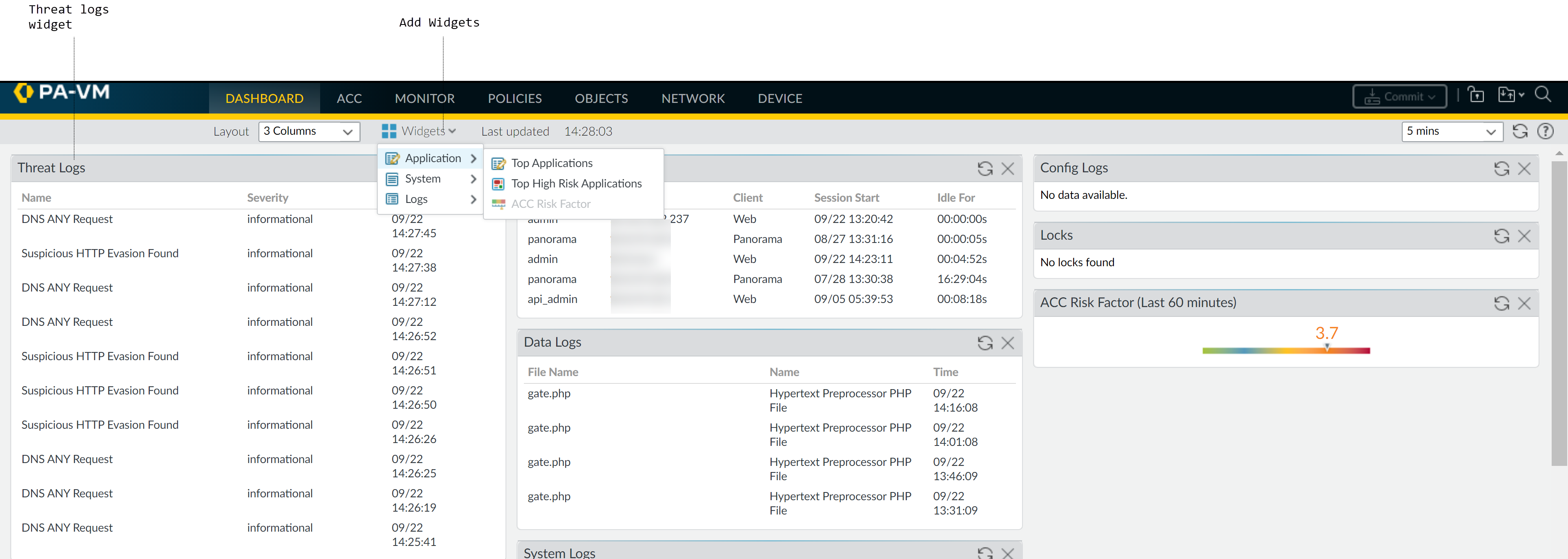
Detailed technical explanation
Mental model: The rule is the gate; profiles are the inspectors after the gate; the group is the inspection checklist.
Three points to remember
- Allow session: Use Security policy to permit or deny the connection.
- Attach profiles: Apply antivirus, URL, vulnerability, file, and WildFire inspection.
- Correlate verdict logs: Link Traffic, Threat, File, URL, and WildFire events.
Production example: A permitted PDF upload is still blocked because the attached profile group detects malware in the file.
Evidence, logs, commands, counters, captures, or GUI: Use the capture beside this answer as your reference. In your own lab, repeat the same check with the real tuple, user, and rule, then redact hostnames, addresses, and identities before sharing it.
Common incorrect answer or misunderstanding: Profiles do not replace the Security rule; they operate on traffic the rule has allowed.
Interviewer follow-up: When would a per-rule profile be preferable to the shared Profile Group?
Model answer to the follow-up: I would clarify the exact tuple and expected result, verify the relevant route, rule, session, and log evidence, make the narrowest reversible correction, then repeat the same business test and document rollback evidence.
Beginner explanation
The Security rule opens the conversation; Security Profiles inspect what travels inside it. An allow log therefore does not prove that every inspected object was permitted.
Traffic path
Allowed session → decoder and content inspection → signature/category/verdict → profile action → Threat/URL/Data/WildFire evidence correlated to the Traffic session.
Safe evidence command
SAFE READ-ONLY show jobs all
Purpose: Reads recent content, commit, and update jobs that can explain a change in inspection behavior. Interpretation: Do not treat one green state or allow log as end-to-end proof. Correlate the threat output with the same tuple, session ID, both traffic directions, final application result, and the user-visible test.
Operational caution
The listed command is read-only. Use narrow filters for packet capture or debug, schedule disruptive session clear/restart/failover/upgrade actions, name the rollback owner, and never paste customer secrets or unredacted production data.
Version or licensing note: Profile capabilities and cloud-delivered services require the applicable subscriptions.
Advanced44. How do Threat, URL, WildFire, Data, and Decryption logs fit one investigation?
Short interview answer (30–60 seconds): These logs are different lenses on related activity. Traffic tells me whether the session was allowed and which rule handled it. URL Filtering adds the category and URL action. Threat identifies signatures or exploit events. WildFire records file submission and verdict. Data Filtering records sensitive-data or file actions. Decryption tells me whether TLS was inspected, bypassed, or failed. I join them by session ID where available, then source/destination, user, application, rule, timestamp, URL, and file/hash.
Detailed technical explanation
Start with the decision the firewall is making, then name the evidence that proves it.
Three points to remember
- Build Timeline: Join logs by session, tuple, user, application, rule, and timestamp.
- Trace Protections: Compare Traffic, URL, Threat, WildFire, Data, and Decryption outcomes.
- Verify Verdict Timing: Separate inline blocks from retrospective verdicts before concluding impact.
Production example: Use one known-good transaction and one controlled failure so the result can be proved rather than guessed.
Evidence, logs, commands, counters, captures, or GUI: Use the capture beside this answer as your reference. In your own lab, repeat the same check with the real tuple, user, and rule, then redact hostnames, addresses, and identities before sharing it.
Common incorrect answer or misunderstanding: The original correctly stresses correlation. Tighten the example: a WildFire verdict may be inline or retrospective, and not every log shares a session ID. Use a composite key and never claim that a later verdict rewrote an earlier Traffic-log action.
Interviewer follow-up: Which identifier remains reliable when different logs are written at different times?
Model answer to the follow-up: I would clarify the exact tuple and expected result, verify the relevant route, rule, session, and log evidence, make the narrowest reversible correction, then repeat the same business test and document rollback evidence.
Beginner explanation
The Security rule opens the conversation; Security Profiles inspect what travels inside it. An allow log therefore does not prove that every inspected object was permitted.
Traffic path
Allowed session → decoder and content inspection → signature/category/verdict → profile action → Threat/URL/Data/WildFire evidence correlated to the Traffic session.
Safe evidence command
SAFE READ-ONLY show jobs all
Purpose: Reads recent content, commit, and update jobs that can explain a change in inspection behavior. Interpretation: Do not treat one green state or allow log as end-to-end proof. Correlate the threat output with the same tuple, session ID, both traffic directions, final application result, and the user-visible test.
Operational caution
The listed command is read-only. Use narrow filters for packet capture or debug, schedule disruptive session clear/restart/failover/upgrade actions, name the rollback owner, and never paste customer secrets or unredacted production data.
Version or licensing note: Profile capabilities and cloud-delivered services require the applicable subscriptions.
Advanced45. How do URL Filtering and DNS Security complement each other?
Short interview answer (30–60 seconds): They protect different points in the same user journey. DNS Security evaluates the domain lookup and can stop known malicious, newly registered, or algorithmically generated domains before a connection is established. URL Filtering evaluates the web request and category, reputation, credential-phishing indicators, and policy response when the browser requests a URL. I enable both, attach the appropriate profiles to the Security rule, and make sure the logs are usable for the help desk. In an incident I correlate the DNS event, the URL event, the user, source device, application, and timestamp; one control may block while the other records the later attempt. DNS protection is not a substitute for URL categories, and URL Filtering is not a replacement for DNS telemetry because applications can use direct IPs, cached answers, or encrypted DNS. I also check whether decryption is required for visibility and explicitly handle approved exceptions with expiry dates. The practical goal is layered prevention plus a clear explanation to the user—not two disconnected lists of blocked domains.
Detailed technical explanation
Mental model: DNS is the address-book checkpoint; URL Filtering is the destination and page checkpoint.
Three points to remember
- Protect DNS Lookup: Block malicious or newly registered domains before connections begin.
- Inspect Web Request: Apply URL categories and reputation controls to requested destinations.
- Correlate Bypasses: Join DNS, URL, decryption, and direct-IP telemetry for gaps.
Production example: A phishing domain is blocked during lookup by DNS Security; a different newly categorized site is blocked by URL Filtering when the browser requests it.
Evidence, logs, commands, counters, captures, or GUI: Use the capture beside this answer as your reference. In your own lab, repeat the same check with the real tuple, user, and rule, then redact hostnames, addresses, and identities before sharing it.
Common incorrect answer or misunderstanding: Do not claim DNS Security can inspect every web page or that URL Filtering sees traffic without the required visibility (often decryption for HTTPS).
Interviewer follow-up: What can URL Filtering decide that a DNS-only control cannot see?
Model answer to the follow-up: I would clarify the exact tuple and expected result, verify the relevant route, rule, session, and log evidence, make the narrowest reversible correction, then repeat the same business test and document rollback evidence.
Beginner explanation
The Security rule opens the conversation; Security Profiles inspect what travels inside it. An allow log therefore does not prove that every inspected object was permitted.
Traffic path
Allowed session → decoder and content inspection → signature/category/verdict → profile action → Threat/URL/Data/WildFire evidence correlated to the Traffic session.
Safe evidence command
SAFE READ-ONLY show jobs all
Purpose: Reads recent content, commit, and update jobs that can explain a change in inspection behavior. Interpretation: Do not treat one green state or allow log as end-to-end proof. Correlate the threat output with the same tuple, session ID, both traffic directions, final application result, and the user-visible test.
Operational caution
The listed command is read-only. Use narrow filters for packet capture or debug, schedule disruptive session clear/restart/failover/upgrade actions, name the rollback owner, and never paste customer secrets or unredacted production data.
Version or licensing note: Profile capabilities and cloud-delivered services require the applicable subscriptions.
Advanced46. Zone Protection versus DoS Protection: when do you use each?
Short interview answer (30–60 seconds): Zone Protection is a broad, interface-zone defense against floods and reconnaissance entering a zone. I use it for baseline protections such as SYN, UDP, ICMP, and port-scan thresholds, with thresholds sized from normal traffic and applied consistently to internet-facing zones. DoS Protection is more targeted. A DoS Protection profile and policy let me rate-limit or classify traffic for a particular destination, source, or service, which is useful when one server or VIP is at risk while other services must remain available. I start with measurements, not arbitrary low limits: interface counters, session rates, SYN rates, and business peak patterns. I stage alerts or conservative thresholds, then validate counters and user impact. Neither feature replaces upstream DDoS capacity, routing hygiene, or a resilient service design. I also check policy order, NAT interaction, asymmetric paths, and whether the protection is applied to the traffic direction I intend. During an event I correlate protection counters with Traffic logs and packet captures, then adjust or escalate to the provider. The answer should always include a safe rollback and an owner for threshold changes.
Detailed technical explanation
Mental model: Zone Protection is the building lobby; DoS Protection is a guard assigned to one valuable room.
Three points to remember
- Baseline Zone: Measure normal flood, scan, session, and interface rates first.
- Shield Broadly: Use Zone Protection for zone-wide reconnaissance and flood thresholds.
- Target Criticals: Use DoS Protection for specific servers, VIPs, or services.
Production example: Protect the whole untrust zone from SYN floods, then rate-limit a public payment VIP separately.
Evidence, logs, commands, counters, captures, or GUI: Use the capture beside this answer as your reference. In your own lab, repeat the same check with the real tuple, user, and rule, then redact hostnames, addresses, and identities before sharing it.
Common incorrect answer or misunderstanding: Do not set aggressive thresholds from a vendor example and assume they are safe. Baseline first and document the expected false-positive behavior.
Interviewer follow-up: How would you baseline thresholds before moving from alert to enforce?
Model answer to the follow-up: I would clarify the exact tuple and expected result, verify the relevant route, rule, session, and log evidence, make the narrowest reversible correction, then repeat the same business test and document rollback evidence.
Beginner explanation
The Security rule opens the conversation; Security Profiles inspect what travels inside it. An allow log therefore does not prove that every inspected object was permitted.
Traffic path
Allowed session → decoder and content inspection → signature/category/verdict → profile action → Threat/URL/Data/WildFire evidence correlated to the Traffic session.
Safe evidence command
SAFE READ-ONLY show jobs all
Purpose: Reads recent content, commit, and update jobs that can explain a change in inspection behavior. Interpretation: Do not treat one green state or allow log as end-to-end proof. Correlate the threat output with the same tuple, session ID, both traffic directions, final application result, and the user-visible test.
Operational caution
The listed command is read-only. Use narrow filters for packet capture or debug, schedule disruptive session clear/restart/failover/upgrade actions, name the rollback owner, and never paste customer secrets or unredacted production data.
Version or licensing note: Profile capabilities and cloud-delivered services require the applicable subscriptions.
Advanced47. A URL category or profile blocks legitimate traffic. How do you handle it safely?
Short interview answer (30–60 seconds): Correlate the user report with URL/Threat logs, exact category, profile, action, rule, and TLS visibility. Validate the business URL, then create the narrowest reviewed exception instead of weakening the category globally.
Detailed technical explanation
Correlate the user report with URL/Threat logs, exact category, profile, action, rule, and TLS visibility. Validate the business URL, then create the narrowest reviewed exception instead of weakening the category globally. The engineering standard is to correlate configuration intent with one real session and time-bounded evidence before changing policy.
Production example: A software-update host is newly categorized as unknown and blocked.
Evidence an engineer should collect: URL log, category lookup, SNI/hostname, decryption state, profile action, owner proof
Relevant logs, commands, counters, captures, or GUI: Monitor > Logs > URL Filtering; Objects > Custom Objects > URL Category
Common incorrect answer or misunderstanding: Adding the whole parent domain to allow without checking subdomains.
Interviewer follow-up: How do you verify recategorization versus local exception?
Model answer to the follow-up: Check current PAN-DB verdict and logs; document whether waiting for vendor correction or using a scoped temporary custom category.
Beginner explanation
The Security rule opens the conversation; Security Profiles inspect what travels inside it. An allow log therefore does not prove that every inspected object was permitted.
Traffic path
Allowed session → decoder and content inspection → signature/category/verdict → profile action → Threat/URL/Data/WildFire evidence correlated to the Traffic session.
Safe evidence command
SAFE READ-ONLY show jobs all
Purpose: Reads recent content, commit, and update jobs that can explain a change in inspection behavior. Interpretation: Do not treat one green state or allow log as end-to-end proof. Correlate the threat output with the same tuple, session ID, both traffic directions, final application result, and the user-visible test.
Operational caution
The listed command is read-only. Use narrow filters for packet capture or debug, schedule disruptive session clear/restart/failover/upgrade actions, name the rollback owner, and never paste customer secrets or unredacted production data.
Version or licensing note: Advanced URL Filtering requires a subscription on NGFW; categories change over time.
Advanced48. Threat logs show a detection, but traffic was not blocked. Why?
Short interview answer (30–60 seconds): A detection records a signature verdict; enforcement depends on the profile action. Alert allows and logs, while drop or reset actions enforce. Check exceptions, rule/profile attachment, packet direction, and whether the action completed.
Detailed technical explanation
A detection records a signature verdict; enforcement depends on the profile action. Alert allows and logs, while drop or reset actions enforce. Check exceptions, rule/profile attachment, packet direction, and whether the action completed. The engineering standard is to correlate configuration intent with one real session and time-bounded evidence before changing policy.
Production example: Inline cloud analysis logs C2 with action alert, so the request is permitted.
Evidence an engineer should collect: Threat ID/type/severity/action, profile, exception, session ID, Traffic log
Relevant logs, commands, counters, captures, or GUI: Monitor > Logs > Threat; Objects > Security Profiles
Common incorrect answer or misunderstanding: Equating every Threat log with prevention.
Interviewer follow-up: What should change first?
Model answer to the follow-up: Validate the detection and business impact, then set the supported recommended enforcement action in a narrow staged change.
Beginner explanation
The Security rule opens the conversation; Security Profiles inspect what travels inside it. An allow log therefore does not prove that every inspected object was permitted.
Traffic path
Allowed session → decoder and content inspection → signature/category/verdict → profile action → Threat/URL/Data/WildFire evidence correlated to the Traffic session.
Safe evidence command
SAFE READ-ONLY show jobs all
Purpose: Reads recent content, commit, and update jobs that can explain a change in inspection behavior. Interpretation: Do not treat one green state or allow log as end-to-end proof. Correlate the threat output with the same tuple, session ID, both traffic directions, final application result, and the user-visible test.
Operational caution
The listed command is read-only. Use narrow filters for packet capture or debug, schedule disruptive session clear/restart/failover/upgrade actions, name the rollback owner, and never paste customer secrets or unredacted production data.
Version or licensing note: Threat/Advanced Threat Prevention licensing and default actions vary.
Intermediate49. How do you investigate a WildFire verdict?
Short interview answer (30–60 seconds): Correlate the WildFire submission with file hash, application, user, source, filename, verdict, and subsequent signature enforcement. A submission is analysis evidence, not proof the endpoint executed the file.
Detailed technical explanation
Correlate the WildFire submission with file hash, application, user, source, filename, verdict, and subsequent signature enforcement. A submission is analysis evidence, not proof the endpoint executed the file. The engineering standard is to correlate configuration intent with one real session and time-bounded evidence before changing policy.
Production example: A PDF is submitted as unknown, later returns malicious, and a signature protects later downloads.
Evidence an engineer should collect: WildFire Submissions log, hash, verdict timeline, Traffic/Threat logs, endpoint telemetry
Relevant logs, commands, counters, captures, or GUI: Monitor > Logs > WildFire Submissions
Common incorrect answer or misunderstanding: Saying WildFire always blocks the first unknown sample synchronously.
Interviewer follow-up: What changes without an Advanced WildFire license?
Model answer to the follow-up: Real-time capabilities and signature delivery differ; document the entitlement and expected update delay.
Beginner explanation
The Security rule opens the conversation; Security Profiles inspect what travels inside it. An allow log therefore does not prove that every inspected object was permitted.
Traffic path
Allowed session → decoder and content inspection → signature/category/verdict → profile action → Threat/URL/Data/WildFire evidence correlated to the Traffic session.
Safe evidence command
SAFE READ-ONLY show jobs all
Purpose: Reads recent content, commit, and update jobs that can explain a change in inspection behavior. Interpretation: Do not treat one green state or allow log as end-to-end proof. Correlate the threat output with the same tuple, session ID, both traffic directions, final application result, and the user-visible test.
Operational caution
The listed command is read-only. Use narrow filters for packet capture or debug, schedule disruptive session clear/restart/failover/upgrade actions, name the rollback owner, and never paste customer secrets or unredacted production data.
Version or licensing note: Advanced WildFire subscription controls real-time features; platform support varies.
Intermediate50. How do DNS Security and file controls complement other profiles?
Short interview answer (30–60 seconds): DNS Security evaluates domains and can sinkhole malicious resolution; File Blocking controls transfer by file type and direction; WildFire can analyze supported samples. They solve different stages and should be correlated by session, user, and time.
Detailed technical explanation
DNS Security evaluates domains and can sinkhole malicious resolution; File Blocking controls transfer by file type and direction; WildFire can analyze supported samples. They solve different stages and should be correlated by session, user, and time. The engineering standard is to correlate configuration intent with one real session and time-bounded evidence before changing policy.
Production example: DNS sinkhole identifies an infected host before its attempted executable download is blocked.
Evidence an engineer should collect: DNS/Threat log, sinkhole address, File Blocking log, WildFire submission, endpoint event
Relevant logs, commands, counters, captures, or GUI: Anti-Spyware DNS actions, File Blocking profile, WildFire analysis profile
Common incorrect answer or misunderstanding: Treating a file extension as guaranteed file-type identification.
Interviewer follow-up: What evidence identifies the infected endpoint behind DNS?
Model answer to the follow-up: Use the original source IP/user mapping and sinkhole connection logs, then confirm on the endpoint.
Beginner explanation
The Security rule opens the conversation; Security Profiles inspect what travels inside it. An allow log therefore does not prove that every inspected object was permitted.
Traffic path
Allowed session → decoder and content inspection → signature/category/verdict → profile action → Threat/URL/Data/WildFire evidence correlated to the Traffic session.
Safe evidence command
SAFE READ-ONLY show jobs all
Purpose: Reads recent content, commit, and update jobs that can explain a change in inspection behavior. Interpretation: Do not treat one green state or allow log as end-to-end proof. Correlate the threat output with the same tuple, session ID, both traffic directions, final application result, and the user-visible test.
Operational caution
The listed command is read-only. Use narrow filters for packet capture or debug, schedule disruptive session clear/restart/failover/upgrade actions, name the rollback owner, and never paste customer secrets or unredacted production data.
Version or licensing note: DNS Security, WildFire, and threat features have separate subscription requirements.
TLS decryption and certificate troubleshooting 7 questions
Advanced51. Compare SSL Forward Proxy and SSL Inbound Inspection.
Short interview answer (30–60 seconds): Forward Proxy protects outbound users. The firewall sits between a client and an Internet server, establishes the upstream TLS session, and presents the client with a substitute certificate signed by our trusted Forward Trust CA. Inbound Inspection protects a service we own. The firewall receives Internet traffic for that service and decrypts it with the server certificate and private key, then re-encrypts toward the server. The direction, certificate custody, trust chain, and failure modes are different. I choose the mode from the traffic path and key-ownership requirement, then check the Decryption rule and profile, Decryption logs, TLS version, certificate errors, and the corresponding Traffic log. I never describe the two modes as interchangeable: Forward Proxy needs endpoint trust distribution; Inbound Inspection needs secure private-key handling and rotation.
In both cases I plan for pinned applications, unsupported TLS versions, certificate renewal, and a clearly owned exception process before production enablement.
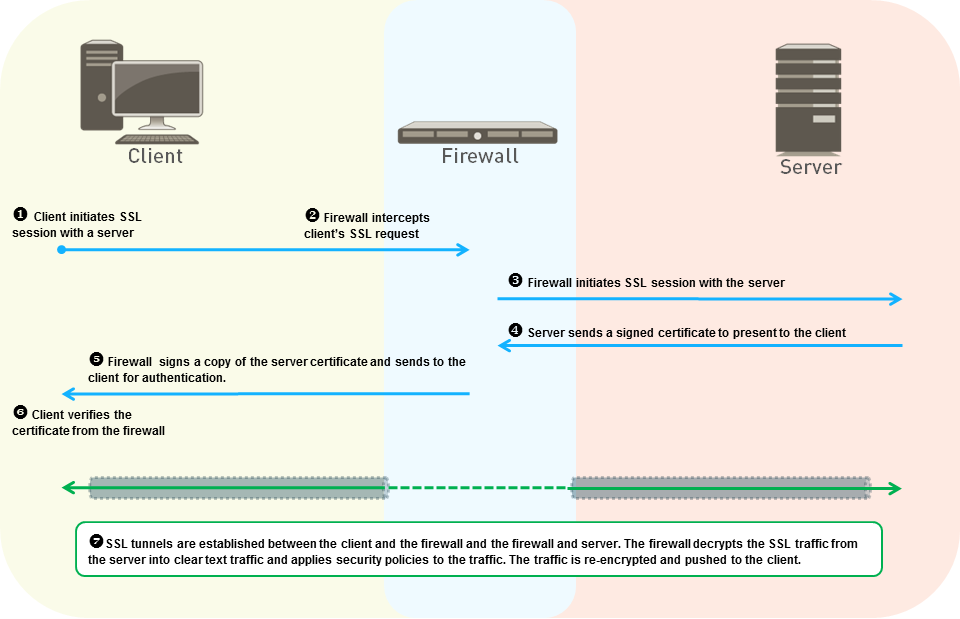
Detailed technical explanation
Mental model: Forward Proxy = firewall impersonates the destination to the client; Inbound Inspection = firewall terminates a service we own.
Three points to remember
- Identify traffic direction: Choose forward proxy for clients or inbound inspection for servers.
- Select trust model: Deploy trusted certificates and keys appropriate to each inspection mode.
- Validate decrypted flow: Test policy, exclusions, errors, logs, and application behavior.
Production example: Decrypt employee web browsing with Forward Proxy; inspect HTTPS to the company portal using its key.
Evidence, logs, commands, counters, captures, or GUI: Use the capture beside this answer as your reference. In your own lab, repeat the same check with the real tuple, user, and rule, then redact hostnames, addresses, and identities before sharing it.
Common incorrect answer or misunderstanding: Do not claim Forward Proxy requires the destination server’s private key—it does not.
Interviewer follow-up: How would key rotation differ for Inbound Inspection and Forward Proxy?
Model answer to the follow-up: I would clarify the exact tuple and expected result, verify the relevant route, rule, session, and log evidence, make the narrowest reversible correction, then repeat the same business test and document rollback evidence.
Beginner explanation
Forward-proxy decryption creates one TLS connection to the server and another to the client. Trust, certificate validation, policy, privacy, and application compatibility all matter.
Traffic path
Client TLS → decryption policy → firewall validates server certificate → firewall-to-server TLS plus client-to-firewall TLS → inspection → re-encryption or a documented technical exclusion.
Safe evidence command
SAFE READ-ONLY show session id <session-id>
Purpose: Reads the live session, including application, rule, counters, and available decryption context. Interpretation: Do not treat one green state or allow log as end-to-end proof. Correlate the decryption output with the same tuple, session ID, both traffic directions, final application result, and the user-visible test.
Operational caution
The listed command is read-only. Use narrow filters for packet capture or debug, schedule disruptive session clear/restart/failover/upgrade actions, name the rollback owner, and never paste customer secrets or unredacted production data.
Version or licensing note: Decryption has no separate NGFW license; logs, paths, and supported TLS behavior vary by release.
Advanced52. How would you roll out outbound decryption safely?
Short interview answer (30–60 seconds): I treat decryption as a change programme, not a checkbox. First get privacy and legal approval, size dataplane capacity, and establish certificate ownership and renewal. Deploy the Forward Trust CA to a pilot group, create a narrow policy with explicit no-decrypt exceptions for regulated categories and certificate-pinned applications, and measure baseline versus post-change success rates. I review Decryption logs, certificate errors, application breakage, help-desk cases, and dataplane resource use. If the pilot meets an agreed failure threshold, expand by user or application in waves with a documented rollback. I keep the old policy available until business transactions pass end to end. Global enablement in one commit is poor practice because it combines trust, compatibility, privacy, capacity, and rollback risk.
I communicate the pilot scope and success criteria to the service desk, so user reports arrive with timestamps and application names instead of an unbounded “the Internet is broken” escalation.
Detailed technical explanation
Mental model: Trust → pilot → measure → wave → rollback trigger.
Three points to remember
- Scope pilot: Start with managed users, low-risk applications, and measurable cohorts.
- Prepare exceptions: Handle pinned certificates, sensitive sites, failures, and support paths.
- Expand evidence: Compare logs, incidents, performance, and user impact before widening.
Production example: Pilot 50 managed laptops, exclude banking and pinned update apps, then expand department by department after a 1% error ceiling is met.
Evidence, logs, commands, counters, captures, or GUI: Use the capture beside this answer as your reference. In your own lab, repeat the same check with the real tuple, user, and rule, then redact hostnames, addresses, and identities before sharing it.
Common incorrect answer or misunderstanding: Exceptions should be narrow and justified; “bypass all finance traffic” is not automatically correct without policy approval.
Interviewer follow-up: What numeric failure threshold would pause the next rollout wave?
Model answer to the follow-up: I would clarify the exact tuple and expected result, verify the relevant route, rule, session, and log evidence, make the narrowest reversible correction, then repeat the same business test and document rollback evidence.
Beginner explanation
Forward-proxy decryption creates one TLS connection to the server and another to the client. Trust, certificate validation, policy, privacy, and application compatibility all matter.
Traffic path
Client TLS → decryption policy → firewall validates server certificate → firewall-to-server TLS plus client-to-firewall TLS → inspection → re-encryption or a documented technical exclusion.
Safe evidence command
SAFE READ-ONLY show session id <session-id>
Purpose: Reads the live session, including application, rule, counters, and available decryption context. Interpretation: Do not treat one green state or allow log as end-to-end proof. Correlate the decryption output with the same tuple, session ID, both traffic directions, final application result, and the user-visible test.
Operational caution
The listed command is read-only. Use narrow filters for packet capture or debug, schedule disruptive session clear/restart/failover/upgrade actions, name the rollback owner, and never paste customer secrets or unredacted production data.
Version or licensing note: Decryption has no separate NGFW license; logs, paths, and supported TLS behavior vary by release.
Advanced53. What do Forward Trust and Forward Untrust certificates do?
Short interview answer (30–60 seconds): Forward Trust signs the substitute certificate when the upstream site’s certificate validates successfully. Endpoints trust that CA, so the browser sees a normal trusted connection. Forward Untrust is deliberately used when the upstream certificate is expired, revoked, self-signed, or otherwise unacceptable. The firewall signs the replacement with a CA that endpoints do not trust, preserving an explicit certificate warning instead of silently hiding the problem. I keep the two CAs separate, protect their private keys, distribute only the trust CA to managed endpoints, and monitor expiry. During troubleshooting I inspect the Decryption profile and log certificate fields, then validate the chain from the endpoint. Marking Forward Untrust as trusted defeats the safety signal.
I set reminders for CA expiry, keep the trust CA private key in controlled storage, and test renewal with a small endpoint group before the existing certificate reaches its final days.
Detailed technical explanation
Mental model: Trust CA says “the inspected upstream certificate was acceptable”; Untrust CA says “inspection found a trust failure.”
Three points to remember
- Validate upstream: Check whether the server certificate is trusted, expired, revoked, or self-signed.
- Select signing CA: Use Forward Trust for valid chains; Forward Untrust preserves explicit warnings.
- Verify endpoint: Inspect Decryption logs and confirm the client sees the intended certificate chain.
Production example: An expired vendor certificate produces a browser warning rather than a silently trusted page.
Evidence, logs, commands, counters, captures, or GUI: Use the capture beside this answer as your reference. In your own lab, repeat the same check with the real tuple, user, and rule, then redact hostnames, addresses, and identities before sharing it.
Common incorrect answer or misunderstanding: Never export or share private keys in screenshots; show certificate names/fingerprints only.
Interviewer follow-up: How do you protect and rotate the Forward Trust private key?
Model answer to the follow-up: I would clarify the exact tuple and expected result, verify the relevant route, rule, session, and log evidence, make the narrowest reversible correction, then repeat the same business test and document rollback evidence.
Beginner explanation
Forward-proxy decryption creates one TLS connection to the server and another to the client. Trust, certificate validation, policy, privacy, and application compatibility all matter.
Traffic path
Client TLS → decryption policy → firewall validates server certificate → firewall-to-server TLS plus client-to-firewall TLS → inspection → re-encryption or a documented technical exclusion.
Safe evidence command
SAFE READ-ONLY show session id <session-id>
Purpose: Reads the live session, including application, rule, counters, and available decryption context. Interpretation: Do not treat one green state or allow log as end-to-end proof. Correlate the decryption output with the same tuple, session ID, both traffic directions, final application result, and the user-visible test.
Operational caution
The listed command is read-only. Use narrow filters for packet capture or debug, schedule disruptive session clear/restart/failover/upgrade actions, name the rollback owner, and never paste customer secrets or unredacted production data.
Version or licensing note: Decryption has no separate NGFW license; logs, paths, and supported TLS behavior vary by release.
Advanced54. A certificate is about to expire on a firewall. How do you determine blast radius?
Short interview answer (30–60 seconds): I first inventory the certificate, its private key, issuing chain, expiration, key usage, and every configuration reference. On a firewall that can include management HTTPS, GlobalProtect portals and gateways, inbound decryption, Forward Trust/Untrust, authentication profiles, SAML, syslog over TLS, API clients, and Panorama communication. I search the candidate configuration and inspect each service’s binding rather than trusting the certificate name. I check whether endpoints pin the CA, whether the replacement needs a renewed intermediate, and whether clocks and revocation checks are healthy. I issue the replacement with overlap, import the complete chain, and test one dependent service at a time in a maintenance window. For GlobalProtect I test portal login, gateway authentication, and a real tunnel from representative clients; for decryption I verify the forward-proxy trust chain and endpoint warnings. I capture logs and transaction results before removing the old object. The blast radius is the set of services and clients that reference that identity—not merely the number shown on the certificate page—so I leave a rollback copy and a dated removal task.
Detailed technical explanation
Mental model: The certificate is a key ring; blast radius is every door still using that key.
Three points to remember
- Inventory Dependencies: Find certificate bindings, keys, chains, services, clients, and expiration.
- Renew With Overlap: Import complete chain, preserve old object, and test each service.
- Confirm Blast Radius: Validate management, GlobalProtect, decryption, authentication, and integrations.
Production example: One expiring CA is bound to management and GlobalProtect; renew with overlap and test both independently before deleting the old chain.
Evidence, logs, commands, counters, captures, or GUI: Capture a real Device > Certificate Management view and each service binding, plus successful handshake logs. Authentic PAN-OS GUI screenshots are unavailable locally; use your own lab or official Palo Alto documentation only, never fabricated images.
Common incorrect answer or misunderstanding: Renewing a certificate file alone does not update every binding, private key, intermediate chain, or endpoint trust store.
Interviewer follow-up: How would you rotate a CA used for Forward Proxy without endpoint warnings?
Model answer to the follow-up: I would clarify the exact tuple and expected result, verify the relevant route, rule, session, and log evidence, make the narrowest reversible correction, then repeat the same business test and document rollback evidence.
Beginner explanation
Forward-proxy decryption creates one TLS connection to the server and another to the client. Trust, certificate validation, policy, privacy, and application compatibility all matter.
Traffic path
Client TLS → decryption policy → firewall validates server certificate → firewall-to-server TLS plus client-to-firewall TLS → inspection → re-encryption or a documented technical exclusion.
Safe evidence command
SAFE READ-ONLY show session id <session-id>
Purpose: Reads the live session, including application, rule, counters, and available decryption context. Interpretation: Do not treat one green state or allow log as end-to-end proof. Correlate the decryption output with the same tuple, session ID, both traffic directions, final application result, and the user-visible test.
Operational caution
The listed command is read-only. Use narrow filters for packet capture or debug, schedule disruptive session clear/restart/failover/upgrade actions, name the rollback owner, and never paste customer secrets or unredacted production data.
Version or licensing note: Decryption has no separate NGFW license; logs, paths, and supported TLS behavior vary by release.
Advanced55. TLS decryption makes an application fail. What is your method?
Short interview answer (30–60 seconds): Compare one failing decrypted session with a controlled no-decrypt test, then inspect Decryption logs, certificate validation, TLS version/cipher, client authentication, pinning, resource failures, and server behavior. Exclude only the proven hostname and reason.
Detailed technical explanation
Compare one failing decrypted session with a controlled no-decrypt test, then inspect Decryption logs, certificate validation, TLS version/cipher, client authentication, pinning, resource failures, and server behavior. Exclude only the proven hostname and reason. The engineering standard is to correlate configuration intent with one real session and time-bounded evidence before changing policy.
Production example: A finance app uses mutual TLS and fails when Forward Proxy intercepts the handshake.
Evidence an engineer should collect: Decryption log/error, SNI, chain, client/server pcaps, policy/profile, endpoint error
Relevant logs, commands, counters, captures, or GUI: Monitor > Logs > Decryption; Device > Certificate Management paths vary
Common incorrect answer or misunderstanding: Creating a broad no-decrypt rule for the entire category.
Interviewer follow-up: What makes an exclusion safe?
Model answer to the follow-up: Exact hostname, business owner, technical reason, risk review, expiry, compensating controls, and a successful retest.
Beginner explanation
Forward-proxy decryption creates one TLS connection to the server and another to the client. Trust, certificate validation, policy, privacy, and application compatibility all matter.
Traffic path
Client TLS → decryption policy → firewall validates server certificate → firewall-to-server TLS plus client-to-firewall TLS → inspection → re-encryption or a documented technical exclusion.
Safe evidence command
SAFE READ-ONLY show session id <session-id>
Purpose: Reads the live session, including application, rule, counters, and available decryption context. Interpretation: Do not treat one green state or allow log as end-to-end proof. Correlate the decryption output with the same tuple, session ID, both traffic directions, final application result, and the user-visible test.
Operational caution
The listed command is read-only. Use narrow filters for packet capture or debug, schedule disruptive session clear/restart/failover/upgrade actions, name the rollback owner, and never paste customer secrets or unredacted production data.
Version or licensing note: Decryption log fields and GUI paths vary; decryption itself needs no separate NGFW license.
Advanced56. Why does certificate pinning prevent inspection?
Short interview answer (30–60 seconds): A pinned client expects a specific server key or certificate. Forward Proxy presents a firewall-signed substitute, so the client rejects it even when the enterprise CA is trusted. The practical choices are supported app configuration, a narrow technical exclusion, or blocking.
Detailed technical explanation
A pinned client expects a specific server key or certificate. Forward Proxy presents a firewall-signed substitute, so the client rejects it even when the enterprise CA is trusted. The practical choices are supported app configuration, a narrow technical exclusion, or blocking. The engineering standard is to correlate configuration intent with one real session and time-bounded evidence before changing policy.
Production example: A mobile banking SDK closes the TLS session only when decrypted.
Evidence an engineer should collect: Client error, SNI/CN/SAN, decryption log, controlled comparison, vendor documentation
Relevant logs, commands, counters, captures, or GUI: SSL Decryption Exclusion and Decryption policy GUI areas
Common incorrect answer or misunderstanding: Telling users to disable certificate validation.
Interviewer follow-up: Can installing the enterprise CA always fix pinning?
Model answer to the follow-up: No. True pinning compares the expected identity beyond normal CA trust; prove the client behavior and use a reviewed exception if needed.
Beginner explanation
Forward-proxy decryption creates one TLS connection to the server and another to the client. Trust, certificate validation, policy, privacy, and application compatibility all matter.
Traffic path
Client TLS → decryption policy → firewall validates server certificate → firewall-to-server TLS plus client-to-firewall TLS → inspection → re-encryption or a documented technical exclusion.
Safe evidence command
SAFE READ-ONLY show session id <session-id>
Purpose: Reads the live session, including application, rule, counters, and available decryption context. Interpretation: Do not treat one green state or allow log as end-to-end proof. Correlate the decryption output with the same tuple, session ID, both traffic directions, final application result, and the user-visible test.
Operational caution
The listed command is read-only. Use narrow filters for packet capture or debug, schedule disruptive session clear/restart/failover/upgrade actions, name the rollback owner, and never paste customer secrets or unredacted production data.
Version or licensing note: Predefined/local exclusion behavior is PAN-OS and content-version dependent.
Expert57. How do you troubleshoot an incomplete server certificate chain?
Short interview answer (30–60 seconds): Validate the chain independently, identify missing intermediate certificates, check AIA fetching support and firewall trust, and avoid bypassing validation globally. Fix the server chain when you own it.
Detailed technical explanation
Validate the chain independently, identify missing intermediate certificates, check AIA fetching support and firewall trust, and avoid bypassing validation globally. Fix the server chain when you own it. The engineering standard is to correlate configuration intent with one real session and time-bounded evidence before changing policy.
Production example: Browsers build the missing intermediate automatically, but the firewall cannot validate the server during decryption.
Evidence an engineer should collect: Server certificate, intermediates, issuer, AIA, Decryption log, trust store
Relevant logs, commands, counters, captures, or GUI: Certificate Management and Decryption Profile GUI areas
Common incorrect answer or misunderstanding: Importing an unverified CA as trusted just to make the error disappear.
Interviewer follow-up: What is the best correction for an internal server?
Model answer to the follow-up: Install and serve the complete correct chain on the server, then retest through the firewall.
Beginner explanation
Forward-proxy decryption creates one TLS connection to the server and another to the client. Trust, certificate validation, policy, privacy, and application compatibility all matter.
Traffic path
Client TLS → decryption policy → firewall validates server certificate → firewall-to-server TLS plus client-to-firewall TLS → inspection → re-encryption or a documented technical exclusion.
Safe evidence command
SAFE READ-ONLY show session id <session-id>
Purpose: Reads the live session, including application, rule, counters, and available decryption context. Interpretation: Do not treat one green state or allow log as end-to-end proof. Correlate the decryption output with the same tuple, session ID, both traffic directions, final application result, and the user-visible test.
Operational caution
The listed command is read-only. Use narrow filters for packet capture or debug, schedule disruptive session clear/restart/failover/upgrade actions, name the rollback owner, and never paste customer secrets or unredacted production data.
Version or licensing note: Automatic intermediate fetching and certificate paths vary by release.
GlobalProtect architecture and troubleshooting 7 questions
Advanced58. Portal versus Gateway in GlobalProtect: what does each do?
Short interview answer (30–60 seconds): The Portal is the control-plane bootstrap. It authenticates the endpoint and delivers the agent configuration, including which gateways to use. The Gateway is where the tunnel is established and the data-plane decision happens: user authentication, IP-pool assignment, routes, HIP evaluation, and security policy enforcement. A successful portal login proves only that configuration was downloaded; it does not prove a working tunnel or access to an application. In an incident I correlate PanGPS client timestamps with Monitor ▸ GlobalProtect gateway state, assigned IP, HIP result, User-ID, and the first Traffic-log session. For multiple gateways, I explain selection and failover policy rather than assuming the portal forwards user traffic.
I also confirm authentication profiles and certificates are valid on the selected gateway; a portal that works while a gateway certificate is expired creates a misleading half-success.
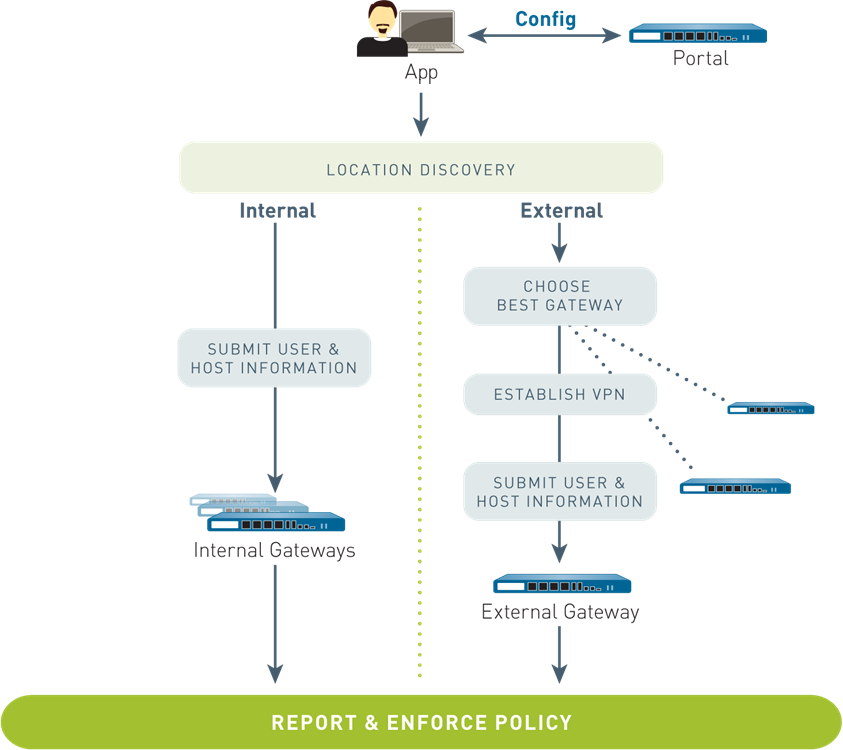
Detailed technical explanation
Mental model: Portal gives the map; Gateway carries and controls the journey.
Three points to remember
- Bootstrap configuration: Portal authenticates the endpoint and delivers agent settings and gateway choices.
- Establish tunnel: Gateway authenticates, assigns an IP, evaluates HIP, and builds the tunnel.
- Prove enforcement: Correlate gateway state, User-ID, and the first protected traffic session.
Production example: A laptop downloads regional gateway choices from the portal, then builds its tunnel to the nearest gateway.
Evidence, logs, commands, counters, captures, or GUI: Use the capture beside this answer as your reference. In your own lab, repeat the same check with the real tuple, user, and rule, then redact hostnames, addresses, and identities before sharing it.
Common incorrect answer or misunderstanding: Portal authentication alone is not evidence that the gateway tunnel is up.
Interviewer follow-up: How would multiple gateways influence selection and failover?
Model answer to the follow-up: I would clarify the exact tuple and expected result, verify the relevant route, rule, session, and log evidence, make the narrowest reversible correction, then repeat the same business test and document rollback evidence.
Beginner explanation
The portal gives the endpoint its configuration; the gateway authenticates and enforces the tunnel. A connected icon does not prove routes, DNS, policy, or the private application work.
Traffic path
Endpoint → portal configuration → gateway authentication → tunnel and access route/DNS → gateway firewall policy → private application → symmetric return through the tunnel.
Safe evidence command
SAFE READ-ONLY show global-protect-gateway current-user
Purpose: Reads current GlobalProtect gateway user and tunnel state; available fields vary by release. Interpretation: Do not treat one green state or allow log as end-to-end proof. Correlate the globalprotect output with the same tuple, session ID, both traffic directions, final application result, and the user-visible test.
Operational caution
The listed command is read-only. Use narrow filters for packet capture or debug, schedule disruptive session clear/restart/failover/upgrade actions, name the rollback owner, and never paste customer secrets or unredacted production data.
Version or licensing note: GlobalProtect app behavior, client log paths, and feature licensing vary by release/platform.
Expert59. GlobalProtect connects but private applications fail. What is your troubleshooting order?
Short interview answer (30–60 seconds): I start with one user, one private hostname, and one destination IP. First confirm the gateway session, assigned tunnel IP, and User-ID. Then check client-pushed routes and DNS suffix/server selection—Internet access can work while private routes or DNS are missing. Next verify the security rule, NAT exemption if required, virtual-router lookup, and the server’s return route to the tunnel pool. I correlate PanGPS, gateway, Traffic, and (if needed) packet captures at the client, firewall, and server. I fix the earliest broken layer and retest the same transaction. Changing the allow rule first is a common mistake because the endpoint may never send the packet into the tunnel. A DNS test against the private resolver separates name-resolution failure from routing failure.
I keep the test destination stable while changing one variable at a time, because changing the client route, security rule, and server ACL together destroys the evidence needed to identify the first failing layer.
Detailed technical explanation
Mental model: Prove path in order: tunnel → route/DNS → policy/NAT → return path → application.
Three points to remember
- Prove tunnel: Confirm gateway session, assigned IP, User-ID, and client connection state.
- Check path: Verify pushed routes, private DNS, virtual-router lookup, and NAT requirements.
- Trace return: Compare firewall logs, captures, and server return routing for one destination.
Production example: Git works by IP after adding the private route, proving the original fault was client routing/DNS rather than policy.
Evidence, logs, commands, counters, captures, or GUI: Use the capture beside this answer as your reference. In your own lab, repeat the same check with the real tuple, user, and rule, then redact hostnames, addresses, and identities before sharing it.
Common incorrect answer or misunderstanding: Internet success does not prove private-app routing or policy.
Interviewer follow-up: Which test separates DNS failure from missing tunnel routing?
Model answer to the follow-up: I would clarify the exact tuple and expected result, verify the relevant route, rule, session, and log evidence, make the narrowest reversible correction, then repeat the same business test and document rollback evidence.
Beginner explanation
The portal gives the endpoint its configuration; the gateway authenticates and enforces the tunnel. A connected icon does not prove routes, DNS, policy, or the private application work.
Traffic path
Endpoint → portal configuration → gateway authentication → tunnel and access route/DNS → gateway firewall policy → private application → symmetric return through the tunnel.
Safe evidence command
SAFE READ-ONLY show global-protect-gateway current-user
Purpose: Reads current GlobalProtect gateway user and tunnel state; available fields vary by release. Interpretation: Do not treat one green state or allow log as end-to-end proof. Correlate the globalprotect output with the same tuple, session ID, both traffic directions, final application result, and the user-visible test.
Operational caution
The listed command is read-only. Use narrow filters for packet capture or debug, schedule disruptive session clear/restart/failover/upgrade actions, name the rollback owner, and never paste customer secrets or unredacted production data.
Version or licensing note: GlobalProtect app behavior, client log paths, and feature licensing vary by release/platform.
Advanced60. How do you investigate GlobalProtect instability that looks like MTU or keepalive loss?
Short interview answer (30–60 seconds): I correlate exact client and gateway timestamps before changing timers. I test path MTU with controlled packet sizes, compare SSL and IPSec transport, and capture the missing keepalive or fragmented packet. If large transfers fail while small pings work, fragmentation or PMTUD handling is a stronger hypothesis than “the timeout is too low.” Lowering tunnel MTU can be a controlled test, but raising keepalive timers alone can hide loss and make recovery slower. I also verify the path permits the relevant IPSec/UDP transport and inspect PanGPS and gateway logs for the same session. The fix is accepted only when sustained traffic passes the old failure point and the captures show no recurring fragmentation loss.
I record the tested packet size and transport in the change notes; otherwise a later ISP or endpoint change can quietly reintroduce the same symptom and make the workaround impossible to compare.
Detailed technical explanation
Mental model: Find where the packet disappears; do not mask it with a longer timer.
Three points to remember
- Correlate timestamps: Match PanGPS and gateway events before changing timers or tunnel settings.
- Test packet sizes: Compare controlled MTU tests and SSL versus IPSec transport behavior.
- Capture loss: Find fragmented or missing keepalives, then apply and verify a reversible fix.
Production example: A 1,400-byte test fails over IPSec but passes over SSL; a reduced tunnel MTU restores repository transfers.
Evidence, logs, commands, counters, captures, or GUI: Use the capture beside this answer as your reference. In your own lab, repeat the same check with the real tuple, user, and rule, then redact hostnames, addresses, and identities before sharing it.
Common incorrect answer or misunderstanding: Lower MTU immediately” is not a diagnosis; it is one reversible experiment.
Interviewer follow-up: How would you prove whether PMTUD or UDP 4501 handling is responsible?
Model answer to the follow-up: I would clarify the exact tuple and expected result, verify the relevant route, rule, session, and log evidence, make the narrowest reversible correction, then repeat the same business test and document rollback evidence.
Beginner explanation
The portal gives the endpoint its configuration; the gateway authenticates and enforces the tunnel. A connected icon does not prove routes, DNS, policy, or the private application work.
Traffic path
Endpoint → portal configuration → gateway authentication → tunnel and access route/DNS → gateway firewall policy → private application → symmetric return through the tunnel.
Safe evidence command
SAFE READ-ONLY show global-protect-gateway current-user
Purpose: Reads current GlobalProtect gateway user and tunnel state; available fields vary by release. Interpretation: Do not treat one green state or allow log as end-to-end proof. Correlate the globalprotect output with the same tuple, session ID, both traffic directions, final application result, and the user-visible test.
Operational caution
The listed command is read-only. Use narrow filters for packet capture or debug, schedule disruptive session clear/restart/failover/upgrade actions, name the rollback owner, and never paste customer secrets or unredacted production data.
Version or licensing note: GlobalProtect app behavior, client log paths, and feature licensing vary by release/platform.
Expert61. How do split tunnel and HIP-based policy change the GlobalProtect design?
Short interview answer (30–60 seconds): Split tunneling decides which destinations enter the VPN; excluded traffic goes directly to the local network and therefore bypasses the firewall’s inspection and visibility. HIP is a separate context check: after authentication, the gateway evaluates endpoint posture such as encryption or antivirus state and policy can require a matching HIP profile. I document the risk owner for every exclusion, keep private and sensitive applications in the tunnel, and define what happens when the HIP report is missing or stale. In verification I inspect the agent’s include/exclude routes, HIP report and match, User-ID, matched security rule, and logs for one included and one excluded application. A split-tunnel exception is a security decision, not merely a performance tweak.
A split-tunnel exception is a security decision, not merely a performance tweak. I make the HIP failure action explicit—deny, quarantine, or reduced access—so an unavailable posture report cannot silently become full access.
Detailed technical explanation
Mental model: Split tunnel chooses where packets travel; HIP chooses whether the device is trusted enough.
Three points to remember
- Define tunnel scope: Include sensitive destinations; exclude only traffic with documented risk ownership.
- Evaluate posture: Require HIP matches for endpoint state before granting protected application access.
- Verify both paths: Compare included and excluded routes, logs, identities, and policy decisions.
Production example: Payroll stays in the tunnel and requires a compliant HIP match; approved video traffic is excluded with documented ownership.
Evidence, logs, commands, counters, captures, or GUI: Use the capture beside this answer as your reference. In your own lab, repeat the same check with the real tuple, user, and rule, then redact hostnames, addresses, and identities before sharing it.
Common incorrect answer or misunderstanding: HIP does not replace authentication, and excluded traffic cannot be centrally inspected by that firewall.
Interviewer follow-up: What should happen when the HIP report is missing or stale?
Model answer to the follow-up: I would clarify the exact tuple and expected result, verify the relevant route, rule, session, and log evidence, make the narrowest reversible correction, then repeat the same business test and document rollback evidence.
Beginner explanation
The portal gives the endpoint its configuration; the gateway authenticates and enforces the tunnel. A connected icon does not prove routes, DNS, policy, or the private application work.
Traffic path
Endpoint → portal configuration → gateway authentication → tunnel and access route/DNS → gateway firewall policy → private application → symmetric return through the tunnel.
Safe evidence command
SAFE READ-ONLY show global-protect-gateway current-user
Purpose: Reads current GlobalProtect gateway user and tunnel state; available fields vary by release. Interpretation: Do not treat one green state or allow log as end-to-end proof. Correlate the globalprotect output with the same tuple, session ID, both traffic directions, final application result, and the user-visible test.
Operational caution
The listed command is read-only. Use narrow filters for packet capture or debug, schedule disruptive session clear/restart/failover/upgrade actions, name the rollback owner, and never paste customer secrets or unredacted production data.
Version or licensing note: GlobalProtect app behavior, client log paths, and feature licensing vary by release/platform.
Advanced62. GlobalProtect authentication fails. How do you isolate the stage?
Short interview answer (30–60 seconds): Separate portal from gateway authentication, then identify the exact profile, method, certificate, SAML/RADIUS/LDAP transaction, username format, and time. Correlate firewall authentication/GlobalProtect logs with IdP and client logs.
Detailed technical explanation
Separate portal from gateway authentication, then identify the exact profile, method, certificate, SAML/RADIUS/LDAP transaction, username format, and time. Correlate firewall authentication/GlobalProtect logs with IdP and client logs. The engineering standard is to correlate configuration intent with one real session and time-bounded evidence before changing policy.
Production example: Portal SAML succeeds, but gateway certificate-profile validation rejects the client certificate.
Evidence an engineer should collect: GlobalProtect log, authd log, IdP/RADIUS log, certificate chain, client PanGPS/PanGPA
Relevant logs, commands, counters, captures, or GUI: `less mp-log authd.log` is operational log viewing; client log location varies
Common incorrect answer or misunderstanding: Saying VPN authentication is one step.
Interviewer follow-up: What does portal success prove?
Model answer to the follow-up: Only that the portal accepted the user and can provide configuration; gateway authentication can still fail separately.
Beginner explanation
The portal gives the endpoint its configuration; the gateway authenticates and enforces the tunnel. A connected icon does not prove routes, DNS, policy, or the private application work.
Traffic path
Endpoint → portal configuration → gateway authentication → tunnel and access route/DNS → gateway firewall policy → private application → symmetric return through the tunnel.
Safe evidence command
SAFE READ-ONLY show global-protect-gateway current-user
Purpose: Reads current GlobalProtect gateway user and tunnel state; available fields vary by release. Interpretation: Do not treat one green state or allow log as end-to-end proof. Correlate the globalprotect output with the same tuple, session ID, both traffic directions, final application result, and the user-visible test.
Operational caution
The listed command is read-only. Use narrow filters for packet capture or debug, schedule disruptive session clear/restart/failover/upgrade actions, name the rollback owner, and never paste customer secrets or unredacted production data.
Version or licensing note: GlobalProtect app behavior and license requirements vary by version/platform.
Intermediate63. How does portal or gateway selection fail?
Short interview answer (30–60 seconds): Verify portal reachability and certificate, downloaded gateway list, internal-host detection, attempted gateways and latency, priority, DNS, and whether manual or intelligent selection is configured.
Detailed technical explanation
Verify portal reachability and certificate, downloaded gateway list, internal-host detection, attempted gateways and latency, priority, DNS, and whether manual or intelligent selection is configured. The engineering standard is to correlate configuration intent with one real session and time-bounded evidence before changing policy.
Production example: A stale portal config points users to a retired gateway FQDN.
Evidence an engineer should collect: Attempted gateways, portal config timestamp, DNS, certificate, GlobalProtect log, client logs
Relevant logs, commands, counters, captures, or GUI: Monitor > Logs > GlobalProtect; portal agent configuration
Common incorrect answer or misunderstanding: Forcing a gateway without checking the cached portal configuration.
Interviewer follow-up: What evidence shows the app chose another gateway?
Model answer to the follow-up: The client and GlobalProtect logs show attempted gateways, response times, priority, and the selected gateway.
Beginner explanation
The portal gives the endpoint its configuration; the gateway authenticates and enforces the tunnel. A connected icon does not prove routes, DNS, policy, or the private application work.
Traffic path
Endpoint → portal configuration → gateway authentication → tunnel and access route/DNS → gateway firewall policy → private application → symmetric return through the tunnel.
Safe evidence command
SAFE READ-ONLY show global-protect-gateway current-user
Purpose: Reads current GlobalProtect gateway user and tunnel state; available fields vary by release. Interpretation: Do not treat one green state or allow log as end-to-end proof. Correlate the globalprotect output with the same tuple, session ID, both traffic directions, final application result, and the user-visible test.
Operational caution
The listed command is read-only. Use narrow filters for packet capture or debug, schedule disruptive session clear/restart/failover/upgrade actions, name the rollback owner, and never paste customer secrets or unredacted production data.
Version or licensing note: Fields and intelligent selection features vary by GlobalProtect release/license.
Intermediate64. Which evidence do you collect when the tunnel is connected but apps fail?
Short interview answer (30–60 seconds): Record assigned tunnel IP, routes, DNS servers, gateway, tunnel interface/zone, User-ID, Security rule, session, MTU symptoms, and captures. Connected proves tunnel establishment, not application reachability.
Detailed technical explanation
Record assigned tunnel IP, routes, DNS servers, gateway, tunnel interface/zone, User-ID, Security rule, session, MTU symptoms, and captures. Connected proves tunnel establishment, not application reachability. The engineering standard is to correlate configuration intent with one real session and time-bounded evidence before changing policy.
Production example: The tunnel is up, but split tunnel omits the private subnet and traffic exits locally.
Evidence an engineer should collect: Client route/DNS, GlobalProtect log, session, User-ID, Traffic log, both-direction pcaps
Relevant logs, commands, counters, captures, or GUI: Client app logs plus Network > GlobalProtect > Gateways and Monitor logs
Common incorrect answer or misunderstanding: Reinstalling the client before checking routes and policy.
Interviewer follow-up: What is the fastest safe discriminator?
Model answer to the follow-up: Test the exact private IP and name, compare route and DNS results, then see whether the firewall receives the flow.
Beginner explanation
The portal gives the endpoint its configuration; the gateway authenticates and enforces the tunnel. A connected icon does not prove routes, DNS, policy, or the private application work.
Traffic path
Endpoint → portal configuration → gateway authentication → tunnel and access route/DNS → gateway firewall policy → private application → symmetric return through the tunnel.
Safe evidence command
SAFE READ-ONLY show global-protect-gateway current-user
Purpose: Reads current GlobalProtect gateway user and tunnel state; available fields vary by release. Interpretation: Do not treat one green state or allow log as end-to-end proof. Correlate the globalprotect output with the same tuple, session ID, both traffic directions, final application result, and the user-visible test.
Operational caution
The listed command is read-only. Use narrow filters for packet capture or debug, schedule disruptive session clear/restart/failover/upgrade actions, name the rollback owner, and never paste customer secrets or unredacted production data.
Version or licensing note: Client commands/log paths differ across Windows, macOS, Linux, iOS, and Android.
High availability and failure scenarios 6 questions
Intermediate65. What are HA1, HA2, and HA3 used for?
Short interview answer (30–60 seconds): HA1 is the control link: peer heartbeats, control messages, and configuration synchronization. HA2 is the data link for dataplane state such as sessions, so a peer can continue established flows after takeover. HA3 is used in Active/Active designs to forward packets between peers when the session owner is on the other firewall. I also mention link and path monitoring, backup links, and the effect of losing one link: a healthy HA1 with failed HA2 can leave peers visible while new session state stops synchronizing. I verify with show high-availability all, checking link state, synchronization status, session counts, peer role, and errors—not just the green dashboard icon.
The operational question is always “what would users notice if this link failed?” That answer drives backup-link design and the failover test, not just the labels in a diagram.
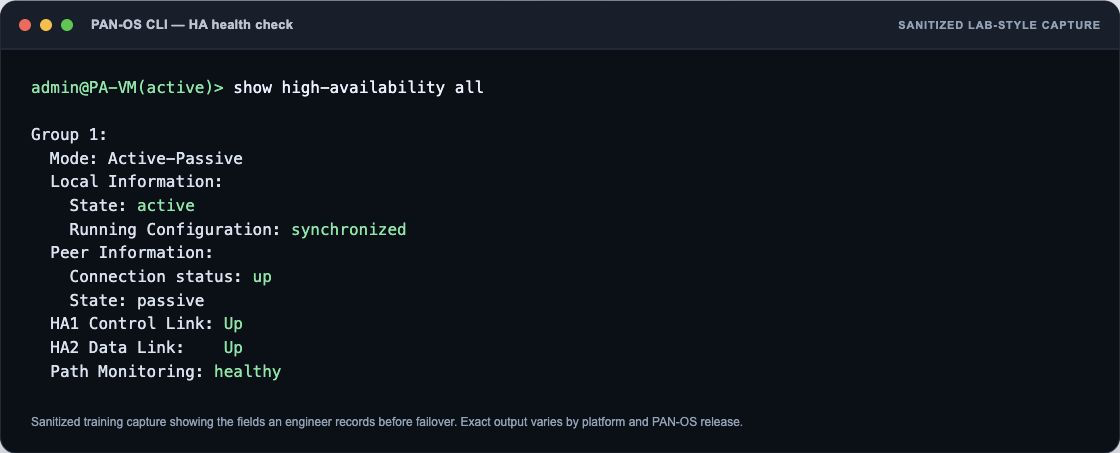
Detailed technical explanation
Mental model: HA1 knows and coordinates; HA2 remembers flows; HA3 moves packets between active owners.
Three points to remember
- Coordinate peers: HA1 carries heartbeats, control messages, and configuration synchronization.
- Synchronize sessions: HA2 carries dataplane state so established sessions can survive takeover.
- Forward ownership: HA3 forwards packets between active/active peers when session owners differ.
Production example: During maintenance, HA2 fails while HA1 stays up; the pair looks connected but session synchronization is degraded.
Evidence, logs, commands, counters, captures, or GUI: Use the capture beside this answer as your reference. In your own lab, repeat the same check with the real tuple, user, and rule, then redact hostnames, addresses, and identities before sharing it.
Common incorrect answer or misunderstanding: HA3 is not required for ordinary Active/Passive operation.
Interviewer follow-up: Which traffic requires HA3 in active/active mode?
Model answer to the follow-up: I would clarify the exact tuple and expected result, verify the relevant route, rule, session, and log evidence, make the narrowest reversible correction, then repeat the same business test and document rollback evidence.
Beginner explanation
An HA pair coordinates role and configuration, synchronizes eligible session state, and fails over when monitored conditions require it. The user impact depends on what state and paths recover.
Traffic path
Client → active session owner → synchronized eligible state over HA2 → monitored failure/election → peer takeover → routing/ARP convergence → application validation.
Safe evidence command
SAFE READ-ONLY show high-availability all
Purpose: Reads peer role, link, synchronization, compatibility, and failure state. Interpretation: Do not treat one green state or allow log as end-to-end proof. Correlate the ha output with the same tuple, session ID, both traffic directions, final application result, and the user-visible test.
Operational caution
The listed command is read-only. Use narrow filters for packet capture or debug, schedule disruptive session clear/restart/failover/upgrade actions, name the rollback owner, and never paste customer secrets or unredacted production data.
Version or licensing note: HA support and session synchronization exceptions vary by platform and release.
Intermediate66. Why is Active/Passive usually simpler than Active/Active?
Short interview answer (30–60 seconds): Active/Passive has one forwarding owner, so routing and session symmetry are straightforward; the passive peer is prepared to take over. Active/Active can use both peers, but it requires deliberate session ownership, path symmetry, and sometimes HA3 forwarding when a packet arrives at the non-owner. That adds topology-dependent failure modes and more complicated testing. I choose Active/Active only when a real routing or availability requirement justifies the complexity, and I still size each peer to carry the workload after a failure. I validate the design with show high-availability state, session-owner fields, HA3 counters (if used), routing adjacencies, and packet paths through both peers. Active/Active is not automatic throughput doubling.
Active/Active can also complicate upgrades, troubleshooting, and capacity after one peer is removed. I require a topology diagram showing ingress paths and session ownership before approving it.
Detailed technical explanation
Mental model: One owner is easier to reason about; two owners demand a plan for every asymmetric packet.
Three points to remember
- Choose forwarding owner: Active/passive keeps one predictable forwarding path and session owner.
- Model asymmetry: Active/active requires explicit ownership, symmetry, and possibly HA3 forwarding.
- Test failure capacity: Size each peer for full load after the other peer fails.
Production example: A routed perimeter stays Active/Passive because there is no requirement for simultaneous forwarding.
Evidence, logs, commands, counters, captures, or GUI: Use the capture beside this answer as your reference. In your own lab, repeat the same check with the real tuple, user, and rule, then redact hostnames, addresses, and identities before sharing it.
Common incorrect answer or misunderstanding: Active/Passive does not mean the passive unit is unprepared; it should be synchronized and monitored.
Interviewer follow-up: Which business requirement would justify the extra active/active complexity?
Model answer to the follow-up: I would clarify the exact tuple and expected result, verify the relevant route, rule, session, and log evidence, make the narrowest reversible correction, then repeat the same business test and document rollback evidence.
Beginner explanation
An HA pair coordinates role and configuration, synchronizes eligible session state, and fails over when monitored conditions require it. The user impact depends on what state and paths recover.
Traffic path
Client → active session owner → synchronized eligible state over HA2 → monitored failure/election → peer takeover → routing/ARP convergence → application validation.
Safe evidence command
SAFE READ-ONLY show high-availability all
Purpose: Reads peer role, link, synchronization, compatibility, and failure state. Interpretation: Do not treat one green state or allow log as end-to-end proof. Correlate the ha output with the same tuple, session ID, both traffic directions, final application result, and the user-visible test.
Operational caution
The listed command is read-only. Use narrow filters for packet capture or debug, schedule disruptive session clear/restart/failover/upgrade actions, name the rollback owner, and never paste customer secrets or unredacted production data.
Version or licensing note: HA support and session synchronization exceptions vary by platform and release.
Expert67. How do you execute and verify a controlled HA failover?
Short interview answer (30–60 seconds): I schedule a change window, confirm both peers have healthy links, synchronized configuration, expected session state, and enough capacity to carry the load. I establish a representative transaction—such as a payment session—then trigger one failover reason at a time, recording the timestamp. After takeover I verify peer role, routing convergence, critical sessions, new-session creation, application transactions, logs, and user impact. Only after acceptance criteria pass do I fail back and repeat the checks. show high-availability all and related routing/session evidence support the result, but a dashboard role change alone is not an acceptance test. I also retain rollback and console access in case the surviving peer does not become forwarding-ready.
The change record includes expected convergence and transaction timings, the exact failover command or condition, and who can stop the test. That discipline turns an HA exercise into evidence rather than a role toggle.
Detailed technical explanation
Mental model: Health check → controlled event → measure recovery → validate business traffic → fail back.
Three points to remember
- Check readiness: Confirm HA links, synchronization, routing, sessions, and spare capacity.
- Trigger once: Fail over one controlled reason while recording exact timestamps.
- Prove recovery: Validate routes, sessions, logs, transactions, user impact, and failback.
Production example: Keep a payment flow open, fail over the active peer, and measure whether the transaction survives and how long new logins take.
Evidence, logs, commands, counters, captures, or GUI: Use the capture beside this answer as your reference. In your own lab, repeat the same check with the real tuple, user, and rule, then redact hostnames, addresses, and identities before sharing it.
Common incorrect answer or misunderstanding: Never test only by clicking “suspend”; verify real traffic and capacity.
Interviewer follow-up: Which acceptance test would reveal unsynchronized sessions?
Model answer to the follow-up: I would clarify the exact tuple and expected result, verify the relevant route, rule, session, and log evidence, make the narrowest reversible correction, then repeat the same business test and document rollback evidence.
Beginner explanation
An HA pair coordinates role and configuration, synchronizes eligible session state, and fails over when monitored conditions require it. The user impact depends on what state and paths recover.
Traffic path
Client → active session owner → synchronized eligible state over HA2 → monitored failure/election → peer takeover → routing/ARP convergence → application validation.
Safe evidence command
SAFE READ-ONLY show high-availability all
Purpose: Reads peer role, link, synchronization, compatibility, and failure state. Interpretation: Do not treat one green state or allow log as end-to-end proof. Correlate the ha output with the same tuple, session ID, both traffic directions, final application result, and the user-visible test.
Operational caution
The listed command is read-only. Use narrow filters for packet capture or debug, schedule disruptive session clear/restart/failover/upgrade actions, name the rollback owner, and never paste customer secrets or unredacted production data.
Version or licensing note: HA support and session synchronization exceptions vary by platform and release.
Intermediate68. What does and does not synchronize across HA peers?
Short interview answer (30–60 seconds): Configuration and many runtime tables synchronize over defined HA links, but the exact behavior depends on HA mode and state type. Sessions commonly use HA2, while routing adjacencies, VPN state, multicast, BFD, or other tables may have mode-specific limits or may need to re-form after takeover. I never promise that “everything is synced.” I build the test around the traffic the business actually runs: ordinary TCP, long-lived sessions, VPNs, dynamic routing, multicast, and any stateful inspection that matters. Before and after failover I record config-sync and running-sync status, HA2 statistics, synchronized-session totals, routing/VPN/multicast state, and application recovery. The interview answer should acknowledge uncertainty and point to the PAN-OS version and HA mode, then verify in the actual design.
Release notes and the platform’s HA reference are the starting point, not substitutes for a failover test. I write down which state is expected to rebuild and how long that rebuild may take.
Detailed technical explanation
Mental model: Sync is a contract per table and mode, not a magic mirror of the dataplane.
Three points to remember
- Classify state: Separate configuration, sessions, routing, VPN, multicast, and mode-specific tables.
- Check synchronization: Record HA2 statistics, sync status, and synchronized-session totals.
- Test real traffic: Fail over representative applications and document rebuilt versus preserved state.
Production example: A multicast application is included in failover testing because ordinary TCP success does not prove multicast state survives.
Evidence, logs, commands, counters, captures, or GUI: Use the capture beside this answer as your reference. In your own lab, repeat the same check with the real tuple, user, and rule, then redact hostnames, addresses, and identities before sharing it.
Common incorrect answer or misunderstanding: Avoid absolute claims that every session or adjacency survives unchanged.
Interviewer follow-up: Which state in your environment would require a fresh control-plane adjacency?
Model answer to the follow-up: I would clarify the exact tuple and expected result, verify the relevant route, rule, session, and log evidence, make the narrowest reversible correction, then repeat the same business test and document rollback evidence.
Beginner explanation
An HA pair coordinates role and configuration, synchronizes eligible session state, and fails over when monitored conditions require it. The user impact depends on what state and paths recover.
Traffic path
Client → active session owner → synchronized eligible state over HA2 → monitored failure/election → peer takeover → routing/ARP convergence → application validation.
Safe evidence command
SAFE READ-ONLY show high-availability all
Purpose: Reads peer role, link, synchronization, compatibility, and failure state. Interpretation: Do not treat one green state or allow log as end-to-end proof. Correlate the ha output with the same tuple, session ID, both traffic directions, final application result, and the user-visible test.
Operational caution
The listed command is read-only. Use narrow filters for packet capture or debug, schedule disruptive session clear/restart/failover/upgrade actions, name the rollback owner, and never paste customer secrets or unredacted production data.
Version or licensing note: HA support and session synchronization exceptions vary by platform and release.
Expert69. How do you plan a PAN-OS upgrade for an HA pair?
Short interview answer (30–60 seconds): I begin with the supported upgrade path, release notes, known issues, content compatibility, and a tested configuration backup. I record current HA state, session synchronization, routing neighbors, VPNs, GlobalProtect gateways, dataplane health, and business-critical transactions. The pair must be healthy before I touch software; a degraded peer is not a safe starting point. During the change window I suspend or fail over deliberately, upgrade one peer, reboot it, and validate that it returns as the expected active or passive state. I check HA1/HA2, configuration and session sync, interfaces, routes, BGP/OSPF neighbors, VPN tunnels, certificates, logs, and representative application sessions. Only after that evidence is clean do I upgrade the second peer. I keep console or out-of-band access, a rollback decision point, and a communication plan. I never upgrade both peers together unless the documented design explicitly requires it and downtime is accepted. Afterward I compare session counts, dataplane resource use, threat/decryption behavior, and monitoring alerts with the baseline. The interview-quality answer is a controlled sequence with evidence, not “click install and wait.
Detailed technical explanation
Mental model: An HA upgrade is changing one engine while the other keeps the aircraft flying, then swapping roles only after inspection.
Three points to remember
- Validate Readiness: Check supported path, backups, HA sync, routing, VPNs, and health.
- Upgrade One Peer: Upgrade passive peer, fail over deliberately, then test services.
- Confirm And Continue: Verify sessions, routes, tunnels, logs, and rollback criteria before second peer.
Production example: Upgrade the passive peer first, fail over during a quiet window, validate VPN and routing, then upgrade the former active peer.
Evidence, logs, commands, counters, captures, or GUI: Use the capture beside this answer as your reference. In your own lab, repeat the same check with the real tuple, user, and rule, then redact hostnames, addresses, and identities before sharing it.
Common incorrect answer or misunderstanding: Do not promise zero impact simply because HA is enabled; session sync, feature compatibility, and routing reconvergence can still create interruption.
Interviewer follow-up: When is session synchronization across different PAN-OS versions limited?
Model answer to the follow-up: I would clarify the exact tuple and expected result, verify the relevant route, rule, session, and log evidence, make the narrowest reversible correction, then repeat the same business test and document rollback evidence.
Beginner explanation
An HA pair coordinates role and configuration, synchronizes eligible session state, and fails over when monitored conditions require it. The user impact depends on what state and paths recover.
Traffic path
Client → active session owner → synchronized eligible state over HA2 → monitored failure/election → peer takeover → routing/ARP convergence → application validation.
Safe evidence command
SAFE READ-ONLY show high-availability all
Purpose: Reads peer role, link, synchronization, compatibility, and failure state. Interpretation: Do not treat one green state or allow log as end-to-end proof. Correlate the ha output with the same tuple, session ID, both traffic directions, final application result, and the user-visible test.
Operational caution
The listed command is read-only. Use narrow filters for packet capture or debug, schedule disruptive session clear/restart/failover/upgrade actions, name the rollback owner, and never paste customer secrets or unredacted production data.
Version or licensing note: HA support and session synchronization exceptions vary by platform and release.
Expert70. One HA peer is suspended, non-functional, or out of sync, and sessions do not fail over. What do you collect?
Short interview answer (30–60 seconds): Record both peers’ states, last transition reason, HA1/HA2 health, version/content compatibility, config sync, link/path monitoring, session sync eligibility, and whether the flow is decrypted. Do not make a peer functional until the cause and traffic owner are understood.
Detailed technical explanation
Record both peers’ states, last transition reason, HA1/HA2 health, version/content compatibility, config sync, link/path monitoring, session sync eligibility, and whether the flow is decrypted. Do not make a peer functional until the cause and traffic owner are understood. The engineering standard is to correlate configuration intent with one real session and time-bounded evidence before changing policy.
Production example: The passive is suspended after maintenance; failover is attempted, but decrypted sessions reconnect and a routing adjacency takes longer than expected.
Evidence an engineer should collect: `show high-availability all`, system/HA logs, jobs, session state, monitoring, app test
Relevant logs, commands, counters, captures, or GUI: `show high-availability all` is operational. Suspend/make-functional are production-affecting operational actions.
Common incorrect answer or misunderstanding: Forcing failover as the first diagnostic step.
Interviewer follow-up: Why might sessions still reset with healthy HA2?
Model answer to the follow-up: Some sessions are not synchronized; decrypted SSL/SSH sessions are documented examples, and surrounding routing/ARP convergence also matters.
Beginner explanation
An HA pair coordinates role and configuration, synchronizes eligible session state, and fails over when monitored conditions require it. The user impact depends on what state and paths recover.
Traffic path
Client → active session owner → synchronized eligible state over HA2 → monitored failure/election → peer takeover → routing/ARP convergence → application validation.
Safe evidence command
SAFE READ-ONLY show high-availability all
Purpose: Reads peer role, link, synchronization, compatibility, and failure state. Interpretation: Do not treat one green state or allow log as end-to-end proof. Correlate the ha output with the same tuple, session ID, both traffic directions, final application result, and the user-visible test.
Operational caution
The listed command is read-only. Use narrow filters for packet capture or debug, schedule disruptive session clear/restart/failover/upgrade actions, name the rollback owner, and never paste customer secrets or unredacted production data.
Version or licensing note: Platform and release support varies; PA-7500 starts 12.1.5 and PA-5500 12.1.7 for active/passive.
Panorama, templates, device groups, and logs 5 questions
Advanced71. Device Groups versus Templates and Template Stacks in Panorama?
Short interview answer (30–60 seconds): I keep two kinds of ownership separate. Device Groups hold the security policy and shared policy objects. Templates hold device and network configuration—interfaces, virtual routers, certificates, and system settings. A Template Stack combines templates in a deliberate order and lets me apply one network baseline to many firewalls. I document where every value is inherited and where a site is intentionally overridden, because the next push should never be a surprise.
Detailed technical explanation
Think of a Device Group as the policy library and a Template Stack as the appliance blueprint. The firewall can show an inherited value and, in some cases, a local override. An override is not automatically wrong; it is wrong when nobody owns it or when a later push silently changes the intended result.
For a branch exception, I first decide whether it is a policy exception (Device Group) or a device/network exception (Template variable or stack override). I inspect the stack order, variable values, and the target firewall’s effective configuration before pushing. I also check that the Device Group and Template targets are the same devices; a perfectly valid rule in an unassigned group changes nothing on the branch.
Three points to remember
- Assign ownership: Put policy and objects in Device Groups; device settings in Templates.
- Build stack: Order templates and variables to create a reusable network baseline.
- Preview effective: Inspect inheritance, overrides, targets, and effective configuration before pushing.
Production example: For a branch exception, I first decide whether it is a policy exception (Device Group) or a device/network exception (Template variable or stack override). I inspect the stack order, variable values, and the target firewall’s effective configuration before pushing. I also check that the Device Group and Template targets are the same devices; a perfectly valid rule in an unassigned group changes nothing on the branch.
Evidence, logs, commands, counters, captures, or GUI: Use the capture beside this answer as your reference. In your own lab, repeat the same check with the real tuple, user, and rule, then redact hostnames, addresses, and identities before sharing it.
Common incorrect answer or misunderstanding: The original answer is accurate but too absolute about a local fix being overwritten. A local override can persist when deliberately configured. Say “an unmanaged local change may be overwritten or rejected on a later push” and explain ownership instead of implying every local override disappears.
Interviewer follow-up: How would you model global policy with a site-specific network exception?
Model answer to the follow-up: I would clarify the exact tuple and expected result, verify the relevant route, rule, session, and log evidence, make the narrowest reversible correction, then repeat the same business test and document rollback evidence.
Beginner explanation
Panorama stores shared intent, but each firewall must receive and run the correct result. A Panorama commit, a push job, and runtime proof are three different checkpoints.
Traffic path
Administrator edit → Panorama candidate → Panorama commit → device-group/template resolution → push job → firewall commit → running policy/session/log proof.
Safe evidence command
SAFE READ-ONLY show jobs all
Purpose: Reads local commit and Panorama push job results on the managed firewall. Interpretation: Do not treat one green state or allow log as end-to-end proof. Correlate the panorama output with the same tuple, session ID, both traffic directions, final application result, and the user-visible test.
Operational caution
The listed command is read-only. Use narrow filters for packet capture or debug, schedule disruptive session clear/restart/failover/upgrade actions, name the rollback owner, and never paste customer secrets or unredacted production data.
Version or licensing note: Panorama device management requires licensing; hierarchy and limits vary by release.
Intermediate72. What is the operational difference between Commit and Push?
Short interview answer (30–60 seconds): Commit validates and saves my candidate configuration on Panorama. Push takes that committed configuration—or the selected scope of it—and delivers it to managed firewalls. A green Panorama commit only proves the manager accepted the change; I still need the push scope, each device’s job result, and a transaction on the firewall to prove deployment.
Detailed technical explanation
Start with the decision the firewall is making, then name the evidence that proves it.
Three points to remember
- Commit Panorama: Validate and save the candidate configuration on Panorama.
- Push scope: Deliver committed changes to selected managed firewalls.
- Verify devices: Check each job result and prove a real transaction on firewalls.
Production example: Use one known-good transaction and one controlled failure so the result can be proved rather than guessed.
Evidence, logs, commands, counters, captures, or GUI: Use the capture beside this answer as your reference. In your own lab, repeat the same check with the real tuple, user, and rule, then redact hostnames, addresses, and identities before sharing it.
Common incorrect answer or misunderstanding: The original answer is correct. Add that “Commit and Push” is a combined workflow that may perform both steps, while a device’s local commit is still distinct. Mention partial push failures and out-of-sync devices; this is where experienced interviewers usually probe.
Interviewer follow-up: What would you check when Panorama and firewall running configurations differ?
Model answer to the follow-up: I would clarify the exact tuple and expected result, verify the relevant route, rule, session, and log evidence, make the narrowest reversible correction, then repeat the same business test and document rollback evidence.
Beginner explanation
Panorama stores shared intent, but each firewall must receive and run the correct result. A Panorama commit, a push job, and runtime proof are three different checkpoints.
Traffic path
Administrator edit → Panorama candidate → Panorama commit → device-group/template resolution → push job → firewall commit → running policy/session/log proof.
Safe evidence command
SAFE READ-ONLY show jobs all
Purpose: Reads local commit and Panorama push job results on the managed firewall. Interpretation: Do not treat one green state or allow log as end-to-end proof. Correlate the panorama output with the same tuple, session ID, both traffic directions, final application result, and the user-visible test.
Operational caution
The listed command is read-only. Use narrow filters for packet capture or debug, schedule disruptive session clear/restart/failover/upgrade actions, name the rollback owner, and never paste customer secrets or unredacted production data.
Version or licensing note: Panorama device management requires licensing; hierarchy and limits vary by release.
Advanced73. What evidence belongs in a firewall change record before and after implementation?
Short interview answer (30–60 seconds): Before implementation I want the business intent, owner, exact source/destination/application or service tuple, affected zones, risk, maintenance window, approvers, baseline metrics, predicted rule match, candidate diff, test plan, and rollback steps. I record dependencies and the success condition in language the service owner understands. During implementation I capture the commit or push job ID, validation output, warnings, HA state, and any deviation from the approved plan. Afterward I attach evidence that the firewall accepted the change and that the service actually works: rule hit, session and application logs, threat/profile results, transaction or synthetic test, route/VPN checks, and monitoring during an agreed observation window. I note who observed the result and whether the change is closed, rolled back, or needs follow-up. A screenshot of “commit succeeded” is only configuration evidence; it does not prove the intended security decision or business outcome. I keep the pre-change backup and post-change diff so another engineer can reproduce the decision months later.
Detailed technical explanation
Mental model: The record is a lab notebook: hypothesis before, controlled action during, reproducible proof after.
Three points to remember
- Record Intent First: Capture owner, tuple, risk, baseline, diff, test, rollback, approvals.
- Document Implementation: Retain validation output, commit job, warnings, HA state, deviations.
- Prove Outcome: Attach sessions, logs, transaction tests, monitoring, and closure decision.
Production example: For a new SaaS rule, attach the owner-approved flow, predicted match, commit ID, successful login test, Traffic-log session, and 30-minute monitoring result.
Evidence, logs, commands, counters, captures, or GUI: Use the capture beside this answer as your reference. In your own lab, repeat the same check with the real tuple, user, and rule, then redact hostnames, addresses, and identities before sharing it.
Common incorrect answer or misunderstanding: Do not close a change on commit status alone; capture a real session and the business test, or document why the test was impossible.
Interviewer follow-up: Which evidence must be captured before rollback removes the failed state?
Model answer to the follow-up: I would clarify the exact tuple and expected result, verify the relevant route, rule, session, and log evidence, make the narrowest reversible correction, then repeat the same business test and document rollback evidence.
Beginner explanation
Panorama stores shared intent, but each firewall must receive and run the correct result. A Panorama commit, a push job, and runtime proof are three different checkpoints.
Traffic path
Administrator edit → Panorama candidate → Panorama commit → device-group/template resolution → push job → firewall commit → running policy/session/log proof.
Safe evidence command
SAFE READ-ONLY show jobs all
Purpose: Reads local commit and Panorama push job results on the managed firewall. Interpretation: Do not treat one green state or allow log as end-to-end proof. Correlate the panorama output with the same tuple, session ID, both traffic directions, final application result, and the user-visible test.
Operational caution
The listed command is read-only. Use narrow filters for packet capture or debug, schedule disruptive session clear/restart/failover/upgrade actions, name the rollback owner, and never paste customer secrets or unredacted production data.
Version or licensing note: Panorama device management requires licensing; hierarchy and limits vary by release.
Expert74. A Panorama push partially succeeds or creates a conflict. What is your response?
Short interview answer (30–60 seconds): Separate Panorama commit from device push, inspect each device job and validation message, confirm Device Group and Template Stack ownership, overrides, object scope, version compatibility, and disabled push settings. Correct only the failed scope and verify every firewall.
Detailed technical explanation
Separate Panorama commit from device push, inspect each device job and validation message, confirm Device Group and Template Stack ownership, overrides, object scope, version compatibility, and disabled push settings. Correct only the failed scope and verify every firewall. The engineering standard is to correlate configuration intent with one real session and time-bounded evidence before changing policy.
Production example: Nine devices accept a policy push; one rejects a referenced object inherited from another Device Group.
Evidence an engineer should collect: Panorama tasks/jobs, per-device result, config diff, hierarchy, overrides, system/config logs
Relevant logs, commands, counters, captures, or GUI: `show jobs all` and `show jobs id <id>` are operational; Config Audit is GUI-based
Common incorrect answer or misunderstanding: Repeating Force Push without understanding the validation error.
Interviewer follow-up: When is force-template-values dangerous?
Model answer to the follow-up: When local overrides are intentional; inventory owners and diffs before replacing them.
Beginner explanation
Panorama stores shared intent, but each firewall must receive and run the correct result. A Panorama commit, a push job, and runtime proof are three different checkpoints.
Traffic path
Administrator edit → Panorama candidate → Panorama commit → device-group/template resolution → push job → firewall commit → running policy/session/log proof.
Safe evidence command
SAFE READ-ONLY show jobs all
Purpose: Reads local commit and Panorama push job results on the managed firewall. Interpretation: Do not treat one green state or allow log as end-to-end proof. Correlate the panorama output with the same tuple, session ID, both traffic directions, final application result, and the user-visible test.
Operational caution
The listed command is read-only. Use narrow filters for packet capture or debug, schedule disruptive session clear/restart/failover/upgrade actions, name the rollback owner, and never paste customer secrets or unredacted production data.
Version or licensing note: Device Management license required; push behavior and limits vary by Panorama/PAN-OS release.
Advanced75. How do log collectors and forwarding fit an investigation?
Short interview answer (30–60 seconds): Confirm the firewall generated the log, the forwarding profile selected it, connectivity and certificates are healthy, collector groups are assigned, and the query time/serial/device group are correct. Missing centralized logs do not prove the firewall never logged the event.
Detailed technical explanation
Confirm the firewall generated the log, the forwarding profile selected it, connectivity and certificates are healthy, collector groups are assigned, and the query time/serial/device group are correct. Missing centralized logs do not prove the firewall never logged the event. The engineering standard is to correlate configuration intent with one real session and time-bounded evidence before changing policy.
Production example: Traffic logs exist locally but are absent in Panorama because the Log Forwarding profile was not attached to the rule.
Evidence an engineer should collect: Local log, forwarding profile, collector status, serial, time sync, Panorama query
Relevant logs, commands, counters, captures, or GUI: Panorama Managed Collectors/Collector Groups and Monitor logs; CLI varies
Common incorrect answer or misunderstanding: Changing retention before proving ingestion failure.
Interviewer follow-up: What is the first split?
Model answer to the follow-up: Check whether the event exists locally; if yes, troubleshoot forwarding/collection, and if no, troubleshoot rule logging and session completion.
Beginner explanation
Panorama stores shared intent, but each firewall must receive and run the correct result. A Panorama commit, a push job, and runtime proof are three different checkpoints.
Traffic path
Administrator edit → Panorama candidate → Panorama commit → device-group/template resolution → push job → firewall commit → running policy/session/log proof.
Safe evidence command
SAFE READ-ONLY show jobs all
Purpose: Reads local commit and Panorama push job results on the managed firewall. Interpretation: Do not treat one green state or allow log as end-to-end proof. Correlate the panorama output with the same tuple, session ID, both traffic directions, final application result, and the user-visible test.
Operational caution
The listed command is read-only. Use narrow filters for packet capture or debug, schedule disruptive session clear/restart/failover/upgrade actions, name the rollback owner, and never paste customer secrets or unredacted production data.
Version or licensing note: Collector architecture, quotas, and licensing vary.
Advanced production troubleshooting 5 questions
Intermediate76. What does the session browser tell you that Traffic logs do not?
Short interview answer (30–60 seconds): Session Browser is my live microscope. It shows the current five-tuple, ingress and egress interfaces, selected rule, NAT, application state, directional packet and byte counters, timeout, and session flags—even while the flow is still open. Traffic logs are durable history, usually at session start and end, and are better for searching over time and proving the final disposition.
Detailed technical explanation
For a hanging API call, I first copy the session ID, inspect show session id <id>, and compare client-to-server and server-to-client counters. One-way growth tells me more than an old allow log. I then use the Traffic log, Threat/Decryption logs, and end reason to explain how the session finished.
Three points to remember
- Inspect Live Session: Check tuple, NAT, interfaces, application state, counters, timeout.
- Correlate Durable Logs: Match session ID with Traffic, Threat, and Decryption history.
- Prove Directionality: Compare packet counters and `show session id` output for asymmetry.
Production example: For a hanging API call, I first copy the session ID, inspect show session id <id>, and compare client-to-server and server-to-client counters. One-way growth tells me more than an old allow log. I then use the Traffic log, Threat/Decryption logs, and end reason to explain how the session finished.
Evidence, logs, commands, counters, captures, or GUI: Use the capture beside this answer as your reference. In your own lab, repeat the same check with the real tuple, user, and rule, then redact hostnames, addresses, and identities before sharing it.
Common incorrect answer or misunderstanding: The original is accurate. Clarify that Session Browser is transient—once the session is gone, it is not a historical data store—and that Traffic-log timing/fields depend on log settings and PAN-OS release.
Interviewer follow-up: Which session flag would make hardware offload relevant to troubleshooting?
Model answer to the follow-up: I would clarify the exact tuple and expected result, verify the relevant route, rule, session, and log evidence, make the narrowest reversible correction, then repeat the same business test and document rollback evidence.
Beginner explanation
Production troubleshooting is a controlled experiment: define the failure, follow one packet path, collect time-bounded evidence, form one hypothesis, make the narrowest reversible correction, and repeat the same test.
Traffic path
Exact five-tuple and timestamp → receive stage → policy/session/inspection stage → transmit stage → return packet → application result → evidence-preserving correction and retest.
Safe evidence command
SAFE READ-ONLY show session id <session-id>
Purpose: Reads the chosen production session without clearing or changing it. Interpretation: Do not treat one green state or allow log as end-to-end proof. Correlate the advanced output with the same tuple, session ID, both traffic directions, final application result, and the user-visible test.
Operational caution
The listed command is read-only. Use narrow filters for packet capture or debug, schedule disruptive session clear/restart/failover/upgrade actions, name the rollback owner, and never paste customer secrets or unredacted production data.
Version or licensing note: Always verify the exact PAN-OS/content release and known issues.
Intermediate77. What is your staged packet-capture workflow on PAN-OS?
Short interview answer (30–60 seconds): I capture one flow, not the whole internet. I set a narrow filter, enable receive, firewall, transmit, and drop stages, reproduce the problem once, stop the capture, remove the filter, and compare timestamps and packet transformations. A packet at receive but only at drop—with a matching counter—is stronger evidence than a screenshot of a deny rule.
Detailed technical explanation
Start with the decision the firewall is making, then name the evidence that proves it.
Three points to remember
- Narrow Filter: Select one five-tuple and record PAN-OS version.
- Capture Four Stages: Collect receive, firewall, transmit, and drop packets during reproduction.
- Compare And Clean: Align timestamps, transformations, counters; stop capture and remove filters.
Production example: Use one known-good transaction and one controlled failure so the result can be proved rather than guessed.
Evidence, logs, commands, counters, captures, or GUI: Use the capture beside this answer as your reference. In your own lab, repeat the same check with the real tuple, user, and rule, then redact hostnames, addresses, and identities before sharing it.
Common incorrect answer or misunderstanding: The original is correct. Add an explicit cleanup step and warn that packet capture consumes dataplane resources. Stage semantics and available filters can vary by PAN-OS version and platform, so the evidence should include the release.
Interviewer follow-up: Which capture-stage pattern indicates a downstream rather than firewall fault?
Model answer to the follow-up: I would clarify the exact tuple and expected result, verify the relevant route, rule, session, and log evidence, make the narrowest reversible correction, then repeat the same business test and document rollback evidence.
Beginner explanation
Production troubleshooting is a controlled experiment: define the failure, follow one packet path, collect time-bounded evidence, form one hypothesis, make the narrowest reversible correction, and repeat the same test.
Traffic path
Exact five-tuple and timestamp → receive stage → policy/session/inspection stage → transmit stage → return packet → application result → evidence-preserving correction and retest.
Safe evidence command
SAFE READ-ONLY show session id <session-id>
Purpose: Reads the chosen production session without clearing or changing it. Interpretation: Do not treat one green state or allow log as end-to-end proof. Correlate the advanced output with the same tuple, session ID, both traffic directions, final application result, and the user-visible test.
Operational caution
The listed command is read-only. Use narrow filters for packet capture or debug, schedule disruptive session clear/restart/failover/upgrade actions, name the rollback owner, and never paste customer secrets or unredacted production data.
Version or licensing note: Always verify the exact PAN-OS/content release and known issues.
Expert78. How do global counters help when there is no useful Traffic log?
Short interview answer (30–60 seconds): Global counters are useful when a packet is dropped before a normal Traffic log exists, but they are diagnostic clues, not verdicts. I take a baseline, reproduce one controlled tuple, and keep only counters whose delta changes with that attempt and lines up with a capture stage or other evidence.
Detailed technical explanation
Start with the decision the firewall is making, then name the evidence that proves it.
Three points to remember
- Baseline Counters: Record filtered global counters, dataplane, version, and timestamp.
- Reproduce Once: Test one tuple, then collect the same counters again.
- Correlate Deltas: Match changing counters with packet stages or interface evidence.
Production example: Use one known-good transaction and one controlled failure so the result can be proved rather than guessed.
Evidence, logs, commands, counters, captures, or GUI: Use the capture beside this answer as your reference. In your own lab, repeat the same check with the real tuple, user, and rule, then redact hostnames, addresses, and identities before sharing it.
Common incorrect answer or misunderstanding: The original’s delta principle is right. Make clear that “delta” behavior and counter availability depend on PAN-OS release/platform; a counter increment alone does not identify the application root cause.
Interviewer follow-up: How would you map an unfamiliar counter to a packet-processing stage?
Model answer to the follow-up: I would clarify the exact tuple and expected result, verify the relevant route, rule, session, and log evidence, make the narrowest reversible correction, then repeat the same business test and document rollback evidence.
Beginner explanation
Production troubleshooting is a controlled experiment: define the failure, follow one packet path, collect time-bounded evidence, form one hypothesis, make the narrowest reversible correction, and repeat the same test.
Traffic path
Exact five-tuple and timestamp → receive stage → policy/session/inspection stage → transmit stage → return packet → application result → evidence-preserving correction and retest.
Safe evidence command
SAFE READ-ONLY show session id <session-id>
Purpose: Reads the chosen production session without clearing or changing it. Interpretation: Do not treat one green state or allow log as end-to-end proof. Correlate the advanced output with the same tuple, session ID, both traffic directions, final application result, and the user-visible test.
Operational caution
The listed command is read-only. Use narrow filters for packet capture or debug, schedule disruptive session clear/restart/failover/upgrade actions, name the rollback owner, and never paste customer secrets or unredacted production data.
Version or licensing note: Always verify the exact PAN-OS/content release and known issues.
Expert79. How do you distinguish a firewall drop from a server or network failure?
Short interview answer (30–60 seconds): I prove each leg of the conversation with the same five-tuple and timestamps: did the firewall receive the packet, create or match a session, permit it, transmit it, and receive a return packet? A Traffic log with action allow proves policy disposition, not that the server accepted the request. I check the session’s directional byte counters and end reason, route and ARP resolution, interface and global drop counters, and a time-bounded packet capture on ingress and egress. I then compare the downstream capture with the server’s socket or application logs. A server-generated RST points to the host or service; a packet leaving the firewall with no return suggests the server, route, or upstream network; a deny or policy drop at ingress points back to configuration. I also test from a second source to rule out endpoint-specific behavior and check asymmetric return paths. I preserve the evidence before clearing sessions or changing rules. This method prevents the common mistake of blaming the firewall because it is the most visible device.
Detailed technical explanation
Mental model: Treat the firewall as a witness: establish what it received, decided, sent, and heard back.
Three points to remember
- Prove Firewall Path: Verify receive, session creation, permit, transmit, and return traffic.
- Correlate Endpoints: Compare captures, server logs, routes, ARP, and directional counters.
- Classify Failure: Identify policy drop, server reset, silent path loss, or upstream fault.
Production example: An allowed SYN exits the firewall, but the server sends no SYN-ACK; server capture shows the packet never arrived, so investigate the path beyond the firewall.
Evidence, logs, commands, counters, captures, or GUI: Use the capture beside this answer as your reference. In your own lab, repeat the same check with the real tuple, user, and rule, then redact hostnames, addresses, and identities before sharing it.
Common incorrect answer or misunderstanding: An allow log is not proof of application success, and a missing log is not proof the firewall dropped traffic.
Interviewer follow-up: What evidence distinguishes server reset, silent return-path loss, and policy discard?
Model answer to the follow-up: I would clarify the exact tuple and expected result, verify the relevant route, rule, session, and log evidence, make the narrowest reversible correction, then repeat the same business test and document rollback evidence.
Beginner explanation
Production troubleshooting is a controlled experiment: define the failure, follow one packet path, collect time-bounded evidence, form one hypothesis, make the narrowest reversible correction, and repeat the same test.
Traffic path
Exact five-tuple and timestamp → receive stage → policy/session/inspection stage → transmit stage → return packet → application result → evidence-preserving correction and retest.
Safe evidence command
SAFE READ-ONLY show session id <session-id>
Purpose: Reads the chosen production session without clearing or changing it. Interpretation: Do not treat one green state or allow log as end-to-end proof. Correlate the advanced output with the same tuple, session ID, both traffic directions, final application result, and the user-visible test.
Operational caution
The listed command is read-only. Use narrow filters for packet capture or debug, schedule disruptive session clear/restart/failover/upgrade actions, name the rollback owner, and never paste customer secrets or unredacted production data.
Version or licensing note: Always verify the exact PAN-OS/content release and known issues.
Expert80. A PAN-OS or content upgrade changes production behavior. How do you investigate?
Short interview answer (30–60 seconds): Freeze unrelated change, define the first bad version/time, compare release notes and known issues, software and content versions, config diff, App-ID/profile actions, resource baselines, and good/bad packet evidence. Use the supported rollback path only after compatibility and state are understood.
Detailed technical explanation
Freeze unrelated change, define the first bad version/time, compare release notes and known issues, software and content versions, config diff, App-ID/profile actions, resource baselines, and good/bad packet evidence. Use the supported rollback path only after compatibility and state are understood. The engineering standard is to correlate configuration intent with one real session and time-bounded evidence before changing policy.
Production example: After upgrade, a SaaS flow maps to a new App-ID and application-default policy stops it.
Evidence an engineer should collect: Versions, job IDs, HA state, release notes, before/after logs, session/capture, rollback plan
Relevant logs, commands, counters, captures, or GUI: `show system info`, `show jobs all`, resource/session commands are operational; upgrade/rollback is disruptive
Common incorrect answer or misunderstanding: Rebooting both HA peers or downgrading immediately without evidence.
Interviewer follow-up: What proves the upgrade caused it?
Model answer to the follow-up: A reproducible good/bad comparison tied to version/content state and the same tuple, with no concurrent change explaining the difference.
Beginner explanation
Production troubleshooting is a controlled experiment: define the failure, follow one packet path, collect time-bounded evidence, form one hypothesis, make the narrowest reversible correction, and repeat the same test.
Traffic path
Exact five-tuple and timestamp → receive stage → policy/session/inspection stage → transmit stage → return packet → application result → evidence-preserving correction and retest.
Safe evidence command
SAFE READ-ONLY show session id <session-id>
Purpose: Reads the chosen production session without clearing or changing it. Interpretation: Do not treat one green state or allow log as end-to-end proof. Correlate the advanced output with the same tuple, session ID, both traffic directions, final application result, and the user-visible test.
Operational caution
The listed command is read-only. Use narrow filters for packet capture or debug, schedule disruptive session clear/restart/failover/upgrade actions, name the rollback owner, and never paste customer secrets or unredacted production data.
Version or licensing note: Upgrade paths, preferred releases, rollback constraints, and known issues change frequently.
Official references and version notes
Research/migration date: 19 July 2026. Commands are safe read-only examples unless explicitly stated otherwise. Verify syntax, platform support, content, subscriptions, and release behavior before production use.
- Palo Alto Networks documentation: ngfw/administration/app-id/application-default
- Palo Alto Networks documentation: pan-os/11-1/pan-os-admin/policy/policy-based-forwarding/use-case-pbf-for-outbound-access-with-dual-isps
- Palo Alto Networks documentation: ngfw/administration/app-id
- Palo Alto Networks documentation: ngfw/pan-os-cli-quick-start/cli-command-hierarchy/pan-os-11-1-cli-ops-command-hierarchy
- Palo Alto Networks documentation: ngfw/networking/routing
- Palo Alto Networks documentation: pan-os/11-1/pan-os-admin/monitoring/take-packet-captures/take-a-custom-packet-capture
- Palo Alto Networks documentation: sd-wan/administration/troubleshooting
- Palo Alto Networks documentation: panorama/11-1/panorama-admin/manage-firewalls/manage-templates-and-template-stacks/add-a-template
- Palo Alto Networks documentation: ngfw/pan-os-cli-quick-start/use-the-cli/test-the-configuration
- Palo Alto Networks documentation: network-security/security-policy/administration/security-rules
- Palo Alto Networks documentation: ngfw/networking/nat/destination-nat-exampleone-to-one-mapping
- Palo Alto Networks documentation: ngfw/networking/nat/source-and-destination-nat-example
- Palo Alto Networks documentation: ngfw/networking/nat
- Palo Alto Networks documentation: ngfw/administration/user-id
- Palo Alto Networks documentation: ngfw/administration/monitoring/monitor-applications-and-threats
- Palo Alto Networks documentation: network-security/security-profiles
- Palo Alto Networks documentation: network-security/decryption/administration/decryption-overview/ssl-forward-proxy
- Palo Alto Networks documentation: network-security/decryption
- Palo Alto Networks documentation: globalprotect/getting-started/globalprotect-overview
- Palo Alto Networks documentation: globalprotect
- Palo Alto Networks documentation: pan-os/u-v/pan-os-device-telemetry-metrics-reference/device-health-and-performance/metric-dt-dhp-61
- Palo Alto Networks documentation: ngfw/administration/high-availability
- Palo Alto Networks documentation: panorama
- Palo Alto Networks documentation: pan-os/11-1/pan-os-admin/monitoring/take-packet-captures
📝 Wrap-up assessment — six more
You've answered 4 inline. Six left. 70% (7 of 10) marks the lesson complete on your profile. Tap Submit all answers at the end.
🧠 In your own words
Type one line: why does a Palo Alto security rule use the pre-NAT IP but the post-NAT zone? Then compare to the expert version.
🗣 Teach a friend
Best way to lock it in — explain it in one line to a teammate. Tap to generate a paste-ready summary.
📖 Glossary
- App-ID
- Identifies the real application no matter the port or encryption, so you allow/block by app.
- Content-ID
- Single-pass threat engine: IPS, AV, anti-spyware, URL filtering, file blocking, WildFire.
- User-ID
- Maps IP addresses to usernames/groups so policy and logs are by person.
- SP3
- Single-Pass Parallel Processing — read the packet once, run all engines in parallel on dedicated hardware.
- Security Zone
- A trust-level grouping of interfaces (Trust/Untrust/DMZ); policy is zone-to-zone.
- Security Profile Group
- A reusable bundle of all security profiles attached to a rule in one click.
- Virtual Router / vsys
- VR = a routing instance; vsys = one box split into independent logical firewalls.
- Pre-NAT / post-NAT
- Security rule uses the pre-NAT IP but the post-NAT zone; translation applies at egress.
- HA1 / HA2 / HA3
- HA1 = control/heartbeat, HA2 = session sync, HA3 = Active/Active packet forwarding.
- WildFire
- Cloud sandbox that detonates unknown files for zero-day verdicts and pushes new signatures fleet-wide.
📚 Sources
What's next?
Cleared the Palo Alto round? Keep the streak going across the rest of the interview-prep library — VPN, Checkpoint, Fortinet and more are next in the roadmap.
Official documentation used for this track
Product and operational claims were checked against Palo Alto Networks documentation on July 16, 2026.