TTechclick ⚡ XP 0% All lessons
Imperva · Login DefenseInteractive · L1 / L2 / L3

Imperva Account Takeover Login Defense - Separate WAF, Bot and MFA Responsibilities

Account takeover is not solved by one control. This lesson shows how to explain WAF, bot signals, credential stuffing evidence, MFA, fraud workflow and safe response without locking out real users.

📅 2026-06-27 · ⏱ 17 min · 5 infographics · scenario lab · 🏷 10-Q assessment + AI Tutor inline

⚡ Quick Answer

Imperva login defense should separate WAF inspection, bot/credential-stuffing detection, MFA or identity controls, and fraud response evidence so the team does not confuse attack blocking with account recovery.

🎯 By the end you will be able to

Read as:

Pick where you want to start

1

What it solves

Use it when credential stuffing or account takeover attempts hit login pages and helpdesk tickets rise.

2

Core objects

Name the pieces before you troubleshoot.

3

Traffic path

Follow one request through the decision chain.

4

Ops & interview

Failure, evidence, fix and verification.

🧠 Warm-up — 3 questions, no score

Just notice which ones make you pause. We answer all three inside the lesson.

1. What is the fastest way to avoid vague Imperva answers?

Answered in Traffic path.

2. What proves a policy decision in production?

Answered in Ops & interview.

3. What is the safest rollout pattern?

Answered in Ops & interview.

Most engineers think...

Most candidates describe Imperva Account Takeover Login Defense as a product name and stop there. That is not enough for L2/L3 work.

The better model is operational: know the components, follow the flow, prove the policy hit, and explain the failure path. For this topic, the core idea is Layered login-defense evidence across WAF, bot and identity outcomes.
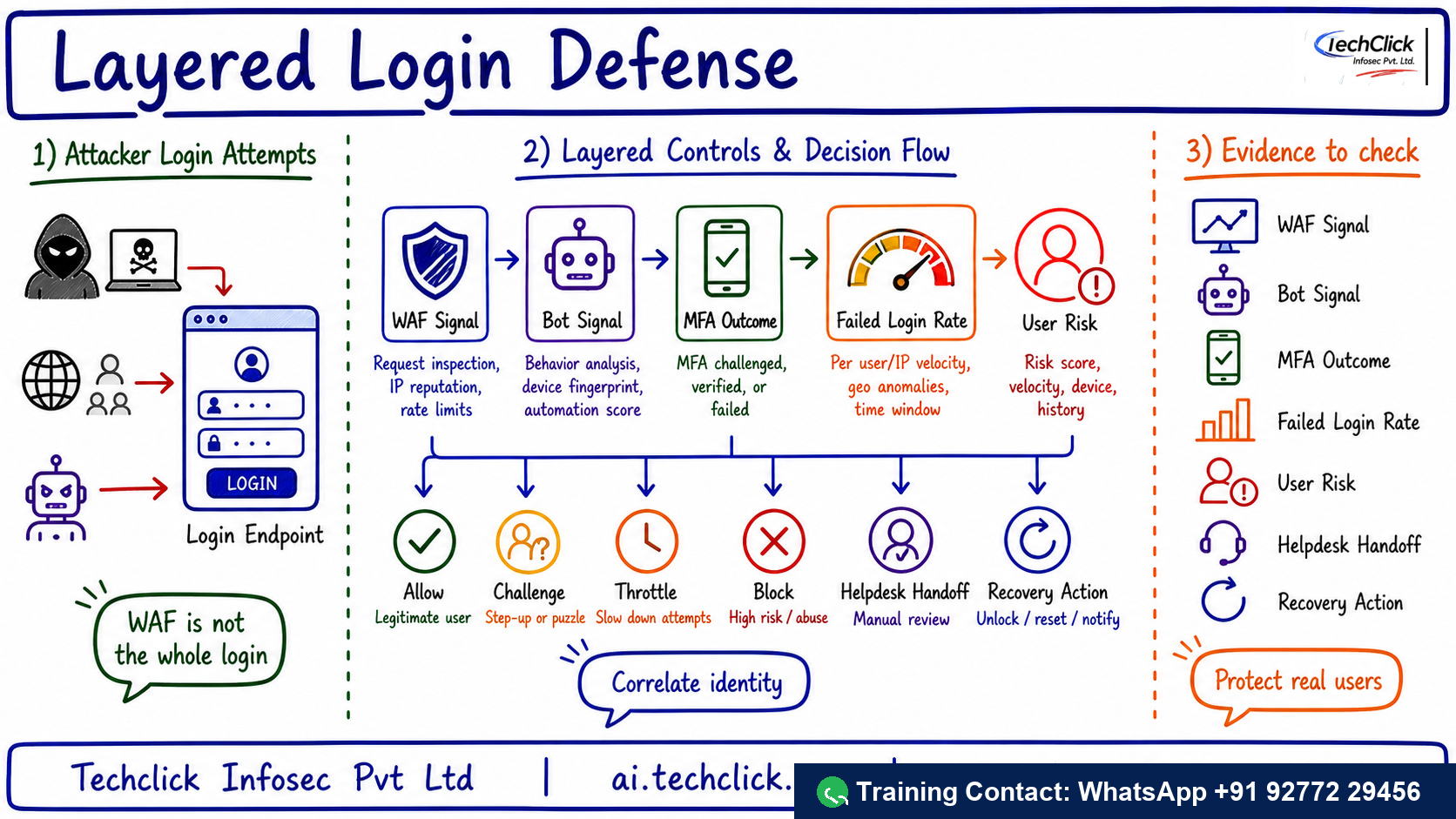
ChatGPT Image infographic - Imperva Account Takeover Login Defense
Handwritten Techclick infographic explaining Imperva Account Takeover Login Defense architecture, flow and evidence points.
Use this visual first: it summarizes the Imperva Account Takeover Login Defense flow, control points and evidence checklist before the deeper lesson.

① What it solves and where it sits

Login abuse crosses security layers. The WAF sees requests, bot controls see automation signals, identity sees authentication outcomes, and fraud teams see account impact.

Production use case: Use it when credential stuffing or account takeover attempts hit login pages and helpdesk tickets rise.

Figure 1 — Imperva Account Takeover Login Defense healthy flow
Start with this path when explaining or troubleshooting.Imperva Account Takeover Login Defense healthy flowDetect attemptdecision pointScore clientdecision pointCheck authdecision pointProtect userdecision pointReview recoverdecision point
Start with this path when explaining or troubleshooting.
Quick check · Q1 of 10 · Understand

Best one-line description of Imperva Account Takeover Login Defense?

Correct: b. The core is Layered login-defense evidence across WAF, bot and identity outcomes; explain the architecture and evidence path, not only the product name.
👉 So far: Imperva Account Takeover Login Defense solves Use it when credential stuffing or account takeover attempts hit login pages and helpdesk tickets rise..

② Core components you must name

Use these names before jumping to troubleshooting. They anchor the architecture and make the interview answer sound practical.

Figure 2 — Component stack
The named objects/components that carry the design.Component stackLogin endpointProtected path targeted by credential stuffingBot signalAutomation evidence before authentication succeedsMFA outcomeIdentity-layer proof of challenge or failureUser riskAccount-level context for fraud or takeover responseHelpdesk handoffRecovery workflow for affected users
The named objects/components that carry the design.
🧭
Flow first
tap to flip

Say the path in order: Detect attempts → Score client → Check auth → Protect user → Review recovery. It keeps the answer structured.

🛡
Policy proof
tap to flip

A decision is not real until logs/events show the rule, object and final action.

🔧
Health gate
tap to flip

Most outages are not product magic; they are forwarding, health, identity, certificate or rule-order problems.

📊
Rollout
tap to flip

Safe rollout: Monitor attack volume, protect high-risk endpoints, tune challenge/block actions, coordinate MFA/user recovery and track helpdesk impact.

Name objects before tools

Lead with Login endpoint, Bot signal, MFA outcome. It sounds like production work, not brochure reading.

Quick check · Q2 of 10 · Remember

Which item belongs in the core architecture?

Correct: c. Login endpoint is one of the named components you should use in a precise answer.
👉 So far: Core components: Login endpoint, Bot signal, MFA outcome, User risk.

③ The traffic or telemetry path

The healthy path is: Detect attempts → Score client → Check auth → Protect user → Review recovery. Walk it left to right. If a user report says 'it is broken', locate the exact stage where evidence stops.

The primary control is: Validate endpoint, bot classification, failed login rate, MFA outcome, user risk and response action.

Figure 3 — Policy and evidence hub
Good troubleshooting ties every path back to policy, health and logs.Policy and evidence hubPolicy + logstruth sourceLogin endpointBot signalMFA outcomeUser riskHelpdesk handoff
Good troubleshooting ties every path back to policy, health and logs.
Figure 4 — Healthy versus broken path
The right side is the classic failure you should catch quickly.Healthy versus broken pathHealthyTraffic is steered correctlyPolicy/object health is validLogs show final actionUser impact is scopedBrokenThe team treated bot mitigation asEvidence stops earlyUsers see inconsistent resultsFix needs verification
The right side is the classic failure you should catch quickly.
Do not skip the first hop

If Detect attempts never reaches the control point, no later policy can help. Confirm steering/forwarding first.

▶ Watch the Imperva Account Takeover Login Defense decision path

Press Play for the healthy path, then Break it for the common outage.

① Detect attemptsDetect attempts: Imperva Account Takeover Login Defense advances this stage and records evidence for troubleshooting.
② Score clientScore client: Imperva Account Takeover Login Defense advances this stage and records evidence for troubleshooting.
③ Check authCheck auth: Imperva Account Takeover Login Defense advances this stage and records evidence for troubleshooting.
④ Protect userProtect user: Imperva Account Takeover Login Defense advances this stage and records evidence for troubleshooting.
Press Play to step through the healthy path. Then press Break it.
Quick check · Q3 of 10 · Apply

What should you trace first during troubleshooting?

Correct: a. Start at Detect attempts and follow the flow until evidence stops.
👉 So far: Healthy flow: Detect attempts → Score client → Check auth → Protect user → Review recovery.

④ Operations, rollout and interview response

The safe rollout answer is: Monitor attack volume, protect high-risk endpoints, tune challenge/block actions, coordinate MFA/user recovery and track helpdesk impact. That prevents broad production impact while still moving toward enforcement.

Compared with blocking login traffic without identity context, the value is richer policy context, better visibility and a clearer operational evidence trail.

Figure 5 — Interview troubleshooting path
Use this sequence to avoid random guessing.Interview troubleshooting pathConfirmscope + symptomTraceflow stageCheckpolicy + healthFixsmall changeVerifylogs + user test
Use this sequence to avoid random guessing.

Rohan at a Noida SOC gets this ticket

Bot blocks reduce requests but users still report suspicious successful logins.

Likely cause

The team treated bot mitigation as full ATO response and did not correlate identity or recovery evidence.

Diagnosis

Trace Detect attempts → Score client → Check auth → Protect user → Review recovery, then compare policy logs, object health and user scope.

Console ▸ policy/logs ▸ health/status ▸ affected user test
Fix

Correlate login events, bot classification, MFA outcomes and affected accounts, then run recovery for compromised users.

Verify

Repeat the original user test and capture the allow/block/health evidence in logs.

Close with proof

The final answer should include log evidence, health state and a user test. That is what separates RCA from guessing.

Quick check · Q4 of 10 · Evaluate

Safest production rollout answer?

Correct: d. A controlled pilot with monitoring and verification reduces blast radius while building confidence.
👉 So far: Classic failure: The team treated bot mitigation as full ATO response and did not correlate identity or recovery evidence.

🤖 Ask the AI Tutor

Tap any question — instant, scoped to this lesson. No login, no waiting.

Pre-curated from vendor docs + community Q&A, scoped to this lesson. For a live prod issue, paste your export into chat.techclick.in.

📝 Wrap-up assessment — six more

You've answered 4 inline. Six left. 70% (7 of 10) marks the lesson complete on your profile. Tap Submit all answers at the end.

Q5 · Remember

What should you name before troubleshooting?

Correct: b. Naming objects and flow prevents random guessing.
Q6 · Understand

What proves a policy decision?

Correct: a. Logs/events prove rule match, action, object and user context.
Q7 · Apply

Where should you start tracing Imperva Account Takeover Login Defense?

Correct: c. Start at Detect attempts and move stage by stage.
Q8 · Analyze

Why is a pilot safer than global enforcement?

Correct: b. Pilot scope lets you catch false positives or broken forwarding before broad impact.
Q9 · Evaluate

Best interview closing line?

Correct: d. Verification is the only defensible close to a production troubleshooting answer.
Q10 · Evaluate

What is the likely root cause in this lesson's scenario: Bot blocks reduce requests but users still report suspicious successful logins.

Correct: c. The team treated bot mitigation as full ATO response and did not correlate identity or recovery evidence.
Lesson complete — saved to your profile.
Almost! You need 70% (7 of 10) — re-read the path that tripped you up and tap "Try again".

🧠 In your own words

Explain Imperva Account Takeover Login Defense in one L2 interview sentence.

Expert version: Imperva Account Takeover Login Defense should be explained by the flow Detect attempts → Score client → Check auth → Protect user → Review recovery, the core control Layered login-defense evidence across WAF, bot and identity outcomes, and the proof points: policy logs, health state and user verification.

🗣 Teach a friend

Best way to lock it in — explain it in one line to a teammate. Tap to generate a paste-ready summary.

📖 Glossary

Cloud WAF
Imperva edge-delivered WAF service for web application and API protection.
WAF Gateway
Imperva local gateway option for environments that need local control or sovereignty.
API discovery
The process of finding documented, undocumented, public, private and shadow APIs.
Client classification
Bot-control evidence that separates likely users, bots, tools and abusive automation.
Clean traffic
Traffic returned from a DDoS scrubbing path after malicious traffic is filtered.
DRA
Data Risk Analytics, the Imperva DSF risk layer for database and data activity.

📚 Sources

  1. Imperva Advanced Bot Protection
  2. Imperva Web Application Firewall
  3. Imperva API Security
  4. Imperva DDoS Protection Services
  5. Imperva Attack Analytics

What's next?

Next, pair this lesson with the new Imperva Account Takeover Login Defense interview Q&A page and explain the same flow out loud in 90 seconds.