Start here · learn the idea before the technical detail
What you are learning
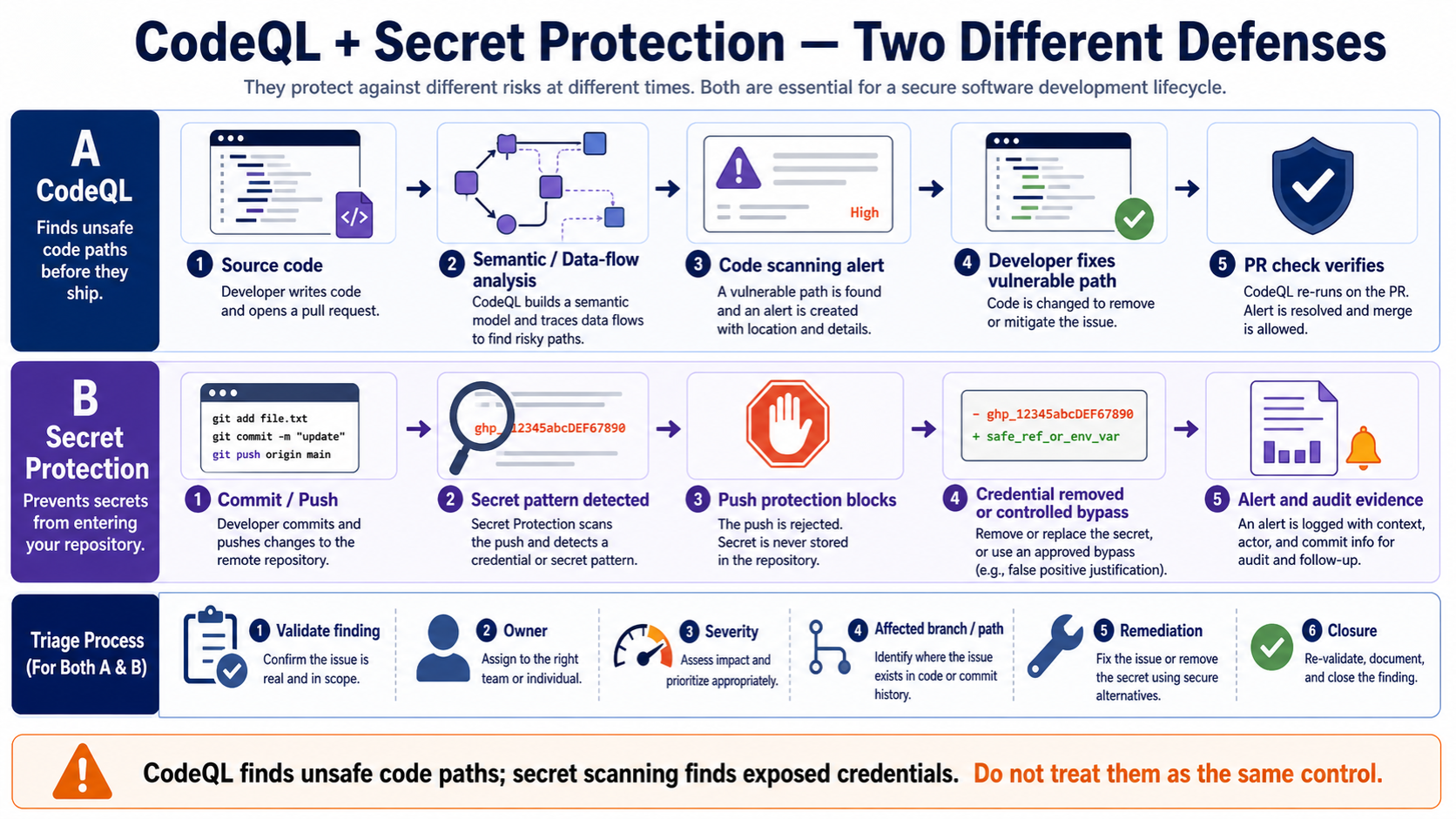
This lesson separates two controls that students often mix together. Code scanning looks for unsafe code patterns and data flows. Secret protection looks for credentials and tokens that could give someone access to a system.
In plain English
CodeQL turns code into a queryable database and runs security queries against it. Secret scanning searches for known secret formats and related evidence. Both produce alerts, but the investigation and fix are different.
Real example
CodeQL reports user-controlled input reaching a database query, so the developer uses a parameterised query and reruns the analysis. Secret scanning reports a cloud token, so the team revokes the credential, removes it from code, checks for misuse, and stores the replacement safely.
Follow this flow
- Identify whether the alert is about vulnerable code or an exposed credential.
- Confirm the affected repository, file, line, rule, and alert state.
- For code, understand the source-to-sink path and correct the unsafe logic.
- For a secret, revoke or rotate it first, then remove it and investigate use.
- Rerun the control and record the final alert decision.
Evidence to collect
- CodeQL query or secret type
- Affected file and line
- Data-flow path for code alerts
- Credential revocation and audit events for secret alerts
- Fix commit, alert state, and rerun result
Common mistake to avoid
Deleting a secret from the latest commit does not make the credential safe. Assume it may have been copied: revoke or rotate it, investigate possible use, clean the repository where required, and prevent recurrence.
Current official source checkpoint
- Configure GitHub code scanningofficial reference checked for this explanation
- GitHub code scanning alertsofficial reference checked for this explanation
- GitHub secret securityofficial reference checked for this explanation
- GitHub SARIF filesofficial reference checked for this explanation
Key terms before you continue
Most engineers think...
Most candidates describe GitHub Advanced Security CodeQL and secret scanning as a product name and stop there. That is not enough for L2/L3 work.
The better model is operational: know the components, follow the flow, prove the policy hit, and explain the failure path. For this topic, the core idea is CodeQL query, secret scanning, dependency review, alert triage and fix PR.
① What it solves and where it sits
GitHub Advanced Security CodeQL and secret scanning is used to shift code, secret and dependency risk into the pull request workflow. In production, the useful model is CodeQL query, secret scanning, dependency review, alert triage and fix PR: name the objects, follow the flow, capture evidence, and change policy only after a controlled test.
Production use case: shift code, secret and dependency risk into the pull request workflow
Best one-line description of GitHub Advanced Security CodeQL and secret scanning?
② Core components you must name
Use these names before jumping to troubleshooting. They anchor the architecture and make the interview answer sound practical.
- CodeQL query — Semantic code analysis for vulnerability patterns
- Secret scanning — Credential detection and partner validation
- Dependency review — Risk check for package changes in PR
- Alert triage — Dismiss, fix or track finding with reason
- Fix PR — Developer-owned remediation and merge evidence
Say the path in order: Open PR → Run CodeQL → Scan secrets → Review dependency → Merge fix. It keeps the answer structured.
A decision is not real until logs/events show the rule, object and final action.
Most outages are not product magic; they are forwarding, health, identity, certificate or rule-order problems.
Safe rollout: Pilot with a small scope, baseline logs, tune exceptions, then expand enforcement with rollback and owner approval.
Lead with CodeQL query, Secret scanning, Dependency review. It sounds like production work, not brochure reading.
Which item belongs in the core architecture?
③ The traffic or telemetry path
The healthy path is: Open PR → Run CodeQL → Scan secrets → Review dependency → Merge fix. Walk it left to right. If a user report says 'it is broken', locate the exact stage where evidence stops.
The primary control is: Use CodeQL query, secret scanning, dependency review, alert triage and fix PR to shift code, secret and dependency risk into the pull request workflow.
If Open PR never reaches the control point, no later policy can help. Confirm steering/forwarding first.
▶ Watch the GitHub Advanced Security CodeQL and secret scanning decision path
Press Play for the healthy path, then Break it for the common outage.
What should you trace first during troubleshooting?
④ Operations, rollout and interview response
The safe rollout answer is: Pilot with a small scope, baseline logs, tune exceptions, then expand enforcement with rollback and owner approval. That prevents broad production impact while still moving toward enforcement.
Compared with a standalone point tool or manual spreadsheet workflow, the value is richer policy context, better visibility and a clearer operational evidence trail.
Rohan at a Noida SOC gets this ticket
A production rollout fails because a leaked token is rotated but remains in git history and alert status is not closed.
A leaked token is rotated but remains in git history and alert status is not closed.
Trace Open PR → Run CodeQL → Scan secrets → Review dependency → Merge fix, then compare policy logs, object health and user scope.
Console ▸ policy/logs ▸ health/status ▸ affected user testRevoke and rotate the token, remove history if needed, confirm secret alert status and add prevention rule.
Repeat the original user test and capture the allow/block/health evidence in logs.
The final answer should include log evidence, health state and a user test. That is what separates RCA from guessing.
Safest production rollout answer?
🤖 Ask the AI Tutor
Tap any question — instant, scoped to this lesson. No login, no waiting.
Pre-curated from vendor docs + community Q&A, scoped to this lesson. For a live prod issue, paste your export into chat.techclick.in.
📝 Wrap-up assessment — six more
You've answered 4 inline. Six left. 70% (7 of 10) marks the lesson complete on your profile. Tap Submit all answers at the end.
🧠 In your own words
Explain GitHub Advanced Security CodeQL and secret scanning in one L2 interview sentence.
🗣 Teach a friend
Best way to lock it in — explain it in one line to a teammate. Tap to generate a paste-ready summary.
📖 Glossary
- CodeQL query
- Semantic code analysis for vulnerability patterns
- Secret scanning
- Credential detection and partner validation
- Dependency review
- Risk check for package changes in PR
- Alert triage
- Dismiss, fix or track finding with reason
- Fix PR
- Developer-owned remediation and merge evidence
- Evidence trail
- Logs, health state and owner approval used to prove CodeQL query, secret scanning, dependency review, alert triage and fix PR worked as intended.
📚 Sources
What's next?
Next, compare this GitHub lesson with another Techclick gap-track page in CNAPP cloud workload and DevSecOps security and practice the same flow out loud.