FortiClient EMS evaluates Zero Trust tagging rules and syncs security posture tags plus the client certificate to the FortiGate. The user hits an access-proxy VIP (ZTNA Server), not a VPN pool. A simple ZTNA policy is a firewall policy with Type = ZTNA and set ztna-ems-tag; dstintf stays any and you cannot match on the real server’s destination interface. A full ZTNA policy is config firewall proxy-policy with set proxy access-proxy after Explicit Proxy is visible. Multiple tags default to Any of; use All of when AV and domain-join must both be true. SD-WAN is a different plane: Performance SLA probes members, then an SD-WAN rule steers M365. ZTNA replaces remote-access VPN for published HTTPS and TCP-forward apps on managed FortiClient endpoints. Keep IPsec for site-to-site overlay members. Keep Agentless VPN only for unpublished apps or unmanaged break-glass.
1. Why the two tickets share one box
Monday the branch says Outlook is “on the cheap link and it feels like a café.” Tuesday Security says a contractor on SSL-VPN browsed a file share that was never in scope. Both are FortiOS jobs. They are not the same job.
SD-WAN answers: which member (underlay or overlay) should this session leave on, given live latency, jitter, and loss. ZTNA answers: is this device + user allowed to reach this application through an encrypted access proxy, without a network-wide tunnel.

Fortinet’s Administration Guide is blunt on the ZTNA half: ZTNA policies let users reach resources through an encrypted access proxy. That reduces the need for remote-access VPN and allows only specific application access. It does not delete IPsec overlays you still need as SD-WAN members.
SD-WAN ticket language
“M365 on lowest-latency underlay, backups on cheapest, failover when the SLA probe dies.” Objects: zone, member, Performance SLA, SD-WAN rule.
ZTNA ticket language
“Jira only if EMS-managed, cert present, tags FortiAD and Low-Risk.” Objects: EMS connector, posture tag, ZTNA Server, ZTNA policy.
2. Mental model: path quality vs identity
Pre-train the hard words before you click anything.
- SD-WAN zone — logical bundle of members. Policies can reference the zone instead of each WAN.
- Member — one underlay (port1, port2) or overlay (IPsec) enrolled in a zone. SLA probes test members.
- Performance SLA — health-check probes (ICMP, HTTP, HTTPS, and others) that measure latency, jitter, and packet loss on participants that are SD-WAN members.
- SD-WAN rule — first-match steering. Strategies in FortiOS include Manual, Best Quality, Lowest Cost (SLA), Load balancing / Maximize Bandwidth, and Automatic.
- EMS security posture tag — result of a Zero Trust tagging rule on FortiClient EMS. Synced to the FortiGate. Older docs still say “ZTNA tag.”
- Access-proxy VIP / ZTNA Server — the FortiGate gateway clients open HTTPS to. Service/server mappings send matching Host/path to a real server.
- Simple ZTNA policy — firewall policy, Type = ZTNA. CLI:
config firewall policy+set ztna-ems-tag. - Full ZTNA policy — proxy policy, Type = ZTNA. CLI:
config firewall proxy-policy+set proxy access-proxy.
Read left → right, then the two planes. ZTNA never picks wan1 vs wan2. SD-WAN never checks EMS tags.
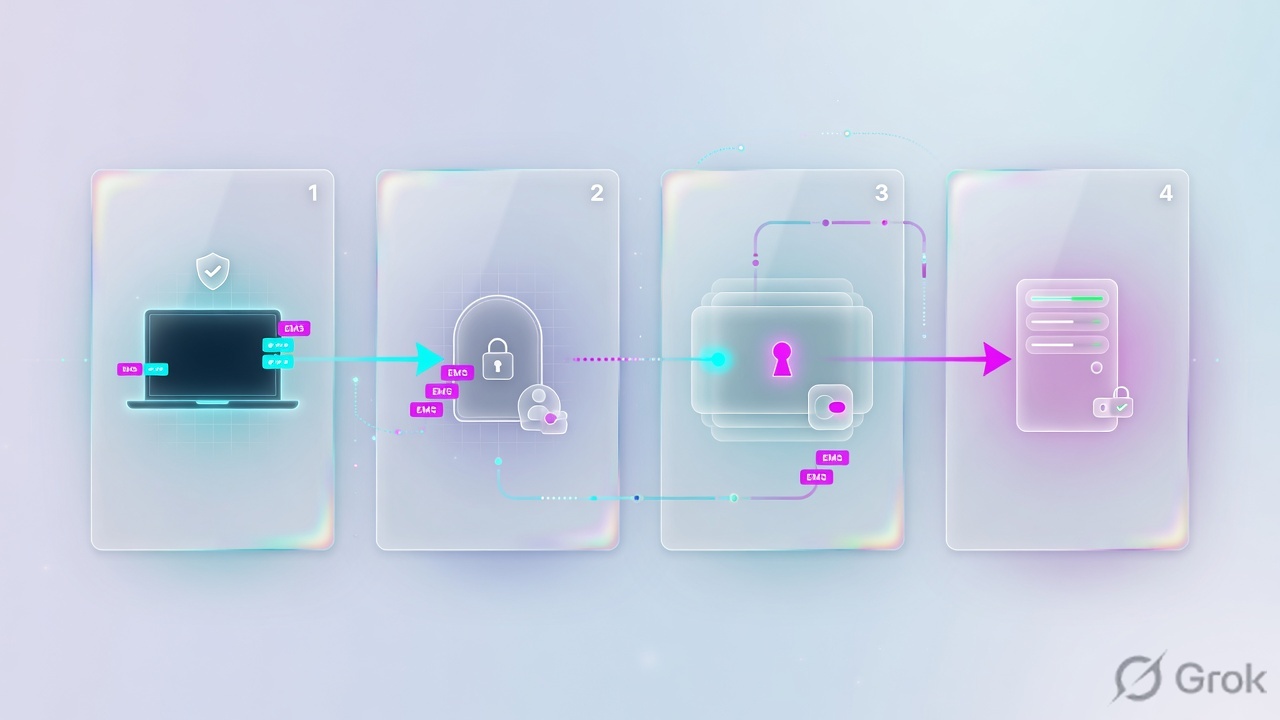
EMS owns posture. The FortiGate owns the access-proxy VIP and the policy. SD-WAN owns which WAN the other traffic leaves on. A ZTNA allow is not a VPN.
Official FortiOS: security posture tags are used in ZTNA policies and standard firewall policies, but each type reads different data from the tag. A ZTNA policy uses device identity (client cert / EMS context), not the IP or MAC inside the tag. A regular firewall policy uses the tag as an IP or MAC source/destination object — typical for on-net users. Mixing those two stories is the most common interview fail.
3. Decision: ZTNA, VPN, simple vs full
Diamond = decision. Official limit: a simple ZTNA policy cannot control access by destination interface or the real server’s destination address.

Simple vs full — official split
FortiOS documents two GUI ways to write the ZTNA rule.
Full ZTNA policy. Enable System → Feature Visibility → Explicit Proxy. Then Policy & Objects → Proxy Policy → Create New, Type = ZTNA. CLI stays config firewall proxy-policy with set proxy access-proxy and set access-proxy "<ZTNA Server>". You can set incoming interface, source, destination (real server object), and the ZTNA Server.
Simple ZTNA policy. Policy & Objects → Firewall Policy → Create New, Type = ZTNA. Pick Incoming Interface, Source, Security posture tags, and the ZTNA Server. CLI uses set dstaddr <access-proxy VIP> and set ztna-ems-tag. set dstintf "any" cannot be modified. This covers most full-policy functions except destination-interface and real-server destination matching.
Multiple tags on a ZTNA policy default to Any of (one tag is enough). Switch to All of when the ticket is “AV and domain-joined.” Official deny evidence is action="deny", policyid=0, msg="Traffic denied because failed to match a policy or proxy-policy", with the live tags in clientdevicetags.
set ztna-policy-redirect enable on a simple policy can force a second match against full proxy-policies. It is disabled by default. If you enable it and no full policy matches, traffic is implicitly denied even though the simple row looked like an allow.
4. How to choose
| Question | Use ZTNA | Keep VPN / overlay |
|---|---|---|
| What is being accessed? | One HTTPS app or a TCP-forward mapping (RDP/SSH/thick client) published on a ZTNA Server. | Arbitrary subnets, unpublished apps, or site-to-site prefixes. |
| Who is on the endpoint? | FortiClient registered to EMS, client cert present, tags you trust. | Unmanaged browser, contractor kit, or break-glass. Agentless / web ZTNA is a separate design. |
| Blast radius if the laptop is stolen | Only apps whose tags still match. Posture change can tear the session (WAD). | SSL-VPN / Agentless VPN that assigned a tunnel IP can still see whatever the firewall policy allows on that pool. |
| Where does SD-WAN fit? | Does not replace ZTNA. Steers SaaS and other egress. Overlay IPsec members stay in the zone. | IPsec hub-spoke overlays remain SD-WAN members even after remote-access VPN shrinks. |
| Need | Simple ZTNA (firewall policy) | Full ZTNA (proxy policy) |
|---|---|---|
| GUI path | Policy & Objects → Firewall Policy, Type = ZTNA | Feature Visibility → Explicit Proxy, then Proxy Policy, Type = ZTNA |
| CLI | config firewall policy · set ztna-ems-tag · dstintf any |
config firewall proxy-policy · set proxy access-proxy |
| Match dest-intf / real-server dest | No — official limitation | Yes — set dstaddr on the real server object |
Log policytype |
policy |
proxy-policy |
| When to pick it | Most HTTPS access-proxy pilots | You must pin dest-intf or a specific real-server address |
| SD-WAN strategy (official family) | Use when |
|---|---|
| Manual | Static member order. No SLA failover by itself. |
| Best Quality | Pick the measured best member (latency / jitter / loss / custom). |
| Lowest Cost (SLA) | Prefer cheaper members that still meet the SLA target. Classic M365 + broadband-if-healthy pattern. |
| Load balancing / Maximize Bandwidth | Spread across healthy members. Wrong default for a single voice/M365 session you want sticky. |
5. Runbook: EMS, SD-WAN, ZTNA
Lab numbers are RFC 5737 / RFC 1918 training values: WAN1 port1 203.0.113.10/24 gw 203.0.113.1, WAN2 port2 198.51.100.10/24 gw 198.51.100.1, LAN port3 10.0.1.0/24, ZTNA VIP 203.0.113.50:443, real server 10.88.0.3:9443, tags FortiAD and Low-Risk. Primary source for each block is named under the steps.
Side A — EMS connector and posture tags
Source: FortiOS Administration Guide — Establish device identity and trust context with FortiClient EMS and Types of security posture tags.
-
Connect FortiGate to EMS
Security Fabric → Fabric Connectors (Endpoint/Identity family) → FortiClient EMS. Point at the EMS FQDN. Authorize the FortiGate on EMS. The FortiGate keeps a continuous connection and syncs FortiClient UID, client-certificate SN, EMS SN, user/domain, and IP/MAC.
-
Do not confuse the two certificates
EMS has
default_ZTNARootCA(signs FortiClient CSRs). That is not the EMS HTTPS / fabric SSL certificate. Refreshing the ZTNA CA revokes and reissues client certs. On Windows, the client cert in the store must match UID/SN on EMS and the FortiGate. -
Build tags on EMS
On FortiClient EMS: Security Posture Tags → Tags → Create. Example rule: domain-joined + AV running → tag
FortiAD. Separate rule: risk class low → tagLow-Risk. A third rule for malware →Malicious-File-Detectedused only in a deny story. Tags evaluate on the endpoint; EMS pushes results. -
Confirm the FortiGate learned them
diagnose endpoint fctems test-connectivitythendiagnose firewall dynamic listanddiagnose endpoint ec-shm list. No tag on the FortiGate means the policy cannot match it, no matter how pretty EMS looks.
Side B — SD-WAN zone, members, SLA, rule
Source: FortiOS Administration Guide — Performance SLA overview and SD-WAN rules / Application steering using SD-WAN rules.
-
Zone and members
Network → SD-WAN. Create or use a zone (default
virtual-wan-link, or a namedunderlay). Add membersport1andport2with their gateways. Overlay IPsec tunnels that should participate are members too — that is how hub-spoke stays on SD-WAN after you shrink SSL-VPN. -
Performance SLA
Performance SLAs tab → Create New. Name
Office365. Protocol HTTP or HTTPS to a real target the member can reach (or a FortiGuard SLA-database destination on entitled builds). Participants = the members you care about. SLA target example for this lab: latency 150 ms, jitter 30 ms, packet loss 1%. Participants must be SD-WAN members. -
Application-steering rule
SD-WAN Rules tab → Create New. Identify traffic with ISDB / application (example Microsoft-Office365). Strategy Lowest Cost (SLA) bound to health-check
Office365. Prefer the cheaper member that is still in SLA. A later implicit or catch-all rule handles the rest. Rules are first-match. -
Firewall policy still required
SD-WAN does not accept traffic. You still need Policy & Objects → Firewall Policy LAN → SD-WAN zone. Steering without an accept policy is a dark GUI.
Network → SD-WAN → Performance SLAs → Create New
New Performance SLA
Training values. Participants must already be SD-WAN members. Ping to the gateway is not this probe — test with execute ping-options source <member-ip> toward the SLA server.
Click next: OK → SD-WAN Rules → Create New → Lowest Cost (SLA) → bind Office365. Source: Performance SLA overview.
config system sdwan
    set status enable
    config zone
        edit "underlay"
        next
    end
    config members
        edit 1
            set interface "port1"
            set zone "underlay"
            set gateway 203.0.113.1
        next
        edit 2
            set interface "port2"
            set zone "underlay"
            set gateway 198.51.100.1
        next
    end
    config health-check
        edit "Office365"
            set server "www.office.com"
            set members 1 2
            config sla
                edit 1
                    set latency-threshold 150
                    set jitter-threshold 30
                    set packetloss-threshold 1
                next
            end
        next
    end
    config service
        edit 1
            set name "M365-lowest-cost"
            set mode sla
            set internet-service enable
            set internet-service-name "Microsoft-Office365"
            set health-check "Office365"
            set sla 1
            set priority-members 2 1
        next
    end
end
Side C — ZTNA Server and policy
Source: FortiOS Administration Guide — Basic ZTNA configuration and Full versus simple ZTNA policies.
-
ZTNA Server (access-proxy VIP)
Policy & Objects → ZTNA → ZTNA Server → Create New. Interface = WAN that clients hit. External IP
203.0.113.50(or 0.0.0.0 to use the interface primary/secondary). Port must not collide with management HTTPS on that interface. Default certificate = the server cert clients see on the VIP. -
Service / server mapping
Service = HTTPS. Virtual Host = Specify
jira.lab.example(or Any Host if every name that resolves to the VIP should map). Path match as needed (substring / wildcard / regex). Real server IP10.88.0.3port9443. Extra real servers from CLI enable load-balancing in the GUI. -
Simple ZTNA policy for the pilot
Policy & Objects → Firewall Policy → Create New. Type = ZTNA. Incoming interface = the WAN. Source = all (or a user group once auth schemes exist). Security posture tags =
FortiADandLow-Risk, matching method All of. ZTNA Server = the object from step 1. Action ACCEPT. Do not skip the tags — a Type=ZTNA row with noztna-ems-tagis a posture-free allow for anyone who completed the ZTNA handshake. -
Use full policy only if you need dest-intf
Enable Explicit Proxy, then Proxy Policy Type ZTNA, Destination = real-server address object
Webserver1, ZTNA Server set. Skip this for the first HTTPS pilot.
Policy & Objects → Firewall Policy → Create New
New Firewall Policy
Official simple-policy CLI sets dstintf "any" and dstaddr to the access-proxy VIP. Multiple tags default to Any of unless you choose All of.
Click next: OK → resolve jira.lab.example to 203.0.113.50 on the pilot laptop → open HTTPS → read subtype=ztna. Source: Basic ZTNA configuration.
config firewall vip
    edit "ZTNA-webserver"
        set type access-proxy
        set extip 203.0.113.50
        set extintf "port1"
        set server-type https
        set extport 443
        set ssl-certificate "lab-vip-cert"
    next
end
config firewall access-proxy
    edit "ZTNA-webserver"
        set vip "ZTNA-webserver"
        set client-cert enable
        config api-gateway
            edit 1
                set service https
                set url-map "/"
                config realservers
                    edit 1
                        set ip 10.88.0.3
                        set port 9443
                    next
                end
            next
        end
    next
end
config firewall policy
    edit 17
        set name "ZTNA-jira-all-of"
        set srcintf "port1"
        set dstintf "any"
        set action accept
        set srcaddr "all"
        set dstaddr "ZTNA-webserver"
        set ztna-ems-tag "FortiAD" "Low-Risk"
        set schedule "always"
        set nat enable
    next
end
You can put a user group under Source on both simple and full ZTNA. The authentication scheme and rules must already send that traffic to the ZTNA application gateway. Regular firewall authd is a different engine. config firewall auth-portal / set proxy-auth enable is the WAD path and is off by default.
6. Runtime path and proof
After go-live, a good session looks like this. A bad session fails at a named step — do not restart EMS first.
Read left → right. Fail at 2 = VIP/DNS/cert. Fail at 3 = tags. Fail at 4 = virtual host. Fail at 5 = real server / health.

diagnose endpoint fctems test-connectivity
diagnose test application fcnacd 2
diagnose endpoint ec-shm list
diagnose wad dev query-by uid
diagnose wad dev query-by ipv4 10.0.1.50
diagnose firewall dynamic list

execute log filter category traffic
execute log filter field subtype ztna
execute log display

diagnose sys sdwan member
diagnose sys sdwan health-check
diagnose sys sdwan service
execute ping-options source 203.0.113.10
execute ping www.office.com
ZTNA allow: type=traffic subtype=ztna action=accept policytype=policy (simple) or proxy-policy (full), vip and accessproxy set, clientcert=yes, emsconnection=online, clientdevicetags includes every tag you required for All of. SD-WAN: diagnose sys sdwan health-check shows the member in-SLA, not just “gateway ping works.”
7. Traps and pilot checklist
| Symptom | Likely cause | First proof |
|---|---|---|
| HTTPS to the VIP fails before a policy name appears | VIP IP/port collides with management HTTPS, or client does not trust the Default certificate | Browse the VIP from the laptop. Check empty-cert-action / client-cert on the access-proxy VIP. |
action=deny policyid=0 failed to match a policy |
Tags are Any/All wrong, or the endpoint lacks Low-Risk, or you enabled ztna-policy-redirect with no full match |
Read clientdevicetags on that log. Compare to the policy’s All of / Any of list. |
| Type=ZTNA policy works for every EMS laptop, including contractors | No ztna-ems-tag on the simple policy — handshake-only allow |
CLI show firewall policy for that id. Add tags or it is not zero trust. |
| On-net firewall policy with a tag never hits | You used a ZTNA-style identity story. Firewall policies consume the tag’s IP or MAC | Confirm address type on the dynamic object. FortiGate learns IP/MAC for directly connected FortiClient (and fabric-shared EMS tags). |
| Member “dead” but you can ping the gateway | SLA probe target is blocked from the member source, or threshold too tight so the member flaps | execute ping-options source <member-ip> then ping the SLA server. Tune failtime / thresholds — do not disable the SLA. |
| M365 still on the expensive link | SD-WAN rule below a broader first-match, or strategy is Manual, or no ISDB match | diagnose sys sdwan service hit-count. Move the Microsoft-Office365 rule up. |
| CISO asks “did we turn VPN off?” | You published two apps and left the SSL-VPN pool on LAN | Shrink Agentless VPN to unpublished / break-glass only. IPsec overlays stay as SD-WAN members. |
Pilot checklist
- EMS connector Authorized;
diagnose endpoint fctems test-connectivitysucceeds. - Pilot endpoint shows expected tags in EMS and on
diagnose firewall dynamic list. - ZTNA Server VIP does not share the management HTTPS port on that interface.
- Simple policy has Type = ZTNA, ZTNA Server set, All of both required tags.
- Pilot user: HTTPS to
jira.lab.example→action=acceptsubtype=ztna. - Same user after you revoke the Low-Risk tag: deny + session tear-down.
- SD-WAN: Office365 SLA in-SLA on at least one member; M365 rule hit-count increments; bulk backup uses the other member.
- SSL-VPN / Agentless VPN portal disabled for the pilot group, or scoped to a documented leftover app.
Official language is reduce the need for remote-access VPN, not “delete the portal before every app is mapped.” Publish the HTTPS and TCP-forward set, prove tags, then shrink the tunnel. Site-to-site IPsec that is an SD-WAN member is not in that shrink list.
Knowledge check
Six judgment questions. Each maps to a promise bullet. Check answers shows the reason and the section to re-read.
Sources
- FortiOS 7.6.3 Administration Guide — Zero Trust Network Access introduction
- FortiOS 7.6.3 — Basic ZTNA configuration (ZTNA Server, access-proxy VIP, simple vs full policy CLI)
- FortiOS 7.6.3 — Full versus simple ZTNA policies
- FortiOS 7.6.3 — Types of security posture tags (ZTNA vs firewall policy; Any of / All of)
- FortiOS 7.6.3 — Establish device identity and trust context with FortiClient EMS
- FortiOS 7.6.3 — ZTNA troubleshooting and debugging commands
- FortiOS 7.6.3 — Performance SLA overview
- FortiOS 7.6.3 — SD-WAN rules overview
- FortiOS 7.6.3 — Application steering using SD-WAN rules
Related: FortiGate SD-WAN SLA + rules · FortiGate policy lookup + NAT · FortiGate IPsec / SSL-VPN · FortiGate ZTNA tags and private apps · FortiGate interview · Troubleshooting command center