Lessons · FortiGate series · Zones, policy, NAT
This lesson is how FortiOS turns a packet into a session: zone membership, policy lookup, then NAT, then the session table. Rule order and implicit deny depth live on first-match. Tenant isolation is VDOM.
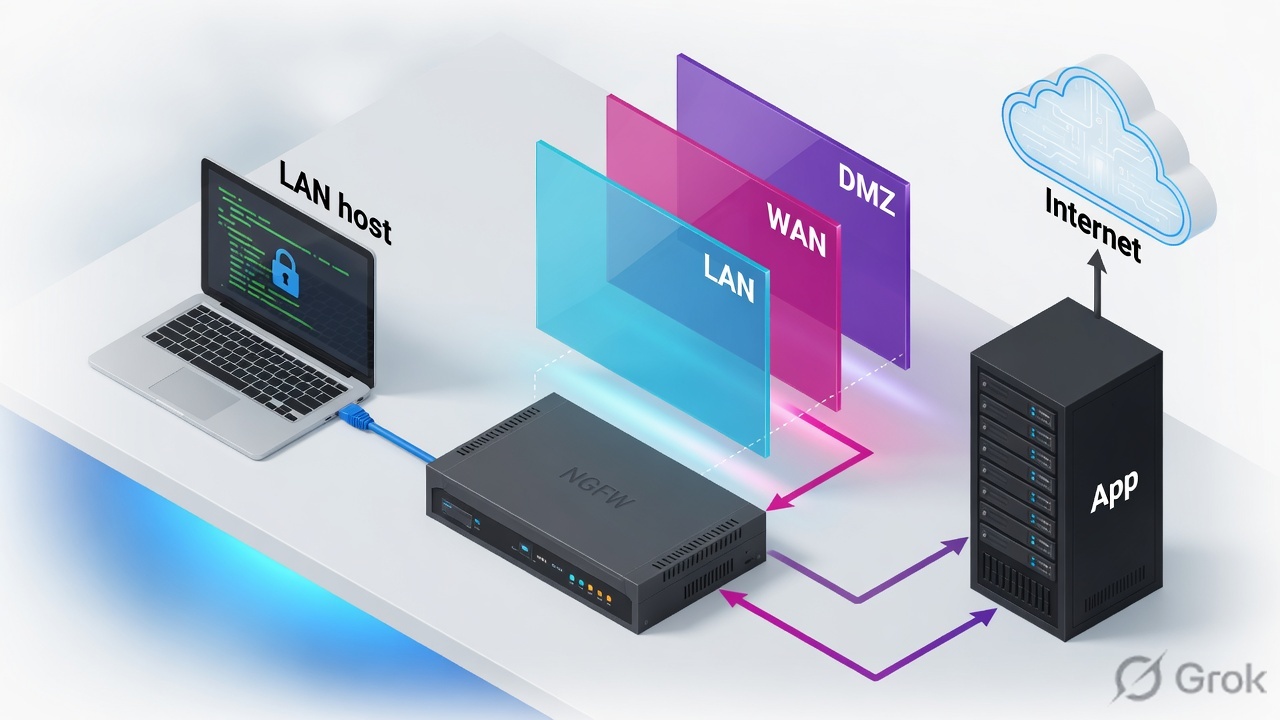
FortiGate policy matches incoming interface or zone, destination zone, source/dest address, and service (plus schedule/user if set). First match wins; nothing matching is implicit deny. SNAT (set nat enable / IP pool / Central SNAT) and DNAT (VIP) rewrite addresses — they do not grant the permit. An entry is placed in the session table for each session that passes a security policy. Prove with diagnose sys session filter then diagnose sys session list. Lab: LAN 10.20.20.0/24, FGT 10.20.20.1, WAN 192.0.2.0/24.
Why a route is not a session
The day-one ticket is always the same: “Routing is fine, so the firewall is broken.” Wrong. RIB lookup only names the egress interface. FortiOS still needs a firewall policy whose srcintf / dstintf (interface or zone), addresses and service cover that 5-tuple. No match → implicit deny. No accept → no session to list.
Three silent-zero states look identical from the host (timeout):
- Default route exists; policy is still LAN→LAN or missing dest zone WAN.
- Policy is accept, but
srcintfisport2while the packet arrived on a VLAN that is not in that object — zone membership is the real incoming interface. - VIP exists; no WAN→LAN policy with that VIP as
dstaddr. DNAT without accept is still a drop.
Traffic to the FortiGate uses local-in policy. Traffic through it uses firewall policy. Do not debug SNAT until diagnose debug flow shows a policy id other than 0 and diagnose sys session list shows the flow.
Zone, policy, NAT — three objects
A zone is an interface object: one or more physical, VLAN, LAG or tunnel interfaces grouped so a policy can say LAN instead of listing every port. Members of the same zone do not need a policy to talk to each other unless you enable intra-zone block. Policies still match on the zone name as srcintf / dstintf.
A firewall policy is the allow/deny. Required match fields: incoming interface(s), outgoing interface(s), source address(es), destination address(es), service(s), schedule. Optional: user, internet-service, security profiles. Action is accept or deny. NAT is a separate knob on that policy, or a separate VIP / Central NAT table.
Zone
config system zone. GUI: Network › Interfaces › Create New › Zone. Lab: LAN = internal, WAN = wan1. Policy talks in zone names.
Address / service
LAN_NET = 10.20.20.0/24. Service is ALL, HTTPS, or a custom TCP port. Objects, not raw CIDR typed in the policy every time.
Allow
set action accept. First matching policy wins. Implicit deny is policy 0 — debug flow says denied by policy 0 when nothing hit.
NAT
SNAT: set nat enable (outgoing interface IP or IP pool). DNAT: VIP as destination. Central NAT if central-nat is on — then the policy NAT checkbox is the wrong place.
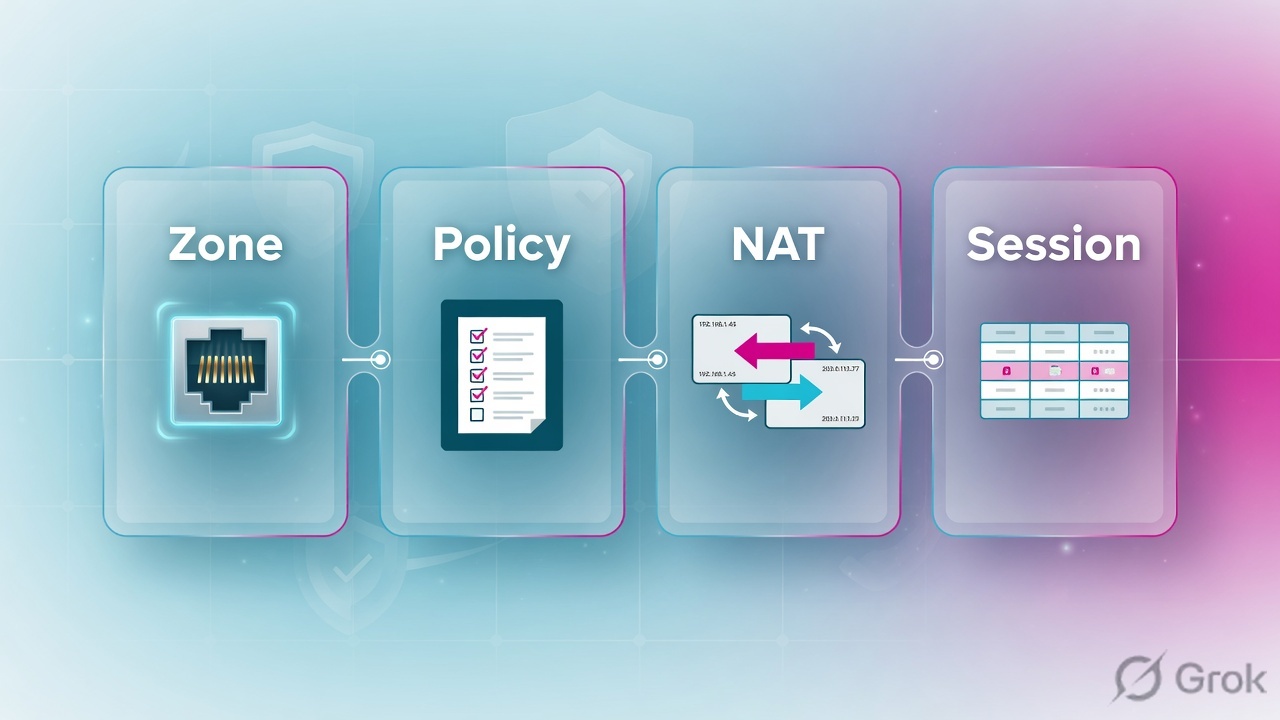
The packet hits a zone. Policy matches that zone pair plus address and service. Accept builds the session. SNAT or DNAT only rewrites. No accept, no session.
How a session is built
Existing session first. If FortiOS already has the 5-tuple, later packets skip policy lookup and follow the installed NAT hooks. New flows walk the full path. DNAT (VIP / Central DNAT) rewrites destination before routing and policy so the RIB and the dest-zone match the real server. SNAT runs after accept.
Read left → right, then the gold bar. Route names the dest zone; policy still has to accept that pair. SNAT is after accept.
| Object | Lab value | If missing |
|---|---|---|
| LAN zone / IP | zone LAN · 10.20.20.1/24 | Host cannot ARP the gateway. Local ping fails — not a policy problem. |
| WAN zone / IP | zone WAN · 192.0.2.1/24 | No egress. Route lookup fails before policy. |
| Address | LAN_NET = 10.20.20.0/24 | Policy matches nothing; debug flow policy 0. |
| Outbound policy | LAN-to-WAN accept + nat enable | Route yes, session no. Return from 203.0.113.80 has no state. |
| VIP | web_pub 192.0.2.80 → 10.20.20.80:443 | Published IP answers nothing. VIP without a WAN→LAN policy is not an open port. |
| Session proof | diagnose sys session list | GUI hit counter can lie on cached sessions. The table is the wire. |
Policy NAT vs VIP vs Central NAT
Pick the NAT engine the VDOM is actually running. Mixing them is the usual “NAT is on but nsrc is wrong” ticket.
Three columns, three tickets. Do not toggle NAT to “fix” a zone mismatch.
| Need | Use | Skip |
|---|---|---|
| LAN hosts share WAN IP | Policy NAT: set nat enable on LAN-to-WAN (outgoing interface address) | VIP. VIP is dest rewrite, not hide-NAT. |
| Many-to-one with a dedicated public | IP pool + set ippool enable / set poolname | Outgoing-interface SNAT if you must pin the source. |
| Publish 192.0.2.80:443 to 10.20.20.80 | VIP + WAN→LAN accept, dstaddr = VIP, usually nat disable | SNAT on that policy unless the server’s default gw is not the FGT. |
| NAT rules independent of every policy | Central SNAT / Central DNAT (config system settings set central-nat enable) | Leaving policy NAT enabled and wondering why it does nothing. |
Runbook Side A / B / C
Side A is objects. Side B is the policy and NAT. Side C is the session table. Do not start at C.
Side A — zones and addresses
-
Zone LAN and WAN
Network › Interfaces › Create New › Zone. Lab:
LANmember = internal (or port2);WANmember = wan1. CLIconfig system zone. Address on the member interface, not on the zone: LAN10.20.20.1/24, WAN192.0.2.1/24. Source: FortiOS Administration Guide — Zone. -
Address object
Policy & Objects › Addresses —
LAN_NETsubnet10.20.20.0/24. Do not useallas source on the first outbound policy if you want a readable session later.
config system zone
    edit "LAN"
        set interface "internal"
    next
    edit "WAN"
        set interface "wan1"
    next
end
config firewall address
    edit "LAN_NET"
        set subnet 10.20.20.0 255.255.255.0
    next
end
config router static
    edit 1
        set gateway 192.0.2.254
        set device "wan1"
    next
end
Side B — policy then NAT
Policy & Objects › Firewall Policy › Create New
LAN-to-WAN
Source: FortiOS Administration Guide — Firewall policy parameters (incoming/outgoing interface, address, service, schedule). NAT enable is the SNAT checkbox, not the action. Log all on the first lab policy so Forward Traffic has a row when the session exists.
-
Outbound accept + SNAT
Policy id 1
LAN-to-WAN:srcintf LAN,dstintf WAN,srcaddr LAN_NET,dstaddr all,service ALL,action accept,nat enable,logtraffic all. This is hide-NAT to192.0.2.1. -
Inbound VIP (separate from allow)
Policy & Objects › Virtual IPs —
web_pub, interface WAN, external192.0.2.80map to10.20.20.80, port 443→443. Then policy id 2 WAN→LAN,dstaddr web_pub, service HTTPS, accept, NAT off unless the server’s gateway is not the FGT.
Policy & Objects › Virtual IPs › Create New
web_pub
Source: FortiOS — Configuring VIPs. After OK you still need the WAN→LAN policy with destination web_pub. VIP object ≠ open port.
config firewall policy
    edit 1
        set name "LAN-to-WAN"
        set srcintf "LAN"
        set dstintf "WAN"
        set srcaddr "LAN_NET"
        set dstaddr "all"
        set action accept
        set schedule "always"
        set service "ALL"
        set nat enable
        set logtraffic all
    next
end
config firewall vip
    edit "web_pub"
        set extintf "WAN"
        set extip 192.0.2.80
        set mappedip "10.20.20.80"
        set portforward enable
        set protocol tcp
        set extport 443
        set mappedport 443
    next
end
config firewall policy
    edit 2
        set name "WAN-to-WEB"
        set srcintf "WAN"
        set dstintf "LAN"
        set srcaddr "all"
        set dstaddr "web_pub"
        set action accept
        set schedule "always"
        set service "HTTPS"
        set nat disable
        set logtraffic all
    next
end
Side C — prove the session
-
Filter, then list
From 10.20.20.10 open HTTPS to 203.0.113.80. On the FGT:
diagnose sys session filter clear,diagnose sys session filter src 10.20.20.10,diagnose sys session filter dport 443,diagnose sys session list. Source: FortiOS — Using a session table. -
Read the hooks
You want
policy_id=1,hook=post dir=org act=snatwith(192.0.2.1:…), and bytes on org and reply. Empty list after a live attempt = no accept.act=noopon org = accept without SNAT. -
Clear after an edit
diagnose sys session filter src 10.20.20.10thendiagnose sys session clearso the next packet re-walks policy. Old sessions keep old NAT.
diagnose sys session filter clear
diagnose sys session filter src 10.20.20.10
diagnose sys session filter dport 443
diagnose sys session list
# session info: proto=6 proto_state=11 …
# hook=post dir=org act=snat 10.20.20.10:54321->203.0.113.80:443(192.0.2.1:54321)
# hook=pre dir=reply act=dnat 203.0.113.80:443->192.0.2.1:54321(10.20.20.10:54321)
# policy_id=1  vd=0
# nsrc / nport match the SNAT you intended

diagnose firewall iprope lookup 10.20.20.10 54321 203.0.113.80 443 6 internal
# which policy would match — use when list is empty (device = ingress member, proto 6 = TCP)
Session list shows policy_id=1, SNAT to 192.0.2.1, reply packets increment. Forward Traffic log has the same policy name. That is the close — not “the route is there.”
One flow after go-live
Host 10.20.20.10 SYN to 203.0.113.80:443. Ingress LAN. Session miss. No VIP. RIB: default via 192.0.2.254, egress WAN. Policy 1 matches LAN/WAN/LAN_NET/all/ALL. Accept. SNAT source to 192.0.2.1. Session installed. Reply hits WAN, reverse DNAT to 10.20.20.10, egress LAN. Second packet of the same 5-tuple skips policy and uses the hooks.
Inbound: SYN to 192.0.2.80:443. VIP DNAT to 10.20.20.80:443. Route to LAN. Policy 2 matches WAN/LAN/all/web_pub/HTTPS. Accept, no SNAT. Session act=dnat on org. Hairpin from 10.20.20.10 to 192.0.2.80 needs extra policy + often SNAT so the server replies via the FGT — that is a different ticket.

diagnose sys session list fields: policy_id, hook act, nsrc, proto_state. Artwork checkmarks are not FortiOS.diagnose debug reset diagnose debug flow filter addr 10.20.20.10 diagnose debug flow filter port 443 diagnose debug flow show function-name enable diagnose debug enable diagnose debug flow trace start 20 # look for: find a route / allowed by policy 1 / SNAT 10.20.20.10 -> 192.0.2.1 # or: denied by policy 0 → zone/address/service miss, not a NAT bug diagnose debug disable
Traps + proof
| Symptom | Likely cause | Proof |
|---|---|---|
| Route exists, no session | No accept for that zone pair / service. Implicit deny. | debug flow policy 0. session list empty after filter. |
| Policy on port2, packet on vlan20 | Incoming interface is the member, not the alias in your head. Zone never included vlan20. | diagnose netlink interface list vs srcintf on the policy. |
| NAT checkbox on, nsrc still RFC1918 | Central NAT enabled, or dest is not leaving WAN, or policy is deny. | get system settings | grep central-nat. Session act=noop. |
| VIP created, port still closed | No WAN→LAN policy with dstaddr = VIP. VIP is DNAT only. | sniffer on WAN sees SYN, no session, no LAN SYN. |
| Changed NAT, still old public IP | Existing session kept old hooks. | Filter + diagnose sys session clear, re-test. |
| LAN host to own VIP fails | Hairpin: dest after DNAT is LAN, src is LAN — missing LAN→LAN VIP policy / SNAT. | debug flow dest zone LAN not WAN. |
| Deny in front of VIP does not block | VIP policies take priority unless set match-vip enable on the deny. | FortiOS firewall policy — match-vip. Session still policy_id of the VIP rule. |
Best practice: policies that allow traffic apply to a specific interface or zone, not any. Any hides the dest-zone mistake until the next bypass. Fix the zone membership.
- Host pings 10.20.20.1 (local-in). Separate from through-traffic.
- Policy list shows LAN-to-WAN above implicit deny; NAT enable; log all.
- From 10.20.20.10: HTTPS to 203.0.113.80.
session filter src+list→ policy_id=1, act=snat to 192.0.2.1, reply bytes > 0. - VIP: external 443 to 192.0.2.80, session act=dnat to 10.20.20.80, policy_id=2.
- After any NAT edit: session clear, then the same test. Hit counters on old sessions are not a new proof.
Knowledge check
Six judgment items. Submit once. Reasons point back at the section to re-read.
Sources
- FortiOS Administration Guide — Firewall policy (incoming/outgoing interface, address, service, schedule; VIP vs ordinary policy / match-vip)
- FortiOS Administration Guide — Zone
- FortiOS Administration Guide — Using a session table (
diagnose sys session filter/list/clear; nsrc/nport) - FortiOS Best Practices — Policies (specific interface, not any; zones group interfaces)
- FortiOS Administration Guide — Destination NAT / Configuring VIPs; Source NAT / Central SNAT (policy NAT vs central-nat)
- Fortinet Community — Technical Tip: How to check NGFW policy matching (
diagnose sys session listshows policy_id and SNAT hooks) - FortiOS — Using the debug flow tool (
diagnose debug flow trace start)
Related: Policy first-match · FortiGate command center · FortiGate interview · VDOMs