Forcepoint is a policy factory. A request arrives as a user and/or a source IP. The product picks one policy (Web policy, NGFW Access rule, or DLP policy + action plan). That policy writes an action. The action writes a log or a DLP incident. Web: Reporting → Report Center → Transaction Viewer quotes Action, Policy, User, Source IP. NGFW: Logs quotes Action + Rule Tag (for example @20.1). DLP: Data → Main → Reporting → Data Loss Prevention quotes ID, Policy, Action, Channel. A single Blocked / Discard / Block row is the product working. Empty Transaction Viewer usually means the request never landed. Test Filtering is a predicted URL-filter action, not a logged transaction.
I name the user or the source IP, then the policy, then the action, then the log or incident. One Blocked row is not Forcepoint-down. Empty Transaction Viewer is not a missing category Allow. Audit only is not Block. I do not Save and Deploy a global Permit until I can quote that chain.
1. Why a Blocked row is not “Forcepoint is down”
The ticket is always the same sentence: “Forcepoint is blocking Salesforce” or “Forcepoint is down.” Those are two different factories jobs. A Blocked Transaction Viewer row with a named Policy is the product doing what the category filter asked. Mail-down thinking — disable URL filtering, add a Super Administrator permit exception for the whole org, or punch an any-any Access rule — is how a P3 SaaS ticket becomes a real incident.
The factory view stops that. You ask which client did Filtering Service (or SMC, or the DLP engine) think this was, which policy that client owned, and which action that policy wrote. Only then do you decide whether the recipe is wrong, the request never arrived, or a different product owns the hop.
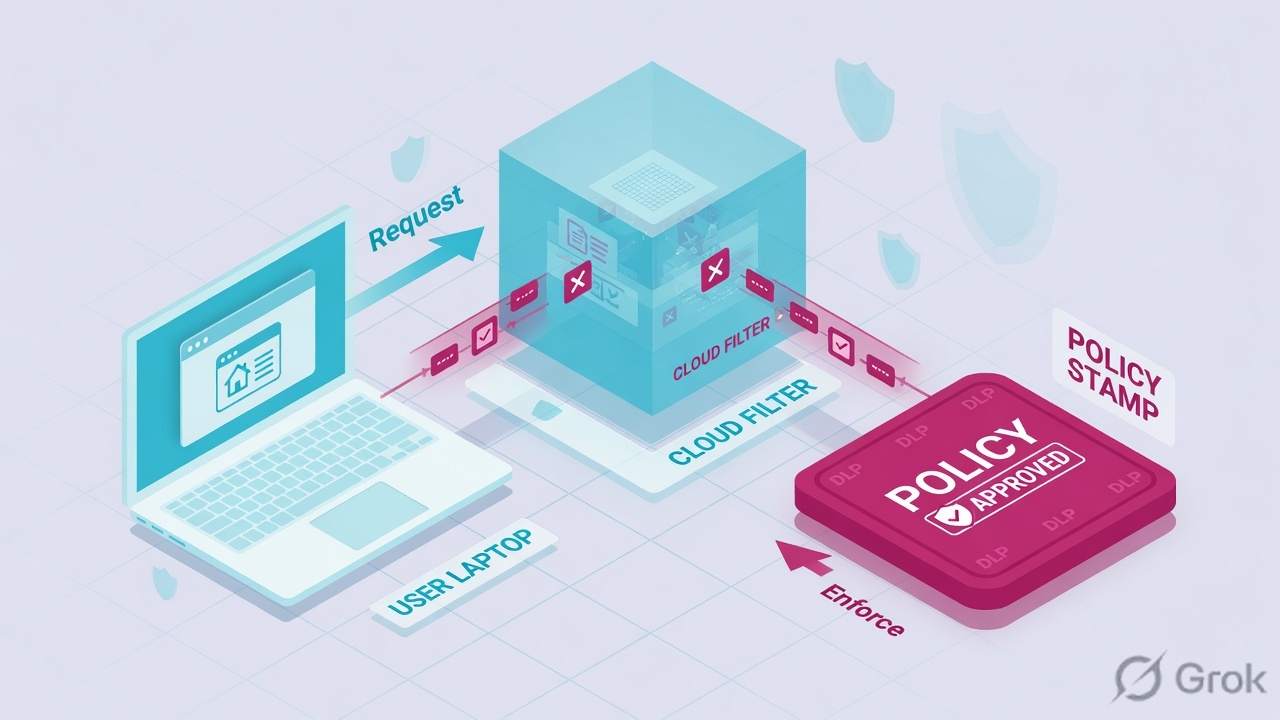
Control hit
One user, one URL or one upload, named Policy + Action. Dashboard / engines up. Peer users still browse. This is the product.
Platform ticket
Empty Transaction Viewer for every user, NGFW engine not installing, Policy Engine down, or PAC / GRE / endpoint never sending traffic. Now it is “Forcepoint is down.”
A policy is the recipe assigned to a client. A filter (Web) or an Access rule (NGFW) or an action plan (DLP) is how that recipe decides. An action is the disposition written on the request. A log or incident is the receipt. You never argue with “it was blocked.” You name the client, the policy, and the action. Official Web path: Policy Management → Policies. Official proof path: Reporting → Report Center → Transaction Viewer.
“Salesforce is a business app, so add it to Permit All.” Permit All is a category-filter template, not a diagnosis. Official: if the active category filter is Permit All, Filtering Service permits the site — and you just turned the factory off for that policy. Name the current policy and the current action first. The evidence desk is the night-shift version of that order.
2. Mental model — four stations, three factories
Hold four stations. Interviews fail when people mix the products and skip a station.
1. The client is user and/or IP
Web: directory client (user, group, OU) or computer / network client (single IP or range). NGFW Source cells accept Network Elements and User / User Group. DLP Source is who moved the data. Empty User is data — cloud Help: Not available when authentication is bypassed.
2. The policy is the recipe
Web: one named policy, built from category / protocol / cloud-app / limited-access filters plus exceptions. NGFW: an Access policy is a list of matching criteria and actions; Inspection is a different tab. DLP: a policy plus an action plan plus a channel.
3. The action is the stamp
Cloud Web: Allowed, Authentication Required, Blocked, Confirmed, Quota. On-prem also exposes Result (permitted / blocked). NGFW: Allow, Discard, Refuse, Continue, Terminate, Wait for further actions, Wait for authentication. DLP: Permit, Block, Audit only, Quarantine, Confirm — and more, channel-dependent.
4. Proof is the log or incident
Transaction Viewer is the Web receipt. NGFW Logs + Rule Tag is the firewall receipt. A DLP incident is a policy violation; an event is any transaction the engine saw. Test Filtering is a what-if. Real-Time Monitor is now, not the Log Database.
Read left → right, then the three factory cards. Same four stations on every product. Do not start in the policy editor.
Web. Official FAQ: policies and exceptions apply to directory clients (user, group, OU) or computer and network clients (IP or range). Filtering Service uses a precedence order. Default: User > Computer > Network > Group > OU. You can flip directory ahead of IP: User > Group > OU > Computer > Network. Hybrid always uses User > Group > OU > IP address (filtered location). A computer (single IP) policy beats a network (range) policy. If nothing else matches, the Default policy applies. Exceptions take precedence over policies; among equivalent exceptions, Blocked beats Permit.
NGFW. Official: Access rules are lists of matching criteria and actions. They are the main configuration for how the engine treats traffic. Source and Destination accept Network Elements and User / User Group. Action is the command — Allow, Continue, Discard, Refuse, plus Wait / Terminate on some trains. Rule Tag is not editable. It is two parts, for example @20.1: the first part is permanent and belongs only to that rule; the second part changes when the rule changes. The tag is the link between the log and the rule. Inspection Policy looks at traffic Access already allowed.
DLP. Official: an action plan is how the system responds when a breach is discovered. Path: Data Security module → Main → Policy Management → Resources → Action Plans. Incidents live at Data → Main → Reporting → Data Loss Prevention (or cloud Reporting → Report Center → Incident Manager). Quote ID, Policy, Action, Channel, Source. Channel is Email, Web, FTP, Endpoint application, Endpoint printing, Network printing — not “the DLP box.”
3. Decision flow — who, then which policy, then which action
Flowchart first. Do not open Policy Management, an NGFW Access policy, or an action plan until a diamond says so.
Write user + IP + URL/port + UTC. Ask whether Transaction Viewer / NGFW Logs even have a row. If empty, stop — that is PAC / proxy / endpoint / GRE, not a category Allow. If a row exists, read User / Source IP, then Policy (or Rule Tag), then Action. Only then open an editor. DLP is a fourth click: incident ID + Channel, not the Web category.
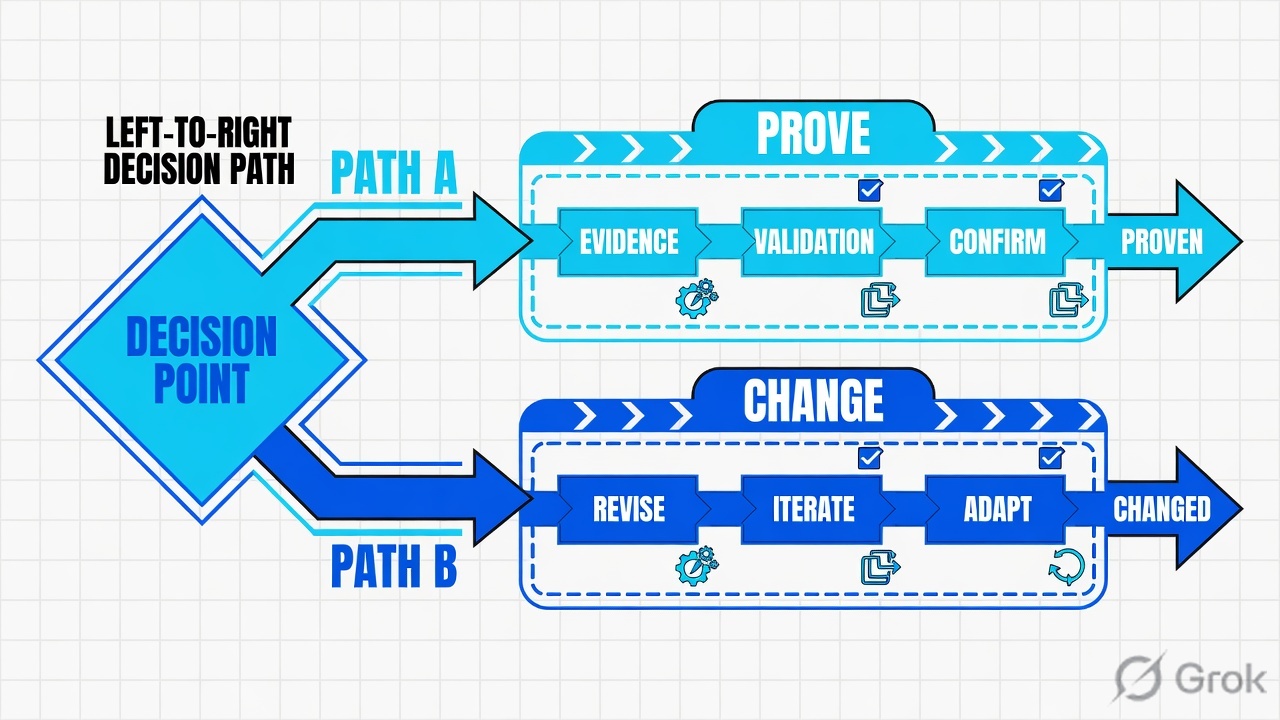
Read the Web row left → right. Empty Transaction Viewer is the green “no” branch. NGFW and DLP are different factories with the same four stations.
Toolbox → Test Filtering asks for a fully qualified user or an IP, plus a URL, and returns category, action, and reason in a popup. Official note: it provides information only for URL filtering. It does not prove the browser request landed. It does not prove NGFW Discard. It does not prove a DLP action plan. If Test Filtering says Permit and Transaction Viewer is empty, the request never hit Filtering Service. Fix PAC / Content Gateway / endpoint / GRE. Do not add another exception.
4. How to choose the client, the policy, the action
You are not choosing a product SKU. You are choosing who the factory thinks is on the wire, which recipe they own, and which stamp that recipe is allowed to write.
| Choice | Use when | Do not use when | Proof you were right |
|---|---|---|---|
| Assign policy to the user | Directory identification works. You want the same recipe on every desk that person sits at. | Auth is bypassed and User is Not available. Then you are really assigning to an IP. |
Transaction Viewer User = that account, Policy = the one you assigned. |
| Assign policy to a computer (single IP) | Shared kiosk, printer, or lab jumphost. On-prem default: computer beats group. | You meant “the finance group.” A single-IP computer policy will steal the request from the group policy. | TV Source IP matches; Policy is the computer policy, not the group one. |
| Assign policy to a network (range) | A subnet that should share a recipe when no user / computer policy exists. | You need one host to differ. Computer (single IP) already beats the range. | TV Policy is the network policy only when no higher client matched. |
| Assign policy to a group / OU | Role-based web filtering. Hybrid / cloud: group beats IP. On-prem: only if you flipped precedence, or no computer/network policy exists. | The user is in two groups and you forgot Use most restrictive group policy (Settings → General → Filtering). | TV Policy matches the group you intended; if restrictive is on, any blocking group wins. |
| Leave them on Default | Brand-new lab, or a client you have not classified yet. Official: Default governs until you assign another. | Production “we’ll tune Default later.” Default is the catch-all for everyone you forgot. | TV Policy = Default. That is a finding, not a success. |
| Category action = Block / Confirm / Quota | You want Filtering Service to stop, warn, or spend quota on that category for this policy. | You set Permit All on Finance-Standard because one SaaS ticket was loud. | TV Action + Category match the filter. Confirm / Quota are not Block. |
| Permit exception for one URL | One site must override the category for a named client. Policy Management → Exceptions → Add. | You write a Super Administrator permit for the whole role to close one CEO ticket. Security override can still Block a security-risk URL. | TV reason / exception name. Security-risk still Blocked = override working. |
| NGFW Access = Allow + inspect | The connection must exist, then Inspection / File Filtering may look inside. | You think a Discard rule will still run Inspection. Inspection only sees allowed traffic. | Logs Action = Allow, Rule Tag of the Allow rule, then an Inspection hit if any. |
| NGFW Continue | You want default log level / Protocol for many rules underneath. Official purpose of Continue. | You put Continue as the last rule and wonder why traffic is silent. Continue does not allow. | A later Allow / Discard still matches. Rule Counters move on both. |
| DLP action plan = Audit only | Pilot. You want incidents without stopping the upload. | You tell the CISO “we blocked payroll.” Audit only is review, not deny. | Incident Action = Audit only, Channel = Web. The file still left. |
| DLP action plan = Block | The channel and classifier are tuned. False-positive rate is known. | You Block on a regex that matches every invoice number in the company. | Incident Action = Block, same Policy, same Source as the user who complained. |
Multiple group policies and no higher client: official Use most restrictive group policy on Settings → General → Filtering. Selected = any blocking group blocks. Not selected = any permitting group permits. All groups the same policy = that policy. Hybrid does not use the on-prem computer-beats-group default — group beats IP.
5. Runbook Side A → B → C
Side A names the client and the factory. Side B assigns or reads the policy and the stamp (Save and Deploy / Save and Install). Side C quotes the receipt: Transaction Viewer, Rule Tag, or DLP incident. Predicted (Test Filtering) is not logged.
Lab values only. User example\finance.user, client 192.0.2.25, SaaS login.salesforce.com / 198.51.100.44, Web policy Finance-Standard, category filter Finance-Day, NGFW rule name finance-saas with Rule Tag @20.1, DLP policy PCI-Web-Outbound, action plan Block-Web-Upload, incident INC-LAB-1042. Nothing here is a live tenant.
Side A — who is on the wire (building the factory floor)
Primary source: Working with clients + How is a policy or exception assigned to a request. Path: Policy Management → Clients.
-
Write the three identifiers before you click
User, source IP, destination URL or port, UTC. If you cannot write those four, you are not ready for a policy editor. Shared NAT and hot-desks will lie; that is why both user and IP exist.
-
Decide which factory owns the hop
Browser / SaaS URL → Web. SYN never leaves the LAN or a port is Discarded → NGFW Logs. File / paste / upload of regulated data → DLP incident. A spinning Salesforce tab can be all three in sequence: NGFW first, Web second, DLP only if they uploaded.
-
Confirm the client object exists
Policy Management → Clients. Directory user
example\finance.user, or computer192.0.2.25, or the network that contains it. If the user is missing, Filtering Service will fall through computer → network → group → OU → Default (on-prem default order). That is a client problem, not a Salesforce category problem.
Side B — name the policy, then the stamp (printing the ticket)
Primary source: Creating a policy / Assigning a policy to clients / Define Action options in Access rules / Action plans. Web: Save and Deploy. NGFW: Save and Install.
Policy Management › Policies › Finance-Standard
Edit Policy · Finance-Standard
Apply to Clients is a separate toolbar action. OK caches. Save and Deploy implements. Default still governs anyone you did not assign.
Source: Working with policies / Assigning a policy to clients — Policy Management → Policies → Apply to Clients, then Save and Deploy. Dummy values only. UI may say “Apply Policy to Clients” on the Edit Policy page.
-
Web — assign, do not widen Default
Policy Management → Policies → Finance-Standard → Apply to Clients. Mark the finance group (or the computer
192.0.2.25if this is a kiosk). OK, then Save and Deploy. Official lesson text: the selected client now receives that policy. Leave Default as the safety net, not the production recipe. -
Web — set the category / exception stamp
Policy Management → Filters for the category filter, or Policy Management → Exceptions → Add for one URL. Enter a unique Name. Scope the exception to the client, not the whole Super Administrator role, unless that is the documented intent. Security override still Blocks security-risk URLs permitted by exception — official default, leave it on.
-
NGFW — write Access, then Inspection
SMC policy editing view → IPv4 Access. Source = finance user or
192.0.2.0/24, Destination = the Salesforce elements you actually own, Service = HTTPS / Network Application, Action = Allow if the hop must exist. Put Discard / Refuse rules above the Allow only when you mean them. Save and Install on the engine. Inspection Policy and File Filtering Policy sit on a different tab and only see allowed traffic. -
DLP — policy plus action plan plus channel
Main → Policy Management → Resources → Action Plans for
Block-Web-Upload. Attach it toPCI-Web-Outboundon the Web channel. Audit only for the first week if you have not measured false positives. Do not call Audit only a Block in the ticket. -
Predict before you celebrate
Toolbox → Test Filtering: user
example\finance.useror IP192.0.2.25, URLhttps://login.salesforce.com, Go. Read category, action, reason. Say the word predicted. Side C is the logged row.
Toolbox → Test Filtering
  Client : example\finance.user    (or 192.0.2.25)
  URL    : https://login.salesforce.com
  Go

Popup (predicted, URL filtering only):
  Category : Legal / Business
  Action   : Permit
  Reason   : Policy Finance-Standard · filter Finance-Day
  Cloud app: salesforce  ·  Monitor Only
If this popup says Permit and the browser still spins, you do not have a category problem. You have a land-the-request problem, an NGFW Discard, or a DLP Block on the upload — three different factories.
Side C — prove the action in the receipt
Primary source: Transaction Viewer display options + Web attributes + What the Logs view shows + Viewing the incident list.
-
Web receipt — Transaction Viewer
Reporting → Report Center → Transaction Viewer. Filter User
example\finance.useror Source IP192.0.2.25, destination hostlogin.salesforce.com, last 15 minutes. Open Detail View → General (user, group, policy, category) and Request Details (source / dest IP, full URL, port, protocol). -
NGFW receipt — Logs + Rule Tag
SMC Logs. Filter Src Addr
192.0.2.25, Dst Addr198.51.100.44, dest port 443. QuoteActionandRule Tag. Click the tag — official troubleshooting: it opens the rule that generated the log.@20.1first half is permanent; if someone edited the rule, only the second half moved. -
DLP receipt — incident, not event
Data → Main → Reporting → Data Loss Prevention → Incidents (last 3 / 7 days), or cloud Reporting → Report Center → Incident Manager. Quote
IDINC-LAB-1042,PolicyPCI-Web-Outbound,Action,Channel= Web,Source= the same user. An event with no incident is “the engine looked.” An incident is “a policy fired.” -
If the receipt is empty, do not add a permit
Empty TV + empty NGFW log = the packet never arrived. PAC, explicit proxy, Content Gateway, SmartEdge / endpoint, GRE, or the wrong engine. That is the evidence desk, not a missing category Allow.
Reporting › Report Center › Transaction Viewer
Transaction Viewer · lab search
| Time (UTC) | User | Source IP | URL | Category | Policy | Action |
|---|---|---|---|---|---|---|
| 09:14:22 | finance.user | 192.0.2.25 | login.salesforce.com | Legal / Business | Finance-Standard | Allowed |
| 09:12:03 | finance.user | 192.0.2.25 | parked.example | Parked | Finance-Standard | Blocked |
| 09:11:40 | Not available | 192.0.2.80 | login.salesforce.com | Legal / Business | Default | Allowed |
Row 1 is the working finance user. Row 2 is a control hit on the same policy — not mail-down. Row 3 is auth bypass: User = Not available, so Default (or an IP policy) stamped the request.
Click next: highlight the 09:14 row, enable Detail View → General for Policy / User / Category, then Request Details for Source IP and full URL. Source: Transaction Viewer display options + Web attributes. Dummy lab only.
Test Filtering predicted Permit on Finance-Standard. Transaction Viewer shows the same Policy and an Allowed (or on-prem permitted) action for example\finance.user / 192.0.2.25 on the Salesforce URL. NGFW Logs, if this hop crosses an engine, show Action = Allow and Rule Tag = @20.1. If they uploaded a payroll file, the DLP incident is a separate receipt — do not use the Web Allowed row to claim DLP is off.
6. Runtime — after Save and Deploy / Save and Install
Web: Save and Deploy pushes the recipe to Filtering Service. It does not create a Transaction Viewer row. The next real browser request does. Hybrid users outside the network are judged by the hybrid service, which always uses User > Group > OU > IP and ignores your on-prem computer-beats-group default. Cloud Help: a user’s home policy overrides the IP-based policy for enforcement actions.
NGFW: Save and Install compiles the Access policy onto the engine. Official: the engine blocks connections that have not been specifically allowed. Continue rules underneath a template set default log level or Protocol; a later rule’s own options win. After Allow, Inspection looks for Situations; File Filtering is a separate element. Clicking Rule Tag in Logs is how you walk from receipt back to recipe without guessing the ID.
DLP: deploying a policy / action plan does not invent incidents. The next matching transaction on that channel does. Cloud Web DLP Blocks on the Web Proxy Policy options log under Analyze → Logs → Web DLP (Forcepoint ONE wording) and still surface as incidents in Incident Manager. An Allowed Web row plus a Web-channel DLP Block is consistent: URL category said yes, content said no.
A green Save and Deploy is a printed recipe. Success is the next request’s receipt. Re-read Side C if you only have the toast.
Delegated administration: Super Administrator exceptions beat delegated ones unless the Super Administrator flipped that option. Exceptions on one client beat exceptions on a whole role. Custom categories and custom protocols beat predefined ones. If a user sits in groups owned by two delegated roles, Manage Role Priority decides. Quote those names in the ticket if two admins “fixed” the same user.
7. Traps + proof checklist
| Symptom | Looks like | Actually | First move |
|---|---|---|---|
| Salesforce spins, one user | Forcepoint is down | Named policy Blocked / Confirm / Quota, or NGFW Discard, or DLP Block | Transaction Viewer for that user. Quote Action + Policy. |
| Empty Transaction Viewer | Need a category Allow | Request never landed (PAC / proxy / endpoint / GRE) | Prove the hop. Do not add an exception. |
| Test Filtering Permit, browser still blocked | Filtering Service is lying | Predicted ≠ logged. Or a different factory owns the hop. | TV, then NGFW Logs, then DLP incidents. |
| Group policy never hits | Directory is broken | On-prem computer / network policy is beating the group (default order) | Check Clients assignments + precedence. |
| User = Not available | Forcepoint lost AD | Authentication bypassed. Cloud official wording. | Treat it as an IP client. Fix auth, do not invent a user. |
| Two group policies, flip-flop actions | Random bug | Use most restrictive group policy on or off | Settings → General → Filtering. Quote the checkbox. |
| Permit exception, still Blocked | Exception did not deploy | Security override on a security-risk category | Leave override on. Recategorize or pick a different URL. |
| NGFW Allow, Inspection silent | Signatures failed | Traffic was Discarded earlier, or Inspection Policy not attached | Rule Tag of the Access hit first. |
| DLP “blocked” but file left | DLP is broken | Action plan = Audit only / Confirm / Permit | Incident Action column. Say the real verb. |
| Web Allowed, payroll still stopped | Category filter is wrong | Web-channel DLP Block after URL permit | Incident Manager / DLP incident list. Different factory. |
- You wrote user + source IP + URL/port + UTC before you opened an editor.
- The client exists under Policy Management → Clients (or NGFW User / Network element, or DLP Source).
- Test Filtering (if this is a URL) predicts the action you intended for that same client type.
- Reporting → Report Center → Transaction Viewer shows
Policy = Finance-Standard, the expectedAction,Userand/orSource IP. - If the hop crosses NGFW: Logs
Action+Rule Tag(clickable) matchfinance-saas/@20.1. - If they uploaded: DLP incident
ID+Policy+Action+Channel. Audit only is not called Block. - A peer user on a different policy still has a different TV row — you did not Permit All the org.
- The same business click that opened the ticket now succeeds, or you have a named exception with an owner and a date.
Forcepoint is a policy factory. Web, NGFW and DLP all do the same four stations: identify the user or IP, pick one policy, write an action, write a log or incident. On-prem Filtering Service defaults to User then Computer then Network then Group then OU. I prove Web in Transaction Viewer, NGFW with Action plus Rule Tag, and DLP with an incident ID and channel. I do not add a global Allow from an empty log.
Night shift: take the same four stations to the Forcepoint evidence desk — first tool + one official proof field per ticket.
Knowledge check
Six judgment questions. Map each miss back to the section named in the reason.
Sources
- Forcepoint Help — How is a policy or exception assigned to a request? (directory vs computer/network clients; default User > Computer > Network > Group > OU; hybrid User > Group > OU > IP; exceptions beat policies; computer beats network; Default last)
- Forcepoint Help — Responding to a URL request (Filtering Service order: protocol → recategorize → exception → cloud app → category / limited access → bandwidth → file type → keyword → Permit / Quota / Confirm; security override)
- Forcepoint Help — Assigning a policy to clients (Policies → Edit Policy → Apply Policy to Clients)
- Forcepoint Help — Lesson 6: Using the sample policies (Apply to Clients, Save and Deploy)
- Forcepoint Help — What are filters, and how do they work? (category / protocol / limited access; Permit, Block, Confirm, Quota)
- Forcepoint Help — Test Filtering (Toolbox; user or IP + URL; URL filtering only; category, action, reason)
- Forcepoint Help — Transaction Viewer display options (Detail View: General, Request Details, Cloud Apps, Threat Details)
- Forcepoint Help — Web attributes (
ActionAllowed / Authentication Required / Blocked / Confirmed / Quota;Policy;User) - Forcepoint Help — Using the Transaction Viewer (Reporting → Report Center → Transaction Viewer)
- Forcepoint Help — Prioritizing group and domain policies (optional User > Group > Domain > Computer > Network)
- Forcepoint NGFW Help — The different parts of the policy editing view (IPv4 Access cells; Rule Tag two-part; Save and Install; Inspection / File Filtering tabs)
- Forcepoint NGFW Help — Define Action options in Access rules (Allow, Continue, Discard, Refuse)
- Forcepoint NGFW Help — Troubleshoot traffic that is incorrectly stopped (click Rule Tag in the log)
- Forcepoint NGFW Help — What the Logs view shows
- Forcepoint NGFW Help — Exportable Firewall log entry fields (
Action,Rule Tag,Src Addr,Auth. User) - Forcepoint DLP Help — Possible actions for an action plan (Permit, Block, Audit only, Quarantine, Confirm, …)
- Forcepoint DLP Help — Action plans (Main → Policy Management → Resources → Action Plans)
- Forcepoint DLP Help — Viewing the incident list (Data → Main → Reporting → Data Loss Prevention)
- Forcepoint Help — Using the Incident Manager (Reporting → Report Center → Incident Manager)
Related: Forcepoint evidence desk — first tool + proof field · DLP architecture · DLP channels · DLP policies and rules · Forcepoint interview hub · All lessons
All console values on this page are fixed fictional lab data (example\finance.user, RFC 5737 addresses, INC-LAB-1042). Confirm current menu labels, permissions and privacy rules on the production release before you type on a live system.