Weak answer vs real troubleshooting answer
A weak answer says: 'The pool is green, so F5 is fine.' In real incidents, that skips VIP listener status, VLAN selection, SSL/profile behavior, SNAT and return path.
A strong answer collects proof first: curl from client to VIP, curl from BIG-IP to pool member, tmsh show ltm virtual, tmsh show ltm pool, tmsh show sys connection, tcpdump filtered on client/VIP/member, /var/log/ltm, virtual server VLAN/listener, pool monitor send/receive string, SNAT setting, server default gateway, persistence record and traffic-group owner. Then it changes only the proven break point.
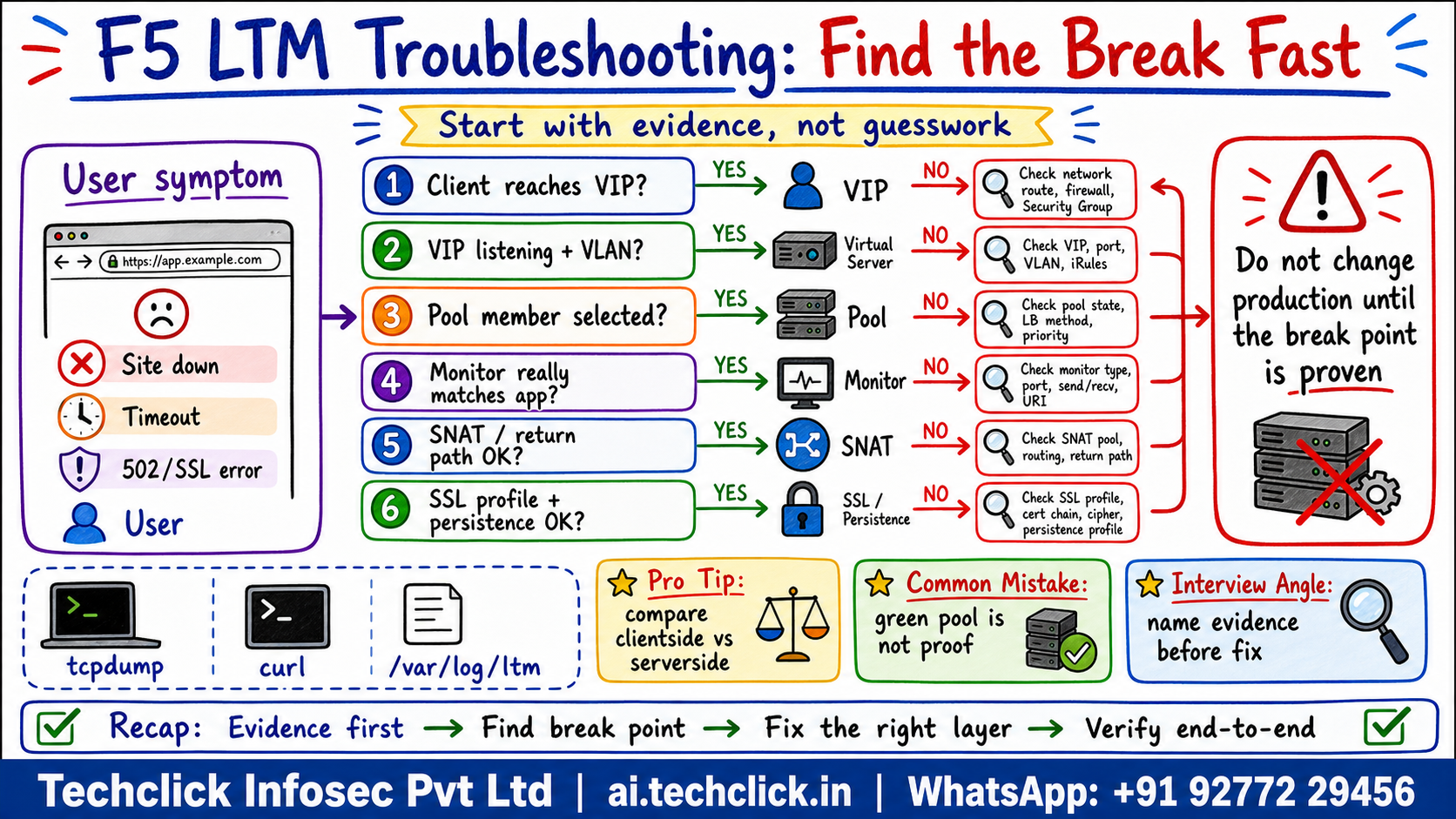
① Incident triage map - where can the flow break?
Most LTM outages are misdiagnosed because teams jump straight to pool members. The correct approach is to isolate control-plane status, data-plane packet flow and application-layer response in one evidence ladder.
Healthy path: Client test -> VIP/listener -> Pool select -> Profile logic -> Return path. Do not skip a layer just because one dashboard tile is green.
Production rule: prove whether the packet fails before VIP, at virtual server selection, during pool selection, inside profile logic, or on return path.
What makes an LTM troubleshooting answer production-ready?
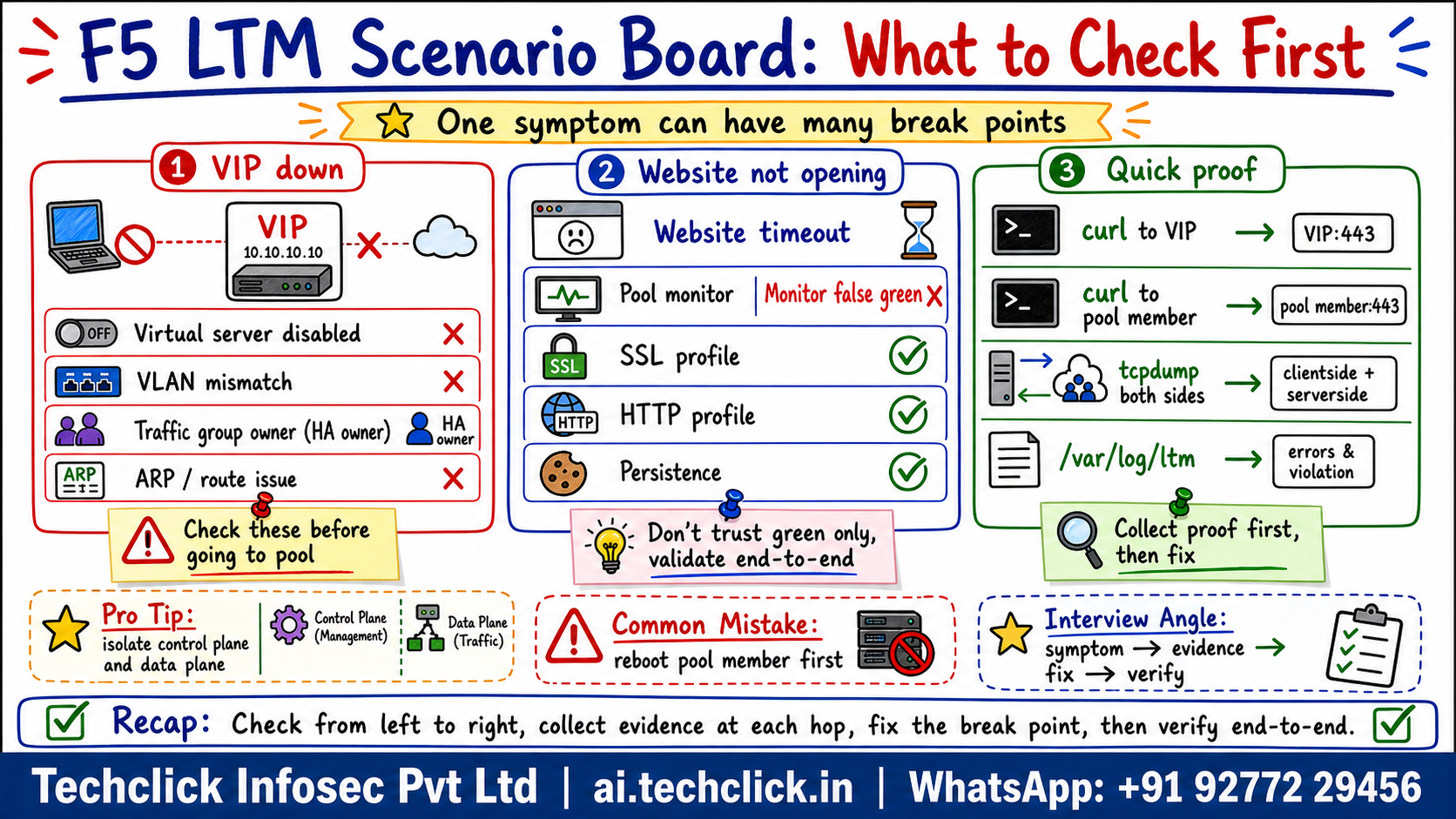
② VIP down or virtual server not accepting traffic
When the VIP looks down, do not start at the backend. First prove whether BIG-IP is even selected for the connection.
- Check listener: destination IP, service port, protocol, source-address match and enabled state.
- Check network scope: VLAN and tunnel enablement, route domain, self IP reachability, ARP and upstream routing.
- Check HA: active device, traffic-group owner, floating address ownership and config sync.
Safe fix: correct the listener, VLAN or traffic-group owner only after proving the VIP is the break point.
Check virtual server, VLAN, traffic-group owner and ARP before touching pool members.
③ User cannot access website but BIG-IP looks green
This is the most common trap. A green pool usually means the configured monitor condition passed; it does not always prove the real URI, TLS, host header, authentication path or application dependency.
| Scenario | Evidence clue | What to prove |
|---|---|---|
| VIP down | curl times out before TLS; no connection table entry | Check destination, service port, VLAN enablement, virtual address, traffic-group owner, ARP and route. |
| Website not opening but VIP up | curl to VIP connects but HTTP code or TLS fails | Compare VIP curl with pool-member curl, then inspect HTTP/clientssl/serverssl profiles and app response. |
| Pool green but app broken | monitor reports up but user path fails | Verify monitor type, send string, receive string, alias address/port and whether the monitor proves the real URI. |
| SNAT/asymmetric issue | serverside SYN leaves BIG-IP; reply does not return | Check backend default gateway, route table, SNAT setting and tcpdump on both directions. |
| Persistence issue | same users fail repeatedly while others work | Inspect persistence records, pool member state, cookie/source persistence and whether the stuck member is unhealthy for that user path. |
| HA owner mismatch | VIP reachable only through one side or after failover | Check floating self IPs, traffic-group owner, ARP, failover state and config sync before moving traffic. |
Do not say: Restart the pool member because the user says the website is down. That answer creates downtime because it skips the actual evidence path.
Check virtual server enabled state, destination, port, VLAN, virtual address, ARP and traffic-group owner.
Compare curl to VIP with curl from BIG-IP to pool member, then inspect connection table and tcpdump.
Monitor up means monitor condition passed; validate the real user URI, host header, TLS and app response.
If request goes out but response bypasses BIG-IP, fix SNAT or route symmetry.
An L2 engineer on a banking change bridge faces this
Multiple users report that the HTTPS website is down. The virtual server exists, the pool is green, but curl to the VIP times out from some networks and succeeds from others.
The failure can be in more than one layer: VIP not listening on the expected VLAN, a monitor that only proves TCP and not the real app, missing SNAT for an asymmetric backend route, SSL profile mismatch, persistence pinning, or the wrong HA traffic-group owner.
Use one failing client IP and one known-good client IP. Compare curl, tmsh status, connection table and tcpdump on both clientside and serverside before changing any pool, monitor, SNAT or profile.
Local Traffic > Virtual Servers + Local Traffic > Pools + Network > Self IPs/VLANs + tmsh show ltm virtual/pool + tmsh show sys connection + tcpdump -ni 0.0 hostFix only the proven break point: enable the correct virtual/VLAN, repair monitor scope, add SNAT or route symmetry, attach the correct clientssl/serverssl profile, clear bad persistence carefully, or fail traffic group to the expected owner.
Replay the same client request, compare curl output, confirm connection table direction, capture both sides if needed and get user confirmation.
The monitor may not test the real URI, host header, login dependency or SSL path users need.
The pool is green but users still get timeout. What should you validate next?
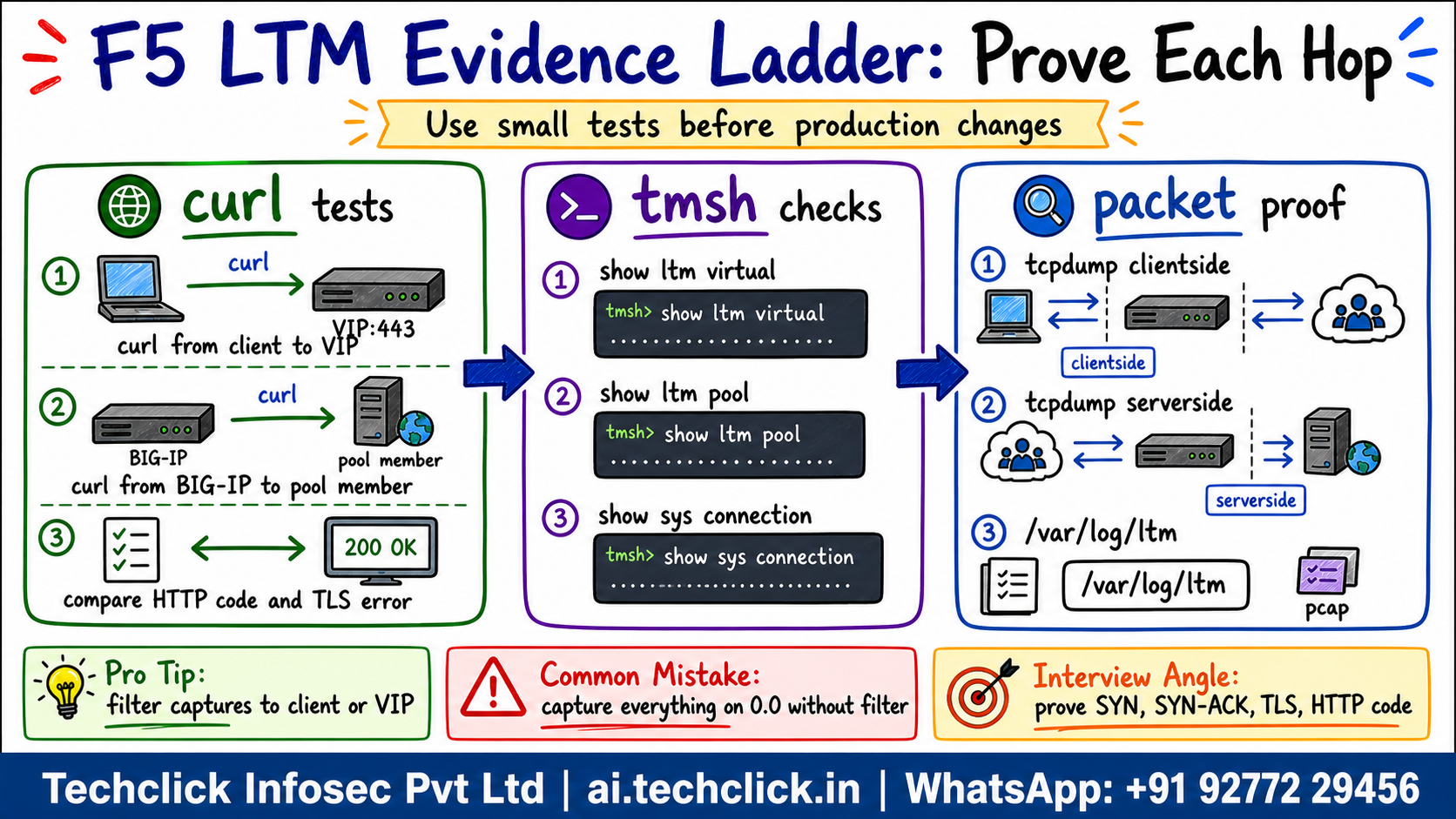
④ curl, tmsh, tcpdump and log command ladder
Use the smallest possible test first, then widen only when evidence is missing. Keep one failing client IP, one VIP and one pool member in scope.
curl -vk https://<vip-fqdn-or-ip>/health
curl -vk --resolve app.example.com:443:<vip-ip> https://app.example.com/
curl -vk https://<pool-member-ip>:<port>/health
tmsh show ltm virtual /Common/<vs-name>
tmsh show ltm pool /Common/<pool-name> members
tmsh show sys connection cs-client-addr <client-ip>
tcpdump -s0 -ni 0.0 host <client-ip> or host <pool-member-ip>
tail -f /var/log/ltm
Interpretation: if curl to VIP fails but curl to pool member works from BIG-IP, inspect listener, profile and SNAT. If both fail, involve server/app routing. If tcpdump sees request on clientside but not serverside, BIG-IP decision logic stopped it. If serverside sees request but reply bypasses BIG-IP, suspect SNAT or routing symmetry.
Use client, VIP or member filters so you can explain the packet path instead of drowning in noise.
Which command pairing best separates F5 and backend scope?
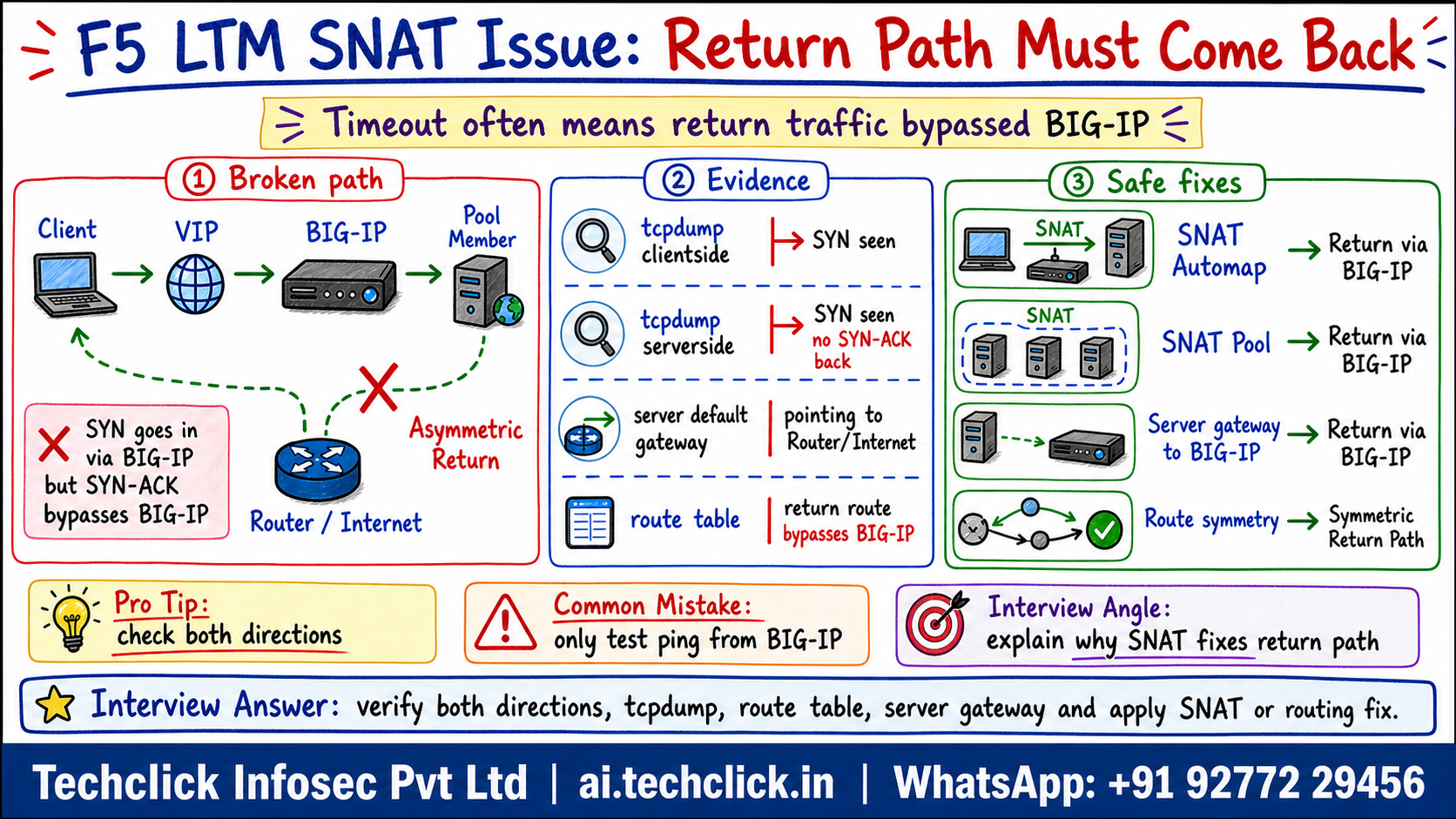
⑤ SNAT issue and asymmetric routing
SNAT is not a magic checkbox; it is a return-path control. F5 documentation explains that SNAT can ensure server responses return through BIG-IP when the server default route would not normally do so.
Failure pattern: clientside tcpdump shows SYN to VIP, serverside tcpdump shows SYN to member, but the SYN-ACK either never appears back on BIG-IP or comes from an unexpected path. The server may be replying to its default gateway instead of to BIG-IP.
Safe fix options: set backend default gateway to BIG-IP, add route symmetry, use SNAT Automap for simple cases, or use a scoped SNAT pool when you need predictable translation addresses and scale.
Use scoped SNAT or route symmetry based on evidence and address exhaustion risk, not as a blind global setting.
Watch one failed HTTPS request cross LTM
Press Play to trace the normal path, then Break it to see the asymmetric return-path failure.
Serverside SYN leaves BIG-IP but reply never returns. What fix should be considered after proof?
⑥ Persistence, HA owner and closeout verification
Not every intermittent issue is network routing. Persistence can keep one user stuck to a weak pool member, and HA ownership can make a VIP behave differently after failover.
- Persistence proof: compare affected user cookie/source persistence records with selected pool member and member health.
- HA proof: verify active/standby state, traffic-group owner, floating self IPs, virtual-address ownership and ARP behavior.
- Closeout proof: replay the original failing user path, check HTTP/TLS result, confirm connection table and verify logs/counters stopped increasing for the failure.
🤖 Ask the AI Tutor
Tap any question — instant, scoped to this lesson. No login, no waiting.
Pre-curated from vendor docs + community Q&A, scoped to this lesson. For a live prod issue, paste your export into chat.techclick.in.
📝 Wrap-up assessment — six more
You've answered 4 inline. Six left. 70% (7 of 10) marks the lesson complete on your profile. Tap Submit all answers at the end.
🧠 In your own words
Type one line: which layer did the packet fail at, and what proof showed it? Then compare with the expert version.
🗣 Teach a friend
Best way to lock it in — explain it in one line to a teammate. Tap to generate a paste-ready summary.
📖 Glossary
- VIP
- The client-facing virtual IP address owned by the BIG-IP virtual server or virtual address.
- Clientside
- Traffic between client and BIG-IP.
- Serverside
- Traffic between BIG-IP and the selected pool member.
- Monitor false green
- A monitor says up, but the monitor does not test the real application condition users need.
- Asymmetric routing
- Traffic goes through BIG-IP in one direction but returns through another path.
- Automap
- A SNAT option that uses BIG-IP self IP addresses as translation addresses.
- SNAT pool
- A group of translation addresses that can be assigned to a virtual server or SNAT policy.
- Traffic group owner
- The active HA device that currently owns a floating virtual address.
📚 Sources
- F5 TechDocs - Introduction to Local Traffic Manager. https://techdocs.f5.com/kb/en-us/products/big-ip_ltm/manuals/product/ltm-concepts-11-5-1/2.html
- F5 TechDocs - About Virtual Servers. https://techdocs.f5.com/kb/en-us/products/big-ip_ltm/manuals/product/big-ip-local-traffic-management-basics-14-0-0/02.html
- F5 TechDocs - About Pools. https://techdocs.f5.com/kb/en-us/products/big-ip_ltm/manuals/product/ltm-basics-11-6-0/4.html
- F5 TechDocs - Health and Performance Monitoring. https://techdocs.f5.com/kb/en-us/products/big-ip_ltm/manuals/product/ltm-concepts-11-5-1/15.html
- F5 TechDocs - SNATs. https://techdocs.f5.com/kb/en-us/products/big-ip_ltm/manuals/product/ltm-concepts-11-5-1/17.html
- F5 TechDocs - NATs and SNATs. https://techdocs.f5.com/kb/en-us/products/big-ip_ltm/manuals/product/tmos-routing-administration-12-1-1/7.html
- F5 MyF5 - K411: Overview of packet tracing with the tcpdump utility. https://my.f5.com/manage/s/article/K411
- F5 MyF5 - K00463541: A breakdown of the tcpdump utility, recommended actions, and filters. https://my.f5.com/manage/s/article/K00463541
- F5 MyF5 - K12531: Troubleshooting health monitors. https://my.f5.com/manage/s/article/K12531
What's next?
Next, take one failed transaction and explain where it disappears: before VIP, at virtual server selection, during pool selection, on serverside connect, on return path, or after SSL/profile processing.