Weak answer vs real interview answer
A weak answer says only: 'F5 BIG-IP DNS and GTM GSLB is important for F5.' That is not enough for a learner, interview panel or production bridge call.
A strong answer connects product objects, evidence and risk: F5 describes BIG-IP DNS as a hyperscale and secure DNS solution with superior DNS performance, DNS security, reporting, global server load balancing, automated failover and DNS health monitors. Then it proves the decision with wide IP status, pool order and method, pool member virtual server status, data center and server health, monitor result, topology records, DNS listener, iQuery/big3d state, sync group health, TTL and resolver cache behavior.
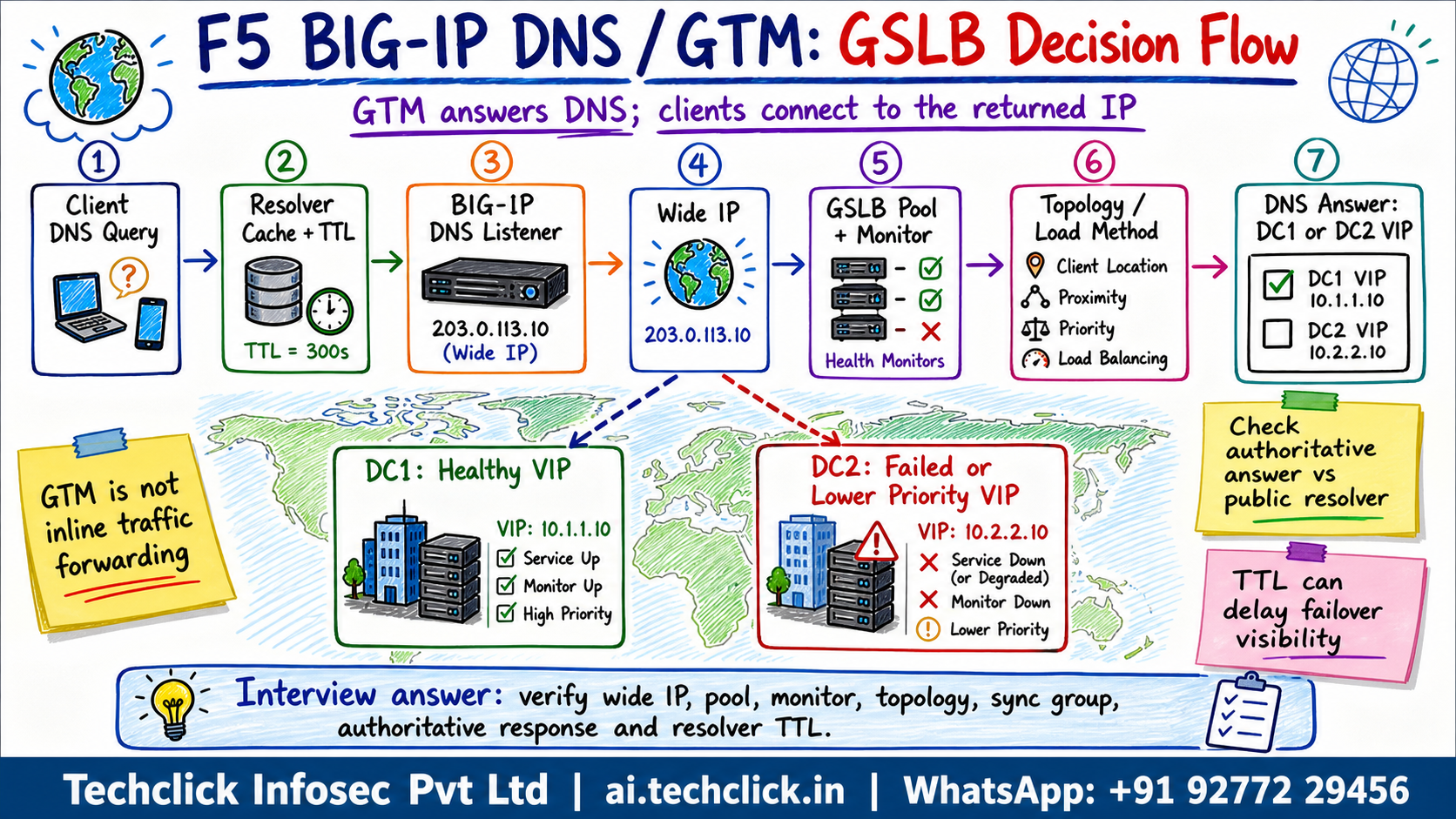
① Why F5 BIG-IP DNS and GTM GSLB matters in production
GSLB outages are often misunderstood because DNS answers can be cached and because the application may be healthy locally while global monitor or topology logic is wrong.
F5-specific angle: F5 describes BIG-IP DNS as a hyperscale and secure DNS solution with superior DNS performance, DNS security, reporting, global server load balancing, automated failover and DNS health monitors.
Do not say: Assume GTM sends traffic like LTM; it only answers DNS queries and clients then connect to the returned IP. That answer skips the evidence path that makes the decision defensible.
For F5 BIG-IP DNS and GTM GSLB, what makes an answer production-ready?
② Product objects and evidence you must name
Name the F5 objects first, then name the evidence. That is what separates a real engineer answer from brochure language.
- Wide IP - The DNS name object that owns the GSLB answer logic.
- GSLB pool - A group of global resources selected for a wide IP.
- Server - A data-center device or host known to BIG-IP DNS.
- Virtual server - The application endpoint returned as a DNS answer.
- Sync group - BIG-IP DNS devices sharing GSLB configuration and state.
Evidence to ask for: wide IP status, pool order and method, pool member virtual server status, data center and server health, monitor result, topology records, DNS listener, iQuery/big3d state, sync group health, TTL and resolver cache behavior.
The DNS name object that owns the GSLB answer logic.
A group of global resources selected for a wide IP.
A data-center device or host known to BIG-IP DNS.
The application endpoint returned as a DNS answer.
For F5 BIG-IP DNS and GTM GSLB, start with the object that makes the decision. Then move to logs, counters and packet/session evidence.
Which evidence set is strongest for F5 BIG-IP DNS and GTM GSLB?
③ Scenario path - where the issue actually breaks
Healthy path: Query -> Wide IP -> Pool pick -> Monitor -> DNS answer. In a live issue, walk the flow from left to right and stop where evidence disappears.
Scenario: A Mumbai data center fails, but some users still resolve the application to the Mumbai virtual server for several minutes.
Likely root cause: The wide IP failed over correctly for new authoritative queries, but recursive resolvers still cache the old answer until TTL expires.
Diagnosis: Compare authoritative BIG-IP DNS answer with public resolver answers, check TTL, monitor state, pool selection and topology rule match.
Neha at a Mumbai fintech faces this
A Mumbai data center fails, but some users still resolve the application to the Mumbai virtual server for several minutes.
The wide IP failed over correctly for new authoritative queries, but recursive resolvers still cache the old answer until TTL expires.
Compare authoritative BIG-IP DNS answer with public resolver answers, check TTL, monitor state, pool selection and topology rule match.
DNS > GSLB > Wide IPs + DNS > GSLB > Pools + tmsh show gtm wideip/pool/server + dig @Tune monitor and TTL strategy, validate authoritative answers, update topology or pool order if wrong, and communicate resolver-cache delay during failover testing.
Repeat the original user path, check the relevant F5 logs/counters, and confirm the owner sees the expected application result.
A green object can still fail for real users if the wrong profile, route, policy branch, DNS answer, SSL behavior or cache state is in play.
Watch one GSLB DNS decision
Press Play to follow a wide IP answer, then Break it to see a TTL-cache failover trap.
A Mumbai data center fails, but some users still resolve the application to the Mumbai virtual server for several minutes.
④ Interview answer, remediation and verification
Model answer: I explain that BIG-IP DNS/GTM decides DNS answers, not live TCP forwarding. During failover I prove the authoritative answer first, then check monitor state, pool method, topology and resolver cache TTL.
Fix path: Tune monitor and TTL strategy, validate authoritative answers, update topology or pool order if wrong, and communicate resolver-cache delay during failover testing.
Unsafe shortcut to avoid: Delete the pool member during an incident without checking TTL, monitor status, topology and sync-group consistency.
A good Techclick answer ends with the exact proof: log entry, counter, packet capture, session variable, DNS answer, support ID or user transaction.
What is the safest remediation mindset for F5 BIG-IP DNS and GTM GSLB?
🤖 Ask the AI Tutor
Tap any question — instant, scoped to this lesson. No login, no waiting.
Pre-curated from vendor docs + community Q&A, scoped to this lesson. For a live prod issue, paste your export into chat.techclick.in.
📝 Wrap-up assessment — six more
You've answered 4 inline. Six left. 70% (7 of 10) marks the lesson complete on your profile. Tap Submit all answers at the end.
🧠 In your own words
Type one line: what makes F5 BIG-IP DNS and GTM GSLB different from a generic F5 answer? Then compare with the expert version.
🗣 Teach a friend
Best way to lock it in — explain it in one line to a teammate. Tap to generate a paste-ready summary.
📖 Glossary
- Wide IP
- The GSLB DNS object matching an FQDN and choosing a pool.
- GSLB pool
- A set of global resources used to answer a wide IP.
- Data center
- A logical site grouping servers and virtual servers.
- Server
- A BIG-IP DNS object representing a BIG-IP device or host.
- Virtual server
- The IP:port application target that can be returned in DNS.
- Topology
- A rule set that steers answers based on source and destination geography or network.
- iQuery
- The communication path used between BIG-IP DNS and other BIG-IP systems.
- Sync group
- A group of BIG-IP DNS systems that synchronize GSLB configuration and status.
📚 Sources
- F5 - BIG-IP DNS product page. https://www.f5.com/products/big-ip-services/big-ip-dns
- F5 MyF5 - K17329: BIG-IP GTM name has changed to BIG-IP DNS. https://my.f5.com/manage/s/article/K17329
- F5 MyF5 - K55502976: BIG-IP DNS/DNS services. https://my.f5.com/manage/s/article/K55502976
- F5 TechDocs - BIG-IP DNS Implementations. https://techdocs.f5.com/en-us/bigip-16-0-0/big-ip-dns-implementations.html
- F5 CloudDocs - BIG-IP DNS (GTM) and GSLB. https://clouddocs.f5.com/products/extensions/f5-appsvcs-extension/3.32/declarations/gslb.html
- F5 TechDocs - Determine DNS Sync Group Health. https://techdocs.f5.com/en-us/bigiq-7-1-0/managing-dns-using-big-iq/determine-dns-sync-group-health.html
What's next?
Next, explain why one data center still receives DNS answers after an outage: monitor scope, TTL cache, pool order, topology rule or sync-group health.