The ticket
Guest SSID is up. Phones get DHCP. The redirect hits https://guest.techclick-lab.in/guest/iaccept.php. Half the visitors click through a red warning; iPhones never pop the portal. The NAC engineer says “policy is fine.” The wireless engineer says “use the default securelogin.hpe.com cert.” Neither statement gets a visitor online without a warning.
HPE documents the blunt version: if ClearPass does not have an HTTPS certificate from a well-known CA, Guest over HTTPS will throw cert warnings. The work is not “make a cert somewhere.” It is “make the cert the guest browser will validate for the exact URL in the redirect.”
On ClearPass the captive-portal certificate is the HTTPS Server Certificate. It is used for Guest HTTPS and also for the admin GUI. Create a CSR under that usage, put the public guest FQDN in Common Name and SAN, sign it with a public CA, import the leaf plus intermediates into Certificate Store, and put the issuing CAs on the Trust List (Usage: Others). A second certificate lives on the controller as Captive Portal Certificate — that name is intercepted and should not be in public DNS. Do not expose ClearPass to the Internet.
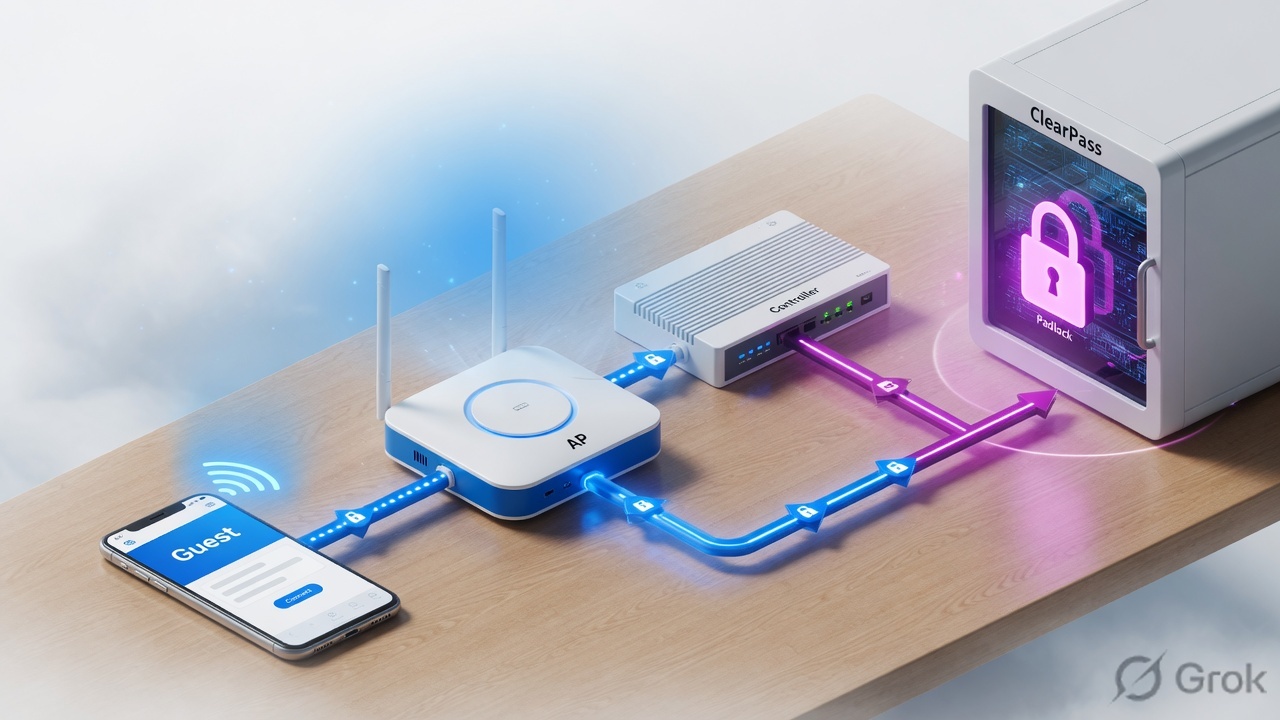
Two certificates, one guest
Train this as two padlocks, not one. Airheads MVPs keep repeating the same split because operators keep installing only one of them.
Certificate 1 — ClearPass HTTPS Server Certificate. This is the object you create in this lesson. The guest browser opens the Guest Web Login URL hosted on ClearPass. The FQDN on this certificate must resolve for the guest and must be reachable from the guest VLAN. Cisco’s 9800 + ClearPass guest guide calls this the “CPPM Web Server Certificate (HTTPS)” used when the Guest Portal is presented over HTTPS.
Certificate 2 — controller Captive Portal Certificate. On ArubaOS this is bound under System → More → General → Captive Portal Certificate. The controller intercepts the name on that cert. That FQDN should not be in public DNS. If you leave the factory name, guests hit securelogin.arubanetworks.com or securelogin.hpe.com and the warning is the default Aruba leaf, not your ClearPass work.
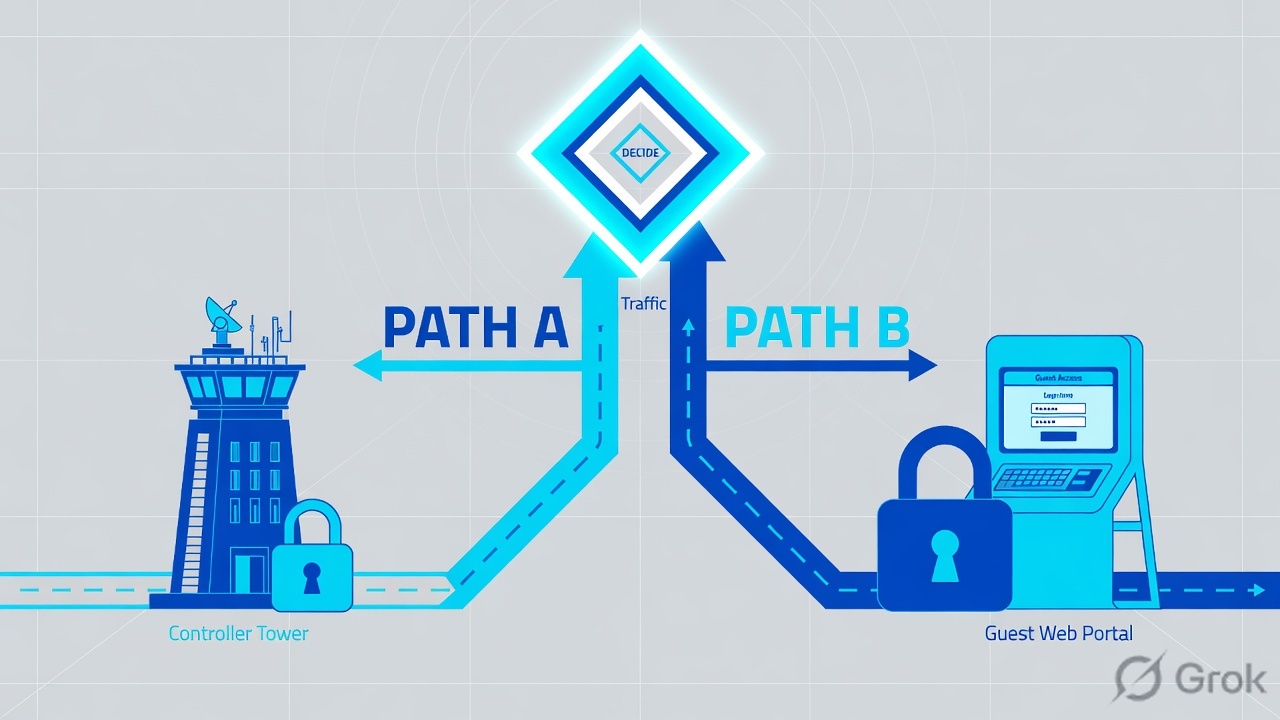
Read left → right. Diamond in your head: “Is this the name the phone typed, or the name the controller intercepted?”
ClearPass HTTPS cert = the page the guest sees. Controller captive-portal cert = the name the controller intercepts for the POST. Public CA on both. Guest DNS only needs the ClearPass name.
HTTPS Server Certificate — ClearPass usage for the web UI and Guest HTTPS. Separate from RADIUS/EAP Server Certificate (802.1X). Trust List — CAs ClearPass itself trusts and, for the presented chain, the intermediates you import. SAN — Subject Alternative Name; modern browsers match the URL here, not only CN. CPD — captive portal detection; phones probe an HTTP URL, not HTTPS, so they can pop the portal without a name-mismatch warning.
How to choose the CA
The flowchart is the decision. The table is the “why.” Do not start a CSR until this box is honest.
A public guest SSID is the “No” branch. Internal CA on that SSID is why visitors see NET::ERR_CERT_AUTHORITY_INVALID.
| Option | Use when | Guest browser | Do not use when |
|---|---|---|---|
| Public CA (DigiCert, Sectigo, Let’s Encrypt, …) | Visitor / BYOD guest portal over HTTPS | Already trusts the root | You only have a .corp.intra name — public CAs will not sign that |
| Internal PKI | Corp-managed Onboard / 802.1X devices that already trust your root | Trusts only if the root is installed | Open guest SSID with stranger phones |
| Self-signed default | Lab only | Always warns | Any production guest |
| HTTP-only Guest | Temporary, per HPE SF000093964, until a public cert exists | No TLS warning; credentials in clear on the guest VLAN | You can already install a public cert — then use HTTPS |
Do not put ClearPass on a public IP “so the cert will work.” Carson Hulcher (Airheads): guests must reach ClearPass, but do not expose ClearPass directly to the Internet. Route the guest VLAN to a ClearPass data/guest interface. Make guest DNS resolve guest.techclick-lab.in to that private address.
Runbook — create and bind the cert
Source for the click path: Cisco 217931 (CPPM Web Server Certificate) plus the official Importing a Server Certificate page. Dummy lab names only.
Guest FQDN guest.techclick-lab.in · ClearPass guest IP 10.80.10.10 · Admin name clearpass.corp.intra · Web Login page /guest/iaccept.php · Not a live customer.
Side A — name, DNS, reach (before any CSR)
-
Pick the public name guests will open
Use a name you can put on a public certificate, for example
guest.techclick-lab.in. Do not useclearpass.corp.intrafor visitors. Public CAs will not issue.intra/.local, and guest phones will not resolve your internal zone. -
Set the ClearPass FQDN you will put on the cert
Path: Administration → Server Manager → Server Configuration → select the node. Cisco’s guide sets Hostname / FQDN here before the CSR. If admin staff still use
clearpass.corp.intra, put both names in SAN — replacing HTTPS also replaces the admin GUI certificate. -
Make guest DNS and the pre-auth ACL agree
Guest DNS (often the public resolver on the isolated VLAN) must return
10.80.10.10forguest.techclick-lab.in. The redirect ACL / role must allow DNS plus TCP 443 to that address. If the phone cannot open 443, the nicest certificate in the store is unused. -
NTP on ClearPass, NAS, and a test phone
Cisco 217931 lists NTP as a prerequisite. A five-minute skew is enough for “certificate is not yet valid.”
Primary source: Cisco 217931 — Server Hostname + Generate CPPM Web Server Certificate.
Side B — Trust List, CSR, sign, import
Administration / Certificates / Certificate Store / Server Certificates
Create Certificate Signing Request
Next click: copy the CSR, sign it at the public CA, then Import Certificate on the same Usage. Source: Cisco 217931 SAN format DNS:<fqdn>,IP:<ip>.
-
Import the CA chain first
Path: Administration → Certificates → Trust List → Add. Enable usage Others. Add the public root and the issuing intermediate. Cisco 217931 does this before the CSR. If you skip it, import of the leaf often fails or the browser still shows “certificate authority invalid.”
-
Open the HTTPS usage, not RADIUS/EAP
Path: Administration → Certificates → Certificate Store → Server Certificates. Set Select Server to the node you are changing. Set Usage to HTTPS Server Certificate. RADIUS/EAP is the 802.1X leaf. A perfect public cert on the wrong usage leaves Guest on the factory self-signed.
-
Create the CSR
Click Create Certificate Signing Request. Common Name = the guest FQDN. Cisco also requires that name in SAN. Lab SAN string:
SAN · dummyDNS:guest.techclick-lab.in,DNS:clearpass.techclick-lab.in,IP:10.80.10.10
Public CAs often refuse private IPs — drop the
IP:part if the CA rejects it. Keep every DNS name the browser might show in the address bar. -
Sign the CSR at the public CA
Download the leaf plus intermediates. Prefer a PEM chain (leaf first, then intermediates) or a PKCS#12 that already contains the key.
-
Import onto the same usage
Click Import Certificate. Certificate Type: Server Certificate. Usage: HTTPS / HTTP Server Certificate (Cisco 217931 uses “HTTP Server Certificate” on the import screen). Official import options:
- Upload PKCS#12 (
.pfx/.p12) + passphrase. On a cluster, HPE says this passphrase is the cluster password. - Upload Certificate and Private Key Files if you created the key outside ClearPass.
- Certificate only if the CSR was created on this node — ClearPass matches the on-box private key.
- Upload PKCS#12 (
Primary source: ClearPass 6.11 — Importing a Server Certificate.
Administration / Certificates / Certificate Store / Import Certificate
Import Certificate
Next click: confirm the new leaf is listed under HTTPS Server Certificate for this node, then open Guest Web Login over HTTPS. Source: HPE Importing a Server Certificate.

Side C — Guest HTTPS, controller cert, cluster
-
Point the Web Login at the certified name
Path: Guest → Configuration → Pages → Web Logins → edit the page. The live URL guests open must be
https://guest.techclick-lab.in/guest/…, not the management IP and nothttp://if you promised HTTPS. HPE SF000093964: Guest over HTTPS without a well-known CA cert is the warning you already have. -
Fix the NAS redirect URL
The RADIUS
url-redirect(or Aruba captive-portal profile) must use the same FQDN as SAN. A policy that still sendshttps://10.80.10.10/guest/…will warn even with a perfect DNS name on the cert. -
Replace the controller captive-portal leaf if you still see securelogin.*
Upload a public cert on the controller and bind it under System → More → General → Captive Portal Certificate. Wildcard
*.techclick-lab.inis commonly expanded to a login name such ascaptiveportal-login.techclick-lab.in— use that name in the ClearPass vendor settings if the controller is doing the credential POST. -
Repeat per ClearPass node
Certificate Store is per server. Publisher and each subscriber need their own HTTPS leaf (or a carefully planned multi-SAN / wildcard). PKCS#12 import on a cluster uses the cluster password.
Primary source: HPE SF000093964 + Airheads guest-portal certificate thread.
What happens after go-live
After the cert is bound, the guest path is no longer “open any HTTPS and hope.” It is a name match plus a reachability match.
Policy Accept only proves RADIUS. The padlock is a separate conversation on TCP 443.

Traps + proof
| What you see | Usual cause | First fix | Green proof |
|---|---|---|---|
| NET::ERR_CERT_AUTHORITY_INVALID on the Guest URL | Self-signed / internal CA / missing intermediate | Public CA leaf + Trust List intermediates + full chain presented | Phone padlock; openssl s_client shows leaf + intermediate |
| Name mismatch: URL is guest.techclick-lab.in, cert is clearpass.corp.intra | CSR SAN/CN does not include the redirect FQDN | New CSR; SAN includes every name the browser displays | Chrome lock details show the guest FQDN in SAN |
| Admin GUI is trusted, Guest still warns | You are hitting two different names, or RADIUS/EAP usage was updated instead of HTTPS | Certificate Store → this node → Usage HTTPS Server Certificate | Same leaf on https://guest…/guest/… as on Certificate Store |
| Warning only when the user typed https://bank.example.com before login | Controller intercept cannot present bank.example.com’s cert | Not a ClearPass cert bug. CPD uses HTTP. Educate / allow the OS probe | OS captive sheet opens without a warning; only random HTTPS is ugly |
| Default securelogin.hpe.com warning | Controller still using the factory captive-portal leaf | Bind a public Captive Portal Certificate on the controller | Intercept name is your FQDN, not securelogin.* |
| Portal never loads; cert looks fine from admin PC | Guest VLAN cannot reach ClearPass:443, or guest DNS has no record | Pre-auth ACL + guest DNS A record to the guest-facing IP | From a guest-VLAN client: TCP 443 open and DNS matches SAN |
- From a guest-VLAN laptop:
nslookup guest.techclick-lab.inreturns the ClearPass guest IP. curl -vk https://guest.techclick-lab.in/guest/iaccept.php— verify return code, that the presented CN/SAN match, and that an intermediate is in the chain.- Phone: associate, wait for the OS captive sheet, confirm no “Not Private”, complete AUP, get internet.
- Certificate Store → this node → HTTPS Server Certificate shows the new issuer and expiry.
- Access Tracker still Accept after CoA — cert work must not have broken WebAuth.
- Admin GUI on the old
.intraname: either add that name to SAN, or tell operators the new URL. HTTPS usage is shared.
curl -vk https://guest.techclick-lab.in/guest/iaccept.php
# expect: subject CN or SAN = guest.techclick-lab.in
# expect: verify return code 0 after the public chain is in the trust store
# expect: issuer is the public intermediate, not "ClearPass Self Signed"
Weak: “Install an SSL cert on ClearPass.” Strong: “Guest browsers validate the HTTPS Server Certificate against the redirect FQDN. That leaf must be public-CA signed, SAN-aligned, and reachable on the guest VLAN. The controller has a second captive-portal certificate whose name is intercepted and should not be in DNS. Access Tracker Accept does not prove the padlock.”
Knowledge check
Six judgment items. Use a guest-phone mindset, not an admin-laptop mindset.
Sources
- Cisco 217931 — Configure 9800 WLC and Aruba ClearPass (Guest). HTTPS Server Certificate CSR, Trust List, SAN format, import.
- HPE SF000093964 — Guest captive portal over HTTPS needs a well-known CA certificate, else warnings (HTTP-only fallback).
- HPE Aruba TechDocs — Importing a Server Certificate (PKCS#12, cert+key, cluster password).
- Airheads — Help to understand Guest Portal Certificate (two certs; do not expose ClearPass; CPD uses HTTP).
Related: ClearPass guest onboarding workflow · Guest / Onboard / Insight · ClearPass Policy Manager pipeline · 802.1X role mapping