Most engineers think…
The usual interview answer is 'Akamai has a WAF called Kona'. That used to be the product language. Adaptive Security Engine (ASE) is the current WAF engine on App & API Protector; Akamai documents it as replacing Kona Rule Set and Automated Attack Groups. Established contracts may still show older payloads until they opt in — say that out loud so you do not sound a year behind.
The operational myth is worse: treating WAF as a toggle on the CDN property. Delivery (Property Manager) and protection (security configuration) are different versioned objects. You can have a perfect cache HIT of a 403. You can also activate a property and leave the hostname unmatched in WAF, which means inspection never ran.
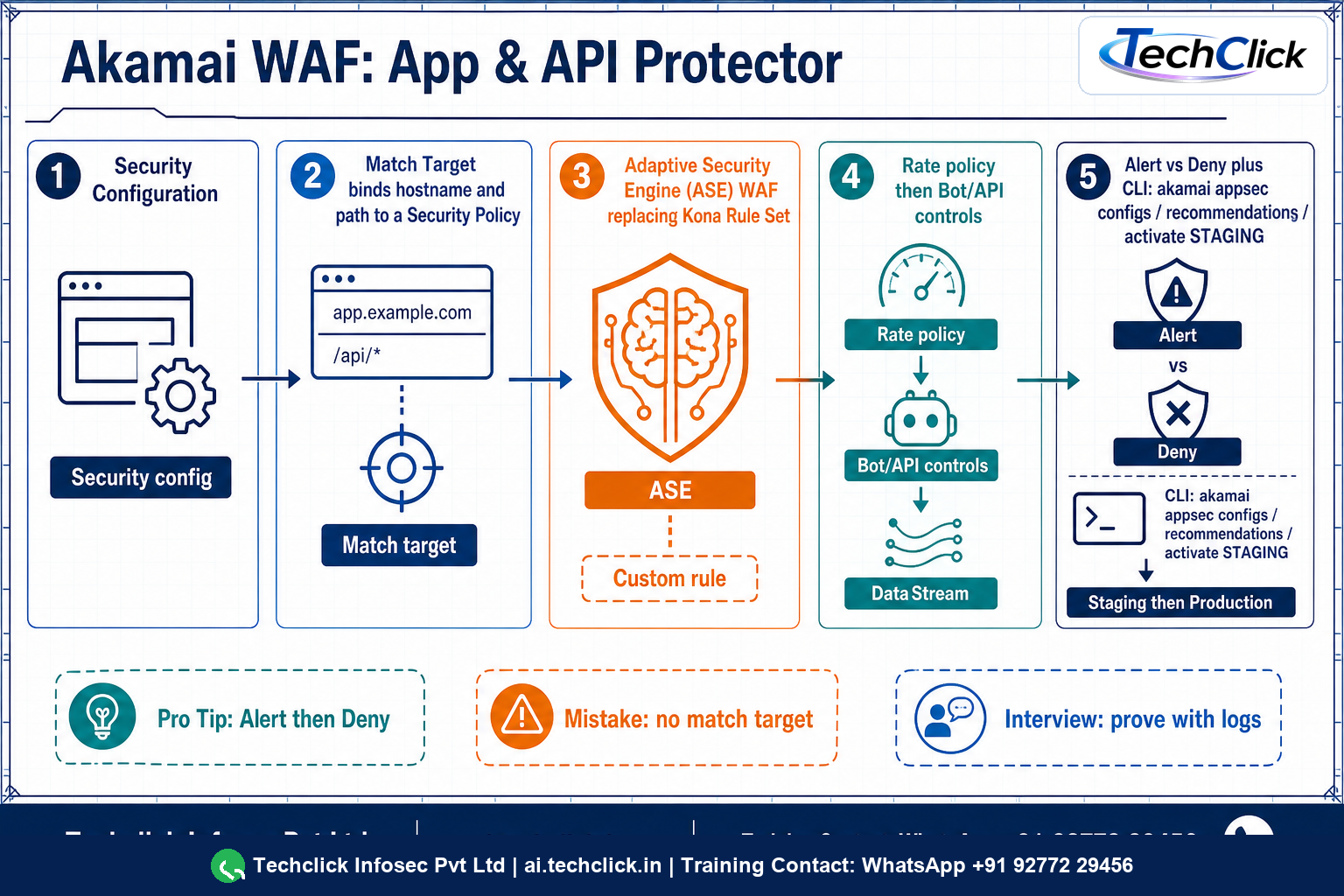
① Akamai WAF is App & API Protector on the edge — not a Kona box
App & API Protector inspects HTTP and HTTPS as they pass through Akamai's edge toward origin. It is the WAF/WAAP product: Adaptive Security Engine, rate controls, API constraints, IP/Geo, custom rules, optional Bot Manager and Account Protector. It is not Property Manager, and it is not Prolexic (network DDoS).
Two commercial shapes matter in interviews. App & API Protector is the simpler one-configuration model. App & API Protector with Advanced Security Management adds multiple security configurations, precise match targets, per-rule actions, and client reputation. Hybrid Protector exists for traffic that never hits the Akamai CDN — useful, but it is a different deployment than the edge WAF this runbook covers.
Prerequisite Akamai documents clearly: you need a delivery configuration active at least on staging before you create the security configuration. WAF has nothing to inspect if DNS does not land on the edge.
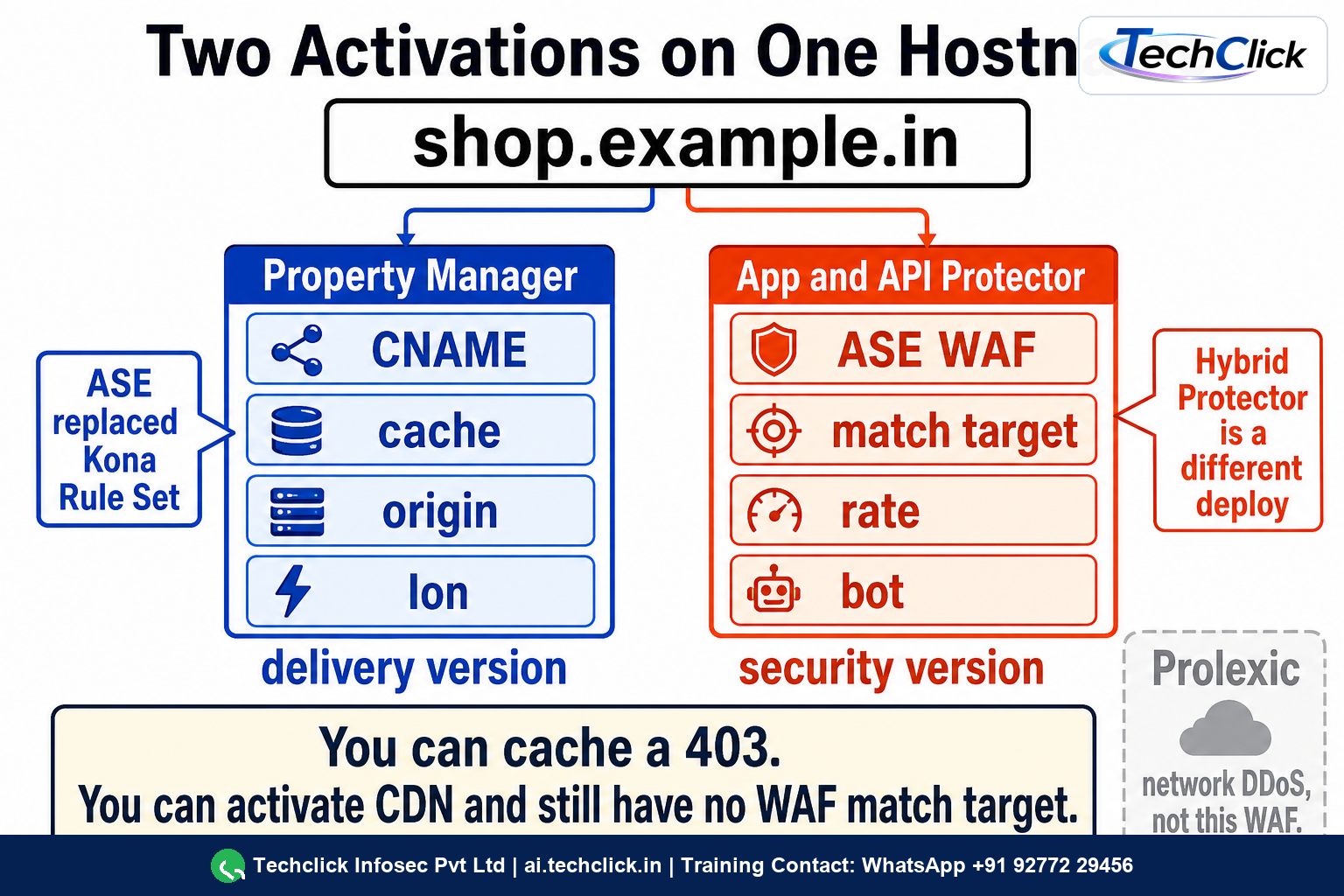
② The object model — config, policy, match target, shared resources
A security configuration is the unit you activate. Standard AAP uses one configuration with multiple security policies for different hostnames or paths. ASM lets you split configurations by business unit or environment.
A match target is the bind. Akamai's own words: nothing is protected without a match target. Requests that miss every match target are not evaluated — they are not 'allowed by a WAF rule'; they never entered WAF.
Shared resources
- Network lists — IPs, geos, TOR; allow or block across policies.
- Rate policies — request-rate thresholds; you still assign IPv4/IPv6 actions or the policy does nothing.
- Client reputation profiles — ASM; prior attacker/scraper reputation.
Custom rules patch what ASE does not cover. Bot Manager Premier and Account Protector are add-ons for transactional pages (login, checkout, gift-card). Do not pretend a SQLi group is credential-stuffing defence.
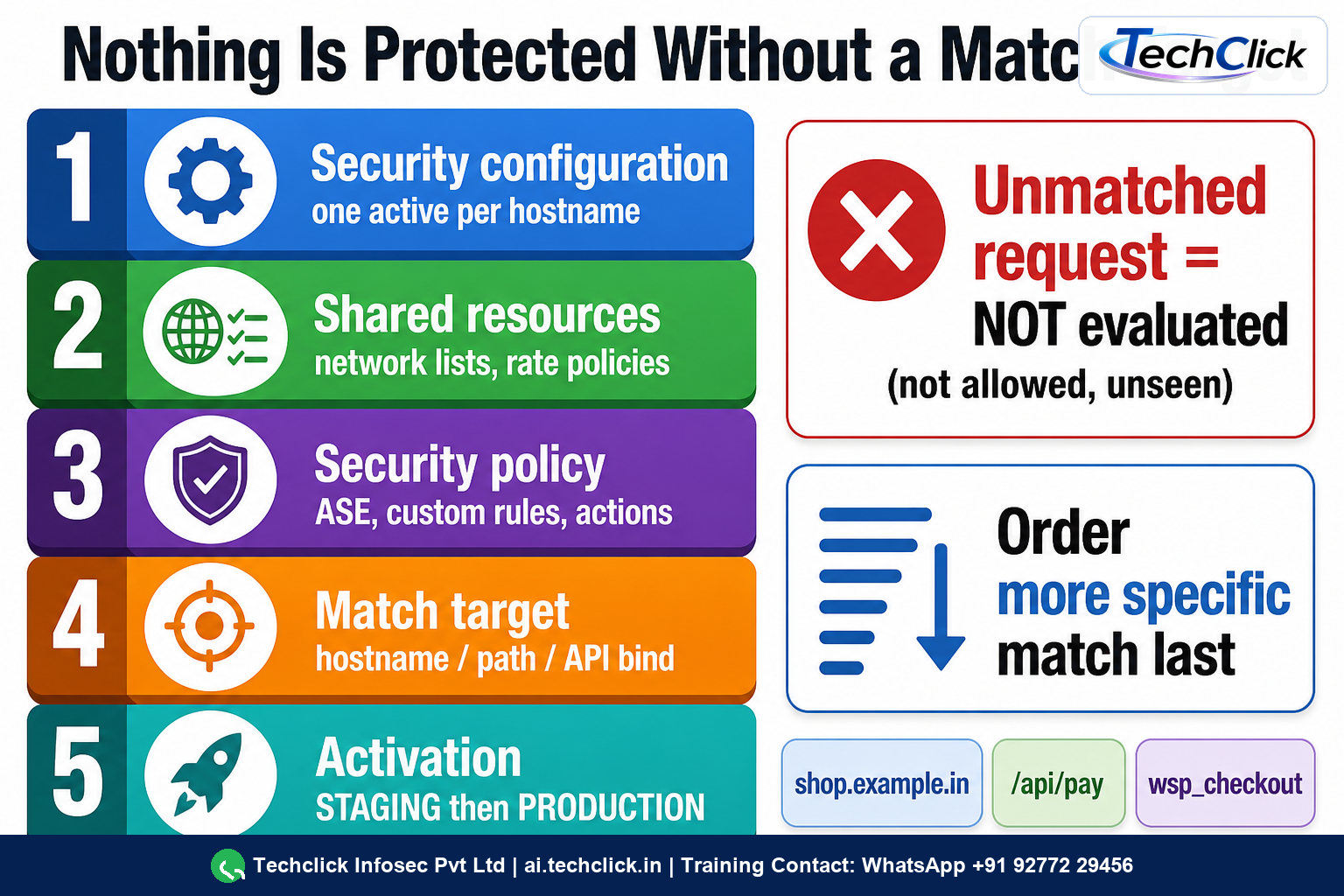
Akamai: order more specific match criteria last. A broad /* policy first can steal /api/pay and apply the wrong actions. Read match-target order before you tune rules.
③ Evaluation, Alert versus Deny, and the evidence you actually keep
When a request matches a target, App & API Protector runs the policy's protection controls in a documented evaluation order and stops on the action you configured — Alert (log, continue or record) versus Deny (or challenge/abort for some controls). Presets create the config with protections on and actions set to Alert so you can see attack versus legitimate traffic before you block.
Use hostname evaluation mode when adding a new host: even Deny controls log as alert until you promote the hostname to full protection. ASE can surface tuning recommendations (exceptions for repeating false-positive patterns). Accept, decline or reset them via API/CLI rather than inventing a blanket skip.
What belongs in the ticket
- Security configuration id + version + activation network (staging vs production).
- Policy id and match target that claimed the request.
- Rule or attack-group id, action (alert/deny), and whether it was evaluation mode.
- DataStream 2 / SIEM Connector fields — not a screenshot of Control Center.
A 403 with X-Cache: TCP_HIT can still be WAF: the edge is serving a cached deny or the object is a deny page. Always pair delivery headers with security logs. Do not disable the whole policy to 'make checkout work'.
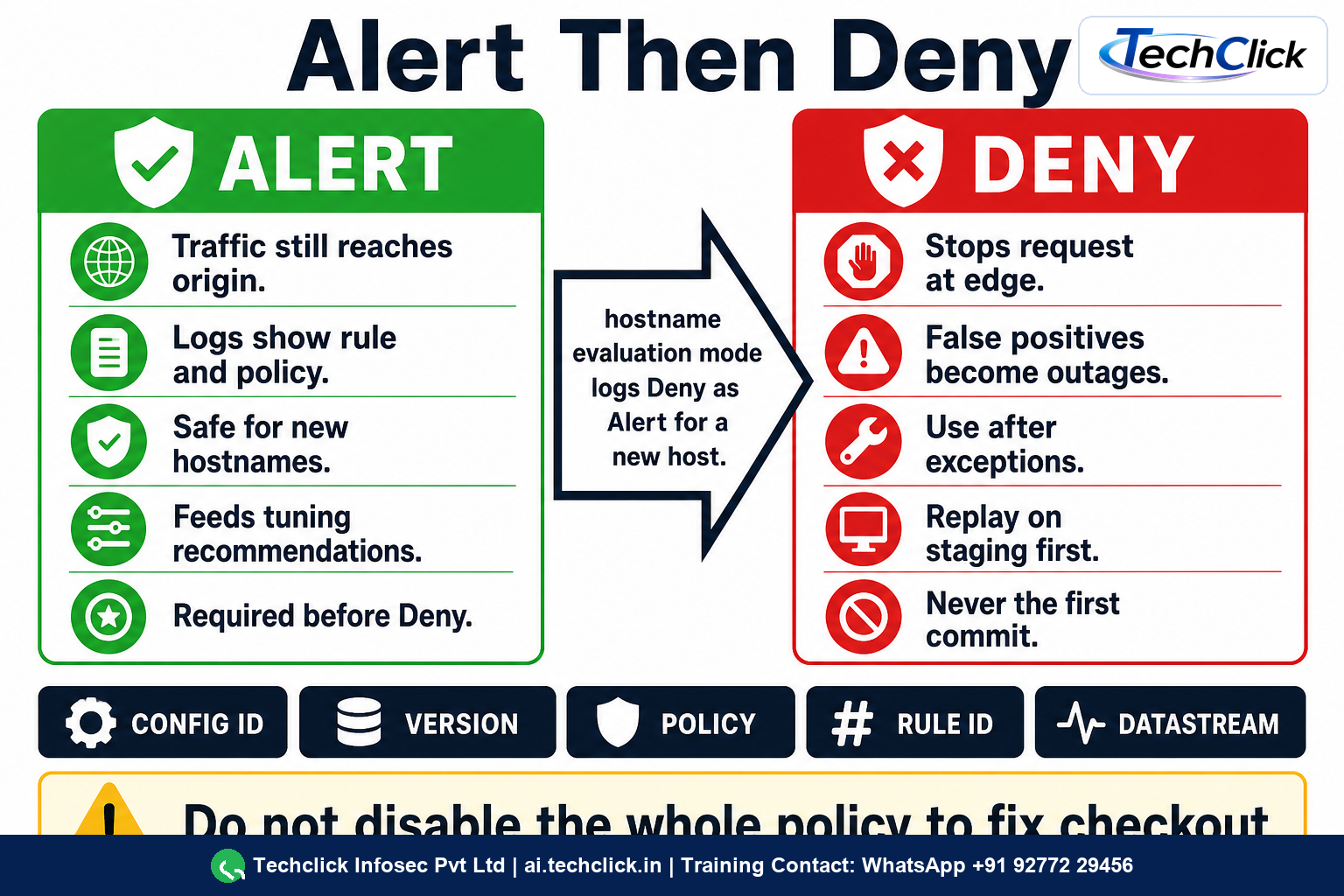
The product presets start at Alert because false positives on checkout are outages. Hostname evaluation exists for the same reason. Jumping to Deny without recommendations is how WAFs get a bad name.
④ akamai appsec CLI — clone, prove, stage, then production
Use the Application Security CLI against a lab-shaped tenant. Values below are illustrative (shop.example.in, config 12345, policy wsp_checkout).
akamai appsec configs
akamai appsec versions --config 12345
akamai appsec policies --config 12345 --version 7
akamai appsec selectable-hostnames --config 12345 --version 7
12345  shop-in-aap   production=v6  staging=v7
Policies: wsp_www  wsp_checkout  wsp_api
Hostnames: shop.example.in (protected), api.shop.example.in (evaluation)
False-positive path — never edit the live version in place
akamai appsec clone --config 12345
# creates editable v8 from the last version
akamai appsec get-recommendations --config 12345 --version 8 --policy wsp_checkout
akamai appsec accept-recommendation --config 12345 --version 8 --policy wsp_checkout
akamai appsec enable-custom-rule --custom-rule 98765 --policy wsp_checkout --action alert
akamai appsec activate --network STAGING --notes 'checkout JSON exception' --notify secops@example.in
akamai appsec activation --activation-id 55501
| Command | Use it when |
|---|---|
akamai appsec configs | You need the config id and which version is on staging vs production |
akamai appsec clone | Production version is locked; you need an editable copy |
akamai appsec create-match-target | A hostname or /checkout path is not in any policy — WAF is silently not evaluating |
get-recommendations / accept-recommendation | ASE identified a repeating false-positive pattern |
enable-custom-rule ... --action alert | You need a patch rule; start at alert even if you are angry |
activate --network STAGING | Always before PRODUCTION. Replay the failing checkout on staging first |
Only after staging replay of the real checkout POST, and SIEM showing the exception (not a new deny), activate production. If you must emergency-allow, prefer a tight network list or a path exception on one policy — not policy-wide disable.
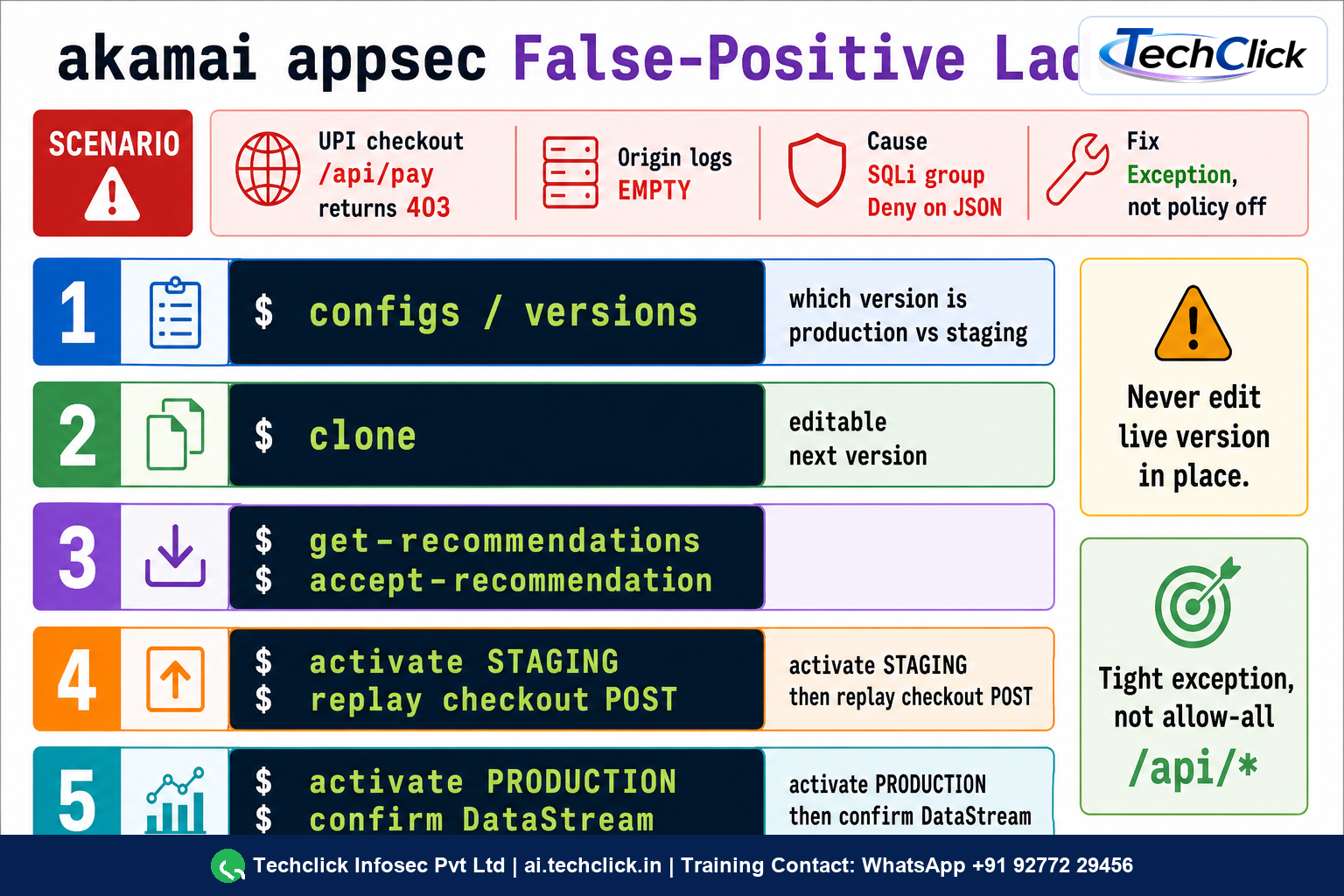
Arjun at a Bengaluru ecommerce platform faces this
UPI checkout POSTs to shop.example.in/api/pay started returning 403 after someone 'enabled WAF deny for SQLi'. Origin app logs show zero hits. Some GET pages still load.
ASE SQLi group was flipped to Deny on wsp_checkout without a baseline. The payment JSON contains a string the rule treats as a tautology. Match target is correct — this is a true evaluation, false-positive action.
akamai appsec configs shows production v6. SIEM/DataStream: policy wsp_checkout, attack group SQL, action DENY, same rule id on every failed POST. Staging still on v6 so you cannot test a fix until you clone.
configs/versions → clone v7 → get-recommendations / exception → STAGING activate → replay /api/pay → PRODUCTIONAccept the ASE recommendation (or a tight custom exception on /api/pay content-type JSON), keep other groups on Deny, activate staging, replay the real checkout payload, then production. Do not disable the policy and do not add a /api/* allow-all custom rule.
Staging replay returns 200 from origin. New DataStream events for that rule id are alert-only or gone. Production activation id is complete. A second malicious SQLi probe still denies.
Replay the exact failing POST against staging after activate --network STAGING. Only then PRODUCTION. Configs and properties activate separately — a new WAF version does not ride a property activation.
📖 Glossary
- App & API Protector
- Akamai's edge WAF/WAAP product inspecting HTTP/HTTPS before origin.
- Adaptive Security Engine (ASE)
- Current WAF engine replacing Kona Rule Set and Automated Attack Groups.
- Security configuration
- Versioned container you activate; one active config per hostname.
- Match target
- Bind of hostname/path/API to a security policy. Required for evaluation.
- Security policy
- Actions and protections (ASE, custom rules, rate, reputation) applied after a match.
- Hostname evaluation
- Preview mode where even Deny controls log as alert for a new hostname.
- Tuning recommendation
- ASE-suggested exception for repeating false-positive patterns; accept/decline/reset via API/CLI.
- DataStream / SIEM Connector
- Log export of WAF decisions — the evidence, not a Control Center screenshot.
📚 Sources
- Akamai — App & API Protector product page
- Akamai TechDocs — App & API Protector (config, match targets, Alert presets)
- Akamai TechDocs — Application Security API (ASE note)
- Akamai TechDocs — Get tuning recommendations
- akamai/cli-appsec — configs, clone, activate, recommendations
- Akamai CLI for Application Security command reference
What's next?
Need the delivery side of the same hostname? Pair this with the Akamai CDN Property Manager lesson — CNAME, cache HIT/MISS and Fast Purge.