Most engineers think…
Most people describe Akamai as 'the CDN in front of the site' and stop. That sentence is true and useless on a bridge call. The ticket is always more specific: the hostname is not on the edge, the edge is reaching the wrong origin, the object is not cacheable, or yesterday's HTML is still in cache.
The working model is operational: three hostnames, two TLS connections, a versioned property that must be activated, and a small set of response headers that tell you whether the edge served cache or went to origin. If you cannot name those, you will debug the origin while the fault is still in DNS.
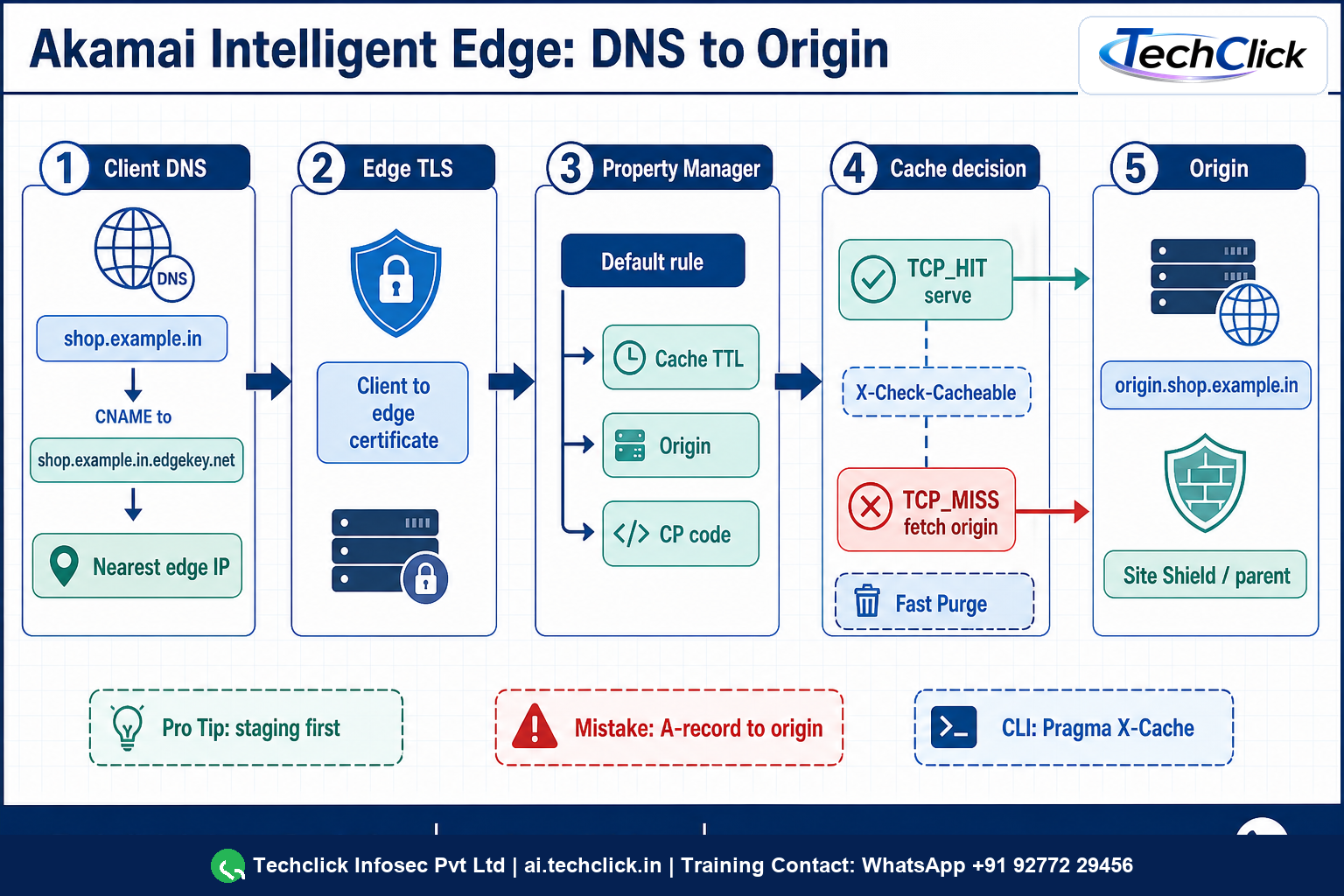
① What Akamai Intelligent Edge actually is — two hops, three names
Akamai's delivery platform is a global anycast edge. A user never needs to know that. You do, because every outage sits on one of two connections: client to edge, or edge to origin.
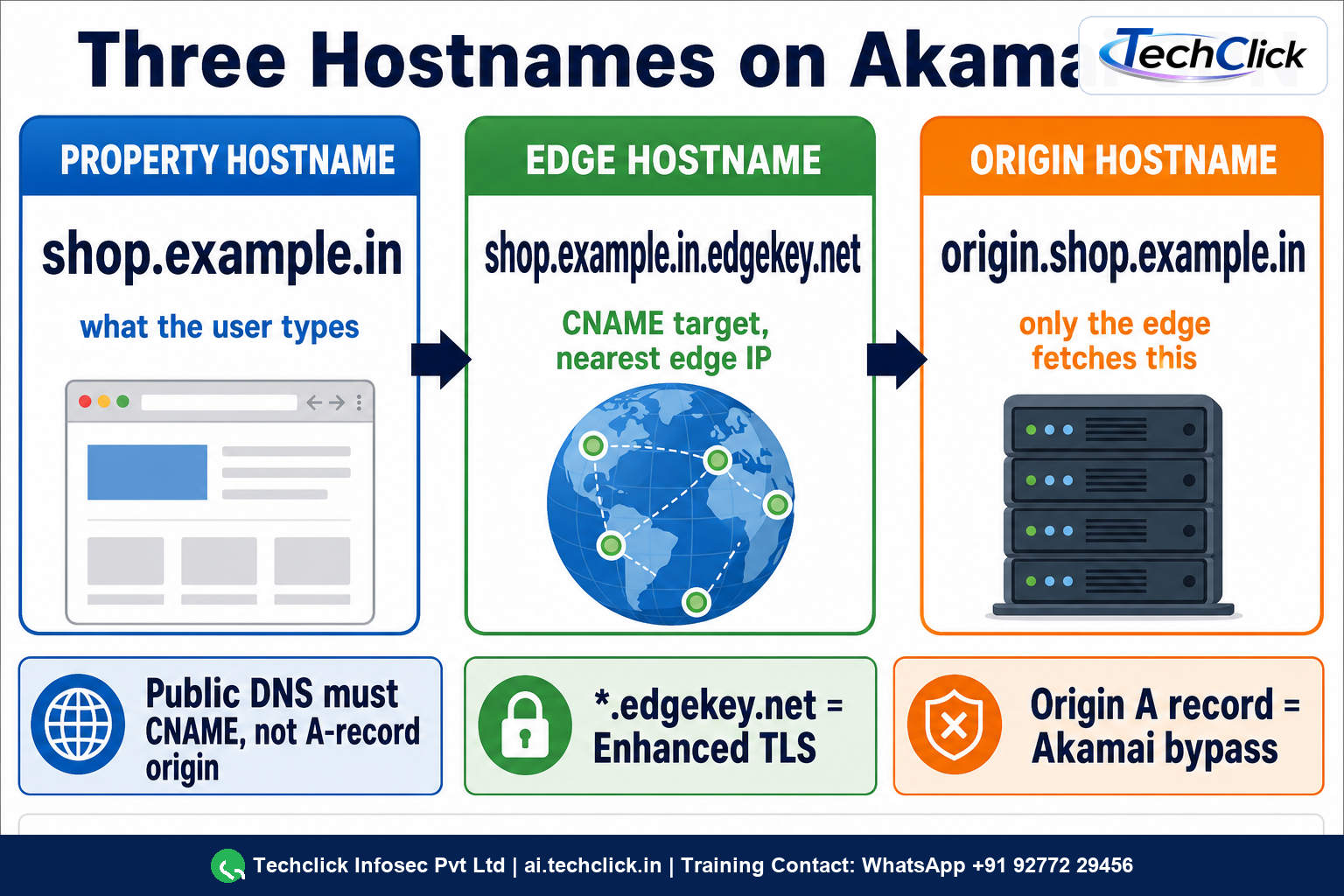
Keep three names distinct. The property hostname is what browsers request. The edge hostname is the CNAME target that puts the site on the Akamai network. The origin hostname is where your servers actually live. Public DNS for the property hostname must be a CNAME to the edge hostname. If you leave an A/AAAA to the origin, users bypass Akamai entirely.
Lab names used below (illustrative, not a live tenant): shop.example.in → shop.example.in.edgekey.net → nearest edge IP, while the edge fetches origin.shop.example.in. Enhanced TLS edge hostnames use *.edgekey.net; Standard TLS uses *.edgesuite.net.
② Property Manager — the rule tree the edge actually runs
Property Manager is the configuration that edge servers load after DNS lands the request. A property is a versioned container: hostnames, a rule tree, and product behaviours (Ion adds performance defaults; other products change the behaviour catalogue). You edit a version, then activate it to staging or production. An unactivated edit is a draft. A live site does not see it.
Rules, matches, behaviours, CP codes
The tree is IF/THEN. A match is the IF (path, file extension, hostname, request header). A behaviour is the THEN (origin server, caching TTL, redirect, HTTPS). There is always a Default Rule that matches everything. Nested child rules can override parents; Akamai documents trees up to five levels, with more specific children applying before the parent when both match. Every property needs at least one CP code in the default rule.
Ion is the common web/app delivery product sitting on this same Property Manager model, with Adaptive Acceleration and cellular optimisation behaviours already in the tree. Includes are reusable rule snippets you version separately. Metadata on the network is the compiled XML of the activated version — that is why 'I saved it in Control Center' is not the same as 'production is running it'.
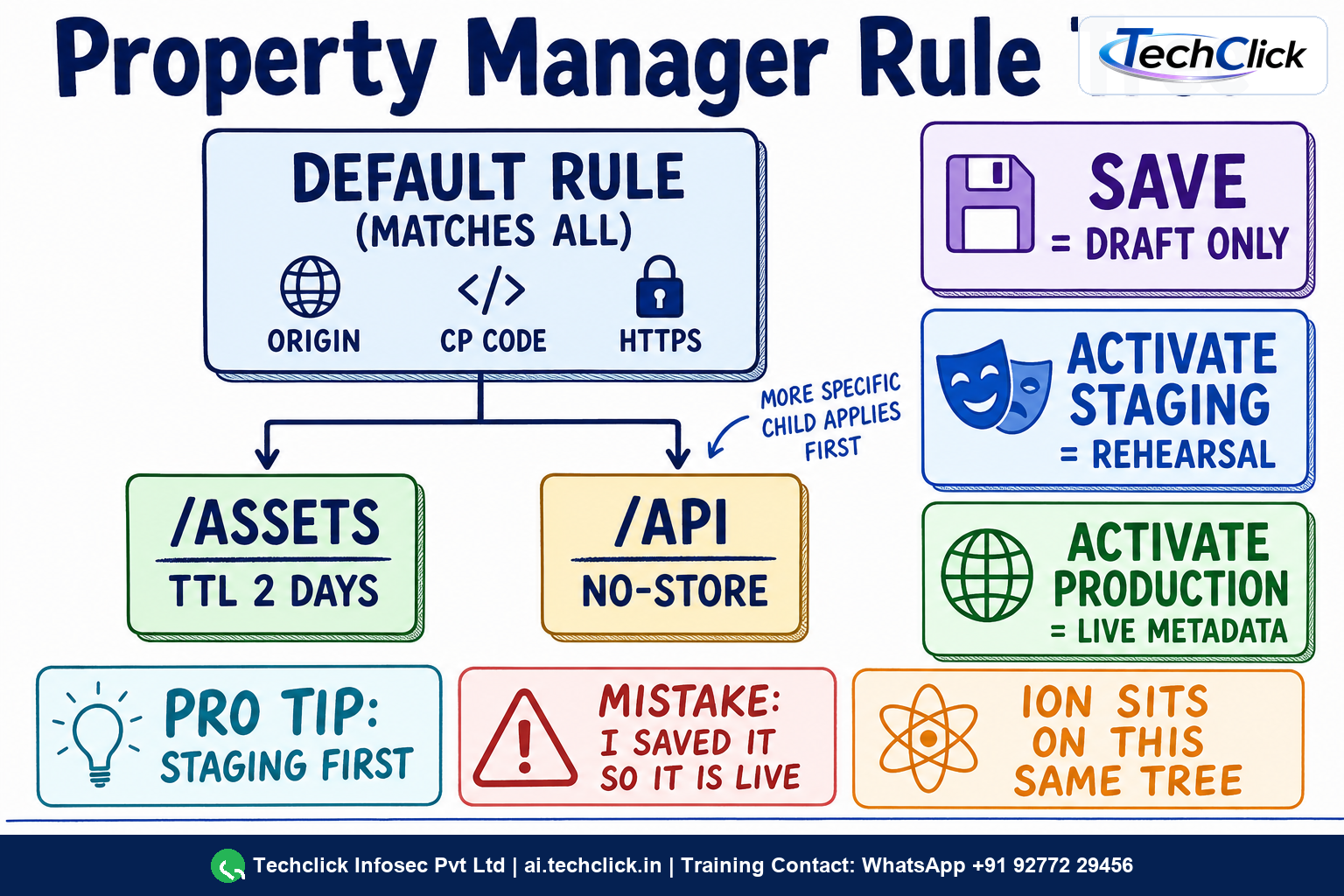
A staging activation plus a hosts-file or staging edge hostname shows X-Akamai-Staging. Production curl will still show the old version until you activate production. Prove with headers, not with 'it looked fine in Control Center'.
③ Cache, origin, Site Shield and the extras that ride the same path
On a cacheable GET, the edge looks up a cache key (ARL). TCP_HIT / TCP_MEM_HIT means the object was fresh in cache. TCP_MISS means the edge (or a parent) fetched origin. X-Check-Cacheable: YES|NO answers the prior question: was this even allowed to be stored? A MISS on a NO is not a CDN failure; it is the property telling the edge not to cache.
Tiered Distribution and Site Shield insert a parent layer so origin sees a small, stable set of Akamai IPs instead of the whole edge. When that is on, X-Akamai-Request-ID can look like {parent-id}.{child-id} and X-Cache-Remote tells you how the parent served. Origin ACLs must allow the Site Shield map, not random edge IPs.
Same path, different products
- Image and Video Manager — transform and cache derivatives at the edge (the IM/RO debug family).
- EdgeWorkers — JavaScript at the edge for request/response logic, not a substitute for WAF.
- mPulse — real-user timing, not a delivery control.
- Fast Purge — invalidate or delete by URL, ARL, CP code or cache tag. Invalidate marks stale; delete removes the object. Use ARL when the cache key is not the public URL.
WAF (App & API Protector) is a security configuration bound to the same hostname. It is not this property. Mixing 'I changed the property' with 'I changed WAF' is the classic Bengaluru ecommerce ticket that wastes an hour.
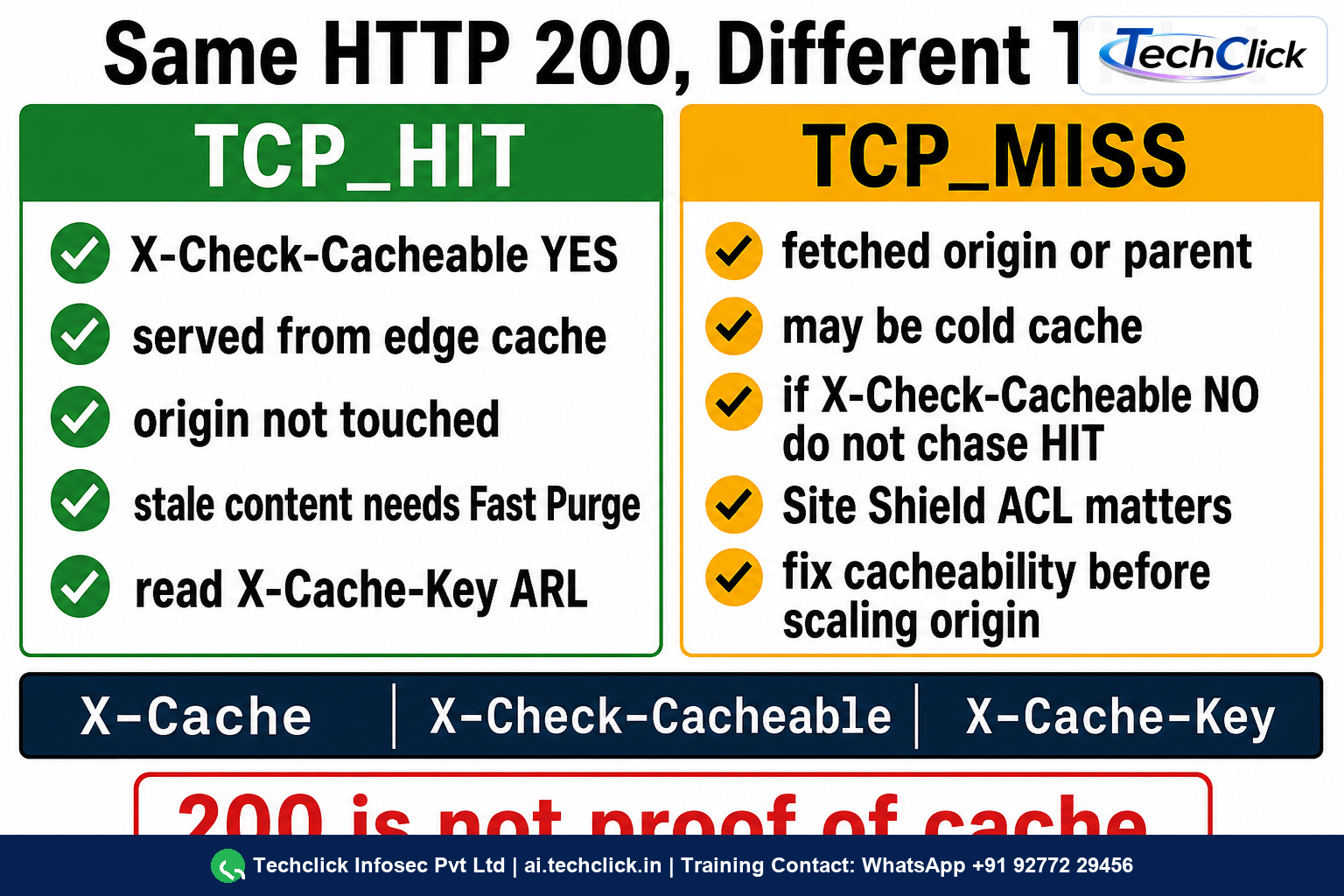
MISS means origin (or a parent) was consulted. If X-Check-Cacheable is NO, the property is working as designed. If MISS is unexpected on a static asset, fix TTL and cache key, do not scale origin first.
④ CLI troubleshooting — prove DNS, prove cache, then change
Walk the ladder in order. Do not purge, and do not activate production, until the evidence names the layer.
1. Did DNS send the user to Akamai?
dig +short shop.example.in CNAME
dig +short shop.example.in.edgekey.net A
shop.example.in.edgekey.net.
23.45.67.89
If CNAME is missing and you get an origin A record, the edge is not in path. Fix DNS before you touch Property Manager.
2. Did this request hit the edge, and was it cached?
Legacy Pragma still works on many properties. Prefer Enhanced Debug with a time-limited Akamai-Debug token when that behaviour is on — it maps cache to the same family of response headers.
curl -sSI https://shop.example.in/assets/app.css \
  -H 'Pragma: akamai-x-cache-on, akamai-x-cache-remote-on, akamai-x-check-cacheable, akamai-x-get-cache-key, akamai-x-get-true-cache-key, akamai-x-get-request-id'
HTTP/2 200
server: AkamaiGHost
x-cache: TCP_HIT from a23-45-67-89.deploy.akamaitechnologies.com (AkamaiGHost/11.4.0)
x-check-cacheable: YES
x-cache-key: /L/123456/2d/shop.example.in/assets/app.css
x-akamai-request-id: 1a2b3c4d
| Header / value | What it proves |
|---|---|
TCP_HIT / TCP_MEM_HIT | Fresh object served from edge cache |
TCP_MISS | Not in cache; fetched from origin or parent |
TCP_REFRESH_MISS | Stale; origin returned a new object |
X-Check-Cacheable: NO | Property (or origin headers) forbids cache — do not chase HIT |
X-Cache-Key | ARL: serial, CP code, TTL token, path — use this to purge |
X-Akamai-Staging | You are on staging (ESSL or EdgeSuite), not production |
3. Activate and purge without guessing
akamai property-manager list-properties
akamai property activate --property shop.example.in --version 18 --network staging --note 'cache TTL 2d for /assets'
# After staging proof, same version to production.
akamai purge invalidate --arl '/L/123456/2d/shop.example.in/assets/app.css'
Staging first is not ceremony. Production activation distributes metadata globally. Fast fallback exists, but you should not need it because you already proved the version on staging with the same curl. If X-Check-Cacheable is YES and users still see yesterday's file, purge the ARL — URL purge misses when the cache key is not the public URL.
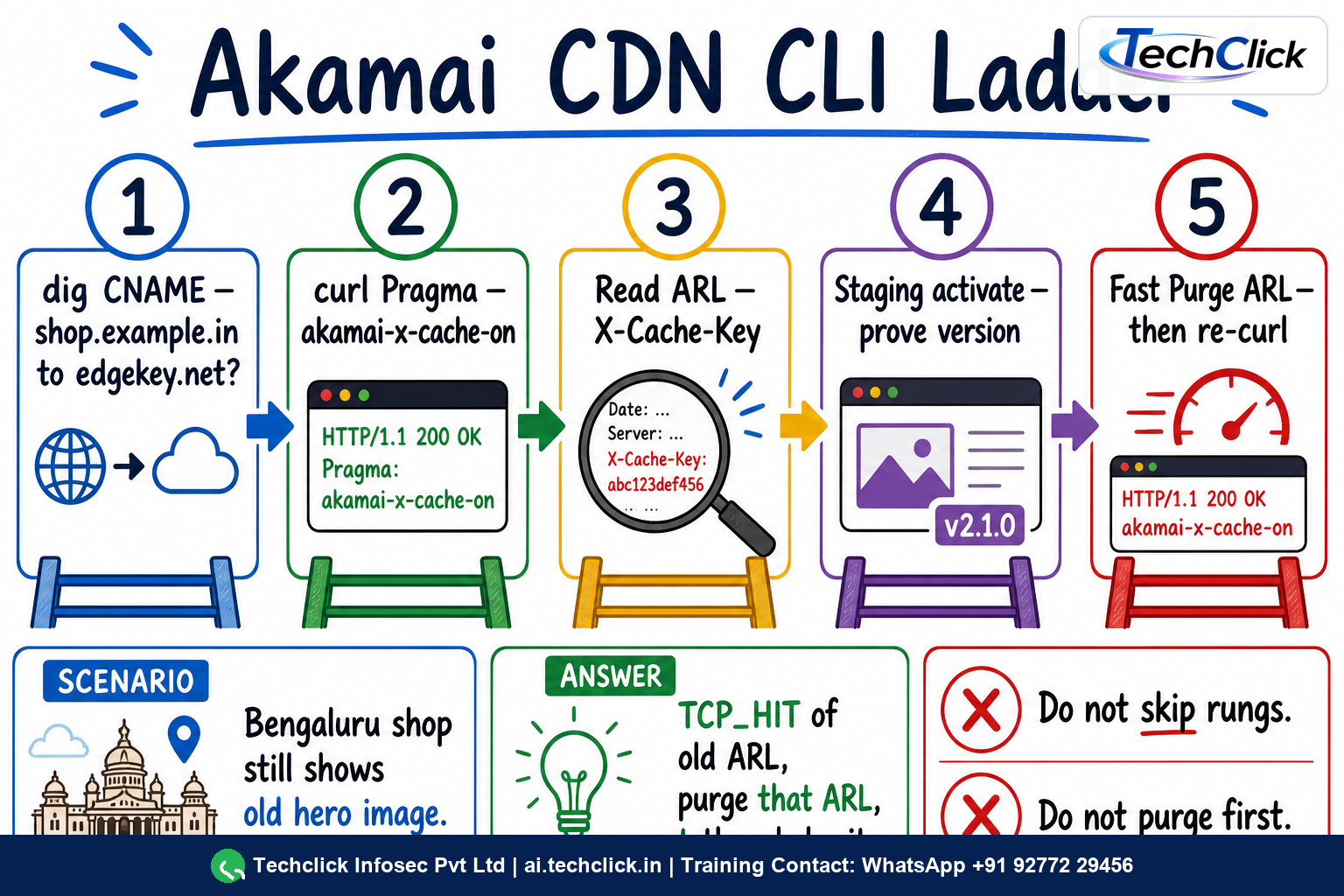
Meera at a Bengaluru ecommerce shop faces this
After a sale banner change, desktop users in India still see yesterday's homepage hero. Origin already has the new image. Mobile on a different subdomain looks fine.
shop.example.in is on Akamai with a long TTL on /hero/*. Origin was updated; the edge still has a TCP_HIT for the old ARL. The team A-recorded a test name to origin, so they thought the CDN was updated.
dig shop.example.in CNAME still points at shop.example.in.edgekey.net. curl with Pragma shows TCP_HIT and X-Cache-Key /L/123456/2d/shop.example.in/hero/festive.jpg. X-Check-Cacheable is YES.
dig CNAME → curl Pragma → read X-Cache-Key → Fast Purge ARL → re-curlakamai purge invalidate of that ARL (or cache tag if tagged). Do not purge the whole site. Confirm a TCP_MISS of the new bytes, then subsequent TCP_HIT. Leave origin ACLs and Site Shield untouched.
Repeat curl from a second resolver: new Content-Length, TCP_HIT after the first MISS, X-Cache-Key unchanged path with fresh object. Staging is not required for a purge-only fix.
A browser screenshot cannot tell HIT from MISS. Capture X-Cache, X-Check-Cacheable, X-Cache-Key and X-Akamai-Request-ID in the ticket. If Enhanced Debug is enabled, pass the token; do not leave debug wide open on production.
📖 Glossary
- Property hostname
- The public FQDN users request. Bound to one property and one edge hostname.
- Edge hostname
- Akamai CNAME target (typically *.edgekey.net or *.edgesuite.net) used for mapping to an edge IP.
- Origin hostname
- Hostname only Akamai uses to fetch your servers after go-live.
- Property Manager
- Versioned rule tree of matches and behaviours the edge executes after DNS.
- CP code
- Content Provider code for billing and reporting; required on the default rule.
- ARL / cache key
- Akamai Resource Locator in X-Cache-Key; the precise object identity for Fast Purge.
- TCP_HIT / TCP_MISS
- X-Cache values: served from cache versus fetched from origin or a parent.
- Site Shield
- Parent layer that shrinks origin ACLs to a published Akamai IP map.
- Enhanced Debug
- Tokenised Akamai-Debug request header that returns cache and related debug response headers.
📚 Sources
- Akamai TechDocs — Welcome to Property Manager
- Akamai TechDocs — Key concepts and terms (hostnames, CNAME, properties)
- Akamai TechDocs — Request flow (client-to-edge, edge-to-origin)
- Akamai TechDocs — Welcome to Ion
- Akamai TechDocs — Pragma headers (X-Cache, X-Cache-Key)
- Akamai TechDocs — Purge content by ARL
What's next?
Got the delivery path? Next, put App & API Protector on the same edge — Adaptive Security Engine, match targets, rate policies and the akamai appsec CLI.