Lessons · Prisma Cloud series · Compute runtime
Self-hosted Compute Edition is the Console. Prisma Cloud Enterprise parks the same tree under Runtime Security. Paths below are the Compute-internal ones: Defend, Monitor, Manage. Prefix Runtime Security on a SaaS tenant.
This lesson is CWPP runtime on the workload. It is not CSPM/RQL, not registry scan, not WAAS. Prisma Cloud interview covers the CNAPP map.
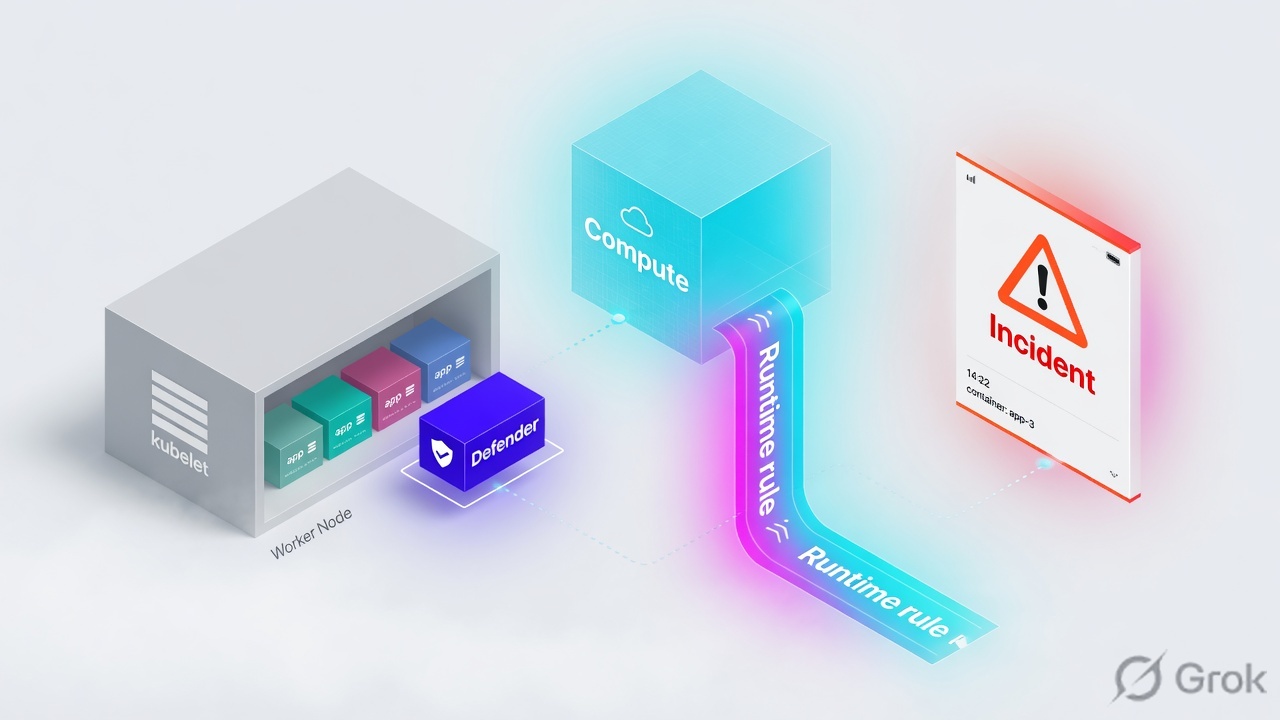
Defender is the agent that enforces Compute runtime on the host or container. Console stores the policy; Defender pulls it and keeps the last push if Console is unreachable. Container policy (Defend → Runtime → Container policy) is models plus rules for images — process, network, filesystem, anti-malware. Host policy is a different object for VMs that do not run containers. Custom expressions live in Defend → Custom Rules → Runtime and are attached onto a runtime rule (processed first). Effects: disable / alert / prevent / block. Audits are the raw events; Incident Explorer sews a kill chain. Proof is the incident story plus the audit effect, not Radar being pretty.
Concept — a rule with no Defender is a document
The day-one ticket is always the same: “We have a container runtime rule. Why did the miner run?” Wrong unit of work. A runtime rule is configuration in Console. Enforcement is a Defender process on that node. If k8s-worker-02 has no Container Defender, payments-runtime never sees /tmp/xmrig.
Three silent-miss states look identical from the queue (zero incidents):
- Container policy scoped to collection
payments-prod. Node has Host Defender only. Host Defender does not do container behavioral modeling. - Container Defender is connected. Enable automatic runtime learning is off. Model is empty. Predictive “process not in image” never fires; only explicit deny / Intelligence Stream hits.
- Effect on the Processes tab is Disable. Sensors watch nothing. Incident Explorer stays empty by design.
Defender must be Connected on the node that runs the container. Policy is evaluated on the Defender, top to bottom, first match. Console being green is not evidence the workload is defended.
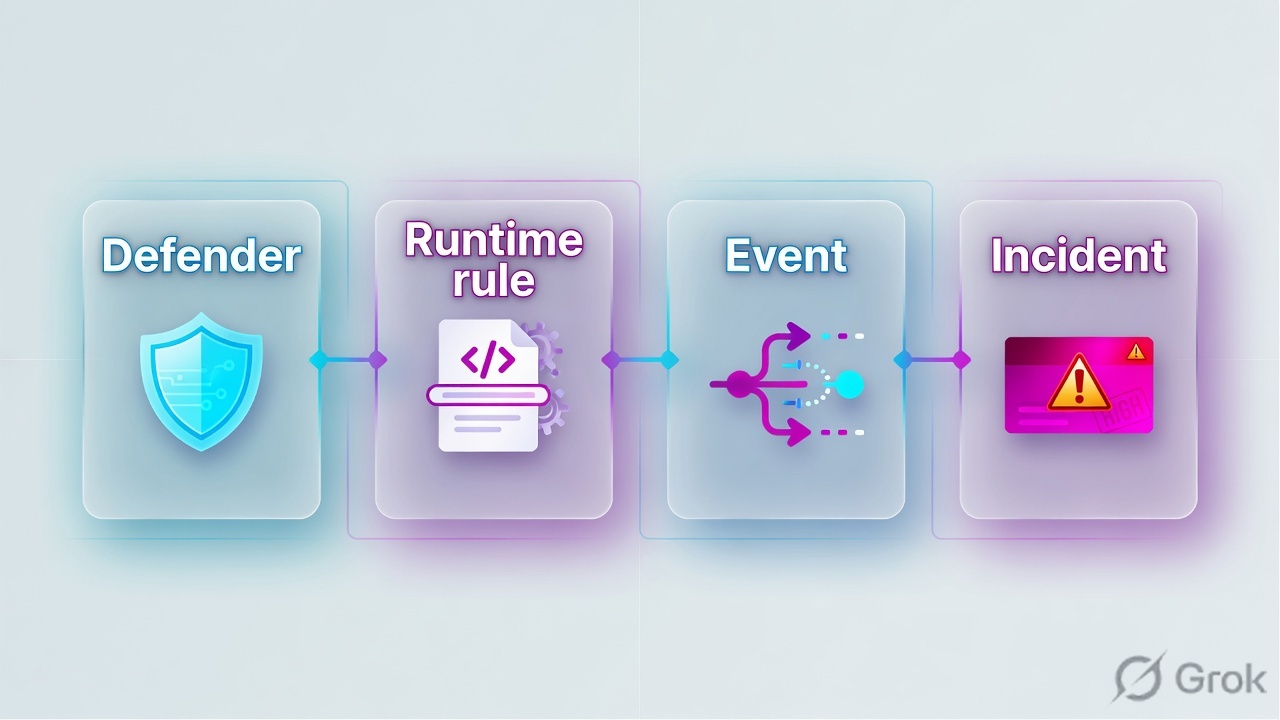
Defender, container, host, incident
Four objects. Name them before you add a deny path.
Defender
Agent on the workload. Types: Container (covers the host plus containers), Host, Serverless, App-Embedded. Linux: user-mode container with net_admin / sys_admin / sys_ptrace / mknod / setfcap — not --privileged. Windows: service + drivers. Fail-open on the runC shim after 60s.
Runtime rule
Defend → Runtime → {Container | Host | Serverless | App-Embedded} policy. Scope is a collection. Made of models and rules. Custom expressions attach here. First matching rule wins; inside a rule, custom rules run first.
Container vs host
Container Defender: behavioral modeling, process / net / fs, forensics, WAAS, Radar. Host Defender: process / net / fs / anti-malware on VMs that do not run containers — no container models. App-Embedded: no learning, no models.
Incident
Logical grouping of audits that match a known attack pattern (crypto miner, reverse shell, port scan, hijacked process). Monitor → Runtime → Incident Explorer. Raw rows stay under Monitor → Events → Container / Host audits.
Defender is the sensor and the enforcer. The runtime rule is the policy object. Container and host are different policies. An audit is one event. An incident is the sewn kill chain.
Path — Defender then rule then incident
Existing incident first: if Incident Explorer already has this image / host / category in the last 24 hours, you join that story — same type on the same resource is suppressed for a day. New activity walks Defender → policy pull → sensors → custom then model → effect → audit → incident. Forensics land about a minute later.
Read left → right, then the gold bar. Defender is the unit of enforcement. The incident is the sewn story. Audits are how you prove the effect.
| Object | Lab value | If missing |
|---|---|---|
| Defender | Container Defender on k8s-worker-02 Connected | No process/fs/net events from the pod. Policy is a document. |
| Collection / scope | payments-prod (ns payments) | Default rule may still hit All; a tight collection that misses the image looks like “runtime is off.” |
| Container rule | payments-runtime, learning on, Processes = Alert | Disable = sensors off. Empty model if learning is off. |
| Host rule | jenkins-host-runtime on vm-jenkins-01 | Container policy never applies to a Host-only Defender. |
| Custom rule | proc.path contains "xmrig" log as incident | You wait for the model. Known-bad binaries should be explicit. |
| Incident proof | Explorer story + Container audit effect | Archiving the incident without the audit CSV is closing the ticket, not proving the block. |
Container vs host vs custom vs effect
Pick the policy object that matches the asset. Mixing them is the usual “I wrote a container rule on a Jenkins VM” ticket.
Four columns, four tickets. Do not Prevent a noisy model on day one. Alert, read the audit, then raise the effect.
| Need | Use | Skip |
|---|---|---|
| K8s node running pods | Container Defender (covers host + containers) + Container policy | Host Defender only. You lose models and container sensors. |
| Jenkins / bastion with no runtime | Host Defender + Host policy (anti-malware, sshd, sudo, outbound) | Container policy. Nothing to model. |
| Known-bad binary / C2 IP | Custom rule proc.path / net.outgoing_ip, attach, log as incident | Waiting for learning. Models are allow-lists of observed behaviour. |
| Fargate / Cloud Run task | App-Embedded Defender + App-Embedded policy | Container models. App-Embedded does not learn. |
Do — runbook Side A / B / C
Side A is Defender on the right asset. Side B is the runtime rule (Alert). Side C is the incident plus the audit. Do not start at C.
Side A — Defender on the node
-
Pick the Defender type from the asset
Manage → Defenders → Deploy. Lab: Single / Orchestrator Container Defender — Linux on
k8s-worker-02(Docker or containerd as the runtime type). Separate install: Host Defender — Linux onvm-jenkins-01. Container Defender already includes host capabilities on a container node — do not stack a second Host Defender there. Source: Prisma Cloud — Deploy the Prisma Cloud Defender. -
Prove Connected, not “script ran”
Manage → Defenders: hostname
k8s-worker-02, type Container, status Connected. Defender talks out to Console (PCCE 8083 / SaaS websocket 8084). If a third-party EDR (Microsoft Defender runtime, similar) blocks kernel events, Prisma does not support that pairing — sensors go dark. Source: Prisma Cloud — Deploy Container Defender; Defender architecture.
# After install, Console must list the node. If it does not:
# 1) node → Console reachability (proxy / whitelist console URL + api.<region>.prismacloud.io)
# 2) Defender type vs asset (Host Defender will never model payments-api)
# 3) Competing runtime agent blocking kernel events — unsupported

# Lab names
# node     k8s-worker-02    10.20.20.42    Container Defender
# host     vm-jenkins-01    10.20.20.51    Host Defender
# image    registry.example.com/payments/api:1.8.2
# pod      payments-api-7f9b   ns=payments
Side B — container rule then host rule
Defend › Runtime › Container policy › Add rule
payments-runtime
Source: Prisma Cloud — Custom runtime rules; runtime defense. Path: Defend → Runtime → Container policy → Add rule. Learning on. Processes / Networking / Filesystem = Alert on the pilot. Attach custom rules on the Custom Rules tab; set Effect and log-as (audit vs incident) per expression.
-
Write the custom expression in the library first
Defend → Custom Rules → Runtime → Add rule. Type Processes. Lab expression:
proc.path contains "xmrig" or proc.name = "nc". Optional network:net.outgoing_ip = "203.0.113.88". Prisma Cloud Labs rules (Owner: system) ship disabled via Intelligence Stream — review, then enable. Source: Prisma Cloud — Custom runtime rules. -
Attach onto Container policy and Host policy separately
Container:
payments-runtime, collectionpayments-prod, Custom Rules tab → Apply → Effect Alert → log as Incident. Host: Defend → Runtime → Host policy rulejenkins-host-runtime, Anti-malware crypto miners / reverse shell / wildfire = Alert, same custom rule attached. Host process order is Activities → custom → anti-malware. Source: Prisma Cloud — custom runtime rules (activating); runtime defense for hosts.
# Defend → Custom Rules → Runtime
# Type: Processes
proc.path contains "xmrig" or proc.name = "nc"

# Type: Networking-outgoing
net.outgoing_ip = "203.0.113.88"

# Then Defend → Runtime → Container policy → payments-runtime
# Custom Rules → select both → Effect: Alert (pilot) → log as: Incident
# proc.cmdline / file.type cannot be Prevent. Deny the process on the Processes tab instead.
Side C — incident then audit then forensics
Monitor › Runtime › Incident Explorer › Active
Incident · cryptominer
Source: Prisma Cloud — Incident Explorer. Path: Monitor → Runtime → Incident Explorer. Story is the sewn audits. Raw rows: Monitor → Events → Container audits. Forensics: View forensic data (pulled ~1 min after the incident; FIFO snapshots in Console). Do not Archive until the audit CSV and the model microscope agree.
-
Trigger on the lab pod, then open Explorer
Exec
/tmp/xmrig(orncoutbound to203.0.113.88:443) insidepayments-api-7f9b. Monitor → Runtime → Incident Explorer should show category cryptominer / hijacked process with that container. Same type on the same resource is suppressed 24h — further copies are not new incidents. Source: Prisma Cloud — Incident Explorer; cryptominers. -
Read the audit effect, not the tile
Monitor → Events → Container audits: image, hostname, attack type,
effect= alert or prevent. Host path: Host audits. Syslog tag on Linux Defender isTwistlock-Defender,type=incident,incident_category. Aggregation can fold a burst after a 15-minute quiet window — one “high rate of …” row is not a miss. Source: Prisma Cloud — syslog and stdout integration; event aggregation. -
Forensics and the model
Incident → View forensic data. On-demand: Monitor → Runtime → Container Models → microscope on the image. Host: Monitor → Runtime → Host Models. Collection is Manage → System → Forensics (default on; ~100 MB container / 10 MB host per Defender). Source: Prisma Cloud — Incident Explorer (forensics).
Defender Connected on k8s-worker-02. Incident Explorer story names /tmp/xmrig on payments-api-7f9b. Container audit effect=alert (pilot) or prevent after you raise it. Host path on vm-jenkins-01 is a separate Host audit. Radar being drawn is not the proof.
One miner after go-live
Container Defender on k8s-worker-02 is Connected. payments-runtime has learning on, Processes = Alert, custom proc.path contains "xmrig" attached and logged as incident. Someone drops /tmp/xmrig in payments-api-7f9b and it phones 203.0.113.88:443. Process sensor fires. Custom rule matches first. Audit: attack type + effect=alert. Incident Explorer opens a cryptominer story (process + net + maybe fs). Forensics snapshot arrives about a minute later. You read the model microscope — xmrig is not in the origin image — then raise Processes / custom effect to Prevent on that collection. Re-exec: process does not stay up; audit effect=prevent.
effect + Defender Connected. Artwork checkmarks are not Compute Console.# Wrong: Prevent on day one, entire cluster, learning still filling the model # Right: Alert on payments-prod → confirm audit path=/tmp/xmrig → Prevent on that rule # If a legitimate sidecar is blocked after Prevent: # 1) Open the model (Monitor → Runtime → Container Models) # 2) Add the process to the allow list or wait for a relearn after the new image tag # 3) Do not Disable the whole Processes tab to "fix prod"
Traps + proof
| Symptom | Likely cause | Proof |
|---|---|---|
| Rule saved, zero incidents | No Container Defender on the node, or Host Defender on a container host. | Manage → Defenders: type + Connected on k8s-worker-02. |
| Model empty after days | Automatic runtime learning off, or App-Embedded (cannot learn). | Container policy toggle. App-Embedded observations ≠ Container Models. |
| Backup cron blocked after Prevent | Process never entered the model; new image tag not relearned. | Container Models history. Allow-list the path or relearn, do not Disable sensors. |
| Custom Prevent greyed / error | proc.cmdline or file.type used with Prevent. | Docs: those fields are Alert-only. Deny the process on the Processes tab. |
| Second miner, no new incident | Same type + same resource suppressed 24h. | Container audits still list rows. Explorer is not the full log. |
| Defender Connected, sensors dark | Third-party runtime agent blocking kernel events; or Processes effect = Disable. | Unsupported pairing. Check the effect on the matching rule, top to bottom. |
| Console unreachable, “runtime died” | Expected: last pushed policy still enforces. | Defender architecture. Fail-open is the runC shim (60s), not “drop all rules.” |
Learning is still filling models. Interactive kubectl exec looks like drift. Pilot one collection (payments-prod), Alert, read audits, then Prevent. Global Prevent-on-unknown-process is how you freeze the platform team’s debug sidecar.
- Container Defender Connected on the lab node; Host Defender only on the non-container VM.
- Enable automatic runtime learning on Container policy. App-Embedded not in this pilot.
- Custom
xmrig/ncattached, Effect Alert, log as Incident. - Exec the miner → Incident Explorer story + Container audit
effect=alert. - Raise to Prevent on that rule only. Re-exec → process stopped, audit
effect=prevent. Then revert the lab.
Knowledge check
Six judgment items. Submit once. Reasons point back at the section to re-read.
Sources
- Prisma Cloud — Deploy the Prisma Cloud Defender (Defender types; Container includes host capabilities; behavioral modeling on Container only)
- Prisma Cloud — Defender architecture (user-mode capabilities; last policy on Console loss; runC shim fail-open 60s)
- Prisma Cloud — Custom runtime rules (Defend → Custom Rules → Runtime; attach on Container/Host policy; allow/alert/prevent/block; custom first; proc.cmdline Prevent limit)
- Prisma Cloud — Incident Explorer (Monitor → Runtime → Incident Explorer; 24h suppress; Events audits; forensics)
- Prisma Cloud Compute — Runtime defense (predictive vs threat-based); runtime defense for hosts; App-Embedded (no models; Disable/Alert/Prevent)
- Prisma Cloud — Cryptominers (Enable automatic runtime learning; Intelligence Stream)
- Prisma Cloud — Syslog / stdout (
Twistlock-Defender,type=incident); event aggregation (15-minute quiet window)
Related: Prisma Cloud interview — CNAPP map (CSPM, CIEM, WAAS) after you can already place Defender and the runtime rule.