Lessons · FGCP design (A-P vs A-A) · Failover operations
This lesson is failover you can prove: heartbeat, session-pickup, monitored interfaces, get system ha status. Active-Passive vs Active-Active, split-brain cabling, and backup-hbdev live on the design page. Do not skip heartbeat health and then debug NAT.
FGCP A-P vs A-A · FortiGate command center · FortiGate interview
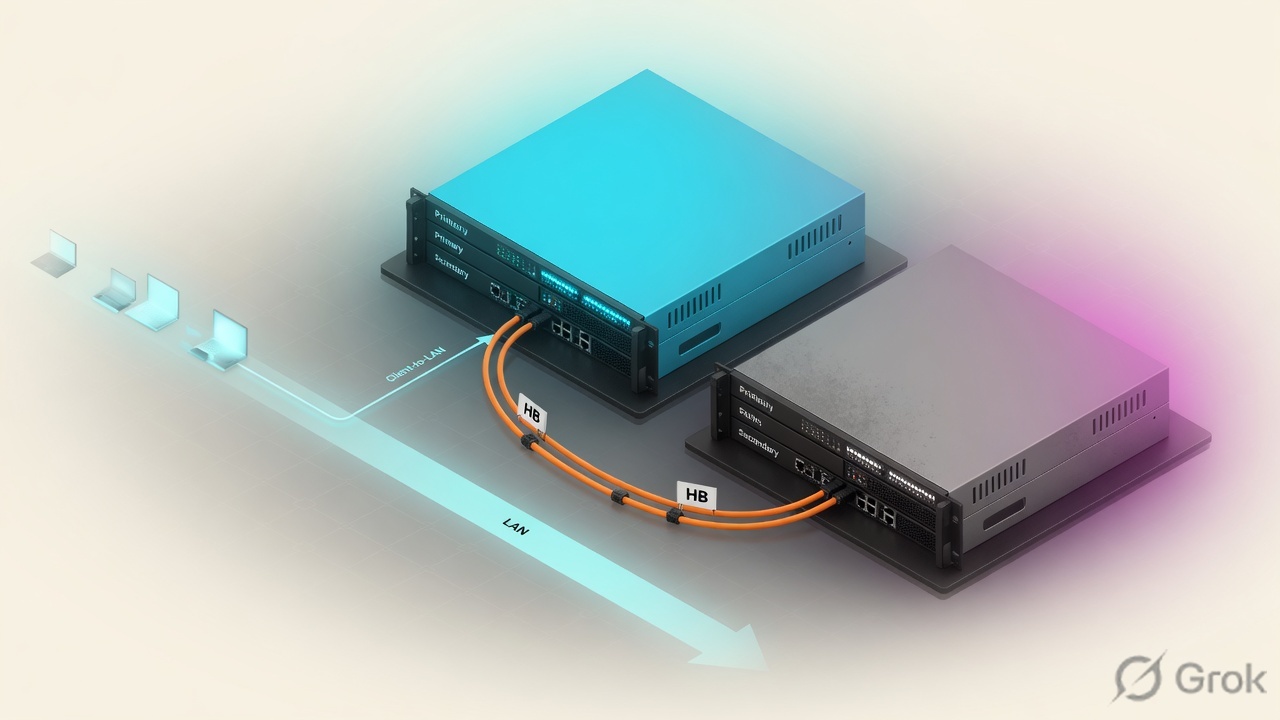
FGCP (FortiGate Clustering Protocol) elects one primary. Heartbeat packets on hbdev (Ethertype 0x8890) reset the subordinate’s negotiation timer. Miss enough of them and the peer promotes, then sends gratuitous ARPs for the virtual MAC. session-pickup is a separate switch — off by default — that syncs the TCP session table so pass-through TCP can resume. UDP/ICMP needs session-pickup-connectionless. Monitored interfaces (set monitor) are a link failover trigger, not heartbeat. Prove the cluster with get system ha status: Health OK, exactly one Primary and one Secondary, Configuration Status in-sync, HBDEV up, MONDEV up, ses_pickup matching the design. Do not invent a cluster group-id as if it were magic — members must match; default group-id is 0.
Why “HA is up” still drops TCP
The day-one ticket is always the same: “HA is configured, so sessions should survive.” Wrong. Three different jobs share the word HA, and only one of them is session failover.
- Device failover — primary dies or stops sending heartbeats. The subordinate becomes primary. That is FGCP. It does not require session-pickup.
- Link failover — a monitored data interface goes down. That unit is no longer eligible to stay primary. Heartbeat can still be perfect.
- Session failover — session-pickup was enabled before the event, so the new primary already has the TCP table. Without it, every session restarts.
GUI cluster status can be healthy with ses_pickup: disable. Existing TCP dies, new TCP works, and the change ticket still says “HA tested.” Read the ses_pickup line on get system ha status before you promise zero-drop.
Heartbeat first, then pickup
FGCP members share one virtual identity on the data plane: same virtual MAC, same configured IPs. The subordinate is not a second hop. It is a hot spare that must be told, continuously, that the primary is still alive.
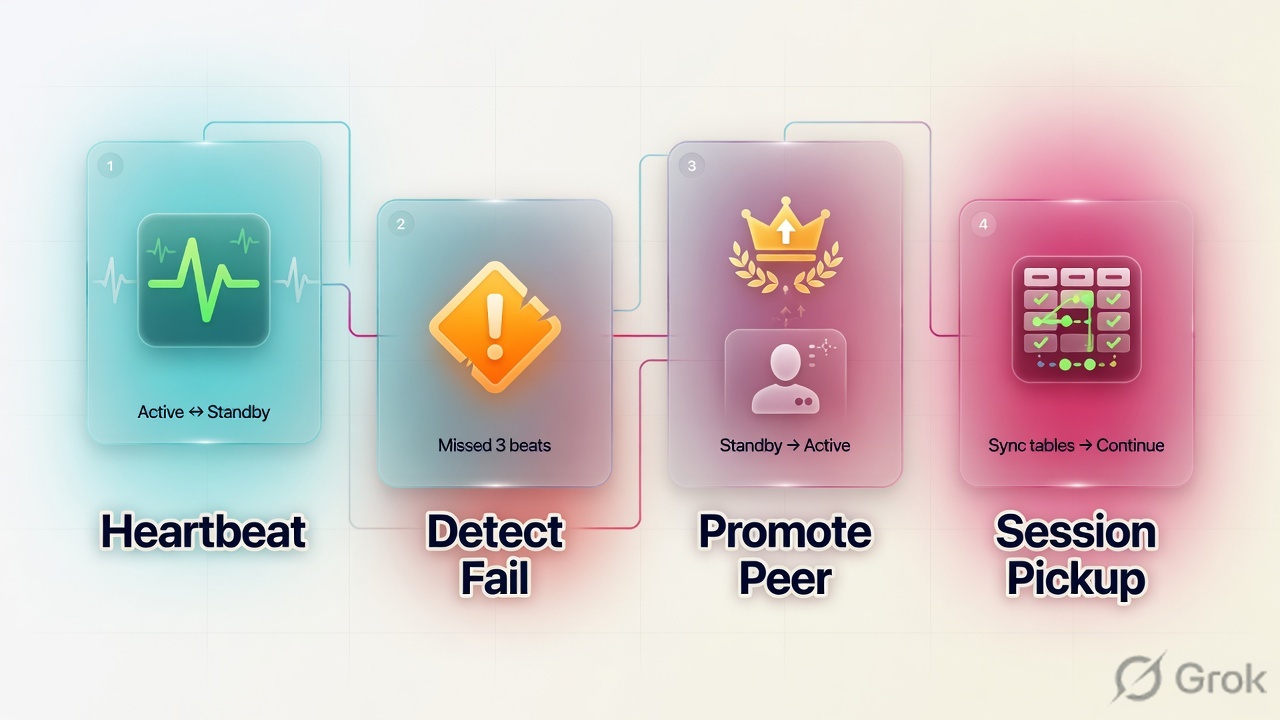
That telling is the heartbeat. Official default hold-down is 1.2 seconds: hb-interval 2 × 100 ms × hb-lost-threshold 6. Each received heartbeat resets the timer. If the timer runs out, the subordinate assumes the primary is gone and negotiates to become primary.
Read left → right. Heartbeat is the cluster’s pulse. Session-pickup is not drawn on the hello path on purpose — it is a later table, synced over the same links unless you set session-sync-dev.
Heartbeat elects the primary. Session-pickup copies the TCP table so that primary can keep existing sessions. Monitored interfaces fail the unit out when a data link dies. Two primaries means heartbeat is broken, not that HA is working twice.
hbdev
Heartbeat interfaces plus priority (0–512). Highest connected hbdev carries hellos. Physical ports only — not VLAN, LAG, IPsec, or switch ports.
session-pickup
Disabled by default. Enable so subordinates keep a TCP session table that matches the primary. Without it, failover is a reconnect storm.
monitor
set monitor on data interfaces. A down monitored link is a failover trigger and resets that unit’s HA uptime to 0.
override
Disabled by default. Enable only if you want device priority to beat uptime — and accept failback when the original primary’s links recover.
Device, link, session failover
FGCP supports those three protections. They stack. Device and link failover happen whether or not you enabled pickup. Session failover does not happen unless pickup was already on and the session type is one FGCP will sync.
| Job | What fires it | What you still owe |
|---|---|---|
| Device failover | Primary stops heartbeats (power, crash, cut hbdev with no backup). | Two physical hbdevs so a cut cable is not split-brain. Source: HA heartbeat interface. |
| Link failover | A monitored interface reports down. get system ha status can show has mondev down. | Monitor only links whose death should move traffic. Do not monitor a bouncing WAN. |
| Session failover | session-pickup enable already syncing TCP (and connectionless if you set it). | A long-lived TCP test that survives. GUI checkbox is not the proof. |
get system ha status prints why the current primary won. Official examples include: only member in the cluster; override priority larger than peer; uptime larger than peer; link-failure + pingsvr-failure lower than peer; EXE_FAIL_OVER flag set after execute ha failover set. Read that stanza. Do not guess.
Pickup, monitor, override
These three knobs decide whether a failover is useful or a second outage. Set them on purpose. Leave the rest at documented defaults unless you can name the failure they fix.
Three ANDs for a surviving TCP flow: pickup enabled, session is pass-through TCP (not on-box), not proxy-based UTM. Miss any one and the client reconnects.
| Control | Default | What it does | Trap |
|---|---|---|---|
session-pickup | disable | Sync TCP session table to subordinates. | Leaving it off is a valid CPU/hbdev choice. It is not “HA tested.” |
session-pickup-connectionless | disable | UDP and ICMP tables. Needed for QUIC / HTTP/3. | TCP pickup alone does not save UDP. |
set monitor | none | Link failover on those interfaces. Failed mondev resets HA uptime to 0. | Monitoring a flapping WAN = repeated failovers. Official status: has mondev down. |
override | disable | Priority beats uptime (after monitored-link count). | Failback when the original primary’s links recover. Standardize override on every member. |
HA group-id (0–255, default 0) must match on members. It is not the argument to execute ha failover set. That argument is the virtual cluster id: 1 when you are not in virtual-cluster mode, 1 or 2 when vcluster is on. Feeding your group-id into failover set is a wrong command, not a clever shortcut.
Runbook Side A / B / C
Two FortiGates, same model and firmware. Mode Active-Passive. Dedicated heartbeat on ha1 and ha2 (or two unused physical ports if the chassis has no HA ports). Data: wan1 and lan. Session-pickup on. Override off. Group name and password identical. Do not pick a cute group-id — leave default 0 unless you already have a matching standard.
Side A — cables / heartbeat / split-brain
-
Two physical hbdevs, member to member
Cross-cable ha1↔ha1 and ha2↔ha2. Official two-member recommendation: double back-to-back heartbeat, not through a switch. hbdev cannot be VLAN, LAG, IPsec, switch port, or redundant interface. Source: HA heartbeat interface.
-
Do not share the only hello path
One hbdev through a switch is split-brain waiting. If heartbeat is lost both ways, both units become primary and apply the same virtual MAC. Console both boxes before you change override.
Side B — product (System → HA)
-
Mode, identity, heartbeat
System > HA — Mode Active-Passive. Same group name and password on both. Heartbeat interfaces ha1 and ha2. Device priority may differ (higher prefers primary only if override is on, or as a later tie-break). Source: HA active-passive cluster setup.
-
Session pickup
Cluster Settings → enable Session pickup. CLI:
set session-pickup enable. Addset session-pickup-connectionless enableif UDP/QUIC matters. Source: Session pickup. -
Monitored interfaces
Monitor wan1 and lan (or the two data links whose death should move the cluster). CLI:
set monitor "wan1" "lan". Do not monitor a link that already flaps. -
Leave override disabled unless failback is the design
Default: uptime beats priority (after monitored-link count). A failed monitored interface resets HA uptime to 0. Override enabled: priority beats uptime — the original primary takes the job back when its links recover. Source: HA primary unit selection criteria.
System › HA
HA settings — Active-Passive
Source: FortiOS Administration Guide — HA active-passive cluster setup + Session pickup. Password is set but not shown. Repeat the same identity (name, password, mode, hbdev list) on the peer. Connectivity may drop briefly while FGCP rewrites interface MAC addresses to the virtual MAC.
config system ha
    set group-name <same-on-both>
    set mode a-p
    set password <same-on-both>
    set hbdev "ha1" 50 "ha2" 50
    set session-pickup enable
    set session-pickup-connectionless enable
    set override disable
    set monitor "wan1" "lan"
end
Side C — proof
-
Identity of the cluster
get system ha statuson both consoles. Health OK. Mode HA A-P. Number of members = 2. One line Primary, one Secondary. Configuration Status in-sync (checksums match).ses_pickup: enable. HBDEV ha1/ha2 up. MONDEV wan1/lan up. CLI prompt should read(Primary)on one box and(Secondary)on the other. -
Start a long TCP, then fail over
Hold an SSH or HTTPS session through the cluster (not to the FortiGate GUI). Then force failover in a window: GUI System > HA → member → Diagnostics and Tools → Actions → Force HA failover, or CLI
execute ha failover set 1. Confirmexecute ha failover statusshows set. The new primary’sget system ha statusPrimary selected using mentions the EXE_FAIL_OVER flag. -
Did the session live?
If pickup is on and the flow is pass-through TCP without proxy UTM, the session should continue. Then
execute ha failover unset 1so election is normal again. Source: Force HA failover for testing and demonstrations. Do not leave the flag set.
System › HA › member › Diagnostics and Tools › Actions
Force HA failover
Source: FortiOS 8.0 — GUI support for HA actions / Force HA failover for testing. Production: maintenance window only. The unit stays in forced failover until you unset. Argument 1 is the non-vcluster id, not your HA group-id.
get system ha status
# HA Health Status: OK
# Mode: HA A-P
# ses_pickup: enable
# override: disable
# Configuration Status: … in-sync
# HBDEV stats: ha1 up, ha2 up
# MONDEV stats: wan1 up, lan up
# Primary selected using: <timestamped reason>

execute ha failover set 1
execute ha failover status
# failover status: set

get system ha status
# Primary selected using: … EXE_FAIL_OVER flag set

execute ha failover unset 1
- Exactly one Primary, one Secondary. Two Primaries = stop and restore heartbeat.
ses_pickup: enableif you promised TCP survival. Replay the payment / SSH flow.- After a monitored-link test:
has mondev downon the failed unit, then Health OK when the link is back — and no bounce loop. - Forced failover flag cleared. Cluster state change time matches the window you ran.
One failover after go-live
After the pair is in-sync, a real event does this:
- Trigger: chassis down, hbdev silent past 1.2 s, or a monitored interface down (uptime on that unit resets to 0).
- Remaining unit wins primary election (override off: monitored-link count → uptime if the gap is > 5 minutes → priority → serial).
- New primary GARPs the virtual MAC on data interfaces (
arps/arps-interval). Neighbors rewrite CAM. If GARPs are ignored,link-failed-signalcan bounce the old primary’s ports for 1 s. - If session-pickup was on, pass-through TCP is already in the table. Proxy UTM and on-box sessions reconnect. UDP needs connectionless pickup.
HA hellos: 0x8890. Cluster session sync: 0x8893. If a switch in the middle is dropping unknown EtherTypes, you do not have a cluster — you have two lonely boxes. That is a Layer-2 filter problem, not an HA password typo.
Traps + proof
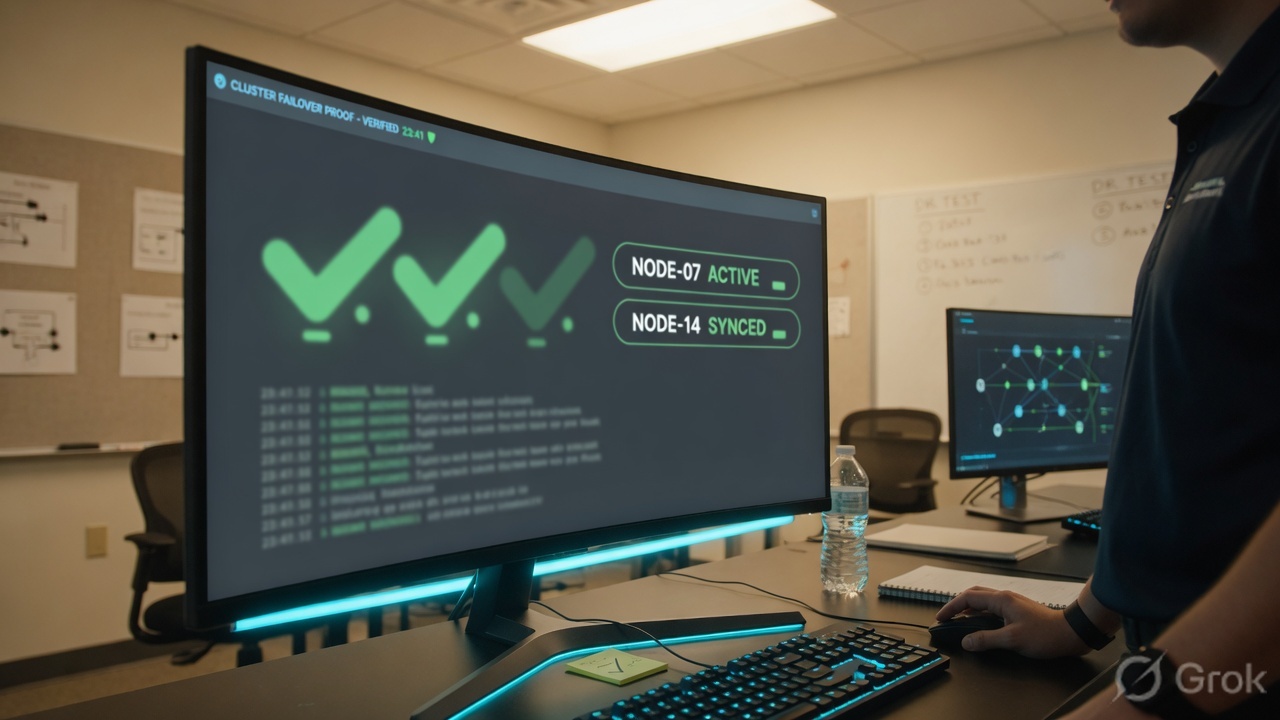
get system ha status plus the original user flow. Illegible log wallpaper is not a substitute for the ses_pickup line.| Symptom | Likely cause | Proof / fix |
|---|---|---|
| Both consoles show Primary; LAN MAC flaps | Split-brain — no heartbeat either way. | Restore hbdev first. Match mode / group-name / password / group-id. Do not keep enabling override. Source: Troubleshoot an HA formation. |
| Cluster never forms | Identity mismatch, or hbdev unplugged / wrong port type. | get system ha status on both. hbdev must be physical. Different group-id also changes VMAC. |
| Failover works; every TCP reconnects | session-pickup still disable (default). | Enable pickup, confirm ses_pickup: enable, replay a long TCP. |
| TCP lives; HTTP/3 / UDP dies | Missing session-pickup-connectionless. | Enable connectionless after TCP pickup. Official QUIC note on the session-pickup page. |
| HTTPS through proxy AV/web filter drops | Pass-through limit: proxy-based UTM is not failed over. | Do not promise zero-drop. Flow-based can resume uninspected. Source: Pass-through sessions. |
| Repeated failovers after a WAN blip | That WAN is a monitored interface; down resets HA uptime to 0. | Remove the flapping link from monitor, or fix the layer-1. Status: has mondev down. |
| Traffic failback the moment the old primary recovers | override enable — priority beats uptime. | Disable override unless failback is the written design. Standardize the setting on both members. |
| Forced test never ends | Forgot execute ha failover unset 1. | execute ha failover status still set. Unset. GUI: Undo HA Failover. |
| Checksum out-of-sync | Config not matching; HA exceptions; backup-hbdev in use (config sync paused). | Configuration Status on get system ha status. Fix the delta; do not force failover to “fix sync.” |
- Same model, same firmware. Mode a-p. Group name and password match. Group-id matches (default 0 is fine).
- Two physical hbdevs cabled member-to-member. Heartbeat EtherType 0x8890 not filtered.
session-pickup enable; connectionless on if UDP/QUIC matters. Override disable unless failback is intended.- Monitor only stable data links. A flap on a monitored port is a failover.
get system ha status= one Primary, one Secondary, in-sync, no hbdev down, no mondev down,ses_pickupmatches the ticket.- Maintenance-window force failover with id 1, prove the user flow, then unset.
Knowledge check
Six judgment calls on FGCP failover — heartbeat, pickup, monitored links, and proof. Not menu trivia.
Sources
- FortiOS 8.0 — FGCP (cluster, same model/firmware, heartbeat)
- FortiOS 8.0 — HA active-passive cluster setup (System → HA fields)
- FortiOS 8.0 — HA heartbeat interface (hbdev, physical-only, split-brain if hellos stop)
- FortiOS 8.0 — HA heartbeat (Ethertype 0x8890 / 0x8893)
- FortiOS 8.0 — Session pickup (TCP default path, connectionless / QUIC, delay)
- FortiOS 8.0 — Pass-through sessions (proxy UTM not failed over; flow UTM uninspected after failover)
- FortiOS 8.0 — HA primary unit selection criteria (override, 5-minute uptime window, monitored-link reset)
- FortiOS 8.0 — Check HA synchronization status (
get system ha status, HBDEV / MONDEV, in-sync) - FortiOS — Force HA failover for testing (
execute ha failover set <cluster_id>; id 1 when not vcluster) - FortiOS 8.0 — GUI HA actions (Force HA failover / Undo)
- Fortinet Community — Heartbeat packet lost (default 1.2 s = interval × 100 ms × lost-threshold)
Related: FGCP A-P vs A-A / split-brain · Policy lookup + NAT · Security profiles · Troubleshooting command center · FortiGate interview